Visiting Iceland, day 1: Reykjavik

Executive summary: wow. I can’t wait to go back.

When I was invited to present at Office 365 Engage, the only way I could get there from Huntsville and still meet the airfare budget was to take a frankenroute: drive to Atlanta, fly JetBlue to Boston, then Icelandair from Boston-Reykjavik-Amsterdam and back. I remembered that Icelandair offered free stopovers, so I decided to tack on a couple of days for a visit when on the return leg. I ended up being on the ground for 42 glorious hours.

To help plan my trip, I read the Lonely Planet guides to Iceland and Reykjavik, then spent a bunch of time hanging out in Reddit’s VisitingIceland forum. This was very valuable and I encourage you to check it out if you’re planning a trip there.

Getting to Amsterdam

Icelandair and JetBlue are both low-cost carriers, but the inflight experience was perfectly OK. Nothing fancy, but they both got me there in reasonable comfort, certainly no worse than traditional US carriers. My outbound flight ATL-BOS was delayed by 2 hours because of taxiway construction (helllloooo, B6.. did you not know about that in advance?), then my outbound BOS-KEF was delayed because the inbound aircraft was late. Despite these delays, I got to KEF on time to make my connection on to Amsterdam. Icelandair has Row44 wifi, which worked tolerably well, for EUR9.40. They have free in-seat entertainment in economy class and free soft drinks, but no in-seat power. On the flight over, I tried to sleep but didn’t have much success because I was too busy looking out the window to see the sun.. because it was up and shining in the middle of the night!

When we landed, we deplaned onto the tarmac and boarded buses back to the terminal. This was fun because many of the passengers, me included, weren’t prepared for the weather: 48 degrees F, wind at 22kts gusting 25, and moderate rain.

Lovely weather

Iceland is a Schengen country, so for connecting flights into the EU you clear customs there. This was fairly efficient, although the KEF terminal is long and narrow so there tend to be long lines everywhere. Incoming passengers are funneled through a large duty free shop before getting to the main concourse, but if you’re connecting onwards you probably shouldn’t bother. After a brief wait, I boarded my connecting flight (which involved another bus, but at least it wasn’t raining) and flew off to Amsterdam.

Amsterdam back to Reykjavik

I like the Amsterdam airport. It is clean, uncluttered, and easy to navigate. Their security is quick and pleasant, with lots of touches that would be welcome in the US (such as automated conveyors that move trays and bags through the X-ray machines).  Icelandair opens their checkin counter 3 hours before flight time, so if you get there earlier, be prepared to lug your suitcase around while you wait. I spent some time upstairs on the Panorama Terrace watching airplanes while I waited, then dropped off my bags and stopped to buy some duty-free goodies for the home folks. I ate at the Grand Cafe Het Paleis, which burned up almost all my layover time. Boarding was quick and efficient, and my flight left at its scheduled time of 1030p. That would put me on the ground in Iceland just before midnight. I settled in to my aisle seat, took a short in-flight nap, and then fidgeted until we were on the ground.

Oh, I also bought a Flybus ticket. This shuttle service is the simplest and least expensive way to get from the airport (which in Keflavik) to Reykjavik (which is about 30mi to the northeast). For 2500 ISK (about US$24), you get a bus ticket on a nice commuter bus that runs to the BSI bus station near the Reykjavik airport. Like the Delta Shuttle, the buses run as often as necessary to handle capacity, and there are buses there after every arriving flight, no matter how late. My plan was to Flybus it from the airport to BSI, then grab a cab onward from there.

Day 0: Thursday night

Once we landed, I deplaned and was through customs in about 15 minutes. I had a slightly longer wait to get my baggage from the carousel, which I spent looking around the airport terminal. I found a vending machine and was delighted to see that it supported ApplePay. I used ApplePay for the overwhelming majority of my transactions. I only used cash after a restaurant mixup (more on that later) left me with some ISK. While Iceland isn’t cashless, it’s fair to call it “low-cash” since virtually everyone pays for virtually everything, even small purchases, with cards.

After I finally got my luggage, I boarded the Flybus and we headed out. Here’s what I spent my whole ride looking at:

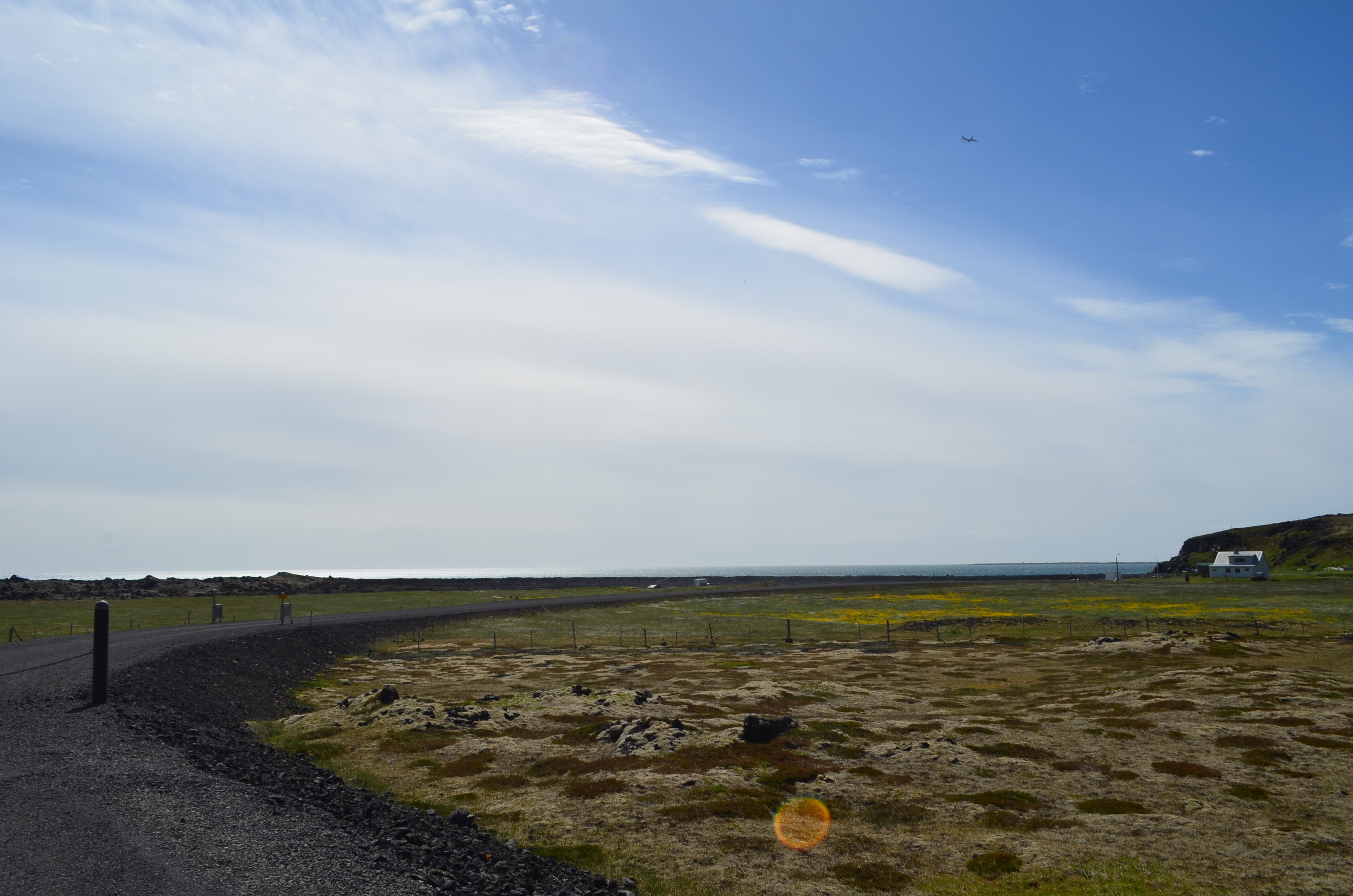
Midnight sun: check.

The bus was full of chatter, but I was content to watch the landscape pass by; although the picture doesn’t show it, the area nearest the airport is the rocky volcanic soil that Iceland is famous for.

Day 1: Friday

I didn’t sleep especially well, mostly because I was still a bit confused about what time it actually was. Between the light and my residual jet lag from going to Haarlem, I got maybe 4hrs total, which was plenty. After I got up, I showered. Interesting true fact: Reykjavik is considered a “low heat” area, meaning that groundwater is warm, but not always hot enough for showers and the like. Keflavik is a “high heat” area, meaning that its groundwater is too hot to be used directly for households. Anyway, all the groundwater in Iceland contains sulfur and other minerals– so you don’t cook with hot water, and when you use hot water in a pool, shower, etc. its mineral content leaves you feeling a little slimy. Anyway.. shower completed, off I went.

First stop for the day was the convenience store on the corner, where I grabbed a protein bar and a diet Coke. This was only because I didn’t know there was a bakery on the other end of the building. Oh well. It was windy, and colder than I thought, so I went back to the house to grab another layer and met Jakob, my Airbnb host, and his cat. We had a nice visit; in addition to Airbnb’ing, he’s a tour guide and has several other small part-time jobs. Nice guy and I would recommend his place highly.

I took off walking again, this time to  Kringlan, a giant American-style mall, just to look around. It was closed, which was no great loss; if you’ve been in an American or Canadian mall, the experience would feel very familiar. One difference: there are tables near the mall exits where you can wrap gifts for free– a nice touch.

Who doesn’t like free gift wrapping?

After Kringlan, I walked over to Hallgrimskirkja, the famous modernist church. My route took me through Miklatún park, one of the small parks that dot Reykjavik. I saw a ton of cyclists and walkers out getting where they needed to go, but I couldn’t help imagining what the park, and the people, would look like in six months when winter set in. Brrrrr.

It’s hard to describe the shape of Hallgrimskirkja, sort of like a football spiked so hard it went partly underground, or a poorly baked baguette. My sister described it as being designed by someone who had read a description of cathedrals but had never actually been in one, and that’s not a bad way to put it. The church spire is tall enough to dominate the city’s skyline; you can clearly see it from a good portion of the city.

Hallgrimskirkja from its less famous side

Most churches have a statue of Jesus; this one has a statue of Leifur Eiríksson

The interior of the church is understated, to put it mildly. I think the builders put much of their capital into the giant organ. An organist was playing while I was there, and it was bone-jarring, which was actually kind of awesome. Sadly I seem to have lost the video I took, not that the puny mic on my phone would have captured the majesty.
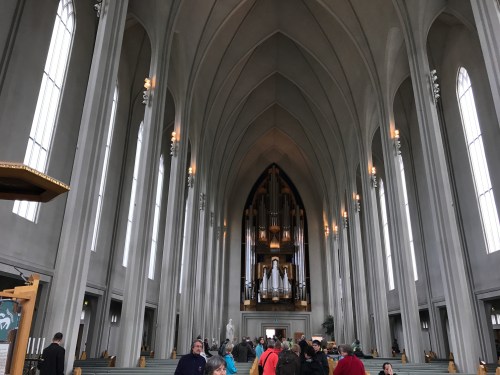
the church interior; notice the organ?

A ticket to the top of the spire costs EUR 8, which was very well worth it for the views. Apart from the spire and the sanctuary, there really isn’t anything else to see here but it is still a worthy stop.
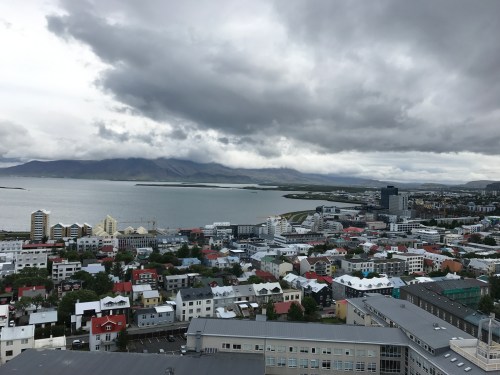
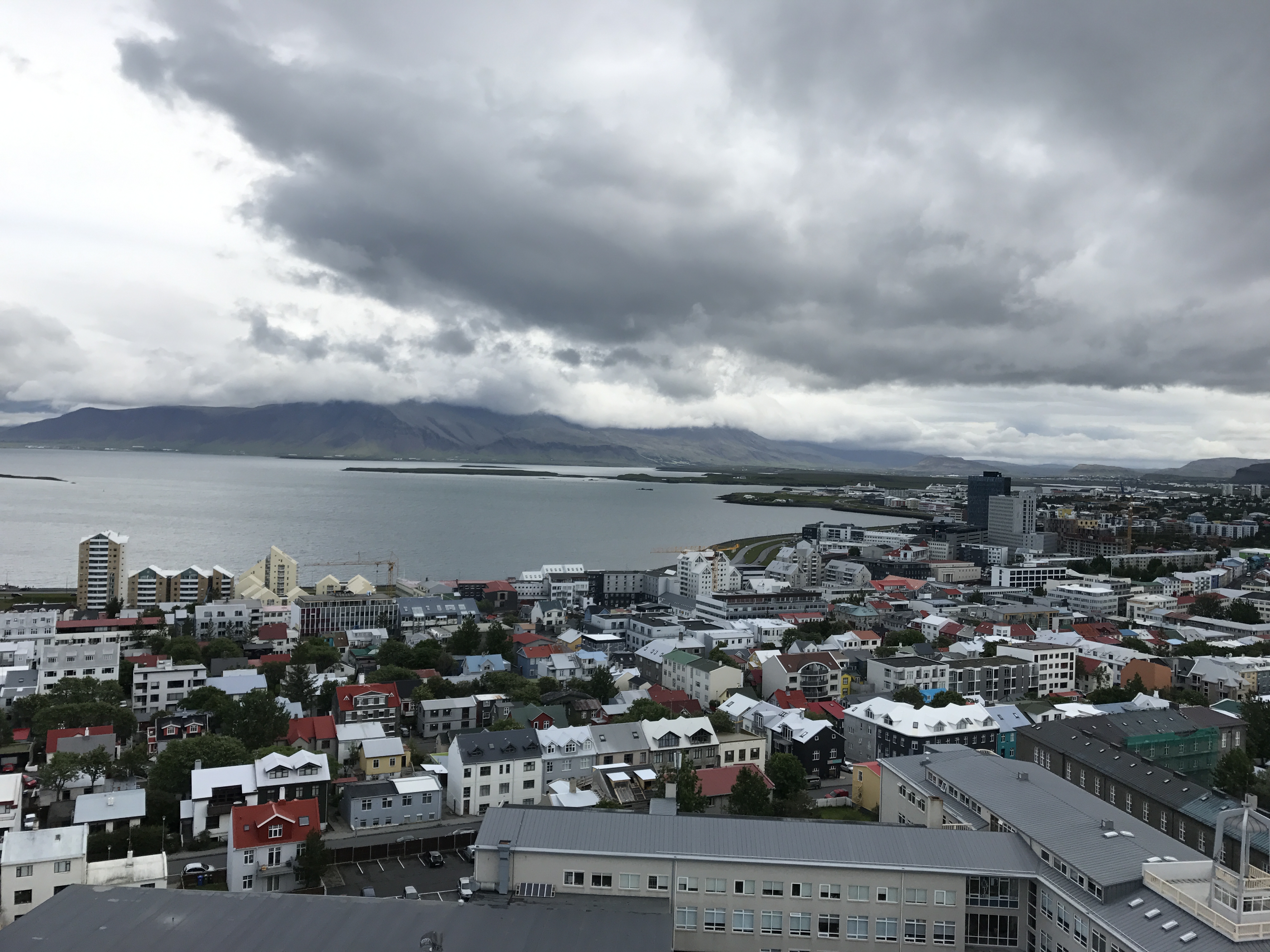
The view from the spire looking north towards the water
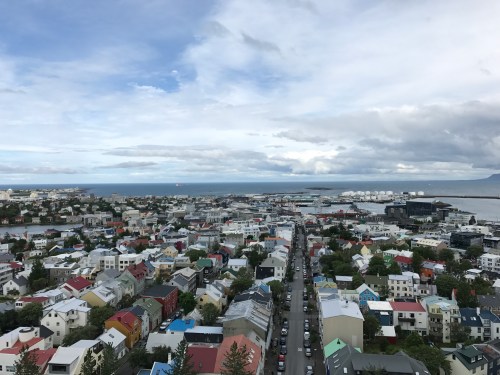
The view to the south is pretty great too

I had read on Reddit about the “waffle wagon,” a small yellow food truck that usually sets up at Hallgrimskirkja, and when I saw it I stopped for breakfast. This turned out to be an excellent decision– that waffle was the best waffle I’ve ever had. However, it was about $8. This was very typical of Iceland overall: everything is expensive. At best you’re paying what you’d pay in a US airport (for example, a half-liter bottle of Diet Coke is usually around $4) for most things.

tasty, tasty waffle

Hallgrimskirkja is near Laugavegur, the primary shopping and tourist street in Reykjavik, so I walked over to have a look. Much like any similar area in another city, there were lots of tourists with shopping bags. I did my fair share of browsing, but couldn’t convince myself to pay $250+ for an Icelandic sweater or $800+ for true Arctic weather gear. My friend Julio had suggested a visit to The Laundromat, a hipster-ish coffee bar (and actual laundromat), so I stopped in and had a $12 latte. It was good, and the atmosphere was fun– the place was crowded but only about half of the people I could see or hear seemed to be speaking English. After people-watching a bit, I set off for more walking and shop/browsing.

When I was planning my trip, I wasn’t sure what I wanted to do Saturday. After talking to Jakob and doing more research, I decided to rent a car and drive the Golden Circle route. Rental cars go for around $60 a day for the cheapest, most basic cars, then go up from there. I decided to rent from Atak, although there are lots of other choices (Hertz, Avis, and SadCars being among them). Demand is high and most places wouldn’t do such a short rental. The rental car companies’ offices are all clustered in a sort of auto-mall a couple of miles away from downtown, so I flagged down a cab, picked up a Hyundai I20, and went back to the house to grab my big camera and some more clothes. Along the way, I stopped at the small convenience store nearest the apartment and found that the shop next door was a fried chicken joint. I ordered a two-piece meal and fries and was charged… about $42. This turned out to be a mistake on the part of the cashier, but she didn’t know how to credit my card so I ended up with $21 worth of cash. This lasted me until I made it back to Boston, with some bonus coins to give Matt for his collection. (Note on the fried chicken from this place: just don’t.)

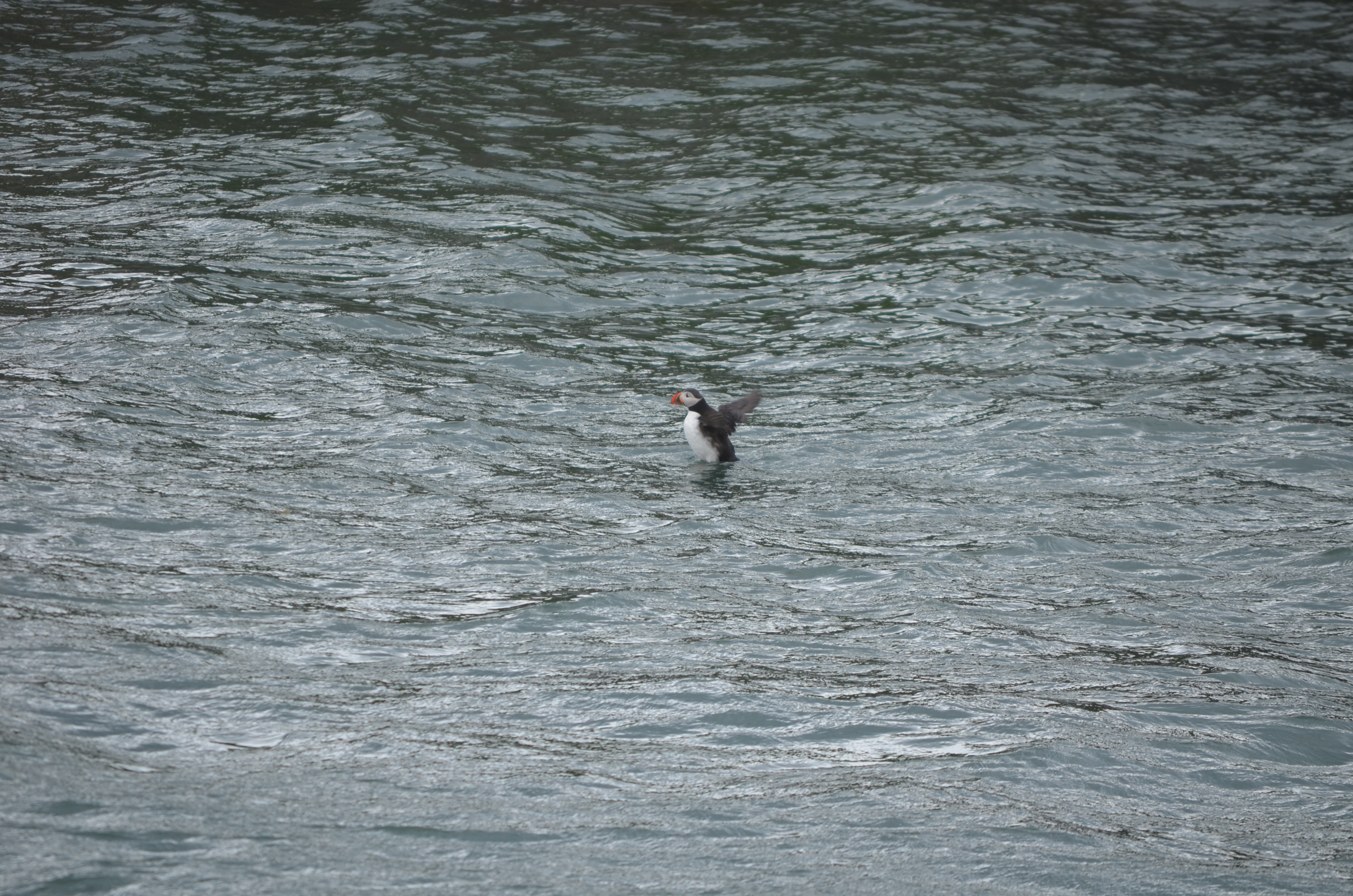
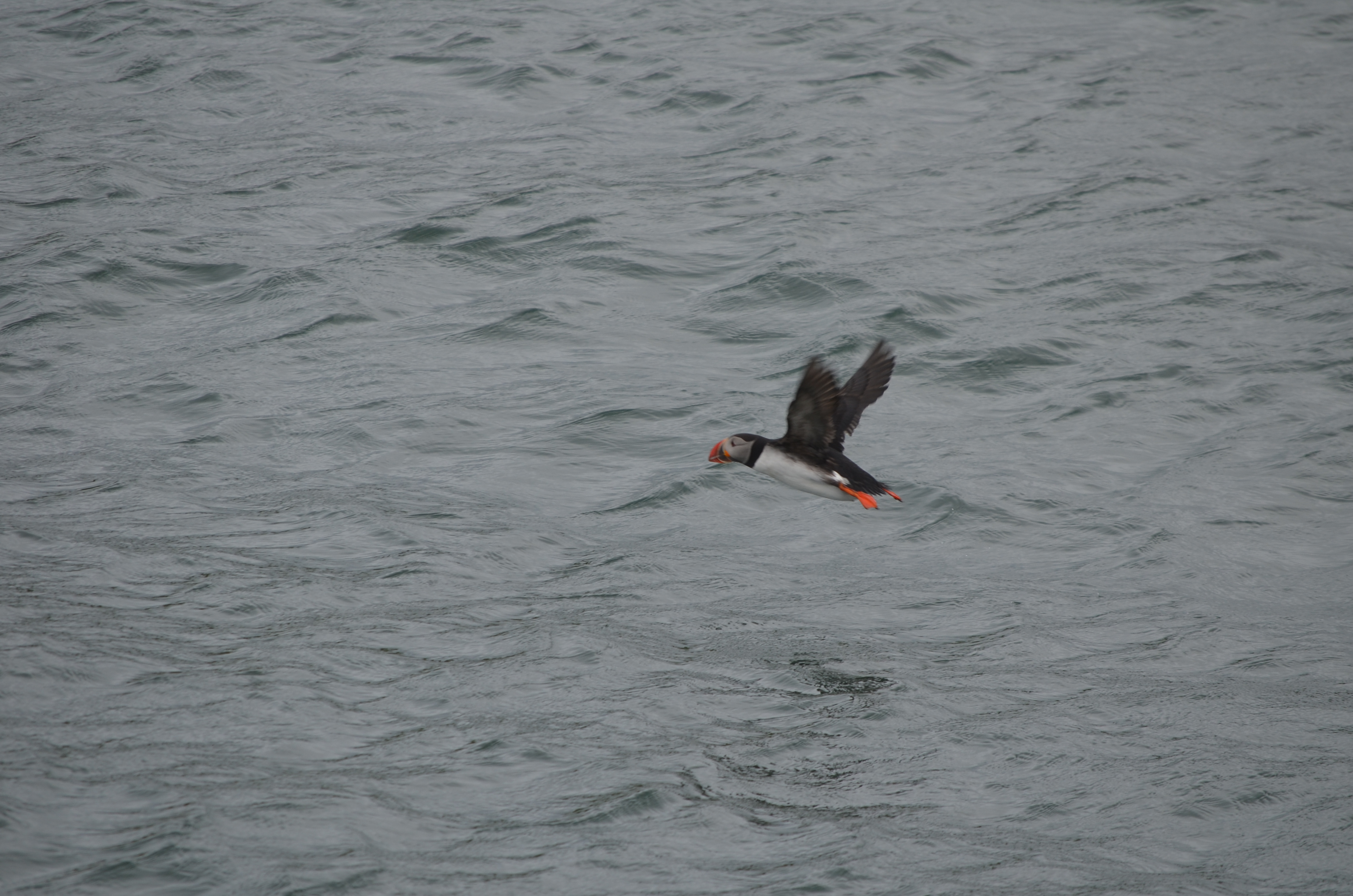
My afternoon plan was to take a boat tour to see puffins. This turned out to be an excellent decision. The excellent MustSeeInIceland website had recommended an operator called Happy Tours, so I booked with them ($55 or so). After parking near the Maritime Museum, I stopped for ice cream (always eat Icelandic ice cream when you can; it’s delicious!) and walked over to the tour area. Amazingly, no one else had signed up for the tour, so I had the boat to myself, along with the crew. Snorri, the captain, has been working the water for nearly 40 years, and his son and daughter both work with him as tour guides. Kristey, the daughter, was a great guide: fluent in English and very knowledgeable about puffins, the harbor, and (of course) Icelandic life and culture. The water was rough, and it was windy, both of which I loved, but Kristey said that previous passengers that day had been seasick.

Without further ado, some of what I saw on the tour…

takeoff roll

After the tour, I walked over to a nearby coffee shop and had a cup of coffee while looking out at the harbor. It was pleasantly warm inside and I was a little nervous about what the race weather would be like. About 6 I headed back to the apartment, where I met my two Airbnb-mates: Zach from Houston and his sister, both of whom were in town to run the race. Neither of them had picked up their race packets, so I offered them a ride over to the venue to save them a walk.

I ran the 10K race, which was a blast. The race organizers include a ticket to the Laugardalslaug swimming pool, which I was looking forward to trying. The pool complex is huge, with four or five large hot tubs (and when I say “large,” I mean “15′ in diameter or so”), a few giant lap pools, a waterslide, and so on. A few tips on Icelandic pool etiquette and use:

  • Bring a towel because the pool won’t provide them.
  • You must shower before entering the pool. You will be expected to be naked when you do, and to use plenty of soap. If casual locker-room nakedness bothers you, you’d better get over it before you hit the locker room.
  • The water feels different on your skin because a) it’s more mineralized than is typical in the US and b) it has much less chlorine than US pools tend to.
  • Some pools (including this one) have lockers that are operated by an RFID wristband. Wristbands are usually available from the front desk.
  • At least at Laugardalslaug, the big pool is just a little cooler than body temperature, and the hot tub I was in was maybe 1 degree above.
  • Expect crowding. When I was in the hot tub, I was shoulder-to-shoulder with the people around me. I don’t know how common that is at 1130 at night, but I would imagine that in the middle of a summer day it wouldn’t be uncommon.

After the pool, we set out to find food. Here’s the problem: for all its exotic nature, Reykjavik is a fairly small city. Just like Huntsville, there are very few restaurants that are open at midnight… and Iceland doesn’t have Waffle House. It didn’t seem that late, given that it was still light and we had just finished running a race– both things you normally associate with daytime. None of the places we wanted to go were open, so we ended up downtown on Laugavegur again. We found Hlolli, which is sort of like an Icelandic version of Subway; I ended up eating what was basically a BBQ beef poboy. Not bad (in fact, the bread was quite good), but it was essentially drunk food, not fine dining. That’s OK, given that I was still wearing my running clothes. On the walk back to the car, we found that the waffle wagon I mentioned earlier had set up shop in the square, so we stopped off for dessert.. then it was back to the Airbnb for bed. I got there abut 130a, and of course it was still light.  That didn’t stop me from sleeping like a lava rock though.

 

7 Comments

Filed under Travel

Office 365 Hybrid Configuration Wizard won’t launch

I recently ran into a bizarre problem with the Office 365 Hybrid Configuration Wizard, and solved it after a bit of trial and error. Hopefully this article will be a useful breadcrumb for future hybridizers.

The HCW used to be a standalone Windows executable that you’d download. The Office 365 team (hi, Tim Heeney!) made the wise decision to turn it into a Click-To-Run (C2R) executable. The biggest benefit to using C2R is that whenever you click the link (which downloads the application’s manifest file) you get the latest version of the HCW, streamed directly to you from Microsoft’s servers. This ensures that everyone always gets the most up-to-date version, but it also introduces a few potential stumbling blocks.

C2R application manifests aren’t executable themselves; they’re just XML files that provide some metadata about the application. With that said, on a properly configured Windows box, as soon as you download the manifest, the C2R helper application does its thing; it reads the manifest, streams the application, and launches it.

In my Exchange 2016 lab, that’s not what was happening. When I clicked on the HCW link in Internet Explorer, the little “Scanning..” infobar would flash across the bottom of the window, but that was it. Same thing in Chrome. Downloading the HCW manually using the Start-BitsTransfer PowerShell cmdlet got me the manifest file, but it couldn’t be launched. Of course, since the C2R launcher itself wasn’t launching, there were no log files to use to troubleshoot the problem. By contrast, when I downloaded the HCW onto my Windows 10 desktop, it would fail because I didn’t have the right prerequisites installed, leaving me a log file full of juicy details. All of the machines in my lab had the same problem, perhaps not surprising since they were built from the same Amazon Web Services AMI.

I spent some time doing the usual things: trolling the TechNet forums, searching random posts by people who had problems with the HCW (all of which were problems with what it did after launch, not problems getting it launched), and asking my smart MVP friends. Nada.

Then I had a hunch and opened the Default Programs control panel. For the “.application” file type, this is what I saw:

Looks plausible, but it’s totally wrong

I changed the “.application” file type to be opened with Internet Explorer. Then I went back to the HCW link, clicked it, and was rewarded with a properly functioning copy of the HCW. Filed for future reference…

18 Comments

Filed under General Tech Stuff, UC&C

Training Tuesday: Reykjavik Midnight Sun 10K race report

I just came back from presenting at Office 365 Engage, where I had a terrific time. More on the conference in another post. As a new conference, the organizers’ budget was somewhat limited, so they gave me a 1500 EUR limit on airfare, which meant I could only afford a convoluted itinerary on JetBlue and Icelandair. However, Icelandair offers free stopovers, so I decided to take a couple of days after my trip to sightsee.

As is my habit, I spent some time looking for interesting places to run before my trip. The folks in /r/visitingIceland were very helpful, and I found https://runninginiceland.com, which led me to the Suzuki Midnight Sun run: 5K, 10K, and half-marathon distances, all starting at or just after 9pm. I immediately signed up online for the half.

Logistics

The race website was clear and easy to follow, and I got multiple mails in the days leading up to the race recapping the race routes, where to park, and so on. The race organizers sell race medals and shirts separately, so you don’t have to pay for them if you don’t want them. Packet pickup was on race day only, from 4p-845p, at the Laugardalshöll sports hall; it was well organized and smooth. I got in, grabbed my race number, bought a race shirt, and was out again all within 10 minutes. I made a game-day decision to move down from the half distance to the 10K because of a lingering hamstring problem, aggravated by the 9.5 miles I had already walked while sightseeing Friday; the race staff easily handled the changeover. In addition to the booth selling race shirts, the expo had a small table selling various Adidas goodies. One thing I particularly appreciated is that Laugardalshöll has plenty of bathrooms.

Men’s room? Right this way

The Airbnb I stayed in also hosted two Americans who were running the race, although I didn’t meet them until maybe 2 hours before the race start. We drove over 45min or so before start time, easily found a place to park, and joined the large crowd avoiding the wind inside the hall.

The hall before the race


Weather

Friday’s weather was pretty good for running: it was about 10ºC and mostly overcast, but a bit windy: a steady 30km/h wind from the north, with occasional higher gusts. I was sightseeing all day and got rained on and fairly wind-blasted during the day, but the rain had thankfully stopped by 9pm. I wore shorts, a long-sleeve tech shirt, and a light rain shell, which I took off about halfway through the race.

Race start

The RD started with a brief announcement that there were nearly 3000 registered runners, 1200 from outside Iceland, from a total of 52 countries, making this by far the most international event I’ve run in. The half marathon and 10K groups started together. As you can see from the race maps, the two courses follow a common path for the first few km, then the longer distance runners split off. The corral had pace signs and runners were encouraged to group according to their projected pace but there were no pacers.

The race start. Big crowd!

The course

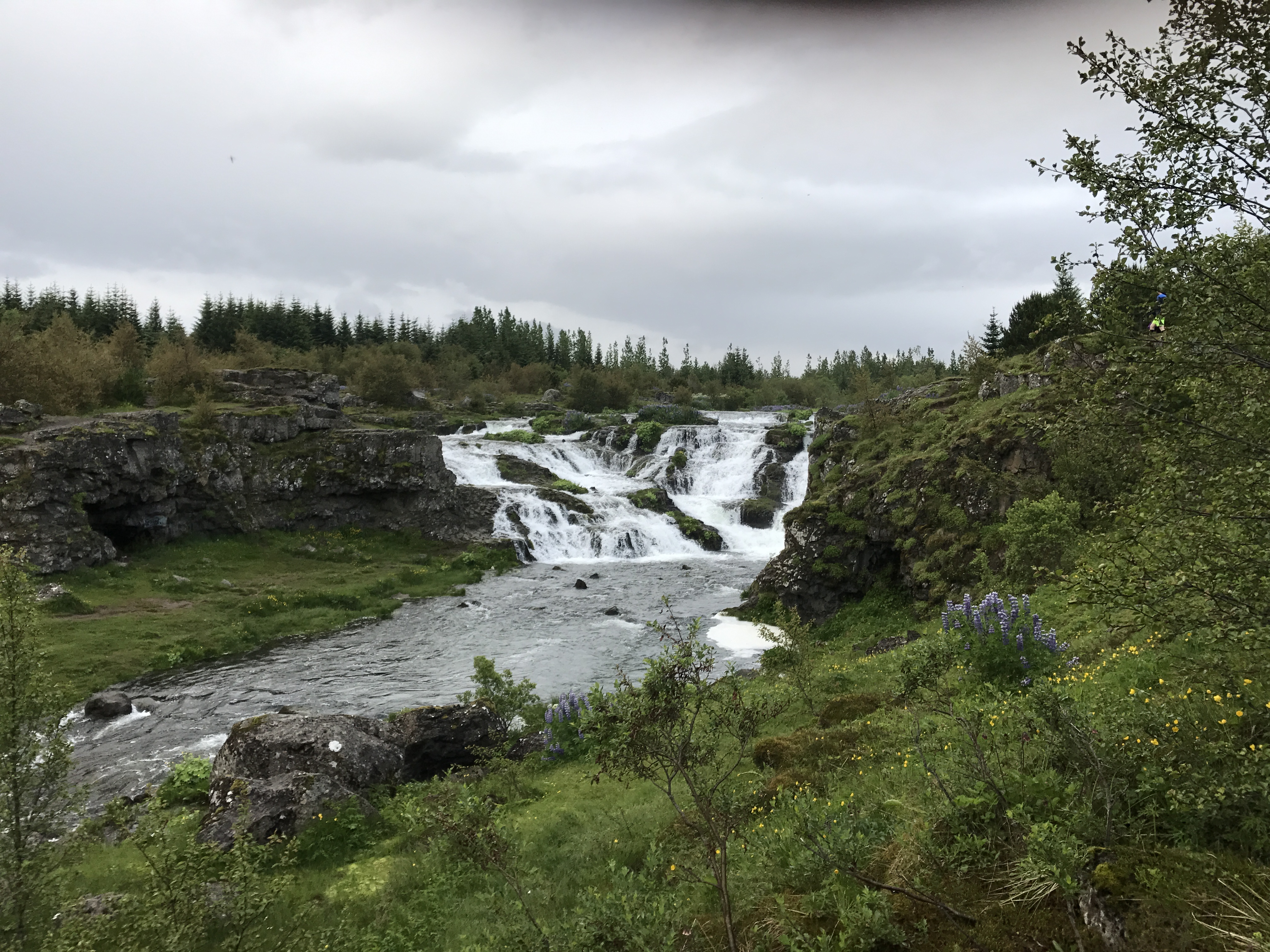
Scenic, mostly on paved paths and some on residential streets. The course runs through a pretty valley and along a stream with a couple of waterfalls, like this one.

Oh, just an Icelandic waterfall

I saw two mother geese with goslings and a few rabbits along the stream, which was cool.

Not shown: large quantities of goose poop on trail

The first 3km has a few small rollers, with a larger and longer climb (maybe 30m elevation change?) from 4km-6km. There was one water stop, which had water, Powerade (a race sponsor), and 2 portajohns. The course was well-marked, with each km indicated and plenty of volunteers to keep runners from going off course. I didn’t see any split timers on the course and there were no on-course timing mats.

My performance

Because my hamstring had been hurting, and my right IT band had joined the party after my warmup run in Haarlem, I planned to take it easy and treat this like a training run. My 10K PR is 54:37 and I didn’t have any ambition of setting a new one on this run. The first 5km or so were fine; the hamstring was quiet and I held a good pace (modulo the time I spent in the portapotty at the rest stop– that cost me 2min or so). About 7km in, my left calf started to tighten, and this progressed into a numbness in my left forefoot. This has happened occasionally around the same distance in both my right and left feet since I switched to my current Brooks Adrenalines, which means pretty clearly I need different shoes. Anyway, it’s damn hard to maintain a good pace when you can’t feel one of your feet, so I slowed down and even walked a few stretches. About 9km it had loosened a bit and I was able to run more normally.

I ended up running a 1:02, well off my PR for the 10K distance. Strava data.

The finish

The finish line featured a traditional chute, right after which volunteers handed out race medals for those who’d bought them in advance. The recovery area had free water, Powerade, and half-bananas. There were a couple of booths set up where you could buy (delicious) Icelandic hotdogs and other snacks. The race also includes admission to the pool complex nearby at Laugardalslaug, so we headed over there. The logistics of using Icelandic public pools are worth a separate post. Suffice to say that you must be fully comfortable with locker-room nudity, large crowds, and crowding in the hot tub… but it was lovely to be able to have a good thermal soak after a long run.

Wrapup

My race experience was a 9/10: a high-energy fun crowd, beautiful course, and the unique aspect of running a race at a time when it would normally be pitch dark all combined to make a great memory. I’d love to go back and run the half, or (better yet), the Reykjavik marathon. Highly recommended.

1 Comment

Filed under Fitness, Travel

Office 365 Engage wrapup

Last week, I had the privilege of presenting at the first Office 365 Engage conference. Billed as a practical, no-marketing-content conference, and chaired by Tony Redmond, the conference offered a pretty impressive lineup of speakers from across the Office 365 world, mostly from Europe. One big drawback to the way that Microsoft and Penton have organized their respective conferences is that it’s often difficult to get European experts and MVPs here to speak, so I was looking forward to seeing some fresh material presented by people I don’t usually get to hear from, and I was not disappointed.

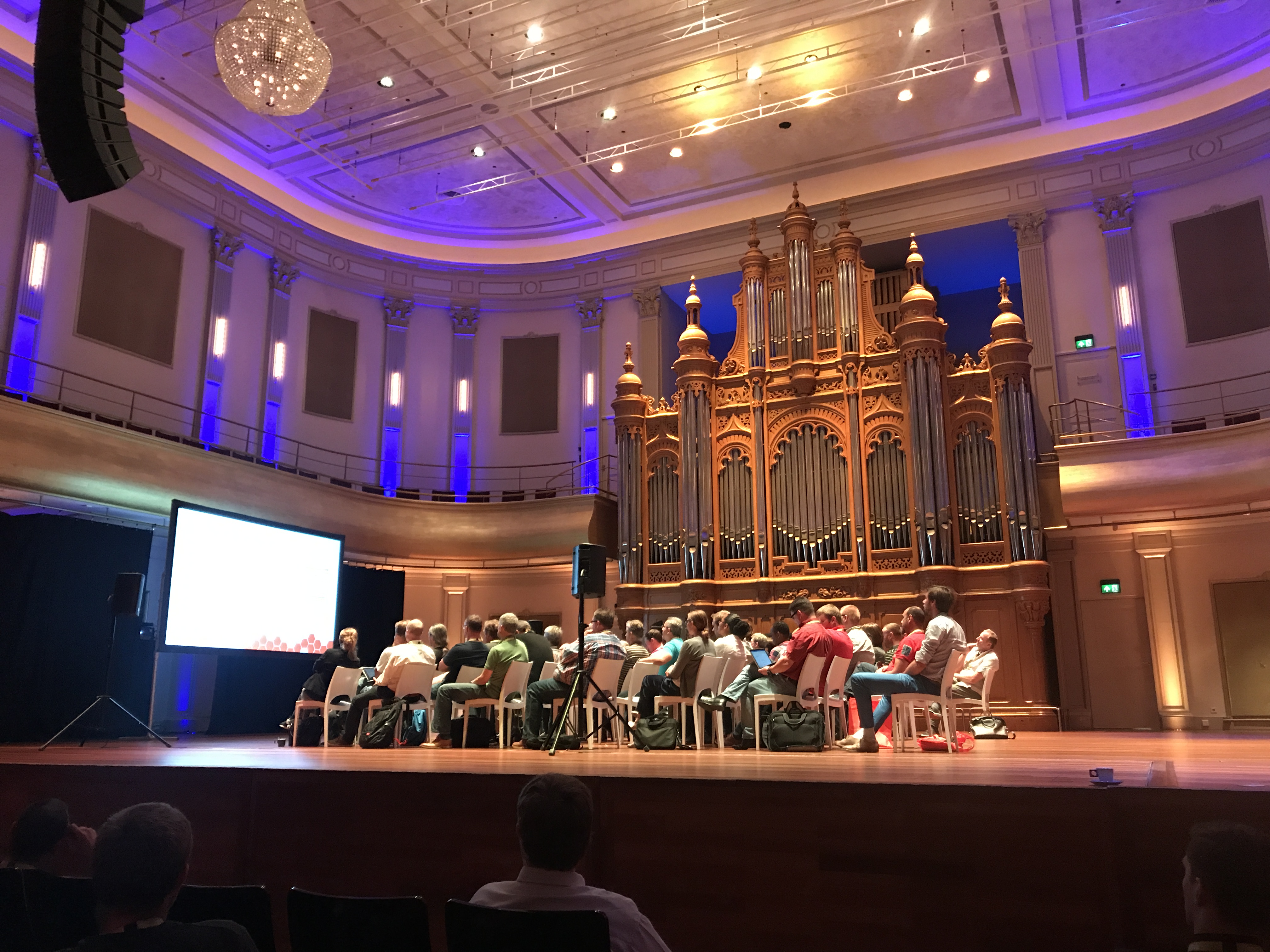
I arrived midday Tuesday after changing planes in Reykjavik (more on that later). A quick train ride got me to the Haarlem Centraal station, after which I grabbed an Uber to the hotel. The conference was booked into the Philharmonie Haarlem, and I must say it was the nicest conference venue I’ve ever been in– a far cry from the typical US conference facilities located in echoing, soulless conference centers or noisy, smoky Vegas hotels. The location was excellent as well– Haarlem is a beautiful city and quite walkable. The conference hotel was a mere 3-minute walk from the Philharmonie and the area contained a wealth of restaurants and shops.

One of the meeting rooms at the Philharmonie

After I got registered, I wandered around talking to attendees and speakers. My first session (on monitoring Office 365, big surprise!) wasn’t until Wednesday morning so I got to drop in on a couple of sessions, which was nice. Unfortunately, I spent most of my time Tuesday either working on my slides and demos or on the phone with folks back in the USA– that’s the big downside to being in Europe. Tuesday night I met a group of MVPs for dinner, at a Mexican restaurant, of all places.

Wednesday I had my monitoring session in the morning, along with more work on my third session’s slides. I got some good attendee questions that I’ll use to make the presentation better for the next time– as Microsoft is always changing the monitoring and reporting functionality in Office 365, this is definitely an evolving area. In the afternoon, I was able to go to Tiago Costa’s session on Office Graph development, which I found quite valuable. Wednesday night the organizers had set up a canal cruise for the speakers, which was a lovely treat– Haarlem looks even better from the water.

Canal ahoy

Obligatory windmill photo. This was the only one I saw the entire trip.

Thursday was a big day. I had two sessions: one on Skype Meeting Broadcast and one on Windows Information Protection. Fellow MVP Brian Reid was kind enough to help salvage my demo; I filed a support ticket with Microsoft about an hour before my session because my tenant didn’t work, but his did. We even got to demonstrate the real-time automated closed captioning feature that Skype Meeting Broadcast now includes, which resulted in quite a few laughs from the audience. It works surprisingly well, better with Brian’s English accent than my own American one. Then it was back to the speaker lounge for still more work on my information protection slides, which I delivered to a curious audience without a hitch. (I had a great side conversation with a lady who works for, shall we say, an allied power and had a lot of interesting questions about ways to use the Information Protection features in what might euphemistically be called a nuclear bunker.) The afternoon sessions were accompanied by a loud, heavy thunderstorm that wouldn’t be out of place in Alabama– I think some of the locals were a little surprised by its ferocity. The rain had cleared and left the air cool and clear afterwards, perfect for the closing session, after which I jumped in a taxi to get to Schiphol for my flight on to Reykjavik.

A quick note on logistics: the venue’s Internet connection worked well for nearly everyone, seating was comfortable and plentiful, and the snacks, coffee, and lunches were good. Overall the logistics were far better than average, especially for a freshman offering. I believe that reflects the experience of the event team, all of whom have put on many such similar events in the past.

Overall, this was a solid first-year conference. With only a couple hundred attendees, it preserves the small-group feel that was formerly so attractive about first MEC and then Connections, but with a great deal of attention paid to ensuring that the content was relevant, unique, and practical. I’m looking forward to next year’s version!

2 Comments

Filed under General Tech Stuff, Travel, UC&C

Training Tuesday: time to work on my bike repair skills

Warning: this post contains disturbing images of graphic violence that may not be suitable for some viewers. Viewer discretion is advised.

This weekend, Dana and I had planned to go for a bike ride on the Arsenal, so I loaded up my bike. First, though, we’d planned to go see Wonder Woman (which I highly recommend– great flick). Because I didn’t want to have my bike stolen by some miscreant, I secured it to the rack with a cable lock.

After we left the theater, I heard a thump and looked out my rear view mirror just in time to see my poor bike departing its slot in the rack, where it was dragged along for 50yds or so by the cable lock until I could safely pull over.

Dana is not amused.

The first thing I noticed was that I’m going to need new handlebars (and bar tape, which I wanted to replace anyway).

Ever wonder what carbon fiber looks like on the inside? Now you know.

The front tire sidewall was abraded enough to ruin the tire, and the corner of the saddle got chewed up pretty badly too. I think I can duct tape this as a temporary fix.

Sad saddle

The retaining strap that I used to secure the wheel to the rack slot was missing. My best guess? Someone wanted to steal the bike, lifted the top clamp, and then gave up when they found the cable lock in place. I didn’t check the rack so I didn’t notice until it was too late. Thankfully the frame and the carbon wheel fairings seem undamaged, although the rear freehub is making a new noise I don’t like. Bar tape is en route from Amazon and mi amigo Lance is giving me a spare set of bars, so hopefully this weekend I can watch enough YouTube videos to learn how to disassemble my brake hoods and shifters, port them to the new bars, and wrap everything.

Meanwhile, I still don’t have a saddle for my tri bike, so I either better get to Bicycle Cove and spend some money or swap out running for riding for the next week or two…

2 Comments

Filed under FAIL, Fitness

Powerlifting meet report: Empire of Renegades, 3 June 2017, Huntsville

I just competed in my third powerlifting meet, Empire of Renegades. It was a blast!

Originally I had planned to lift at Europa Orlando two weeks ago, and had trained for that, but the airplane nose landing gear broke and Matt and I got temporarily stuck in Adel, Georgia. Luckily while I was sulking in my hotel room, I found this meet, which was only about 10min from my house, so I signed up and got ready to kick it. I have long had the goal of getting to 1000# total and I thought that maaaaybe this might be the day, if everything broke perfectly well for me.

Training and meet prep

Most athletes who are preparing for a meet will follow elaborate training programs with a goal of peaking their strength right at meet time. Because I’m coached by the team at Complete Human Performance, I just do what my coach (a pro triathlete) tells me to do. Typically I lift 3x/week (upper one day, squats/deads one day, one day of combo), usually with a LISS run or bike afterwards. The other days are higher intensity cardio. This is liberating since I don’t have to worry about my programming, but undoubtedly means I’m leaving pounds on the rack since I am not trying to optimize my lifts. I lift in my garage, with no spotter or live coaching. My technique probably has lots of room for improvement. So I didn’t do anything super special for the meet other than tell Jon, my coach, three months ago that I had a meet planned.

All powerlifting federations separate lifters into different weight classes. In general, you want to be as heavy as possible within your weight class, but as light as possible overall (because your overall score is computed using your total bodyweight). Like wrestlers and UFC fighters, then, powerlifters have a whole science around trying to drop weight without losing muscle. I usually walk around about 205 lbs, and that would put me in the 220lb weight class against much stronger lifters. I decided to try to get down to 198 or below using a water cut. The idea behind these cuts is simple: by manipulating your fluid and salt intake, you trick your body into dehydrating itself. A typical plan might look like this for a Friday morning weigh-in:

  • Monday: drink a gallon of water, cut down dietary salt, lower the amount of carbs you eat
  • Tuesday: drink 2 gallons of water, with minimal salt and low carbs
  • Wednesday: drink a gallon of water and don’t eat anything
  • Thursday: drink half a gallon of water, no carbs, and nothing after 5:30pm. Spend a little time in the sauna in the afternoon
  • Friday: wake up, go get weighed in, and then start dehydrating and refeeding

I roughly followed this plan, but I didn’t start until Tuesday (Monday I had the Cotton Row 10K race in hot, humid conditions so I ate and drank like a pig until I got up Tuesday morning). That worked fine; I weighed in at 88.1kg. after having 2 gallons of liquid Tuesday with a mostly normal diet, nothing except eggs, cheese, and hot sauce (and a handful of peanuts, I’m weak) with 1 gallon Wednesday, 1/2 gallon and protein only Thursday, then weigh-in Friday morning.

Mid-week I stumbled across Bigger, Smaller, Bigger and will probably use it next time. It makes for a fun read even if you aren’t a powerlifter.

The meet

Crossfit Xiphos hosted the meet; we had 45 lifters arranged into 3 flights. I want to start off by saying that the meet was very well organized and run. Everything was smooth despite the fact that more than half of the lifters were doing their first meet!

A digression about how meets are organized. Each lifter gets 3 attempts for each event. In a full power meet (meaning the lifters will squat, bench press, and deadlift), you thus have 9 tries to lift. Saying that you went “9 for 9” or “2 for 9” thus indicates how successful you were overall. You tell the meet officials what your opening attempt weights will be for each of the 3 lifts, then, if you lift that weight, you can go up (by as much or as little as you want) for each subsequent attempt. There is a lot of strategy behind choosing weights; more on that later.

Once everyone’s checked in, the officials break all the lifters into groups called flights, based on their body weight and the amount of weight they said they’d lift in their opening attempt. The lightest lifter is the first lifter in the A flight, and (in general) the person lifting the most weight will be the last lifter in the last flight. For each lift, the first lifter in the A flight does her thing, then the second person in A flight, and so on. After the last A lifter has lifted, the first A lifter takes a second attempt, and so on. This is harder to explain than it is to do.

I was either #1 or #2 in the B flight for each of the 3 lifts. Based on my lifts, the only reason I wasn’t in A is because more than half of A were novice female lifters (several of whom set Alabama state records, which was extremely cool to see!)

During each lift, there are 3 judges watching you: the head judge is in the center, with one judge on either side. They each have a little switch that illuminates either a red or white light. You need 2 or 3 white lights for a lift to count– get 2 or 3 reds and your attempt is considered a “no lift” and doesn’t count. The head judge gives the lifter commands. You have to wait for these commands before you do anything. For example, in the squat, here’s what happens:

  1. The head judge says “The platform is ready” and you get on the platform and address the bar.
  2. At your own pace, you unrack the bar and walk it out to your preferred position.
  3. The judge says “SQUAT” and you can start the squat, at your own pace. You come up at your own pace.
  4. When you’ve stood all the way up, and have the weight under control and not moving, the judge will say “RACK” and you put it back into the rack.

There are different commands for the other lifts, of course. These commands are what burned me at my last meet– I missed my first squat attempt and was thereafter so frazzled that I blew a couple of attempts just by missing commands. It’s easy to get so focused on your body that you lose awareness of what the judge is telling you to do.

Squat

I warmed up light: 10 reps bar only, then worked up to 125kg x1. I’d planned for an opener at 140kg, with my other attempts bracketed per David Dellanave’s excellent advice about attempt selection. Summary: pick an opener that’s   “a weight you can lift 10 times out of 10 with a cold and a headache,” then decide ahead of time what your second and third attempts will be based on how easy or hard the opener is… and then stick to the plan.

My opener was a headache-and-cold winner: 140kg, 3 whites. Sadly I had a camera problem, so no video of that.

Second attempt I chose 150kg, at the top end of my bracket. Three more whites.

Third attempt I had 155kg at the top of my bracket. I took 157.5kg instead, smoked it, and ended up with a new 12lb PR… sadly, I was too conservative here and could probably have gone 162.5kg. That choice turned out to be important later.

(Side note: we had two dudes go over 700#. One attempted 777# and damn near got it. This was super motivating to watch.)

Bench

I have poverty bench. At 6’3″ with giant albatross arms, my leverage sucks, and my form is, shall we say, unique. I opened at 100kg, well within my cold-and-a-headache range, and got it.

For round two, I had bracketed 105 at my top end and got it, but it was a bit of a fight– probably RPE 7.

Discarding good judgement, and David’s advice, I went for 110kg on attempt #3 and couldn’t lock it out. That was the only lift I missed but I was bummed. Learning for the future: don’t get greedy.

Deadlift

I love the deadlift. I especially love it at meets, when the crowd gets more and more excited as people work up to their third attempts and we see some crazy numbers on the bar. My opener was 165kg, which flew up. However, I got one red light because I lowered the weight before the command– too much excitement, I guess.

I had bracketed 172.5 through 177.5 for my second attempt but had forgotten to look at my bracket before I went on the platform. Sadly I told the scorer that I wanted 172.5 for my second attempt– that proved to be too light, as it flew up. You can see the bar flex as I lift the weight. It’s not that I was lifting a lot (although 380lb is respectable), but that a deadlift barbell has more “whip” in it than a bar that you’d use for squats or bench press. The whip makes a big difference. On my shopping list for my home gym: a deadlift bar. Maybe someday…

For attempt 3 I decided to try for a PR at 182.5. I smoked it too. David talks about the importance of choosing a big third deadlift attempt when you’re competing against other people and trying to win, but I wasn’t, so I didn’t get as aggressive as I could have here.

The aftermath

Only after I sat down did I realize that I totaled at 445kg, just 10kg short of my goal. This goes back to a key point David makes in his attempt selection guide. In retrospect, I could have made up that 10kg by not missing my 3rd bench (putting another 2.5kg on the total) and then getting a measly 7.5kg total across squat and deadlift– both of which I could’ve done.

Despite that I was well satisfied. With two PRs on the day, and 8/9 total, it was a day well spent. My neighbors Ashley, Erica, and Michael came by at various times to watch; Dana was there cheering me on and making sure I had food, and it was a great positive and fun atmosphere. I feel like my hard work in the gym paid off and I look forward to what’s next!

3 Comments

Filed under Fitness

Training Tuesday: running with Stryd PowerRace

Engines are generally most efficient when they run at a constant speed within their design range. That’s why you get better mileage on the highway than in town; it’s why gasoline-powered generators don’t typically have multiple power settings, and and it’s why airplane engines are designed to run for very long periods of time at a steady constant power output. It turns out the fact holds for endurance athletes.

It’s well documented that one of the most effective ways to train for cycling events is to monitor your power output using a power meter. The idea is simple: when you’re riding outdoors, your speed and heart rate will vary widely due to factors you can’t control. On a flat road with no wind and cool weather, you might go 25mh at a certain heart rate. Into a headwind, or uphill, or in an Alabama summer, you might be working just as hard but only going 10mph. So trying to control your workout by pace or heart rate is needlessly difficult and may not give you the results you want. A power meter measures how hard you work, not how fast you’re going or how hard your heart alone is working. Without going too deeply into the complexities of training with power (see this free e-book if you want to know more), the basic idea is that you build your training plan so that you try to put out a certain amount of power, no matter what the road and weather conditions are. I started doing this a little while ago and it’s really useful– my coach will say “make X watts” or “your race target for the 70.3 distance is Y watts” and I just pedal hard enough to hit that number. My speed may go up or down depending on wind and hills, but my effort stays constant so I don’t accidentally work too hard trying to go fast into the wind (for instance) and leave myself unable to sustain my pace later in the race.

That’s the theory, anyway.

The folks at Stryd have built a similar tool for runners: the Stryd power meter is a little pod that clips on to your shoe and measures the amount of force you produce when you run. Since running uphill or into a headwind is harder than running on level ground, or in still air, they intend their product to be used by people who want to control their pace through power management. The problem is that the cycling world is much further along in embracing power, so it’s hard to actually see what your running power is, much less pace to it. Garmin watches can display power data from Stryd pods, and Stryd has a nifty web app called PowerCenter that gives you a bunch of analytics.. but what I wanted was a real-time, on-the-wrist alert that would tell me when I was making too much power, or not enough. Garmin (and many other manufacturers) allow you to set alerts that will buzz or beep when you go outside the predefined pace, speed, heart rate, or distance targets. I wanted one for power… and now I’ve got one.

Stryd recently started beta testing a new app called PowerRace. It’s very simple: you plug in your race distance and your power target, then start the app. It will beep and turn red if you go outside that range. It purposely doesn’t show your pace or elapsed time.. the whole idea is that you only look at your run power and adjust your pace to keep it where it’s supposed to be. Here’s what it looks like in action (“AP” stands for average power, and “HR” is heart rate):

PowerRace in action

I played around with the app a bit and couldn’t get it to work reliably but Gus Nelson of Stryd was kind enough to do some live troubleshooting with me via Google Hangouts and we got the problem sorted out, so I used it for this week’s Cotton Row 10K.

Executive summary: it worked flawlessly and gave me useful cues when I was going too fast, or too slow. I got a 45-second PR, which would have been more if I’d set my power target higher. I hadn’t done the recommended power test, so I was guesstimating what my power level should be; I could have gone a bit harder.

Cotton Row is a tricky course: it’s got a big hill about mile 3 and many a runner has come to grief by blasting across the start line and burning up too much energy.

The Cotton Row course

You may also want to check out the live version, where you can see more clearly the ridge that we run along between miles 3 and 4.

When I compare last year to this year, here’s what my mile times looked like:

2016: 8:55, 8:53, 9:35, 10:20, 9:23, 9:19, 7:18

2017: 9:00, 9:21, 9:55, 10:04 8:42, 8:37, 7:08

So I went out 53 seconds slower this year on the first 3 miles but then finished 46 seconds faster, with an average power of 289W. I targeted 285W, so I did a good job of holding my average. The times aren’t what I would have expected. My perceived effort was about the same, but it was more consistent. For proof, check out the power curve:

Cotton Row data

The red line is my heart rate; the purple line is power. You can clearly see where I walked aid stations or where I took a break to regulate my power output; you can also see my finishing kick.

So what’s the bottom line? I really like the idea of training and running with power. It’s a proven technique for the bike. I did a good job of holding in my power target range, and did get a (small) PR, but I probably could have done just as well by running by feel alone. I think the missing ingredient is that I don’t really know what my target run power is. Once I have that dialed in I will be better able to fine-tune my pacing. I’ll keep using PowerRace and see how it goes.


Leave a comment

Filed under General Stuff

Removing a bad Windows driver, the hard way

From the “don’t touch what isn’t yours” department…

Yesterday I wanted to do some administrative chores related to a large stack of bills that were cluttering the dining room table. I grabbed my Surface Book from my laptop bag and plunked it on the table. My son’s Dell laptop was nearby, with his fancy Razer gaming mouse plugged into it. “Hey, free mouse,” I thought. I plugged it in to the Surface Book, opened it up, and went to get a diet Coke. By the time I came back, Windows and/or Razer had managed to install some kind of evil driver from hell™ that rendered every USB device plugged into the system inert.

That includes the built-in keyboard and trackpad, BTW, as well as anything plugged into the Surface Dock. The clipboard still worked great, though.

I tried rebooting and that didn’t help. Trying to search for a solution with just the on-screen keyboard slowed me down a bit, and I had other stuff to do last night, so I let the broken machine sit forlornly overnight and went back to it this morning.

The touch screen functioned normally, which was helpful so that I could open apps. When I looked at the “recent updates” list, I saw that a Razer device driver had been installed when I plugged the mouse in– but it was a version labeled as being from 2012. Why this happened, I don’t know. This was clearly the culprit… but Windows 10 doesn’t give you a way to remove an individual device driver update from the settings interface. Nothing relevant appeared in the add/remove programs list. There was no “undo the last update” button, and I didn’t have a recent backup. Device Manager didn’t show any driver at all for a Razer HID device of any kind… so back to the search I went.

First I tried installing Razer Synapse, their all-in-one utility. All that did was invite me to sign up for a Razer account. No thanks. Then I poked around various arcane parts of %systemroot% but didn’t find anything suspicious. Re-running Windows Update didn’t force a new version of the driver either.

To make a long story short, the answer is here: I had to run pnputil.exe -e to figure out which driver store package had the bad driver, then remove it with pnputil.exe -d -f. Once the offending driver was removed, all of my USB peripherals miraculously resumed their normal operation.

Moral of the story: don’t plug in your son’s gaming peripherals. Lesson learned.

Leave a comment

Filed under General Tech Stuff

Flying Friday: happy birthday, N32706!

Three years ago this week, John Blevins and I flew Delta to Salt Lake City to pick up N32706 and fly her home. I was perusing my logbook earlier in the week and realized that more than half of my total flying time (318 hours of my total 611) has been sitting in the left seat of this particular airplane. I’ve traveled for races/events (DC, Vermont, Texas, North Carolina, Ohio, West Virginia), family visits (Louisiana, Florida), business (Toronto, Missouri, Kentucky), and fun with the kids (Georgia, Mississippi, Tennessee), and flight training (Utah, New Mexico, Kansas, Oklahoma, Nebraska).

where I’ve been in years 1-3

There are times when I think it’s silly to own an airplane instead of renting– like a horse or a boat, you’re always paying the maintenance and fixed costs even on days when the weather is bad, you’re busy, and so on. But the freedom and flexibility of being able to travel where and when I want to, and the comfort of knowing that I’m flying a well-maintained, well-equipped airplane that hasn’t been neglected or operated improperly, more than make up for it.

My next trip is later today, from Decatur to Orlando (well, Kissimmee) for a weightlifting meet. Later in the year, I’ve got Tuscaloosa, Biloxi, New Orleans, and a few other places on my to-go list. I can’t wait!

Leave a comment

Filed under aviation

Watch out for bird nests

I recently had a really interesting cross-country trip. It featured virgins, dirt, avian invaders, and tractors.

Some local friends talked me into running the American Odyssey relay race: just under 200 miles from Gettysburg to Washington, DC, over two days. (Look for a race report in the near future.) Some of my teammates were flying commercial, and some were driving, but I found three hardy souls who volunteered to go with me. Jim’s a Navy officer who’s used to airplanes of all sizes, but neither Rese nor Melissa had flown in a small airplane before… so they’re the virgins in this story.

I’d planned to fly from Decatur to New River (PSK), fuel up with avgas and diet Coke, and then fly into College Park, MD (CGS). This would allow me to use my fancy secret code to fly into the Washington DC ring of restricted airspace. However, because we were staying in Harpers Ferry, it didn’t make sense to fly 60+ miles to the east just so we could have extra drive time going back to Harpers Ferry. I decided to go into Martinsburg (MRB) instead to avoid the extra driving.

We departed on schedule, with about 1500′ ceilings leaving Decatur. A front was on its way so my goal was to get us to our destination before the weather got bad. We benefited from an epic tailwind– my normal cruise speed is about 135kts but I was seeing over 200kts for a good part of the first leg.

208!

Unfortunately, with wind comes bumps.. so one of our crew (I’m not saying who) needed to use a barf bag. No major damage, thankfully, either to the victim or the airplane. Apart from that, the rest of the flight was uneventful– a quick stop at PSK for fuel and diet Coke and we were on our way. Potomac Approach made me fly the RNAV 26 approach even though the weather was VFR. Martinsburg is home to the 167th Airlift Wing, so there were a bunch of big gray C-17s on the ramp. Always a fun sight.

Aero-Smith, the local FBO, had prearranged a rental van. It was waiting, so we loaded up and off we went. The next couple days were a blur– I had a fantastic time at the race. All too soon, though, it was time to head back home, so I planned our flight to follow roughly the same route. While the big front had passed through, we were still forecast to have 20+ knots of headwind, so I tried to choose a more southerly route to reduce the wind penalty (spoiler: that didn’t work). I’d planned the first leg from Martinsburg to Ashe County, NC, then home.

We got to Martinsburg safely and turned in the van. The FBO lineman offered me a box of rubber gloves. “We saw a lot of birds on your airplane,” he said. “There’s probably some poop on it.” I’ll take “things you don’t want to hear at the airport” for $200, Alex!

I walked out to the plane, which they’d parked on the far edge of the (empty) parking area. I saw a few poop spots and used a gloved hand to remove them. Now, this next part is relevant: I usually start my walkaround by turning on the master switch, existing the forward passenger door, and walking back down the right side of the plane, around the tail, and up the left side– finishing at the engine. That’s what I did… except that when I got to the engine, I noticed what looked like a few pieces of grass sticking out. That certainly wasn’t there when I parked the plane, so I poked a flashlight into the front of the cowling and was surprised to see some more grass.

That led me to remove the upper cowling, whereupon I found this (click it to see the detail).

Bird attack!

Yep. In two and a half days, the forces of evil invaded my cowling and built two large, flammable nests. I started pulling out handfuls of grass and twigs, and the other three came to help. All this action attracted the attention of the FBO staff, and they brought us a handheld leaf blower.

Now, a brief note. Air-cooled piston airplane engines work on a principle called pressure cooling. Baffles inside the cowling drive airflow from top to bottom, not back to front, to cool the cylinders. When you look at the picture above, what you can’t see is that there are only a few small openings under the top deck for air to flow down– making it very difficult to get all the bird debris out with a leaf blower. We ended up having to spend 30 minutes or so picking little sticks and blades of grass out of the engine compartment. Here are Rese and Jim doing just that:

cleaning the bird damage

Once that was finally done, I wanted to run the engine with the cowling off, whereupon I discovered a failed cell in the battery.. so the plane wouldn’t start. This was not popular with my passengers. Or with me, for that matter.

The FBO staff was very reluctant to help start the plane. They claimed not to have a ground power unit, but I eventually talked them into bringing their tow tractor out so I could use my jumper cable. The problem with this cable is that after the plane starts, you have to unplug it, and the FBO guys didn’t want to do it “for liability reasons.” Thankfully Jim wasn’t a big baby like they were, and he volunteered to pull the cable after engine start. We deployed the tractor, got everything hooked up, and the engine immediately started up.

Getting ready to tractor-start

Once we got up to altitude, we got a 1-2 punch from the headwinds: it was bumpy, and we were only making about 105kts over the ground– so less than half of our groundspeed on the way out. After a little fiddling, I got permission to climb from 8000′ to 10000′; as we slowly climbed, we got bounced around quite a bit. To make things worse, the wind was even stronger at 10000′, so we went back down to 8000. It was a steady parade of mountain waves, something I hadn’t spent any time dealing with before. Frankly I didn’t much care for them.

As we got closer to GEV, the wind diminished a bit, although not enough to give us any appreciable speed increase. The Ashe County airport sits at about 3000′ above sea level, and the airport description helpfully notes “RISING TERRAIN ALL QUADRANTS,” so flying in means dealing with shifting winds funneled in various directions by the surrounding terrain. Despite the wind, I stuck the landing, and we were well and cheerfully served by the airport manager, who coaxed the balky full-service pump into working long enough to fill the tanks. I’d happily stop there again. (Note that KGEV has no AT&T cell service and no diet Coke in the soda machine, so plan accordingly.)

There was a good-sized line of storms stretching from south to north moving through Mississippi when we left. Our original plan was to get home before it arrived, but due to our de-birding time, there was no way we were going to make that. As we flew, it became clear that the headwinds were going to prevent us from making our alternate at Winchester, so I decided to stop in Chattanooga, which has rental cars, nearby hotels, and food.. just in case. We landed and found the ramp crowded with more expensive airplanes that had obviously stopped for the weather as well. Luckily the FBO had one crew car remaining, so we headed out to look for dinner and wait for the storm to pass. The city got roughly 1/4″ of rain in the hour we were at dinner, but it had tapered off to a light drizzle by the time we got ready to depart. I pored over the radar and it looked decent if we flew a little to the northwest, more towards Winchester, and then turned south, so that is what I planned for.

Once airborne, I quickly saw that the radar depictions didn’t give the full picture– they showed rain, all right, but the clouds were well above our altitude, so for most of the flight we flew through falling rain but still had decent visibility. The picture below shows what the radar depicted (they’re different, but that’s a topic for another post). After an uneventful trip, with mostly smooth air, we landed at Decatur, packed up, and headed home.

Which one’s right?

1 Comment

Filed under aviation, General Stuff, Travel

Flying with Avidyne’s version 10.2 software

If you think updating the software on your phone is hard, try it with avionics.

Avidyne has been promising a new release of the software for their IFD line of WAAS GPS units for a while now. Originally announced on April Fool’s Day last year, version 10.2 packs a pretty impressive list of features, including synthetic vision, support for a bunch of new devices (including digital radar and FLIR cameras), display of more ADS-B weather and traffic data, and a new “IFD100” iPad app that essentially acts as a second screen for your IFD. They generously made the update available for free, but with a catch: it has to be installed by an avionics shop. The FAA lets aircraft owners make “minor repairs and alterations” (a phrase which has a very specific set of parameters around it), and avionics software updates aren’t considered “minor.” When they finally announced that 10.2 was available, the first order of business was to find a shop to install it. None of the local shops are Avidyne dealers, so we decided to head back to XP Services in Tullahoma. A quick phone call to schedule an appointment was all it took.

The flight to Tullahoma was pleasant, and the XP team had the upgrade done in about 2 hours– right about the amount of time Avidyne says it should take. The update procedure is very detailed and specific, with lots of dire warnings about what happens if you do it wrong, so I’m glad they didn’t. They also upgraded the software in our SkyTrax 100 ADS-B receiver, which will become important a little later in the story. I can’t say enough good things about XP’s staff: they did good work, quickly, at a fair price, and were very friendly. Be forewarned if you go there though: there are no vending machines nearby so bring your own snacks.

On the way home I got to start playing with the new features, but it wasn’t until last week’s Easter trip from Decatur to New Smyrna Beach that they really came into their own. Here’s a partial list of the new goodness in this release.

Let’s start with synthetic vision. The IFD540 doesn’t have a way to sense the attitude of the airplane, so its syn vis feature is limited to showing a “plane in trail” (Avidyne calls it exocentric) view of you, your route, and the surrounding terrain. In this case, I’ve programmed the ILS 18 Y approach into my home airport. You can see the magenta line indicating that I’m on the final approach segment. The white line-and-loop to the upper right is the missed approach procedure that I’d fly if I couldn’t land. There’s another airplane in the area, at 1900 feet and descending. The synthetic vision display makes very clear what the surrounding terrain and obstacles look like, and how my planned flight path would interact with them. This is not a huge deal in the flat riverine terrain near Decatur but in someplace like Montpelier, with more significant terrain, it could literally be a lifesaver.

heading for the approach

Another nifty new feature: temporary flight restrictions (like the one shown below, for firefighting in southern Georgia near Waycross) and winds aloft data (the little white flag-looking things in the second picture) can now be shown along with all the other flight data. You can see that we have about a 20kt headwind. It’s important to remember that, like all other ADS-B weather data, the wind data comes from the ground and may not reflect what’s truly happening in the air at that moment.

Don’t fly in TFRs unless you want to meet the FAA in person

The direction of the wind barb shows which way it’s blowing; the number of little flags shows how strong it is

Traffic display is greatly improved in two ways. First, you can now see trend lines showing you where a traffic target is going (along with its N number, if it’s transmitting one). This is really helpful in crowded airspace, like the area around the Daytona Beach airport. You can see that both airplanes on the display are headed in the same direction as we are, one at roughly our same altitude and the other descending.

In 10.2, you can see where traffic targets are going

I also now get traffic alerts when there’s a potential conflict, i.e. someone else is flying towards me. An aural alert (“bong! TRAFFIC”) comes first, then the screen changes to show the conflicting traffic. This is an extremely valuable feature.

When you hear “TRAFFIC,” you’d better start looking around

The IFD100 app does what it promises: it lets you control the physical IFD, but it also lets you configure its display completely independently of the one on the panel. It does about 80% of what the “real” IFD hardware does. For example, you can load a flight plan into the iPad app while the panel is showing you the map/weather/traffic page, then push a button and activate that flight plan from the iPad. You can see and tune frequencies (but not activate them), zoom in and out on maps, and in general act like you have a second IFD540. It’s pretty neat, although there are some quirks to it that I’m still figuring out.

Not quite a replacement for Foreflight

The IFD100 app isn’t a replacement for FlyQ or Foreflight though; it doesn’t let you anything that the physical IFD can’t do, so no looking up fuel prices or FBO reviews, no satellite imagery display, and so on. ForeFlight has all sorts of useful planning features like terrain mapping, wind estimation, and flight plan filing that the IFD100 doesn’t, and won’t. I don’t think Avidyne intends the app to replace a true electronic flight bag (EFB) app, but rather to give you more options and flexibility with using the in-panel hardware.

I haven’t been able to test one of the signature features of 10.2 yet, though: its ability to do two-way sync over Wi-Fi between the panel device and a tablet. I can already stream a flight plan, and GPS position data, from the IFD to ForeFlight or FlyQ. 10.2 adds the ability for the IFD to send traffic, weather, and TFR data (which means I won’t need my Stratus receiver to see that stuff in ForeFlight), but also the ability to load a flight plan from the iPad to the panel. That means I can plan a complex route at my leisure in my armchair, file it, brief it, get my expected route, and push the route to the airplane when I get to the airport with a single button press. That’s going to be glorious when it finally arrives.

It speaks well of Avidyne that they made this major feature release available for free, and I’m excited to see how they continue to build on the wireless connectivity built into the IFD line.

4 Comments

Filed under aviation, General Stuff

Training Tuesday: 2017 35.1 Challenge

The second weekend in April here in Huntsville features two marquee races: the Heel & Crank duathlon (run by Team Rocket, our local triathlon club) and the Bridge Street Half Marathon, sponsored by our local Fleet Feet. Two years ago, the sponsors joined forces to offer a “35.1 challenge”– do both races back-to-back and you get some kind of swag, plus bragging rights.

In 2015, I completed the challenge,  barely: the duathlon was fine but the 13.1 was a bit of a grind, and I was super sore for the following week. Last year, I signed up for the duathlon and the challenge, but stupidly forgot to register for Bridge Street. One thing you should know: Suzanne Taylor, the RD for Bridge Street, absolutely does not allow transfers, deferrals, or late registrations. Period, full stop. So I didn’t complete the challenge.

This year I made sure to register for all 3 events. Dana had planned to return to the 13.1 world after a long layoff by running with our friend Teri… who managed to catch a stress fracture to her femur (how do you even do that?) just in time to be sidelined for the race. I told Dana I’d run with her instead, at whatever pace she wanted– like a really slow and not especially scenic date. Therefore, my plan ended up being to treat Heel & Crank as a legitimate race, then run the 13.1 more like an LSR. I ran that plan past my coach, who gave me a big thumbs up, so I was all set.

I also planned to volunteer for both races– for Heel & Crank, it was race-morning packet pickup, and for Bridge Street it was day-before packet pickup.

Prerace

Duathlons are easy to prepare for– it’s basically a bike ride (so you need bike gear) plus running shoes, with none of that pesky swimming stuff. I packed everything up Friday afternoon, made sure the ELEMNT was charged, and so on. I didn’t eat anything special for dinner; in the morning, I had a protein shake and a poptart, plus a dose of BeetElite, and headed out to the race. This was the first year for a new RD, and he did such a good job lining up volunteers that they didn’t need me; that gave me a chance to enjoy visiting with friends instead of working. I got transition set up, walked around chatting with people, and waited for the race to start– it was really nice to have plenty of extra chill time, instead of my usual MO of screeching into the parking lot at the last minute and then being harried. My friend Coop was kind enough to buy me a hot chocolate at JaVa.Mooresville, a really good coffee shop that coincidentally happens to be the only one anywhere nearby. It was about 55 degrees and clear just before race start.

Run 1

The run course at Heel & Crank starts on a paved street, which after 0.3mi or so turns into a hard-packed dirt trail. It’s an out-and-back; some of the trail is shaded, some isn’t. It’s almost completely flat. As you can see from the map below, a good portion of the course runs alongside farm fields, which add a lovely pastoral feel– you can literally see the grass (or whatever) waving in the breeze, when there is one, which there was. I settled in early on and tried to hold a steady pace, finishing with an 8:41/mi average in 24:37.

Heel and Crank run course

T1
Transition was completely unexceptional– I dropped my headphones, swapped my hat for a helmet, changed shoes, powered up the bike computer, and choked down a pack of Gu chews. Out the gate in under 2min, which for me is lightning-quick.
The bike
The course overlaps some of the familiar Jetplex course, so my plan was to ride it at a steady pace, in aero as much as possible. This doesn’t sound like a terribly complex plan, but I am still getting used to my tri bike, so I figured anything more complex would be pointless. I made a weighted average of 177W, certainly nothing to write home about, but overall good enough for a 6-minute CR and a PR on one Strava segment.
T2
T2 was even faster– helmet-to-hat, headphones in, shoes on, and out the gate.
Run 2
I was really leery of blowing up by going out too hard on the first half of the run, so I tried to keep my HR caged around 150. I actually ended up averaging 151 for the run; I possibly could have pushed a little harder on the outbound leg, but I was feeling good on the return and was able to hold right around 7:05/mi for the last half mile or so. For reference, my mile PR time is 7:11, so I was well pleased with this. Run 2 was done in 27:26.

Wraup and post-race
Overall, my times were good enough for a 1:52 finish, a 15-minute PR for this race. To say I was pleased would have been a massive understatement. I celebrated with a big plate of the post-race pancakes for which this race is famous, plus a glass of Rocket Republic Scotch Rocket served by my fellow cubano Warren. It was a pretty successful day for the Cubans, in fact: the relay team of Tony, Craig, and Warren placed second, and Lance won the Clydesdale division. I’m sure if Julio had been there he would have won something too. Hats off to first-time race director Paul Erickson and his staff of volunteers for putting on a fun, safe race with excellent post-race food and drink.

I headed home, showered, and went over to Dana’s. Dinner was a giant bowl of Nothing but Noodles‘ finest mac-and-cheese, always a solid pre-race choice.

Race day
We woke up about 530a, with a goal of getting to the race site about 630a. This turned out to be easy. One of the nice things about Bridge Street is that it’s held at an outdoor mall. There is plenty of parking and tons of porta-potties, as well as some nice indoor bathrooms. We wandered around to chat with people for a while, then queued up near the 2:30 pace group for the gun start.

Pre-race

After a rousing rendition of the National Anthem, the cannon went off and so did we.

I wish I had kept better notes on the race itself. The Bridge Street course winds through Research Park, which is pretty flat and not all that scenic for the most part. The course starts in front of Barnes and Noble, runs west for a bit along Old Madison Pike, runs north on Jan Davis and then on Explorer, loops around West Park, and then turns south again. Perhaps the most interesting part is the Double Helix path near HudsonAlpha, which is marked with educational signs about the human genome. It’s also interesting to note the incredible funk we smelled while running past one of Adtran’s buildings; it smelled like someone had bred a skunk the size of a VW Beetle, wrapped it in shrink wrap, and then boiled it in 10W40 motor oil. Truly a scent I will remember for a long time.

The Bridge Street course

It was cool at the start, and we made good time through the course. Dana had planned to do 4/1 run/walk intervals, running for 4 minutes and then walking for 1, but she pretty much ignored these intervals and ran most of it, holding right around a 10:44 pace. I just stuck with her (well, except for once when I let her go ahead while I hit the porta-potty, but let’s not get into that). We crossed the finish line in 2:23:50, quite a respectable performance for Dana’s return to the 13.1 world. We collected our medals and breakfast coupons, then found our friends to hang out and visit a bit.

race posse unite!

The race organizers had thoughtfully arranged for a free breakfast sandwich (which was about the size of a Clementine) at Bar Louie, which we supplemented with a genuine brunch (and, in my case, a couple of ice cream sandwiches). I also grabbed my 35.1 award, which now occupies a prize position on my dining room table until I can figure out what wall to hang it on. Kudos to Suzanne Taylor, the folks at Fleet Feet Huntsville, and the zillions of volunteers who chipped in to put on the race– Bridge Street is one of my favorite races because it’s so well organized, supplied, and staffed.

swag life

All in all, it was a weekend well spent, and I felt fine the next day, at least until I started doing squats… but that’s a story for another time.

2 Comments

Filed under Fitness, General Stuff

Speaking at 2017 Office 365 Engage

I’m delighted to announce that I’ll be presenting 3 sessions at the new Office 365 Engage conference, 19-22 June in Haarlem, The Netherlands.

With the death of TechEd and the product-specific conferences, Microsoft has more or less abandoned the broad conference market in Europe. They’ve hosted smaller, more focused events covering specific technologies in individual countries, but customers who want a broader perspective, or any degree of engagement with non-Microsoft speakers and experts, have had to come to the US-based conferences. Now the UnityConnect team, led by the redoubtable Tony Redmond, are hosting a full-spectrum event focused on all aspects of Office 365, including Teams, Planner, and Groups– not just the more established Exchange/SharePoint/Skype trinity (although there is plenty of that content, too). The speaker lineup is stellar as well; in fact, I wonder how I got in. Attendees will have the opportunity to hear from Michael Van Hybrid Horenbeeck, Steve Goodman, Michel de Rooij, Sigi Jagott, Brian Reid, Alan Byrne, and a host of other MVPs and Microsoft technology experts. The session catalog is pretty impressive.

As for me, I’m presenting three sessions:

  • The Ins and Outs of Monitoring Office 365 covers the fundamentals of monitoring such a complex service environment. Although it may be tempting to just say “let Microsoft worry about it,” the fact is that it’s critical to keep tabs on the health and integrity of the service and all its components, as your users depend on it and probably won’t accept “it was Microsoft’s fault” as an answer. The session will cover the basic tools that Microsoft provides and analyze how they compare to the monitoring needs imposed by dependence on a hybrid cloud service.
  • Windows Information Protection and Azure Rights Managment: Better Together. Normally I hate the phrase “better together” because it is Microsoft-speak for “buy more of our products,” but in this case it’s apropos. WIP and AzureRM work quite well together, and the combination enables some interesting data protection scenarios that I’ll cover here in depth.
  • Like a Megaphone: Skype Meeting Broadcast will cover the little-known, but quite useful, Skype Meeting Broadcast feature. As its name implies, Broadcast lets you take an ordinary Skype for Business meeting and scale it out to up to 10,000 attendees… but there are some caveats you’ll need to know about to use it effectively.

There’s a full slate of pre-conference workshops, receptions, and so on as well. Perhaps I can persuade Tony to do a live episode of Office 365 Exposed while we’re there– we shall see. Come join me! The conference team has given me a discount code, SPRPR469, which will save you 10% on the registration cost. I hope to see you there!

Leave a comment

Filed under General Stuff, Travel, UC&C

Havana, day 7

(See reports from days 01245, and 6.)

Day 7, and time to go home. Logistically, this was a pretty straightforward process, but cognitively, it was deeply weird.

Our flight home was scheduled to leave the Havana airport about 225p. We decided that a 9am pickup time would give us enough time to get all our stuff loaded, get to the airport, and struggle through whatever challenges might be imposed there. Julio had flown home the day and gave us some useful feedback about the amount of time required. Of course, before we could go anywhere, we had to marshal all of our gear and get it down the frighteningly narrow steps to the street. There was a lot of last-minute swearing and horse trading as we all looked for errant pieces of gear (Tony ended up with my Garmin charger and my cycling kit, for example) and scoured the apartment to make sure we weren’t accidentally leaving anything behind. We had the gear stacked by about 9am, so it was time for one more shot of Tia’s coffee:

20170301_143159023_iOS.jpg

Tia’s coffee is best coffee

Unfortunately, we didn’t have a driver. Eventually Eric, our guide from day 1, showed up.. in his Plymouth.. which was useless, as we couldn’t fit all of our people or luggage in it. A long series of negotiations, with some arguing, then ensued. I couldn’t follow it all, but the eventual result was that Juan Carlos showed up in this beauty, with its original engine intact:

20170301_144740206_iOS.jpg

Not a common sight in Alabama

20170301_144725360_iOS.jpg

The original small-block 283, lovingly maintained for decades

Shortly thereafter, two dudes in a stake-bed truck showed up. We loaded up the luggage, and off we went.

It took about 35min to drive from the apartment to the airport. I was much more aware of my surroundings than I had been on the inbound drive, so I noticed more of the details as we moved between areas of the city. Apparently there is very little zoning law in Cuba– it reminded me of Houston in the way that you’d see residential, commercial, and heavy industrial space cheek by jowl. The typical Cuban mix of ugly Cold War-era buildings, graceful but crumbling older buildings, and improvised vehicles and structures held my attention throughout the drive.

Now, here’s the thing about the airport: it’s like every other airport you’ve been to, except it isn’t. For example, there are ticket counters for the various airlines that serve Havana. The Delta counter has the same Sky Priority signs and so on that you’d see in Europe or the US. But the ticket agent didn’t want to hassle with making the computer accept the $150 bike fee that Delta normally charges, so, with a casual wave, we were beckoned around the corner to the freight elevator and our bikes flew free. Of course, there’s no online checkin (at least for Delta), nor is there any wifi on the land side of the terminal… although there are pay phones, something I haven’t seen at a US airport in ages.

The basic workflow is the same as at US airports: check in, drop off your bags, go through security and immigration, and go to the gate. The immigration part is interesting because you are required to turn in the second half of your tourist card. Hypothetically speaking, if you lost it, you could be detained for further questioning or just hassled, unless a bored and irritated immigration agent decided to let you pass without it… hypothetically.

Immediately past immigration, the first thing you come to on the air side is the duty free shop. It was packed. No surprise, since the prices for rum and coffee are set by the government and identical to what you’d pay out in town. We all loaded up with more rum and coffee; I think Warren also bought some more cigars.

20170301_163212890_iOS.jpg

dark and smooth, this is perhaps the perfect rum

The name of our game overall was “spend all your CUC” since there’s no feasible way to change it back in the US. There is a cadeca on the air side, along with a row of small shops (kiosks, really) selling random crap– a far cry from the typical excess of US airport shops. There are two places to buy food– a small coffee shop downstairs and a weird sort of hamburger place in the main concourse. The gates, chairs, and so on all looked essentially the same as in a US airport, but the mix of airlines serving the airport is very different than what you’re probably used to. Aeroflot and Air China are both prominent, for example (I really wanted to take a picture with an Aeroflot flight crew but they were gone before we got to the gate). I had a ham sandwich at the coffee shop, bought some sodas, and settled in with the boys to wait for our flight. There’s (government) wifi in the terminal, so that helped kill some time, but I spent most of it people watching.

20170301_174030401_iOS.jpg

because writing “KILROY WAS HERE” would have been rude

The rest of the trip, to be honest, was anticlimax. Being on a Delta airplane in Havana is just like being on one in Houston, Heathrow, Huntsville. Lance and I got upgraded so we immediately asked for Diet Coke– something that just doesn’t exist in Cuba. Our flight was uneventful, the in-flight wifi worked flawlessly, and soon enough, we were touching down in Atlanta. I had previously signed up for Global Entry and it was magnificent– a quick stop at the kiosk and I was through customs in about 2 minutes total. We all had to do the bag drag to get our bikes and checked bags (most of which had serious quantities of liquor and coffee therein) to the drop off. After that, it was just like every other time I’ve changed planes in Atlanta (well, except that Tony immediately started hunting Pokémon). I had a turkey burger, walked the concourse a few times, and happily boarded our homebound flight. Teri and Theresa met us at the airport, and we happily chatted as we waited for our luggage. Once it arrived, Lance gave me a ride home, I dragged all my crap inside, and that was that… except for Pancake spending the next two hours dogging my heels and/or leaving cat hair on every item I’d brought back. The unpacking and general recovery took me the next few days; I think I’ve put everything where it belongs.

¡Cuba Libre !


Leave a comment

Filed under Travel

Happy day: Windows Outlook now supports Focused Inbox

A few weeks ago I complained about the Focused Inbox feature. A big part of my complaint was that Windows Outlook didn’t support it. This morning, I updated my Windows Office installation and found that the Focused tab magically appeared.. sort of.

First, how I got it: I was already signed up for the Office Insider program, and my tenant is enrolled in Office 365 First Release. My Office installation showed up with “Current” instead of “Office Insider Fast,” though (to check yours, click File | Office Account in any Windows Office application). For some reason, on my unmanaged, non-domain-joined Windows 10 machine, this setting periodically resets, so I launched regedit and changed the value of the UpdateBranch key under Computer\HKEY_LOCAL_MACHINE\SOFTWARE\Policies\Microsoft\office\16.0\common\officeupdate to “Insiderfast”, relaunched Word, and checked for updates. After a few minutes of coffee break, the updates had downloaded. When I launched Outlook, I got the pop-up telling me that Focused Inbox was active.

This leads me to my “sort of” comment. This installation of Outlook has 3 Exchange Online accounts, 1 IMAP account, and a dozen or so shared mailboxes in its default profile. My home robichaux.net account is default. All 3 Exchange Online accounts are on tenants where Focused Inbox is available, and all 3 show the appropriate UI in OWA and Mac Outlook. However, only my work account shows the Focused tab; the other two don’t. Relaunching Outlook didn’t fix this, nor did rebooting, nor did waiting a while. At this point it isn’t clear if having only a single Focused Inbox is by design, a bug, or a temporary limitation. However, I’m happy to see the feature appear at all.

This must be a very new change, as the Outlook 2016 update history doesn’t include it as I write this. Perhaps Microsoft will update it soon to explain more about Focused Inbox support.


3 Comments

Filed under General Stuff, Office 365