Training Tuesday: “The Hybrid Athlete” (Viada) review

Fitness is a huge industry in part because it offers the promise of self-improvement. Look better! Be thinner! Run faster! There are low barriers to entry; anyone can hold themselves out as a fitness expert, and (much like weathermen or stock analysts) no one ever checks back to see if the promised results were actually delivered. One result of this combination is that there are a lot of people who uncritically accept some principles that turn out to be completely false. One example: “cardio kills your gains.” Another: “if I lift weights I’ll be too blocky and slow to run or cycle fast.”

Alex Viada has addressed this lack of knowledge rather neatly in The Hybrid Athlete. The book’s landing page defines a hybrid athlete as “a unique breed who can excel simultaneously in both strength and endurance activities.” Examples might include firefighters, members of military special operations forces, or even people like me who want to be unusually strong and have unusually good endurance. I bought the book sight unseen, although I had the benefit of being coached by Alex and the team at Complete Human Performance, and seeing his unique approach in action, for a few months before it came out. Sadly, I didn’t get around to finishing it until last night, but I’m glad I buckled down— I learned a ton. A few of the things I learned:

  • what causes rigor mortis (page 34)
  • the stomach isn’t an absorptive organ (page 170)
  • swimming burns 10x as many calories per mile per pound compared to running (2.9 cal/mi/lb vs 0.29 cal/mi/lb, page 173)
  • The average hard-training, non-steroid-taking man can gain between 1 and 1.5 lbs of lean body mass every 2 months— far below what I would have expected (p176)
  • That thing you’re doing that you think is Tabata? It probably isn’t (page 66)
  • Trappist ales are perhaps the finest recovery beer yet known to man. (page 232)

The book’s divided into 13 chapters. The first four are primary introductory material, covering hybrid training philosophy and the physiology of muscles and metabolic pathways. There are specific chapters for the critical components of strength and endurance training and chapters covering sport-specific training (along with an appendix listing sample hybrid programs for various combinations of sports, such as a powerlifter who wants to run marathons). To me, three of the chapters were particularly valuable, so I want to dig into those a little more.

First is chapter 7: “Cutting Out the Noise: Eliminating the Waste.” This might seem like an odd chapter title, but when you consider that consolidation of stressors is a fundamental part of hybrid training, it makes perfect sense. The question poses a simple question:  

“Will performing this particular part of my workout routine improve my final performance more than any other potential component?”. If the answer is yes, include it then move on to the next. The answer will go from a firm “yes” to a more general “yeeeeeees” to, eventually, the dreaded “I think so”, or “the internet said so”. Any primary component of training should be both necessary and sufficient to improve sport performance in one particular component of a given sport. For a powerlifter, the squat, bench, and deadlift are all primary. For the triathlete, the tempo run or time trial. For the ultra runner, the long slow trail run. For the Weightlifter, the Snatch and C&J.

This is a really powerful concept once you understand and embrace it. Doing more miles on the bike, more time on the treadmill or road, or more laps in the pool will not necessarily lead to better sport performance. It sounds heretical, but Alex provides a really concrete example in the training template for powerlifting plus triathlon— the swim and bike distances are short relative to traditional triathlon training programs because swimming 5000-8000 meters are “very counterproductive to upper body power production.” Plus, they take a great deal of energy and focus, and it’s questionable whether swimming 8000m to prepare for a race distance of 3800m (in the Ironman-distance swim) is better preparation than spending the same amount of training time on other activities. Alex refers disparagingly sometimes to “junk miles,” referring to distance for distance’s sake, but intensity is a critical element too— for me, perhaps the most valuable single sentence in the book was found on page 66:

…many endurance athletes go entirely too hard on their “aerobic” or “low intensity” days, and end up gaining neither the discrete training benefits of higher intensity work nor recovery benefits of the lower intensity work.

He might as well have started that sentence like this: “HAY, PAUL, PAY ATTENTION BECAUSE THIS IS YOU:…” 

Chapter 11, “Strength for the Endurance Athlete,” pulls no punches in calling out how awful most strength training routines in the fitness press are for triathletes. He points out, rightly, that no matter how much time you plank (to cite one example) it’s not going to help you stay aero on the bike as much as actual resistance training for your core muscles. This chapter (and its companion, “Conditioning for the Strength Athlete”) clearly lays out the specific adaptive benefits of strength training— improved ligament and tendon strength, better bone density, and improved sport-specific fitness.

Finally, Chapter 13, “Nutritional Support for Hybrid Training,” exploded a lot of false knowledge I (thought I) had about the process of feeding my body for the best possible performance. I haven’t worked all the way through the (simple) data gathering and associated math, but essentially I am eating roughly the right amount of calories but in the wrong proportion of macronutrients. This is easy to adjust and should give me better endurance and perhaps a little bit of weight loss.

Overall, this is a superb book. Alex’s writing style is clear and direct, with occasional flashes of his extremely dry wit. The degree of research he’s done, and knowledge he holds, is evident (and bolstered by the bibliography and recommended reading in appendix C). I strongly recommend this book for any triathlete or distance runner; I’d recommend it for powerlifters and Strongman competitors too, but all the ones I know are fellow CHP athletes and they know this stuff already. At $47, it’s cheaper than a jar of good protein powder or a new pair of bike shoes, and it will have much longer-lasting impact on your fitness, health, and performance.

3 Comments

Filed under Fitness, Reviews

My first in-flight emergency

Yesterday, I had my first in-flight emergency. That sounds more dramatic than it actually was but I thought writing up my experience might be helpful. This is to the best of my recollection; a lot happened in a short time, so I might have muffed some details.

With my plane in the shop, I wanted to get in a few instrument approaches, as well as work on my proficiency on the Cessna 182RG at Redstone. The 182RG is about 20kts faster than my plane, and it’s a great cross-country machine to have as a backup. It’s nicely equipped, with a Garmin GNS530 GPS (WAAS-capable, of course), an MX20 multifunction display, and two glideslope indicators. I called my pal John Blevins, an experienced instrument instructor, and we arranged to meet and go fly.

We briefed a simple instrument proficiency check (IPC) route– we’d fly from Redstone to Muscle Shoals, fly the ILS 29 approach, then turn around and fly the WAAS GPS 36 approach into Decatur, then the non-WAAS GPS 17 back into Redstone. The weather was just right– overcast at about 1900′, with a light wind.

The preflight and runup were normal; I contacted Huntsville departure and we were cleared to take off and head towards Muscle Shoals. I got the airplane to our assigned altitude, cleaned it up for cruise flight, engaged the autopilot, and briefed the approach with John. During that time, we were cleared to the HUPOK intersection and told to expect a straight-in approach to the ILS 29. Our instructions were to cross HUPOK at or above 2500′, so after I had the radios set up to my satisfaction, I started our descent.

A brief explanatory note: on an ILS approach, you tune your navigation radio to the frequency specified for the localizer so that you get lateral and vertical guidance for the approach on the course deviation indicator (CDI). If you tune the wrong frequency (or forget to tune it, which amounts to the same thing), you won’t get that guidance. For that reason, I make a habit of tuning the localizer on both my primary and backup navigation radios. I did that this time, too.

As we started our descent, I noticed that the GPS flickered, then went blank, then said “INITIALIZING SYSTEM” in the upper left corner. Simultaneously, the two guidance needles on the CDI started to bounce. The CDI in this plane looks like the picture below: the needles move independently, so as the GPS went online, it was driving the needles towards the center (where they belonged), but when it dropped offline again, the needles drifted towards the upper left corner. Distracting, but not critical. I immediately disconnected the autopilot and continued hand-flying the descent.

The GI106A course deviation indicator

This first failure was annoying but not critical– an ILS approach doesn’t depend on the GPS, and because I already had the localizer tuned on the other radio, it was a simple matter of looking at the other CDI. We broke out below the clouds, at which point the MFD went blank, along with the GPS. The transponder was flashing “FAIL” instead of the 4-digit code we had been assigned. Then it, and the backup nav radio, all quit. We still had electrical power, but all of our radio navigation instruments had crapped out.

I broke off the approach and turned away from the airport, reasoning that we needed to try troubleshooting the failure. First step: we determined that nothing was on fire and that we had plenty of fuel so there was no huge rush to take action. (There’s a saying, which I will explain another time, that the first thing you do in an emergency is wind the clock– rushing to DO SOMETHING can often be worse than taking no action at all.)

John wisely suggested that we shed some electrical load, so we turned off all the stuff that wasn’t working anyway, verified that the ammeter indicated normally and that no breakers were tripped, turned off the avionics master to do a bus reset, and then started turning things back on.

Nada.

While we were doing all that, I was heading the plane due east, back whence we came, staying at least 500′ below the overcast layer so we could maintain VFR. We spotted the Courtland airport (9A4) off to our south, and I decided to head towards it in case we wanted to make a precautionary landing. John was working through the verrrrry skimpy emergency checklists. I flew us for a straight-in approach to runway 31 at Courtland, but when I extended the gear we didn’t get the “gear down” light and couldn’t verify that the gear were locked– so I initiated a go-around and we started some more troubleshooting, this time with the “emergency gear extension” checklist. We decided it would be better to raise the gear to release any residual pressure in the accumulator, so we did. About this time COM2 started working again, so we called Huntsville to tell them we were heading back to Redstone.

Shortly after I turned us for home, the LOW VOLTAGE panel annunciator lit. I discovered that the alternator circuit  breaker had popped, so I reset it. I have a one-and-done rule for circuit breakers in flight– for a critical system I’ll reset the breaker once, but if it pops again, it’s time to land. The light went out, and the breaker didn’t pop again.

Because we were below the clouds and knew where we were, it was easy to navigate visually to get us pointed in the right direction. On the way home, for no good reason that I could see, the GPS began working normally. We left the transponder off, since we were in radio contact with Huntsville and they could see our aircraft on radar.

The approach and landing were uneventful too, except that I didn’t use any flaps. The Cessna 182 flaps are electrically actuated and we agreed that there was no reason to crank them down, putting extra load on the electrical system.

Here’s a partial map of our flight route.

After we landed, John and I discussed what happened, how we reacted, and what we learned from it. On the positive side, we displayed excellent crew coordination, and I was glad to have an experienced pilot in the other seat. The multiple failures were annoying but not critical; the weather was tolerable, we were in a familiar area, and John and I both had iPads with GPS for backup. On the negative side, I wasn’t as familiar with the emergency procedures for this airplane as I should have been (although part of the flight’s purpose was for me to practice emergency procedures).

This morning, I filed an ASRS report; ASRS is a unique success story, and I plan to write about it for my next Flying Friday. Then I wrote this post. I’ll look forward to seeing what Redstone’s mechanic finds. I don’t think there were any telltale signs that I could have caught during the preflight or runup, but I will continue to keep my eyes very sharply peeled.

1 Comment

Filed under aviation

Flying Friday: a sample of instrument flight

Bonus! Two Flying Friday posts in one day (here’s the other one.)

There’s a difference between flying under instrument flight rules (IFR) and flying in instrument meteorological conditions (IMC).

When you fly IFR, that means you’re flying on an instrument flight plan, along a defined route, in communication with and under positive control of ground-based air traffic control.

When you fly in IMC, that means you are flying “primarily by reference to instruments,” as the FAA puts it. That basically means that you can’t see a discernible horizon. You can fly IFR in good weather or bad. If you’re flying in IMC, you must do so under IFR. If you’re flying in visual meteorological conditions (VMC, what normal people call “good weather”), you can fly under visual or instrument flight rules.

Actually, I should clarify just a bit– VMC isn’t necessarily good, it’s just that IMC is defined as “weather worse than the standard VMC minimum visibility and/or ceiling.”

This whole post is basically just an excuse to post a short video showing one example of flight in IMC. I took it while en route from Decatur to Tampa Executive; on that 3h40min flight I was in the clouds for just under an hour.

You can’t see a visible horizon, although the sun was semi-visible through the clouds. (If you take a look at the iPad screen, you’ll see why it was so cloudy.)  Surprisingly, on a sunny day, the inside of the cloud can be very bright with diffuse light, leading to the somewhat odd behavior of wearing sunglasses while flying inside a cloud that blocks the sun from the ground.


Leave a comment

Filed under aviation, General Stuff

Flying Friday: the avionics brain transplant begins

I fly a 41-year-old airplane. Not that there’s anything wrong with that. As I’ve said before, there’s something to be said for mature technologies, and the economics of general aviation are such that there’s no chance I’ll be buying a new airplane any time soon when even an entry-level Cessna 172 costs north of $400K. Because new aircraft are so expensive, there’s a lively market in refitting and upgrading existing airframes. The engines, paint, interior, and avionics on an airplane can all be replaced or upgraded at pretty much any time, and the longevity of the basic airframe means that I can comfortably expect to get another 20-40 years out of my existing plane if I take good care of it.

With that said, newer airplanes have some major advantages, many of which (built-in cupholders, leather seats, ballistic recovery parachutes) aren’t available for my plane. After flying 706 for about a year, getting my instrument rating, and taking more and longer cross-country trips there were a few things that I wanted to add to make instrument flight easier and safer. My co-owner Derek and I spent a lot of time hashing out what we wanted vs what we could afford vs what we could live with. Here’s what we decided.

First off, we knew we’d have to meet Yet Another Unfunded Mandate. Starting in 2020, all airplanes that operate in controlled airspace (meaning the “Class B” and “Class C” airspace surrounding major airports and most cities) have to use a system called ADS-B. The FAA has delusions that ADS-B, which requires every aircraft to continuously transmit its GPS-derived position and velocity, will replace radar. It probably won’t, but that’s a topic for another post. Equipping a plane for ADS-B  requires two pieces:

  • a GPS system that uses the FAA’s Wide Area Augmentation System (WAAS) to provide high accuracy position and location data. The WAAS system combines satellite GPS data with position data from precisely surveyed ground stations to provide sub-meter accuracy.
  • an ADS-B Out transmitter that sends ADS-B data, including the WAAS GPS data

There are lots of ways to get these two parts, ranging in cost and complexity from “absurd” to “merely unpleasant.” The two most popular ways are to install a new transponder that includes a built-in position source or install a separate WAAS GPS and a little box that transmits ADS-B Out without touching your existing transponder. You can also get weather and traffic data using ADS-B In; that requires an ADS-B receiver and something to display the received data on. Right now, I use a Stratus receiver (the original, not the fancy 2S) and ForeFlight on an iPad for ADS-B In… but, as with many other government programs, there’s a huge catch. You get weather data for free, but you only see ADS-B In traffic if there’s an ADS-B Out-equipped airplane near you. This was supposed to be an incentive to get people to add ADS-B Out, but as a practical matter it means that ADS-B In is currently only useful for passive receivers like my Stratus in areas where there are already lots of ADS-B Out airplanes.

Next, we wanted the ability to use WAAS instrument approaches. I love the precision of ILS approaches, and use them whenever I can, but most airports don’t have an ILS, and those that do won’t typically have more than one. However, a growing number of airports have approaches that offer precision vertical and lateral guidance if you have a WAAS GPS. To be more precise (see what I did there?), we wanted to be able to fly LPV approaches so that we’d get precision vertical guidance for approaches where ILS equipment isn’t available. With WAAS equipment, you can also get an advisory glideslope, which gives you non-precision vertical guidance to help keep you from smashing into things.

Finally, we (well, mostly I) wanted to improve the autopilot’s ability to track instrument approaches. The approach phase of single-pilot IFR is a demanding and busy time, and it’s easy to make mistakes. Our existing autopilot can fly a heading, keep the wings level, and hold an altitude, but when you get to a complex approach, being able to let the autopilot turn the airplane based on GPS steering is very helpful because it frees up time and attention for vertical navigation, approach prep, and other critical tasks.

After a lot of back-and-forth, an immense amount of comparison shopping, and lots of head-scratching, Derek and I decided to send 706 to Sarasota Avionics to have the following installed:

  • An Avidyne IFD540 WAAS GPS. I preordered one of these back in 2012, well before I even had my pilot’s license, on the theory that I could always sell it later. The IFD540 is much more capable than the Garmin GNS530 and, to me, is easier to use than the Garmin GTN750. It’s also less expensive to buy, requires less expensive data subscriptions, and provides some much-needed market competition for Big G.
  • An Avidyne AXP340 transponder. The AXP340 transmits ADS-B Out, but it requires a separate WAAS GPS. In our case, that’d be the IFD540. There’s a whole complex mess of rules for which transponders can be legally used with which GPS position sources– basically, only combinations that have been certified by the manufacturer and registered with the FAA can be installed and used, even though other combinations may work just fine. Avidyne’s products are obviously certified to work with each other.
  • An Avidyne MLB100 ADS-B In receiver. Derek talked the Avidyne guys into giving us one of these for free if we bought the preceding two items. With this, the IFD540 can receive and display traffic and weather information. It is extremely useful to see this data overlaid on your primary map, especially because you can “rubber-band” your flight route to deviate around weather and traffic as needed.
  • A DAC GDC31 roll steering converter (which most people just call a GPS steering, or GPSS, adapter). Our autopilot, bless its heart, is the most analog device I think I currently own. It works by sensing voltage output from the directional gyro and course deviation indicator (CDI). To fly a particular course, you twist a knob on the DG to set the heading indicator, or bug, to the desired course; you can also have the autopilot track a VOR or even an ILS localizer, which it does by looking at the voltage used to drive the deflection on the CDI. One thing it can’t do, though, is track an actual GPS course. If the GPS route calls for you to fly a heading of 175 degrees, and the heading bug is set to 95 degrees, guess where you’re going? The GDC31 fixes that by adapting the digital steering commands output by the IFD540 into voltages that the autopilot can understand. I’ve used GPSS in other airplanes before and it’s a great experience– smooth, solid tracking with no “hunting” and accurate turn anticipation.
  • An Avidyne AMX240 audio panel. We’d been talking about replacing our ancient mono audio panel with a nicer unit that would give us better audio quality, and the marginal cost of adding the panel at the same time as the other equipment was considerably lower than doing it later.

The IFD540 + AXP340 combination gives us ADS-B Out, so we’ll be legal. The IFD540 + MLB100 gives us ADS-B In (with the added bonus that the IFD540 has wifi, so it will be able to feed all sorts of useful data to portable devices in the cockpit). Finally, the IFD540 + GDC31 gives us full two-axis autopilot coupling. I think, but haven’t verified, that it will also give us the ability for the autopilot to track altitude changes as expressed by the glideslope. The existing autopilot can track an ILS glideslope, and the IFD540 can provide a glideslope for LPV approaches (and an advisory glideslope for LNAV+V) so I think it should “just work.”

This seems like a huge list of expensive stuff (and it is)– one question that immediately comes to mind is “why bother with all this stuff when you could just use an iPad?” The problem is spelled F-A-A. First, there are no portable ADS-B solutions that are approved to meet the 2020 mandate in Part 23 aircraft. That’s a fancy way of saying that an experimental or homebuilt airplane can use equipment that’s not approved for factory-built airplanes. That also wouldn’t give us WAAS approach capability; even though there are portable WAAS receivers (including this watch!) you can’t use them to fly approaches. While there’s been lots of flailing in the aviation press about the need for cheaper, better-integrated ADS-B solutions, it’s also true that we’re getting a lot of other capability out of the upgrade that we’d miss if we went with a simpler ADS-B-only installation.

Along with the avionics themselves, of course, there are lots of little things– antennae, cables, and so on– that have to be installed and tested. That’s why we expect the upgrade to take an eye-popping four weeks– and that’s assuming everything goes well. Stay tuned!

2 Comments

Filed under aviation, General Tech Stuff

Garmin Fenix 3 drops data from Stages power meter

I’ve been ignoring this problem for a while, hoping that it would be fixed in a firmware update, but it persists, and I finally got aggravated enough with it to write this post (and to engage Garmin support). The problem is simple: my Garmin Fenix 3 triathlon watch will not reliably record data from the Stages power meter I have on my bike.

A quick digression: there are two major standards for wireless exercise sensor connectivity, Bluetooth Low Energy (aka BLE and Bluetooth 4.0) and ANT+. Some devices support one or the other, and some devices support both. For example, my heart rate monitor (the excellent Scosche Rhythm+) simultaneously transmits both ANT+ and BLE signals, but my Wahoo speed/cadence sensor is ANT-only. When I ride, I usually use two devices: my old iPhone 4 on the handlebars, in a Wahoo case that has a built-in ANT+ adapter, plus my Fenix 3. The iPhone is too old to use BLE, and turning on BLE on the Fenix 3 dramatically drops its battery life, so I’m using ANT for all the sensor data. Having two devices means that sometimes I forget to start or stop one device or the other at various points, so I often have mismatched data between the two.

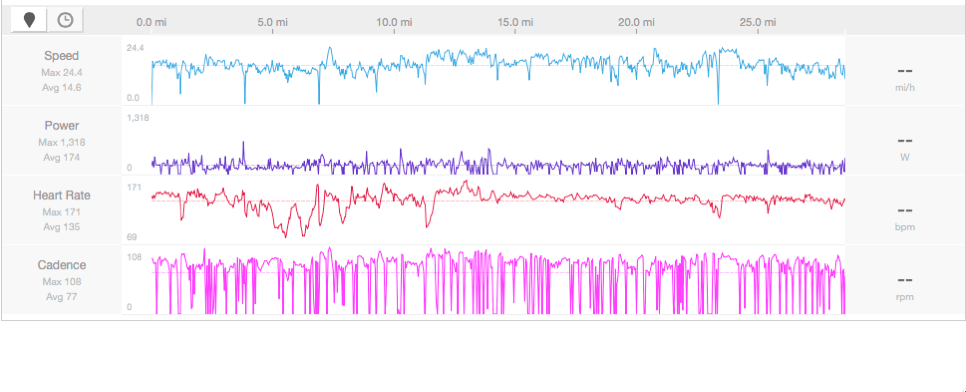
A picture will illustrate the problem most clearly. When I use the Fenix 3, I end up with ride data that looks like this:

Bad power data is bad

As you can see, the power graph has a few spikes with lots of flats– and an average power of only 23W. (I’ll get to why the average is important in a minute). By contrast, here’s what the ride looked like when captured with the Strava app on my iPhone 4. Note that the power data much more closely tracks the speed, cadence, and HR data.

That's more like it

So why is this important? First of all, as a techie, it annoys me when two things that are supposed to work together won’t. More importantly, I actually use the power data from these rides in two ways. While I’m on the bike, I use it to gauge and adjust my level of effort. For example, yesterday’s ride was pretty windy, so I tried to hold a steady 190-210W while riding into the wind, keeping my level of effort constant and accepting whatever speed that gave me. After a ride, my coach and I use the power data to plan my recovery time and to identify areas where I need more practice (e.g. climbing hills). Having inaccurate or dirty data makes both of these uses impossible.

The Stages power meter support FAQ suggests moving the watch around, but I haven’t tried that yet. My troubleshooting efforts so far have been limited to changing the battery in the Stages and making sure the Stages and Fenix both have the latest firmware. I’ll see what Garmin support has to say. Hopefully they have a magic fix; I have a very early-model Fenix 3 so maybe they’ve made some improvements since launch. Until then, I’ll keep recording each ride twice and keeping the cleanest data.

17 Comments

Filed under FAIL, Fitness, General Tech Stuff

Flying Friday: 2015 flying year in review

It’s fitting that as I write this, I’m sitting on a Delta 717 coming back from Tampa, where I just dropped the plane off for a month or so in the avionics shop (more on that in the near future). I closed out my flying year today with 3.7 hours of cross-country time from Decatur to Tampa Executive, during which I got 0.8 actual instrument time, found some rain, and battled a misbehaving engine monitor. (And yes, I know it’s not Friday.)

For the year, I flew a total of 89 hours, considerably down from my 2014 total. Of that, a respectable 8.5 hours was actual instrument time, and I logged 20 instrument approaches. This reflects my typical mission of moderate-distance cross-country trips. Those trips gave me some great experiences– I flew to Chattanooga, New Orleans, and Austin to compete in races, visited family in friends in Louisiana, Texas, Georgia, and North Carolina, and went on a number of business trips that would have been boring and/or unpleasant if I’d had to drive.

During the year, I am happy to report that a) I didn’t do anything egregiously stupid in the air and b) none of the squawks I encountered in the air were serious. Despite that, I’ve learned a few valuable lessons that I plan to apply in 2016.

In 2016, I plan to pursue my commercial license, build my understanding of weather patterns and forecasting, and improve my airmanship skills. Ideally I’d like to fly at least an average of 10 hours/month, including some long cross-country flights to the west coast and some trips to see my sons at their various colleges. I’m looking forward to another great year in the air.


Leave a comment

Filed under aviation

2015: the books I read

I read a lot. This is both a feature and a bug. At any given time, I’ll usually be reading 3-4 different books, in a mix of electronic and physical formats. Inspired by my mom’s example, about this time in 2014 I decided to keep a book journal. Below you’ll find my list of all the books I finished in 2015, more or less in the order in which I finished them.  I omitted any book that I gave up on before finishing, as well as those that I’m still working on. I didn’t think to jot down a short review for each book as I finished it, and I’m not about to take the time to do so now.  I have embedded a few notes for books that I thought were particularly good. Or not.

That’s it. Time to start working on my 2016 list.

7 Comments

Filed under General Stuff, Musings

Training Tuesday: 2015 in review

All right, so it’s not Tuesday. I’m running behind because oft the holidays.

So far in 2015, if I trust Strava’s numbers, I’ve cycled 896 miles and run about 471 miles. That doesn’t count time on my bike trainer, and it’s probably missed a few activities here and there. I don’t know how many pounds of weights I’ve lifted, but I bet it’s a lot.

Competitions

This was a busy year for competitions. Maybe I should say “organized events,” since at my level I am not truly competitive in most events. Still, I had a great time racing with, and against, friends and strangers.

In 2016, I will complete my first half-Ironman: 1.2mi swim, 56mi bike, followed by a half marathon. IRONMAN North Carolina, here I come! Depending on how the offseason goes, I may give IRONMAN New Orleans a shot in April too; I’m still waffling on that. I’ll fill in my schedule with other events as they appear (for example, I already have lifting meets planned in January and February).

Performance

Thanks to the excellent coaching I received from Alex Viada and the crew at CHP, I am much stronger and faster than I was at this time last year. I cut nearly 30 seconds off my best time for the mile, a minute off my 5K, nearly 3 minutes off my best 10K time, and ran my first half marathon in 2:15– then shaved nearly 15 minutes off my best time before the end of the season. My bike endurance is greatly improved, although I’m still not where I want to be speed-wise. And my weightlifting… holy cow. I’ve put 70 pounds on to my maximum bench press, just under 150 pounds on my deadlift, and 80 on my squat. I am looking forward to more speed and power gains in 2016, that’s for sure. I have some specific time goals for Rocketman and Renaissance Man, and my goal is to join the 1000-lb combined lifting club before the end of 2016. (Notice I didn’t say anything about swimming? I will keep hacking away at it. Gradual improvement is still improvement.)

Nutrition

I worked with a nutrition coach for a few months but I did a really poor job adhering to his plan. This is something I need to work on in 2016— not necessarily for weight loss or body composition, but to make sure I’m fueling my body properly for what I’m asking it to do. Most of the nutrition challenges I’ve faced are self inflicted; they come about from failure to stock good things to eat as opposed to random crap, as well as failure to plan to eat so I don’t suddenly decide I’m starving and latch on to whatever’s within reach.

The mental game

If there’s one area where I feel like my 2015 performance was poor, it’s mental focus. I still haven’t learned how to consistently focus and perform. I have a few ideas about how to work on this, luckily enough. I tend to be extremely critical of my performance, and while a certain degree of this is healthy, too much of it is stifling.

I’m looking forward to another dynamic year— as long as I can stay healthy, I’ll see y’all out on the roads. But probably not in the water, because I’ll still be at the back of the pack.

Leave a comment

Filed under Fitness

iOS charging woes

I have been meaning to write a long article about why I moved from Windows Phone back to iOS, and the good and bad parts of the transition, but I’ve been too busy to bother. I do have time for a quick rant, though: damn, I am tired of having charging problems.

See, Apple has this logo certification program called “Made for iOS.” Join it, and your devices (which might include chargers, cables, etc) can be certified as compatible with Apple devices, and you get a cool logo. Sure, it costs you a few bucks to sign up and get certified, but it’s cheap insurance. Nice line of chargers and cables you’ve got there. It’d be a real shame if anything happened to it.

On my last two road trips, previously-working cables have suddenly started producing the infamous “this accessory may not be compatible” message. Once that happens, it’s game over. The phone (or iPad) will no longer charge from that cable. If you happen to be on a road trip, well, too bad. Luckily I had a spare, but I am now nearly out of working cables, and there’s no guarantee that the name-brand cables I bought from Amazon (all of which were from vendors who claimed to be MFi certified) will keep working. Of course, because it’s Apple, there’s no way to override this dialog, ignore it, or force the device to talk to a tainted cable– once the cable is blacklisted, it’s no longer usable with that device at all.

The worst part? I’ve seen many reports of this happening to people who bought cables and chargers from the Apple store. Since I am unlikely to ever do that I’m not too worried, but I hate the precedent, and the inconvenience factor has been pretty stunning compared to my easy prior life of using micro USB cables with my Lumias. While I understand Apple’s desire to protect the IP embodied in the Lightning interface, and while I even believe that part of the rationale behind blocking non-certified devices is to prevent bad customer experiences, the whole thing has left an unpleasant taste in my mostly-discharged battery.

5 Comments

Filed under FAIL, General Stuff, General Tech Stuff

Flying Friday: looking stupid now vs stupid later

Remember this Fram commercial?

The concept it highlights is a fundamental part of many different aspects of life. Technical debt, TiVo guilt, and my own growing backlog of Kindle books are just three of the many manifestations of the now-versus-later principle. Here’s another great one: “It’s better to look a little stupid now, than a lot stupid later.” 

I don’t really have anything to add to this article; it very neatly captures the principle and provides an excellent cautionary tale for all of us, but especially pilots and most especially those who are entrusted with the role of pilot in command.


3 Comments

Filed under aviation

Training Tuesday: the season’s winding down

As I type this Tuesday night, I have only one more scheduled competition this calendar year. Since my last Training Tuesday post, I’ve been busy with a wide variety of things, some of which actually involve training. Rather than an exhaustive and boring list of all the stuff I’ve done, let me summarize: one road race, two half-marathons, and one powerlifting meet.

    • The first race was the Monte Sano 15K, a road race at Monte Sano State Park. It was mildly hilly, but very cloudy, with maybe 200’ ceilings and lots of low fog. Cool and humid conditions made for a pretty fast course. I ran the 15K in 1:27:36, which was a good time for me on that distance, plus I got a very cool neon-yellow running shirt. Winning!
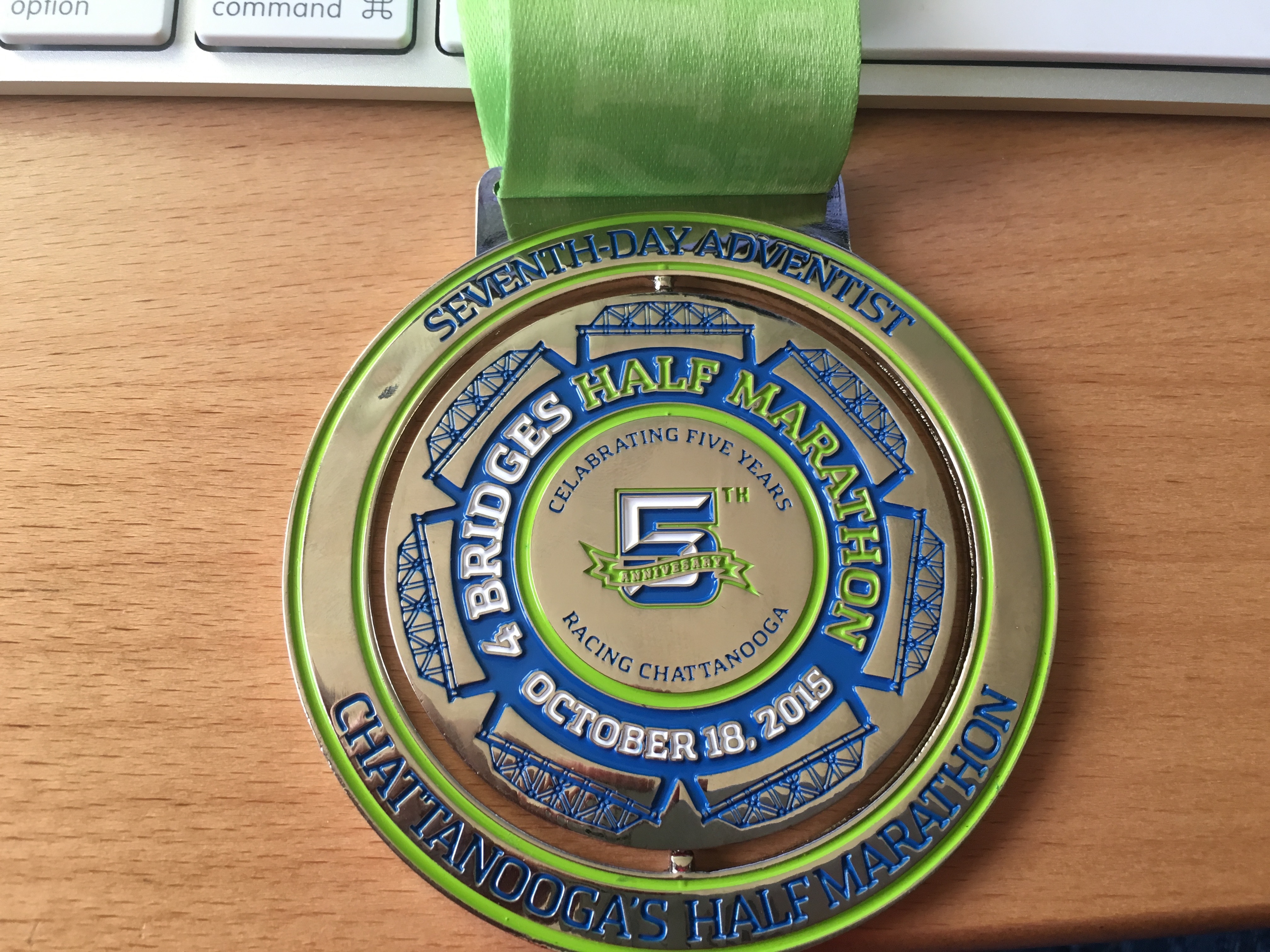
    • The next weekend I flew to Chattanooga for the Four Bridges Half Marathon. I had the boys that weekend, and Tom was working, so I ended up getting up at 0330 to fly myself to the Chattanooga airport, where the superb staff at Wilson Air loaned me a car. The race was a blast: the weather could not have been nicer, the course was lovely, there were plenty of water/potty stops on the course, and the runners and crowd were both enthusiastic. The only blemish on the day was that the volunteers who laid out the half-marathon course accidentally cut about 0.5 miles off it, so I ended up with not quite a half-marathon PR, running 12.5mi in 1:53:29. However, getting to fly to and from the race helped make up for it. As a bonus, the finishers’ medal had a unique misspelling, making it slightly more collectible than I’d expected.

IMG_0017

    • In early November, I flew to Atlanta to compete in the USAPL “Powerlifting for Pink” meet. My performance here was nothing to brag about; I missed two of my three squats and all three bench attempts, mostly due to poor focus. Turns out you really have to pay attention to the judges’ commands. However, I deadlifted well, I had fun with Dana, and I learned a ton that will help me in my future meets.

P4P-187

  • For my birthday, I’d planned a trip to run Rocketman but the logistics just weren’t going to work, so I ran the Huntsville Half Marathon instead. I didn’t do a lot of race preparation beforehand, and it showed; I ran it in 2:07:49, which was nearly 8 minutes faster than my previous half-marathon but about 0:30/mi off the pace in Chattanooga. I have no idea why. After the race, my legs were much more sore than they were after Chattanooga, too.

One of the lessons I am slowly starting to learn is that I’m not always going to set a PR every time I step up to the starting line or platform. There’s still a large gap between what I feel like I should be able to do and what I can actually do, but the gap is getting smaller, both as I adjust my expectations and as I become more capable.

As things stand right now, the Hobbs Island 10K will probably be my last race of the season; there are a few scattered triathlons before the end of the year, but I don’t think it will be feasible for me to run any of them. The good news is that I’ve already started picking my 2016 events and will be working with my coach to build a training plan accordingly. It’s going to be a busy winter!

Leave a comment

Filed under Fitness

Flying Friday: This ain’t Delta

Every pilot has different reasons for flying. For me, a big part of my love of flying is the ability to travel, relatively quickly, where and when I want. The values of “quickly,” “where,” and “when” are all subject to a variety of constraints, though. Some are self-imposed and some are limitations imposed by the FAA, the laws of physics and aerodynamics, or my desire to live to be a grumpy old man.

Let’s take one simple example: time. It would certainly be possible for me to fly from Alabama to southern California for a business trip, but I wouldn’t do it for a short trip— in my particular airplane, that would take me about 11 hours of flight time, which translates into something like 14 hours of total time when you factor in fuel stops… and that really means it would take two days, since flying for that length of time in a single day would make it difficult for me to maintain the focus and energy required for a safe journey. Likewise, I could easily fly from here to Birmingham for dinner, but when you factor in the time required to preflight and prepare the plane, conduct the flight, get to and from the restaurant, and return home, it would be quicker to drive over the short distance. For me personally, with the airplane I have now, the sweet spot is trips of about 150 miles up to about 1000 miles. Shorter or longer trips are possible, but when time is important, taking another means of transport is usually more sensible.

We can lump all the other constraints together into the general heading of “dispatch reliability.” That is, for a planned trip, how often are you actually able to complete it without bumping up against those constraints? It’s critical to keep in mind the difference between a commercial airline (which flies under Part 135 of the Federal Aviation Regulations) and my airplane, which flies under Part 91 of the FAR. There are 3 major factors that influence dispatch reliability in both of those worlds: weather, equipment, and regulation.

The ability to deal with weather, of course, is a huge part of dispatch reliability. I once was stuck away from home for 3 days because the weather was poor and I didn’t have an instrument rating, so I couldn’t leave when I wanted to. Sometimes the weather, or the forecast, is just too crummy to safely complete the planned flight. This happens more often in some places than others, of course; east of the Mississippi, we have lots more thunderstorms than in, say, California or Washington.

Equipment influences dispatch reliability in two different ways. First is redundancy. Unless it were truly urgent, I wouldn’t make an extended night flight in IFR over rough terrain in my airplane— not because it’s inherently unsafe but because, with only one engine and one vacuum system, there are several single points of failure that could make such a flight more exciting than I’d like. Waiting for daylight or better weather would be a smart play. On the other hand, commercial planes flying under Part 135 have doubly- or triply-redundant systems, ranging from engines to hydraulics to avionics. As you spend more money on an airplane, the number of redundant systems (and the reliability of the systems you have) tends to increase. The capability of your equipment also influences reliability. If you have onboard weather radar or in-cockpit radar data through XM Radio or ADS-B, for example, you may be able to complete flights that you wouldn’t without that data. More sophisticated aircraft that have jet engines and pressurized cabins can fly above many regions of bad weather; aircraft with icing protection can fly through moist clouds without picking up a killing load of ice. Most piston-engine singles (mine included) aren’t pressurized, don’t have anti-icing equipment, and don’t have onboard radar— meaning that there are conditions that are no problem for Delta or United but render general aviation flight impossible or unsafe. Both airliners and general aviation aircraft have lists of requirement equipment. Although the contents of the lists are very different, the concept is the same: if something on that list isn’t working, you can’t legally fly. (Keep that in mind the next time you’re on a commercial flight and the pilot tells you that some seemingly unimportant gadget isn’t working so they have to wait for a mechanic— if they’re waiting to fix it, it’s probably because it’s on that minimum list.)

Regulation is the third category. Without going into all the differences between different parts of the FARs, I can still say that there are some conditions that are legal for me but not an airline, or vice versa. For example, thanks to my instrument rating, it is literally legal for me to take off with such poor visibility that I can’t see the propeller while sitting in the pilot’s seat, while Part 135 flights have specific runway visual range (RVR) requirements that must be met before they can depart. On the other hand, a suitably equipped and crewed Part 135 flight can use Category III autoland to land in zero visibility, whereas I have to honor a higher minimum ceiling and visibility limits. There’s sometimes a huge difference between what’s legal and what’s safe, and the FARs that I fly under give a great deal of latitude to the pilot in command in most cases. That can be good or catastrophically bad, depending on your judgement.

In general, the rule I use is simple: if it is critical that I be somewhere, and I’m planning on flying, I’ll always have a backup. Last week, the boys and I were going down to the Voodoo Music Festival in New Orleans. We’d planned to fly, but when I preflighted the airplane, this is what I found: a broken alternator belt. 

WP 20151030 14 35 28 Pro

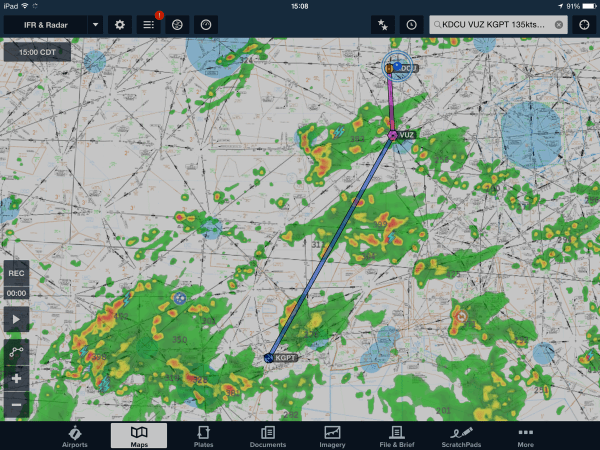
I didn’t have a spare, the shop didn’t have a spare, and even if we had, on my plane, you have to remove the propeller to replace the belt. We drove instead, but we still got to see the headline act because we’d built enough slack into the schedule. Likewise for weddings, funerals, or critical business meetings— if it’s really important, I’ll have a backup airline ticket in my pocket (or enough time to drive). If it’s not critical, I’ve learned to accept that sometimes the weather or the airplane may conspire against going. A couple of months ago, Dana and I had planned to fly down to Gulfport for the day to see Mom, Charlie, and Grandma. Here’s what the weather looked like:

20150816 200809000 iOS

Score that one in the “nope!” column. It would have been perfectly legal to pick my way around those storms, since I didn’t have the equipment to fly over them, but it would have been uncomfortable at best and criminally dangerous at worst. Driving would have taken too long, so we reluctantly cancelled; it wasn’t a critical trip.

Having a backup plan or the willingness to say “we’ll do this another time” is critical because it eliminates the pressure to attempt a flight when weather, equipment, or regulation might dictate otherwise. The hoary old saying “it’s better to be on the ground wishing you were flying than flying and wishing you were on the ground” applies in spades. Even when it’s difficult to tell your boss, your family, or your customer that you won’t be somewhere at the appointed time, it’s a hell of a lot easier than explaining yourself to the FAA, the NTSB, or St. Peter.

2 Comments

Filed under aviation, Travel

Fixed: Surface Book doesn’t recognize docking state

I got a shiny new Surface Book on Monday and started using it immediately… more specific notes on it later when I have more time. I ran into a problem today, though, and wanted to document what I found.

Symptom: the touchpad and keyboard don’t work. The clipboard switches to tablet mode (if you’ve enabled automatic switching). You can’t use the base unit’s USB ports. The taskbar “undock” icon shows that the base is undocked.

Cause: beats me.

Resolution: boot into the system BIOS by turning the machine off, then holding the power and volume-up keys for 15 seconds. When you get into the BIOS, just exit BIOS setup and the machine will reboot normally. There’s a thread here that outlines the exact procedure.

Overall, I love the machine: the form factor, build quality, screen resolution, performance, and trackpad are all superb. I expect this kind of temporary hiccup, so it hasn’t put me off at all.

2 Comments

Filed under General Tech Stuff

The next big thing: joining ENow as CTO

It is a cliché to talk about an opportunity that’s too good to refuse (not to be confused with an offer you can’t refuse), but sometimes it doeshappen.

I am very excited to announce that, effective 26 October 2015, I will be taking the position of chief technology officer (CTO) for ENow Software. In that role, I will be driving the development of their next generation of products for both on-premises and Office 365 monitoring. It’s a big step forward for my career, moving me simultaneously back towards the development world and further into the cloud. (It’s also a little surreal to see one’s job change announced in a press release.)

Before I get into the nuts and bolts of what I’ll be doing, a personal note: I want to thank Scott Edwards, Ben Curry, and all my coworkers at Summit 7 Systems. What a talented and skilled group of people! I accidentally learned much more than I expected about SharePoint from them, and both Ben and managing consultant Matt Whitehorn were instrumental in helping me identify soft skills I need to work on— always a challenge. I have huge respect for what the Summit 7 team has accomplished and recommend them in the highest possible terms to anyone who needs Office 365, Azure, AWS, or SharePoint design, strategy, or migration help.

So, the new job. In the CTO role, I’ll be reporting directly to Jay Gundotra, the CEO. I’ll be responsible for technical product strategy and implementation, the customer success team, technical presales, and internal IT. (I am still working on a transition plan to establish an ENow corporate aviation department, but don’t tell Jay.) That’s quite a broad scope, which means I can bring to bear everything I’ve learned throughout my career as a developer, consultant, and administrator. Driving beneficial change across these disparate fields is going to be an exhilarating challenge! Luckily I will have a really powerful team on my side, including Michael Van Horenbeeck (noted hooligan/tequila drinker, Microsoft Certified Master, and Exchange MVP) and Tony Redmond, a member of ENow’s advisory board.

ENow is already very successful in their chosen markets, but the cloud poses a brand-new set of technical and business challenges, both for them and their customers. The #1 question I hear from IT pros and business decision makers is simple: how will the move to the cloud affect me and my business? It’s interesting that I don’t remember many people asking that during the years-long transition from mainframe- and mini-based solutions to the x86 world; people just naturally assumed their skills would transfer. That hasn’t been the case with the cloud. Figuring out how to effectively monitor and manage cloud services when you don’t control the underlying platform is a tough problem. Instrument flight is probably a good metaphor here. On a clear day, you can see the ground, so flying is easy. There’s a visible horizon and landmarks. In the clouds, everything changes– if you’ve ever been in an airplane on a cloudy day, you know that you can see where the clouds are but not what’s inside them. Flying inside clouds is like being inside a ping-pong ball, with no visual cues you can use for orientation. You have to use your instruments to keep the plane pointed in the right direction and right side up. Moving workloads such as Exchange email or SharePoint to the cloud doesn’t lessen your need to monitor what’s happening, it just changes the way in which you’ll do it, and figuring out that change is a key task in my new role.

Of course, Microsoft is releasing new services and capabilities in Office 365 at a rapid clip, so another key challenge will be figuring out how to keep up with them and how best to bring ENow’s experience in simplifying the complexities of enterprise application monitoring to a world where Microsoft seems intent on giving everyone Fisher-Price-style monitoring and reporting tools.

Despite the new job, some things won’t change: I’m still living in Huntsville, I’m still not a Cowboys fan (sorry, Jay), and I’ll still be blogging here, although I expect to be writing some more strategy-oriented posts for ENow’s blog. Where I can, I plan to share details of what I’m working on, so stay tuned!

4 Comments

Filed under California, Friends & Family, UC&C

Office 365 Exposed ep 01 / Exchange Exposed ep 05

We’re baaaaack…

Last year, Tony and I started producing a podcast for Windows IT Pro called “Exchange Exposed.” It was moderately successful, but the demands of producing and delivering the podcast on a regular schedule didn’t mesh well with Penton’s plan for world domination, so Tony and I took back the rights to the podcast and are recording and distributing it ourselves. However, because of some peculiarities of the way the iTunes Store lists podcasts, we couldn’t just add new episodes to the existing podcast… but we didn’t find this out until the current episode was recorded and ready.

Going forward, we’re retitling the podcast to “Office 365 Exposed” to reflect the reality that Exchange and Exchange Online are part of the Office 365 family. Unlike some other Office 365-branded media that focuses exclusively on SharePoint, we’ll be covering the non-SharePoint part of the ecosystem with vigor and depth. There’s a lot to talk about!

In this episode, recorded at IT/Dev Connections in Las Vegas, we get some quality time with special guest Bhargav Shukla of KEMP Technologies to discuss the release of Exchange 2013 CU10, the impending release of Exchange 2016, and what the future of on-premises Exchange looks like. Give it a listen below. In a day or two, iTunes should pick up the feed and you’ll be able to subscribe, or you can point your RSS feed reader to the “Podcasts” category here.

Leave a comment

Filed under Podcasts, UC&C