When to declare an in-flight emergency 

From Thomas Turner’s excellent FLYING LESSONS newsletter, here is a simple guideline for knowing when you should contact ATC to declare an emergency. 

Should I declare an emergency?

If I’m:

  • Performing a task or procedure from the Emergency Procedures section of the Pilot’s Operating Handbook or Airplane Flight Manual;
  • Violating or in danger of violating an airplane Limitation;
  • Violating or in danger of violating a Federal Air Regulation (or international equivalent) with no way to rectify the situation; and/or
  • The safe outcome of the flight is in any way in doubt;

then I should declare an emergency. There is no question; it is not a judgment call. Get the help you need right away.

Clear, simple, and memorable. 

1 Comment

Filed under aviation

Appareo Stratus and planned obsolescence

Back in September 2013, I bought an Appareo Stratus from Sporty’s Pilot Shop. I thought it was expensive, but getting in-cockpit weather and ADS-B traffic data, displayed conveniently on my iPad, was highly valuable. I have used it on almost every flight I’ve made since and it’s proven its value multiple times— being able to see weather while in flight is a huge safety benefit.

Recently I noticed that it was running out of battery unusually fast. Even if I left it plugged in overnight, it would only run for a few minutes when unplugged. I sent Sporty’s customer service an email asking about repair cost. Here’s what they said:

I am sorry, but we are unable to repair the Stratus 1.

We are able to offer $100 off the purchase of a Stratus 1S or 2S.

This is infuriating. The device is not even 3 years old yet, and the manufacturer won’t even attempt to repair it. Offering to let me pay $449 ($549 for a Stratus 1S minus the $100 credit) to get a device that, when it dies, likely will suffer the same non-support is a complete non-starter. I don’t expect a $50 consumer device to have lifelong support, but an $800 aviation device is a completely different story.

So, no thanks, Sporty’s. I’ll keep my money and build a Stratux instead. If this is the level of support I can expect, I might as well save a few bucks and do it my damn self. And when my Foreflight subscription expires, I’ll have to give serious thought to whether I want to continue to support them given their interlocking relationship with Appareo and Sporty’s. Meanwhile, time to take apart the Stratus and see about replacing its battery pack.

(n.b. the avionics stack in our plane has ADS-B weather and traffic, and it will soon be able to push those to the iPad over wifi. However, when I fly rentals or in other peoples’ planes, having a portable device is still a big winner, as is having the redundancy of a second ADS-B receiver just in case… so although I don’t have a single-point dependency on the Stratus I’ll still replace it).

4 Comments

Filed under aviation, FAIL

Office 365 Exposed, episode 3

I recently had the opportunity to sit down with Tony at ENow World Headquarters (OK, it’s just a regular office, but that sounds better) to talk about the state of the Office 365 world. In this episode, we talked about the latest bit of ill behavior from Microsoft Learning, the best paths to take to gain practical Office 365 knowledge, and what to expect from the upcoming Microsoft Ignite and IT/DevConnections shows. Enjoy!


2 Comments

Filed under Office 365, Podcasts

Race report: IRONMAN 70.3 New Orleans

Summary: my first 70.3 showed me that I have a lot to learn about longer-distance racing.

Friday: flying and murder

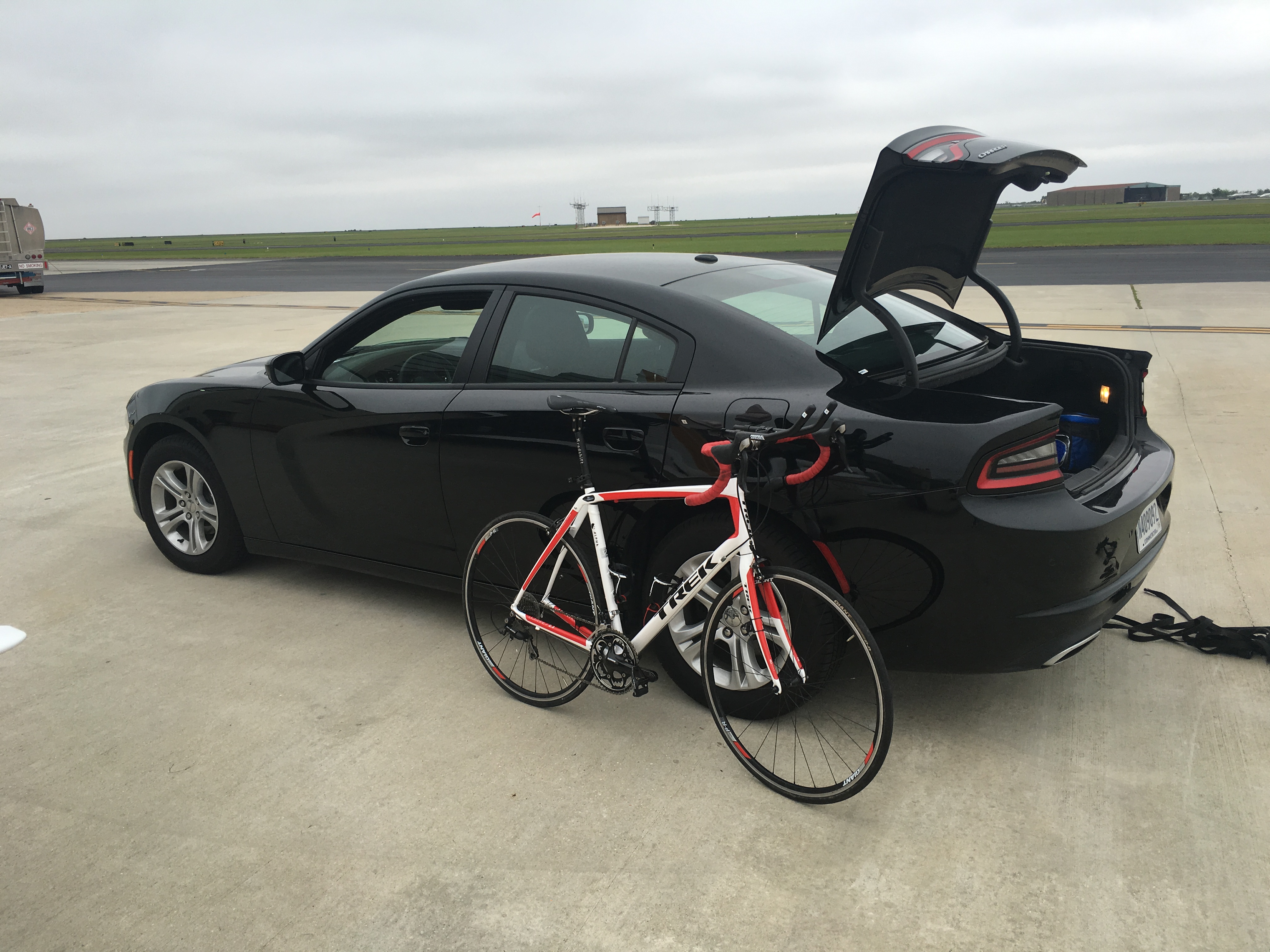
The boys and I left Decatur on schedule and had a perfectly uneventful flight to New Orleans Lakefront, where the reported weather was 900′ ceilings with 2mi visibility and gusty winds. Sure enough, I got to hand-fly the ILS 18R approach with winds from 100° at 15-25 knots. Fun times. We landed and were met at the FBO by my mom and uncle, who had driven over from Alexandria. The FBO had arranged a rental Dodge Challenger for me (much nicer than I expected) so we convoyed over to our Airbnb rental in New Orleans East.
20160415_221521424_iOS

After a delicious dinner at The Joint, Tom and I went in search of an asthma inhaler for him. When we came back, we saw a huge array of police cars and ambulances blocking off the entrance to our street. Turns out two men had been killed and a third shot at a nearby business; one of the victims ran onto “our” street before expiring, thus all the police attention. That was a bit disconcerting but it explained the rental home’s window bars, security cameras, and alarm system.

Saturday

First thing in the morning I went for a short shakeout run around the neighborhood, then we set out to go sightseeing– we hit the French Quarter, Café du Monde, and the excellent New Orleans Museum of Art, which I’d somehow missed in all of my prior trips. They had just added a Vera Lutter exhibition, which was really striking, plus they had two new exhibitions of folk art that we quite enjoyed. Tom and I went to get me checked in at the race hotel, where we also attended the athlete briefing. Lunch was at Deanies‘ on Iberville (fried shrimp poboy, the ideal pre-race meal) and I honestly don’t remember what dinner was.  One highlight from the day was seeing this:

because why wouldn’t you do that if you were getting married?

After a quick trip home to grab my bike, I dropped it off in transition and shot this quick video of the water conditions– very similar to what I saw Sunday morning.

Pro tip #1: go to the race expo earlier in the day, not at the last minute, as much of the goods for sale are already well picked over by that time. I honestly don’t remember what we had for dinner. I mixed up all my race nutrition, double-checked my gear, and went to bed about 10p.

Race day: pregame

I got up about 430, loaded up all my stuff-n-junk, and headed over to the venue. Traffic was a bit of a challenge because of the road layout; there are two narrow, parallel, unconnected roads that front the marina and airport, so getting between them can be a bit difficult. I had plenty of time, though, so I was able to get in and get set up without having to rush.

The swim

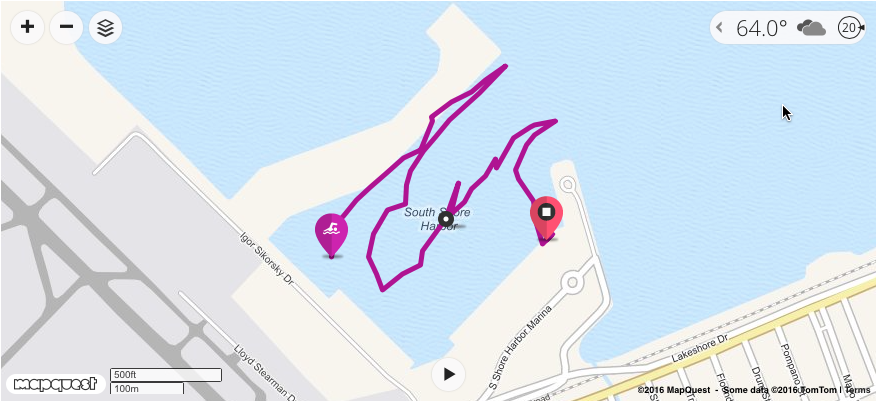
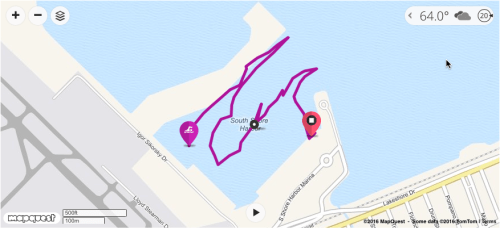
The swim start was delayed about 20 minutes because the support team had to go move the swim buoys (or “nachos”) back to their assigned location. That’s because the wind was about 20mph, with occasional gusts higher. The diagram below tells the tale (see the wind indicator in the upper right corner?) My sighting skills are not great, and with the chop in the water I had a hell of a time keeping on course. I ended up swimming 2700 yards in almost exactly an hour (I think it was 1:00:07 or something). That was a 2:10/100 pace, which would have given me my “A” goal time for the swim. I just swam too much. So, lesson #1 from this race: swim more in choppy water. Lesson #2: practice sighting more. (These will both be hard because there aren’t many OWS location near me at all, much less ones with chop.)
IMNOLA swim

One note: there was a table at swim start where you could leave eyeglasses for pickup. I was told, by the race announcer no less, that glasses would be available in transition. (More on this later.)

T1

In T1, the plan was for me to grab a Stinger waffle, drink some Karbolyn, and be on my way. I was a little discombobulated after the swim so I took my time to make sure I didn’t forget anything for my bike setup… in the end, I forgot to turn on my new bike computer AND I had a nearly 10-minute T1 time. So definitely some room for improvement here. (Oh yeah, I also left the waffles at home so no waffle for me.)

The bike

Omitting all the boring details, in the last 3 weeks I ended up with a new bike frame, a new Redshift seatpost, a new saddle (since the old one didn’t fit the seatpost), and a new Wahoo ELEMNT bike computer. I’d had a couple of short shakeout rides but this was going to be the real test. The wind was from the east (almost 90°, in fact) and the course had us go out for a short western section, then a sharp U-turn and a run out to the turnaround point. I got hit by a gust in the U-turn that nearly knocked me over– that’s how I knew this was going to be a fun one.

My strategy was to try to hold about 80% FTP for the bike. I mostly did, although I had some bursts where I had to go over to keep moving– making 200+ watts just to go 8mph, wobbling, wasn’t my favorite. Because I hadn’t had much time on this setup, I found that about mile 25 I was getting cramps in my abdomen, like you do when you do too many crunches or sit-ups, from being in aero position. There was nothing I could do about it except say “ouch” and keep on trucking. I am a big believer in “nothing new on race day” but I think I might extend that to be “nothing new during race month”. I wish I’d had the bike changes made earlier so I could have had more time to get used to them. I was pretty tired by about mile 35 and was just trying to hang on and ride the tailwind. The bike leg took me 3:53:21. I was aiming for 3:15 or better, so this was a bit of a disappointment but I just couldn’t go any faster on the outbound.

One thing I did differently on this ride was to use Clif Shot Blocks on the bike, along with my normal Mercury. These gave me zero issues, and I had an assortment of flavors available. Some of the bike and run aid stations had them as well, which was nice.

Speaking of aid: this was the first race I’ve done that had a bike bottle exchange. For some reason I thought the drinks would be packaged in bike bottles but they were in original packaging. I purposely brought two crappy old bottles for the ride, figuring they’d get discarded; I ended up keeping one. For future reference I’ll just get a Gatorade or water bottle that fits my cage and leave “my” bottles at home.

Special note: see that wind icon in the picture below? It’s a damn lie. The wind report at Lakefront was 25kts gusting 30, and there were some spots (like right by the Textron plant at mile 20) where it was a direct headwind with gusts that had to be above that, coming right off the water.

SafariScreenSnapz003

T2

Nothing special here– a bit more sunscreen, slap on my lucky Rocketman visor (it came from the only race I ever DNF’d), and out I went.

The run

The run was miserable. For the outbound leg, I had a tailwind but I was still cramp-y from aero on the bike. As that dissipated, I suddenly grew a golf-ball-sized knot in my right quad– the first race cramp I’ve ever had. A kind passerby gave me some Base salt, which worked like a Harry Potter potion– it knocked the cramp out in about 90 seconds. (Key learning: get some of this and keep it handy!) I was just slow through the turnaround, and then I was fighting the wind all the way back. I ended up run/walking almost the entire return leg. My run time was an undistinguished 2:47:53. If I hadn’t had such a bike adventure, I think I could cut 15-20 minutes off that time.

Postgame

I crossed the line at a good clip but completely missed hearing my name– the announcer called names when runners entered the chute, and I just missed it. I reunited with Dan, Mom, and the boys, walked around a bit, and then hit the gear shop to get a hoodie and some other swag. Unfortunately, I got to the athlete’s tent at 4:15p and there was no food. This really pissed me off. It didn’t help that my glasses were gone! Instead of having them in transition, they were at a table at swim exit, which I didn’t know. They packed up the swim exit stuff about 11am, so my glasses went off to some warehouse somewhere. Very important learning: next time I’ll either put my glasses in a case with my name, race number, etc. or just leave the damn things in transition and deal with having to squint my way through swim start.

When we got back to the rental home, we found that the wind has dislodged one of the two electrical feeds from the pole, so we only had power in half the house. Surprise! After a long, hot shower, I packed everything up and we headed back to the airport.

Flight home

The flight home was delightful– a little overcast around 2500′ leaving KNEW, but virtually no one on the radio, no traffic, and clear skies all the way home. The wind was still at 90° so I wanted to use runway 9, but some of the taxiways leading to it were flooded so I elected to use 18R instead. Another 2.5 hours of night time in the books.

Wrapup

I crossed the line at 7:58:28, good for 133rd in my age group. There were 191 registered, and I think 137 or so finished. On one hand, running an 8-hour 70.3 is not really what I’d dreamed of. On the other hand, I spoke to multiple athletes who ran the same race last year and had times as much as an hour faster than this year, and I put in a solid effort, and I finished— so I hit my goals for this race. I’ve learned some things about longer-course races that will help me in future events, and I’m glad to have had the opportunity to start my 70.3 career like this.


9 Comments

Filed under Fitness

Nifty new auto-vacation feature for Outlook on the Web

This is a great example of Microsoft bringing useful innovation to end users by deploying new features in Office 365:

Outlook on the web now makes it easier to clear your calendar and automatically decline meetings before you head out for some time away from the office. When you set an automatic reply in Outlook on the web, Outlook will offer to do the following on your behalf:

  • Block your calendar so people know you’re away.
  • Clear existing meetings on your calendar by declining/canceling them.
  • Automatically send a response to incoming invitations while you’re away.

Of course, Outlook and Exchange have long had the ability to automatically send an out-of-office (or “OOF”, from “out of facility“) message when you specify the dates when you’ll be away. These new features extend the traditional OOF behavior by adding some business logic to the OOF process– after all, when you’re out of the office, it is logical to assume that you won’t be accepting appointments during that time, and that you want new invitations to be automatically declined. (There are exceptions, of course, which is why you can turn this business logic off.) I’m not in love with the fact that this feature requires you to set your  works in Outlook on the web, but I’m hopeful that it will make it into other versions of Outlook at some point.

Apart from the specifics of this individual feature, it’s really encouraging to see the Outlook team invest in innovation like this. Given the large feature gap between Outlook on the web and Gmail (the only real enterprise competitor to Exchange/Outlook) it would be easy for the Outlook team to coast. Part of the ethos of building software at cloud speed involves iterating rapidly, and that in turn means sometimes you build something that turns out to get a lukewarm reception because it’s not as useful as first thought. (Tony argues that this is the case for Outlook’s support for likes and @ mentions.) However, sometimes you build something that turns out to be really nifty, and I think this feature is a good example– I look forward to seeing it roll out more broadly.

(for another time: I know not every tenant admin will want this feature turned on for their users without prior notice or permission, and Microsoft has a lot of room to improve the way they deliver features so that administrators can control user access to them.)


Leave a comment

Filed under General Stuff, Office 365, UC&C

Training Tuesday: it’s 70.3 time

By this time next week, I hope to have had a unique experience: crossing the finish line of a “half-Ironman” triathlon: IRONMAN 70.3 New Orleans.

The half-Iron distance race gets its name because its distances (1.2 mi swim, 56-mi bike, and a 13.1-mi run) are half the distance of a “full Ironman”, but there’s nothing half-y about it. It’s a tough event. I believe that I’m equal to the challenge, though. My new bike setup is solid, I feel good about the run, and the swim will be wetsuit legal in a protected anchorage.

My plan for the rest of this week is to get in a couple of easy runs and bike outings, get my gear together, and pack up the plane Thursday night. Friday morning the boys and I will fly to New Orleans, meet Mom and Tim, get set up in our nifty Airbnb rental, and just relax. That leaves me all day Saturday to get my bike into transition, get to the athlete briefing, and so on, then Sunday it’s race day! Monday we’ll fly home.

USA Triathlon rules prohibit carrying music players on the course. Some refs interpret this to mean that smartphones (which of course can be used as bike computers or athlete trackers) are legal, and some say they are not. I plan to have my phone on the course, which means that (thanks to my triathlon watch) you’ll be able to follow my progress on the bike and run legs live. I’ll post a link to the tracking web site Sunday morning before the race starts.

Leave a comment

Filed under Fitness

On currency

True fact that sometimes shocks people when I share it: a pilot certificate never expires.

Sure, it can be revoked by the FAA if you do something stupid. I suppose you could ask the FAA to cancel it for you, sort of like resigning from a church. But once you obtain the certificate, it’s yours forever, even if you stop using it.

However, in order to legally exercise the privileges granted by that certificate, you need (at least) two things. First, you need a valid medical exam (a worthy topic for a future post). The type of exam you need varies according to the certificate, and the frequency at which you must have it varies both by the type of exam and your age.

Second, you need to be current. This is an interesting word. The FAA doesn’t say you have to be “proficient,” just “current.” What does that even mean? Glad you asked. To be legally current as a private pilot, you must have completed a biennial flight review within the preceding 24 months. That’s it. There’s no set structure for the BFR, other than that it must consist of one hour of ground training and an hour of flight. There’s no set syllabus or standard, as there is with almost every other type of flight training activity. The FAA’s guide to conducting BFRs likens the BFR to a checkup, where each individual doctor is supposed to tailor the specifics of the checkup to a specific patient. Many organizations, such as the Redstone flying activity, specify what they consider the minimum coverage for the BFR to be in order to use their airplanes, but that’s not mandatory.

The currency structure changes a bit if you want to fly under specified circumstances. To carry passengers, you also need 3 landings within the previous 90 days– so you can’t just get a BFR after being inactive, then load up your plane with your friends and head out. To fly with passengers at night, you need 3 landings to a full stop, at night, within the previous 90 days. To fly in instrument conditions, you need 6 instrument approaches (including course tracking and holds) within the preceding six months.

The purpose of these currency requirements is to force recency and proficiency. The idea is that if you fly regularly, you will stay proficient. If you don’t fly regularly, you need to regain currency before you can fly with passengers, thus forcing you to regain proficiency. However, the way the regs are written, you can not fly for 20 years, jump in an airplane and have a de minimus BFR, then do 3 laps around the traffic pattern to get your landings in and then immediately start flying with passengers. That might be legal, but it wouldn’t be either smart or safe.

One approach to keep proficiency is just to fly enough to stay current. If you never let your currency elapse, the theory goes, then you’ll be getting enough air time to stay proficient. This isn’t true for everyone; I know that after I’ve been away from the plane for longer than a few weeks, some skills need sharpening on my next flights. This is especially true for instrument flying, and even more so when you have an unfamiliar airplane, new avionics, and the like.

Last night, I went on a currency flight. I had lost my night currency and needed a couple of instrument approaches to keep my instrument currency. In order to log an instrument approach, you either need to fly in IMC or with view limiting devices, which means you need a safety pilot. Since I am super safety minded, I brought two (hi, Alex! hi, Greg!) Interestingly, when you are not current, you can’t take passengers with you, but you can take safety pilots and/or instructors. Anyway…

After a perfectly normal preflight, runup, and takeoff, we were in the air about 810pm, just over an hour after sunset. According to the FAA, that’s when night starts. The plan was to do an LPV approach at Huntsville Executive, an ILS at Huntsville International, and then another LPV at Decatur, landing at each. That would give me 3 night takeoffs and landings, plus three instrument approaches and a procedure turn (which counts as a hold for purposes of maintaining IFR currency).

Before takeoff, I programmed the IFD540 with the airports, but didn’t load the approaches. Once airborne and talking to Huntsville departure, I asked for the RNAV 36 at MDQ, got the clearance, and programmed the box, then engaged the AP. It flew us to the procedure turn, through the turn, and on course flawlessly. I had the AP in HDG mode, the GPSS in GPS mode, and all was fine. Inbound to the FAF, I armed the GS mode on the PSS, and shortly thereafter found that the AP had turned me about 30° to the right of course. I don’t know if it was the GPS or the AP, but I disconnected the AP and manually flew the missed procedure. This was a great illustration of why currency matters– with new avionics, I’m still learning how to set up and program approaches, and it’s a hell of a lot smarter to get that practice with two other pilots on board, in good weather, than to try to figure it out in the midst of an actual IMC approach.

For the second approach, I got vectors towards HSV for the ILS to runway 36R; the controller  put me between the ENIKY and UJOTY intersections, so all I had to do was turn inbound and intercept the localizer. I manually tuned the localizer frequency on NAV2, used the FREQ button to tune it for NAV1, and verified that I saw “GPS->VLOC” on the display– that’s the signal that the GPS is aware that I want to transition from GPS-derived guidance to guidance signals from the ground-based localizer and glideslope. I armed GS mode on the PSS just after the final approach fix (FAF); the localizer and GS both came in normally and the AP flew a flawlessly coupled approach down to about 1000’, when I disconnected and hand flew the rest. That was full-stop night landing #1. Because Huntsville has such long runways, I was able to land, stop, and take off again on the same runway, which is always nice.

On takeoff, I asked for vectors to the RNAV 36 at DCU and got them. This time, I wanted to check my proficiency at hand-flying the approach. I hand flew the climb, cruise, and approach, using the GPS only for reference, down to about 1300’ AGL and then landed (night landing #2) and a back-taxi, followed by 1 lap of the pattern and a visual landing for #3. Having the advisory glideslope on the approach was nice since DCU doesn’t have VASI or PAPI lights to indicate whether you’re on the right glidepath.

All in all, a good night; I am once again legally night current and have extended my instrument currency.  I still want to fly some fully coupled LPV approaches to make sure I understand the buttonology but my knowledge of the IFD540 is definitely coming along. Thanks to the latest Foreflight app update, Greg, Alex, and I were all getting GPS position and flight plan data from the IFD540 streamed to our iPads, which was cool. We also saw active weather and traffic on the IFD, which I loooooove. Avidyne announced last night that they’re about to start streaming traffic data to Foreflight as well, which will be really nice. Now to get ready to fly to KNEW in two weeks for my race!


Leave a comment

Filed under aviation

I’m coaching Tri201

I’m excited to announce that I’m going to be volunteering as one of the coaches for Fleet Feet Huntsville’s Tri201 program. It’s designed to take people who are already at an intermediate level of fitness (including people who haven’t done a triathlon yet but have completed 10K or longer races and meet the de minimus swim and bike distance requirements) and prepare them to successfully complete the Rocketman Olympic triathlon in August. After completing Tri101 in 2014 and Tri201 last year, I’m really looking forward to share what I’ve learned in my short triathlon experience with a new group of athletes. If you live in metro Huntsville and are interested in triathlon, come check us out!

Leave a comment

Filed under Fitness, General Stuff

Training Tuesday: just call me Sir Paul

A couple of weeks ago, I wrote about my plan to seek Knighthood. That’s how I spent Saturday, March 19th: on a bike, communicating with my fellow CHP athletes (including Rafe, who wrote his own Knighthood recap) via Skype and Facebook, and pedaling. A lot.

(Side note: if you don’t know what I’m even talking about, you might want to poke around the Sufferlandria web site, which explains the culture, customs, and traditions of that mysterious land.)

I set up my bike on the trainer in my living room, using a dog crate to hold my laptop (for communications), my iPad (for streaming video from the Sufferfest app), and snacks. It was cool outside, so I opened several windows and turned on the ceiling fan; one of my gripes about riding indoors is that you don’t get the cooling breeze from forward motion because there isn’t any.

The Sufferfest videos are organized into a few general categories: racing, endurance, climbing, and so on. They feature a mix of sustained riding at a predetermined pace, intervals at specific power levels, and race simulations (which include both). There are attacks, breakaways, climbs, and all sorts of goodies.

Here’s what happened, as best as I remember.

I got up, had a cup of coffee, checked all my equipment, and had a banana and a protein shake. The night before, I’d laid in a huge cache of supplies, including Oreos, beef jerky, M&Ms, and a bunch of other stuff I wouldn’t normally eat. I weighed in at 199.3 pounds, got dressed, and headed towards Sufferlandria.

(n.b. Cyclists take note: each of the video links below includes a description, a short trailer, and a ride profile showing the intervals and intensity levels.)

We started promptly at 0730 my time with The Rookie (55 minutes). This video’s theme is that you are the newest rider on the Giant/Shimano team, so you start riding as a domestique but actually get to lead a breakaway by the end through 3 10-minute race intervals. I rode this scaled to 75% of my FTP, so my threshold was 146W, and the app was smart enough to scale my performance targets accordingly. The ride went well– I felt good when I was done. Refreshed, you might say.

Next up was 48 minutes of The Wretched, the overview of which starts with “Perhaps one of the most difficult Sufferfests, The Wretched is the tale of a Sufferlandrian who has fallen from Local Hero to Zero.” The conceit here is that you’re simulating a stage of the Tour de France, so there are attacks galore. This one went well too; after finishing I had a few handsful of trail mix and a few Oreos, along with another shake (consisting of 1 scoop of Karbolyn and 1 scoop of Optimum Nutrition vanilla protein powder; I nicknamed this a “pain shake” after the famous Sufferlandrian beverage).

Video 3 was A Very Dark Place (51 minutes). I definitely felt this one.  It featured 5 4-minute high-speed intervals, each with a different theme (solo breakaway, holding onto the race leader’s wheel, etc), which provided pleasant variety in the midst of the pain. I hadn’t done this or The Wretched before, so it was fun experiencing them for the first time while watching Rafe, Todd, and Torrey suffering on Skype.

Power Station, video 4, is 50 minutes of climbing– low cadence, high-power climbing that will burn your quads to a crisp. I’d ridden it before so I knew what to expect. It’s a tough workout, especially after the preceding three, but I am lucky in that I have really big quads and hamstrings relative to the rest of my legs (or my entire body for that matter). That makes me a crappy sprinter and a comical rider at 100+ rpm cadences, but I can handle hard low-cadence work.

I had some more snacks. In fact, you should assume that I snacked in between each video because that’s exactly what I did.

Video 5 was Angels, which I hadn’t ridden before: 3 8-minute climbs, which were not fun even a little tiny bit. I had just saddled up when Dana came over with the kids… and more snacks. They kept me company through both Angels and Nine Hammers, the following video. Both were tough but the company made the time pass much faster than I would have expected. Lilly drew me two signs, one for each video, and Dana made me what I must say was the best PB&J I have ever eaten.

Coach Alex prophetically said “this will be the worst part of the day” about video #7, Hell Hath No Fury… 75 minutes in which you race 2 20-minute race intervals against professional female cyclists. a 20-minute race interval is no joke; two of them back to back even less so. I was certainly feeling the burn by the end of this one. By this point, I was starting to have some persistent discomfort in the IT bands of both knees, as well as an occasional twinge in my left ankle. My legs were burning more or less constantly. I’d been taking Sportlegs, in which I am a firm believer, and they helped, but I found myself muttering Jens Voigt’s famous mantra: “shut up, legs.”

Video 8 was Do As You’re Told (47 minutes), which I think was the first Sufferfest video I ever rode. Familiarity didn’t make it any more pleasant; this video is all intervals / sprints, so it was punishing. I hung on, grimly, and used every second of the 10-minute break to refill my bottle, snack up, and stretch out my aching quads.

Video 9 was The Best Thing in the World (48 minutes). This is a flat-out lie, as it contains two 13:30 race simulations, which are not even close to the best thing in the world.

We closed with Blender (1 hour and 40 minutes). That’s right: 100 minutes of various intervals at the end of the quest. Many of the folks in the Knighthood-attempt Facebook group were horrified that we finished with this instead of doing it earlier, but that’s how Alex rolls. I was really dragging during some of these intervals; the recovery intervals weren’t nearly long enough to suit me. However, I managed to struggle through, finally dismounting the bike after successfully completing Blender, to loud cheers from the cat.

I staggered around the living room for a bit, then sat down. This was a bit of a mistake, because it was mighty hard to get up again. Luckily Dana and her kids brought me a pizza, which I gleefully consumed along with a Belgian beer I’d been saving for the occasion. After dinner, I filled out the Knighthood submission form, and earlier today I was rewarded with mail from the Minions containing this beauty:

PreviewScreenSnapz001

I’m eagerly looking forward to the rest of the Knighthood swag I’ve earned, including some custom bike decals. More than that, I’m thankful to have had the opportunity to raise nearly $3,000 for charity along with my CHP posse, and to have completed the single most challenging athletic event I’ve ever attempted. Many thanks to all who donated or who supported us with moral support, snacks, drawings, or PB&J sandwiches.

On to my 70.3!


1 Comment

Filed under Fitness, General Stuff

Training Tuesday: get knighted or die tryin’

I have become a big fan of the cycling training videos from The Sufferfest. They provide high-intensity workouts with a nifty backstory: you are a citizen of the nation of Sufferlandria, a cycling-obsessed country with a completely unique culture. The videos present various entertaining scenarios, such as riding high-power intervals for an hour and forty minutes or trying out for the Giant-Shimano cycling team. The videos are well-produced, feature great music, and are damn challenging.

One feature of Sufferlandrian culture is their titled nobility: Knights of Sufferlandria earn that title by completing 10 of the videos, back to back with no more than a 10-minute break in between. This totals out to between 10 and 13 hours of riding, depending on which videos you choose. There are some other rules, explained at the link above, but the bottom line is that you have to Suffer, ideally while raising money for charity, in order to earn the coveted title. Only about 600 people worldwide have done so… so naturally, when Alex Viada suggested that we do a group Knighthood attempt at CHP, I was all over it.

On Saturday, March 19, I will undertake to earn my Knighthood (along with Alex, Kelly, my lifting buds Derek and Rafe, and about a dozen coaches and athletes). Our team is spread all over the US and UK, and we’ll all be riding at the same time. As a team, we chose two charities: Oxfam and Puppies Behind Bars. “Who?” you ask. Here’s what PBB does:

Puppies Behind Bars (PBB) trains prison inmates to raise service dogs for wounded war veterans and explosive detection canines for law enforcement. Puppies enter prison at the age of eight weeks and live with their inmate puppy-raisers for approximately 24 months. As the puppies mature into well-loved, well-behaved dogs, their raisers learn what it means to contribute to society rather than take from it. PBB programs bring the love and healing of dogs to hundreds of individuals every year. The dogs bring hope and pride to their raisers, and independence and security to those they serve.

I am excited by this opportunity and look forward to Suffering for a good cause. Hopefully we’ll be able to get a live stream put together, too. I invite you to consider donating– 100% of the proceeds are going 50/50 to our two target charities.

For more details on the event, and to donate, please visit this page.

Leave a comment

Filed under Fitness, General Stuff

Office 365 Exposed ep 02

It’s the offseason for Office 365, at least sort of– with no conferences until the fall, Tony and I had to take the opportunity of meetings at ENow to record this episode of Office 365 Exposed. Topics we covered included Delve Analytics, the contentious topic of mailbox anchoring, a bit about Skype for Business Online’s telephony features, and frequent mentions of Yammer for those of you who like to enjoy our podcast with a beverage in hand.

1 Comment

Filed under Office 365, Podcasts, UC&C

First impressions: flying the Avidyne IFD540

cShort version: The transplant was a success and the patient made it home.

Now, the longer version.

I originally dropped the plane off on 31 December at Sarasota Avionics at Tampa Executive (KVDF). The plan was to have the plane ready by late January. That didn’t happen. When I went to pick the plane up on February 10th, it wasn’t ready as promised: the GPS steering steered the plane in the opposite direction as commanded, the interconnection between the new GPS and our engine monitor didn’t work, and the plane failed its initial FAA ADS-B Out automated compliance report (ACR) check. I was really unhappy, flew back to Huntsville, and started firing off emails to get the problem fixed. Long story short, Kirk Fryar, the co-owner of Sarasota, moved the plane to their Venice location, fixed everything that was wrong, tested the plane thoroughly, and had it ready for me on the 25th. (I note with some irritation that I still haven’t ever had an experience with any aircraft maintenance shop that resulted in the plane being ready when it was promised.)

I met Leonard, Sarasota’s check pilot and flight instructor, at KVDF and we flew the plane down to KVNC, stopping along the way to hand-fly the ILS 32 at KSRQ. It was a windy, bumpy day and ATC was vectoring me all over the place (including nearly to the Gulf ADIZ). I was a little rusty, and it showed. Another thing that showed: the localizer flag on the NAV1 CDI (we’ll call this squawk #1). This little flag is supposed to pop out to indicate that the associated signal is unreliable. It’s definitely not supposed to appear in a brand-new avionics installation, especially not when my secondary nav radio didn’t show the flag. We flew a missed approach and then took the RNAV 5 approach into KVNC. This time I let the autopilot and GPSS fly the approach, which it did flawlessly.

While I barricaded myself in their conference room to get some work done, Kirk investigated the cause of the localizer flag problem. It turned out to be simple, stupid, and Avidyne’s fault. There’s a known compatibility issue between early hardware revisions of the IFD540 and the King KI209A CDI we have. Sarasota sent our original unit back to Avidyne to have the hardware modification installed– we needed mod 14 but, for some unknown reason, we got a unit back that only had mod 11. This means that we have to take the plane back to the shop to swap in the new IFD540 unit when it arrives, which is a hassle… but more on that later.

After a thorough preflight, during which I confirmed that the fuel flow data presented to the IFD540 was intermittent (and that’s squawk #2, but not a huge deal since there’s a workaround: power-cycle both the CGR30P and the IFD540), I took off and picked up my clearance to Grady County. They gave me a route out over the water: direct TABIR, then direct 70J. I plugged it in, climbed out, and engaged GPSS. It flew smoothly to TABIR. There’s a lot going on in the picture below:

TABIR-with-traffic

  • The magenta line is where I’m going. Note that at the TABIR intersection, the onward path changes to a “candy cane” stripe to indicate the next planned leg. Other legs further on show up as white. This makes it easy to see what the box is planning on doing at all times.
  • The little blue diamonds are other airplanes, with their relative altitude shown and little up or down arrows indicating climbs or descents. The inner dashed ring has a 5nm radius, so I can clearly see where interesting targets are and what they’re doing.
  • The blue flags indicate VMC at those reporting points. this is a bit of a change from Foreflight, which uses little green dots for VMC METARs. However, the FAA specifies the exact symbology and colors that have to be used in certified devices so we’re stuck with those.
  • Just above the “FMS” button you can see a tiny label that says “Rgnl Rdr 9 Min”. That means I have relatively fresh radar data on screen; however, since the sky was completely cloudless when I took the picture, there’s nothing shown.
  • The radio at the bottom of the stack “knows” that 119.275 is the AWOS frequency for Venice. Why? The GNC255 has an onboard frequency database, and now that Sarasota connected it to a GPS position source, it can look up the frequency and aircraft position and use that combination to label who you’re talking to.

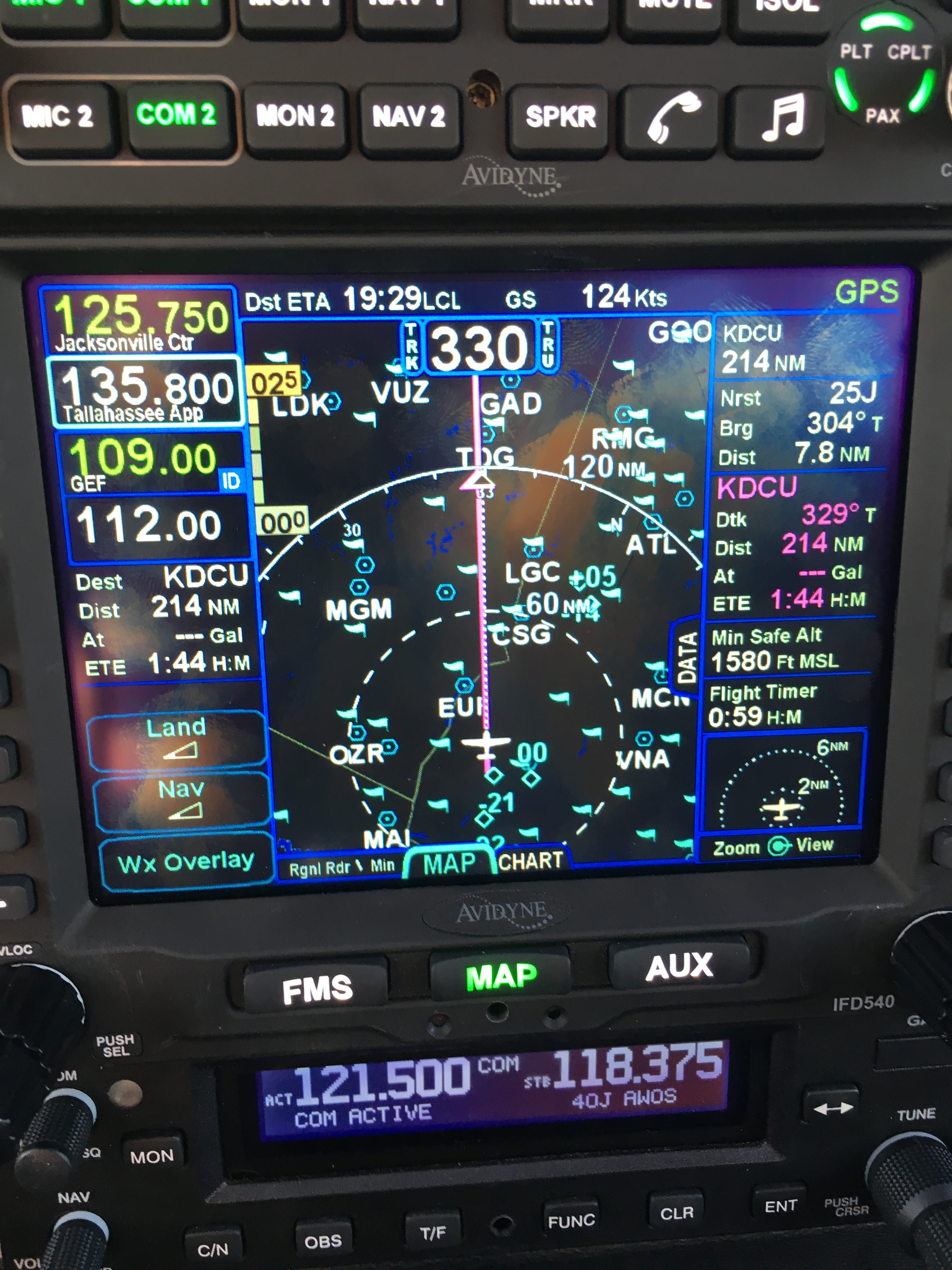
There was a stiff (25+kt) headwind and I was burning fuel faster than I liked, so I decided instead to stop at 40J. I landed, took on 62 gallons (meaning I had 20gals left, or a little over an hour’s flying time, in reserve) and set out for home. Along the way, I customized the datablock display– one of the big features of the IFD540 is that you can extensively customize what data is displayed and where it appears, then save that configuration in your own profile. That way Derek and I can each set up things the way we like, then load our own profiles on demand. Here’s what I came up with:

datablocks set up the way I like them

datablocks set up the way I like them

  • The left side top shows me the current communications and navigation frequencies I have tuned. Note that the unit automatically labels the frequency as soon as you tune it. (Not shown is the extremely useful FREQ button, which, when pushed, shows you a list of the frequencies you are most likely to need based on your location and phase of flight).
  • Below the frequency datablocks, I see my destination, distance, and estimated time enroute. I will see fuel remaining on arrival once the fuel flow issue is fixed.
  • The top line shows the current ETA to my destination, my groundspeed, and the current navigation mode. It says “GPS” in this picture, but it could also show other labels depending on whether I have an approach loaded, the type of approach, etc.
  • The right side shows, in order, the destination and distance (which I’ll probably remove), the bearing and distance to the nearest airport, and the track, distance, fuel remaining, and ETE for the next waypoint (that info is shown in magenta, indicating that it’s tied to the current waypoint). Because I am going direct to my destination, this magenta block is the same as the destination data on the left. (You can also see the minimum safe altitude and flight timer, right over the traffic display thumbnail).

On the way home, I decided to do a couple of turns in the hold at the ATHEN intersection. This is normally part of the RNAV 36 approach to Decatur; I didn’t want to fly the whole procedure, but I wanted to see how the IFD540 handled a hold at an arbitrary waypoint. Turns out it’s just about as simple as you can imagine: you pick the waypoint (any one will do: airport, intersection, VOR, whatever), tell the box you want to fly a hold, and then watch it do its stuff. When you want to exit the hold, you sequence the next waypoint as direct and the magic happens. Thanks to GPSS, the plane happily flew the entire hold on its own, including compensating for the winds.

One more squawk: the IFD540 and the other devices are super-bright in their default night modes. I think the dimmer settings are wrong, because the panel light rheostat that controls all the other lighting (including the CGR30p) did nothing to change the brightness of the IFD540, so I had to manually adjust it. All of these squawks will be addressed when we take the plane back to Sarasota’s shop, this time the one in Tullahoma, just a short flight from here. It shouldn’t take more than 15 minutes or so to swap out the IFD540; fixing the other issues might take a bit longer.

First impressions of using the IFD540 for a cross-country IFR flight:

  • I am very impressed with the display brightness and clarity and the overall build quality of the switches and knobs on all of the hardware.  Being able to switch between items using the left/right rocker switches (labeled “FMS”, “MAP’, and “AUX”) is easy and intuitive. Touch response is fast, and multitouch for panning and zooming worked flawlessly.
  • The UI is responsive and the graphics are clear and readable. The screen seems huge compared to my old KLN94.
  • By default, the combination of land and navigation data presented on the map is cluttered, but it’s easy to declutter.
  • Avidyne brags about their “hybrid touch” interface, in which nearly every action can either be performed directly on the touch screen or by using the knobs and buttons. That  flexibility works very well and was most welcome during my bumpy flight home– aiming precisely at a touchscreen in moderate turbulence can be a challenge.
  • Once you get used to the notion that there are sliding tabs (like the “DATA” tab visible next to the “minimum safe altitude” field in the picture above), it becomes very easy to flip between sets of data, such as the flight plan view when in FMS mode.
  • The location awareness features of the IFD540 are a real time saver. The FREQ button knows what frequencies to present based on where you are, the unit can automatically tune (and ID) the next VOR in your flight path, and so on.
  • Speaking of FMS: flight plan entry, approach management, and so on use a metaphor that’s close to, but still different from, the King/Garmin-style interface that most pilots are used to. It’s like the difference between Brazilian Portuguese and Portuguese Portuguese: lots of common vocabulay and idiom, but some very important differences. I’ll have more to say about that once I have more time flying with it and learning the FMS way of doing things. (It’s interesting that Bendix King, whose KSN770 competes with the IFD540, has the same issue in that the KSN77o steals a lot of FMS-style behavior from BK’s jet FMS family.)
  • The top-of-descent (TOD) marker is a really nifty feature; it tells you where to start your descent in order to hit an altitude constraint on the flight path. The audio cue, along with the audio cue for 500′ AGL, are very valuable prompts. I’d love to see Avidyne add an audio prompt indicating when you reached the missed approach point (MAP) for approaches that define them.
  • I think, but have not confirmed, that the IFD540 should be able to drive the STEC PSS so that the autopilot  can follow an LPV-generated glideslope. It will take a little knobology for me to figure out how to set this up, though.
  • There are many things I learned to coax the KLN94 into doing that I don’t yet know how to do on the IFD540, so this learning process will take a little while. On the other hand, there are many, many things that the IFD540 can do that the KLN94 and Garmin GNS-x30 series can’t.

What about the rest of the stack? Well, the transponder just works… not much to say there. It transmits ADS-B Out like it’s supposed to, so I’m delighted. The AMX240 audio panel is a huge improvement in audio quality and functionality over the old KMA20 we had before. I’ll have more to say about those gadgets, and the GDC-31 roll steering converter, in the future. Overall, I’m delighted with the new stack and can’t wait to fly it a bunch more!

Leave a comment

Filed under aviation

Flying Friday: my airplane’s broken, so here’s a blimp

I went to Tampa yesterday to pick up 706 from the shop. I was expecting to write a triumphant post today about flying behind all the new goodies. However, the GPSS steering system is confused and steers the airplane in the opposite direction, so I had to leave it there for further troubleshooting. Instead of my triumphant post, here’s a short video of the DirecTV blimp, which happened to be at the airport at the same time as me.

Leave a comment

Filed under aviation, FAIL

Training Tuesday: IoT insecurity, fitness division

There’s lots of hype about how the Internet of Things (IoT) will make our lives better, and much of it is true. For example, my house has two Internet-connected thermostats that I can use to see and change temperature settings— that way I can keep the house uncomfortably cool or warm when I’m not there and adjust the temperature remotely so it’s comfy when I get there. Fitness devices are definitely a well-established part of the IoT; companies such as BodyMedia and Garmin have been making devices that can connect, either on their own or through a PC or smartphone, to Internet services for a while. That market has been growing very rapidly over the last few years (some estimates put it as $3 billion in 2015), so some bright folks at Open Effect (funded in part by the Canadian government) decided to take a look at the security of IoT-connected fitness devices.

The results (full report here) are pretty horrifying:

  • Many devices transmit their Bluetooth MAC IDs at all times that the device isn’t pried, and those IDs never change, so it’s easy to track someone through rudimentary Bluetooth beacon monitoring.
  • The Jawbone and Withings fitness services don’t do a very good job of data validation; the researchers mention telling the Jawbone service that their test user walked 10,000,000,000 steps in one day, and the service happily accepted that. Worse still, they were able to inject fake data, generating records of “a person taking steps at a specific time when no such steps occurred.” Given that this data has been used in both criminal and civil trials in the US and Canada (see the extensive footnotes in section 1.4 of the report), this is pretty awful.
  • Garmin and Withings don’t use HTTPS to protect data in transit. Given that I wear a Garmin watch and use a Withings scale daily, I have a problem with this. The researchers only studied the Garmin Connect app on iOS and Android, but if I had to bet, I’d guess that my Garmin watch (which has Wi-Fi) isn’t using HTTPS either.

Apart from calling Garmin to yell at them, I’m posting this mostly to point out yet another case where the rush to get things on the Internet may have unintended consequences. While my individual fitness data is not necessarily something I mind being visible, I don’t like that these manufacturers have been so sloppy. I can understand not wanting to implement HTTPS on a very low-power device but there’s no excuse not to implement it in a mobile app, for crying out loud.

Meanwhile, if I ever need to, now I know how to challenge any fitness-related data that may be introduced in court.

Leave a comment

Filed under Fitness, General Tech Stuff, Security

Why I donated to the Sanders campaign

So here’s a sentence I never thought I’d write: I just gave Bernie Sanders’ campaign some money, despite the fact that I disagree with many of his specific beliefs and policies. Why did I make a campaign contribution?

  1. Sanders has a high degree of personal integrity. I would rather have a person of character and integrity with whom I disagree as our President than someone who’s politically closer to me but lacks those attributes.
  2. Hilary Clinton is fundamentally, thoroughly, reflexively corrupt and dishonest. The thought of her becoming President, and thus sweeping her equally corrupt clique of advisors and hangers-on into positions of power, repels me. If giving Bernie money helps keep her out of office, I’m ready to write a check.
  3. If elected, I don’t believe that the non-interventionist Sanders will be actively dangerous to our country. I can’t say the same about Clinton or any of the Republican contenders except perhaps Rand Paul– and let’s face it, there is no chance in hell that Paul will win the nomination. Sanders’ economic policies are unlikely to get broad traction in a Republican Congress, so I’m not concerned that he is single-handledly going to destroy the economy and the American way of life.
  4. None of the existing Republicans have shown that they deserve my support. Most of them fail on points #1 and #2 above, and the few who don’t (Kasich and Paul, maybe the somnolent Carson) have no chance of beating Clinton in a general election.
  5. In fact, the entire Republican party leadership has shown that they don’t deserve my support as evidenced by their shameful failure to recruit and promote good candidates. If you could take the list of current Republican candidates and their resumes back in time and show it to Eisenhower, Reagan, Carter, Johnson, or Kennedy they would be horrified.
  6. Because of the way our electoral system is currently structured, early money has a bigger leverage effect. If Sanders wins Iowa and/or New Hampshire, that will make him much more competitive against Clinton on Super Tuesday.

I’m definitely soft on Bernie. I’d love to see a last-minute convention miracle on the GOP side (or a well deserved, but unlikely, federal indictment of Secretary Clinton for mishandling of classified information), in which case I’d reconsider my support. But until then, I’m in for Bernie.

3 Comments

Filed under General Stuff