Tag Archives: flying

First impressions: flying the Avidyne IFD540

cShort version: The transplant was a success and the patient made it home.

Now, the longer version.

I originally dropped the plane off on 31 December at Sarasota Avionics at Tampa Executive (KVDF). The plan was to have the plane ready by late January. That didn’t happen. When I went to pick the plane up on February 10th, it wasn’t ready as promised: the GPS steering steered the plane in the opposite direction as commanded, the interconnection between the new GPS and our engine monitor didn’t work, and the plane failed its initial FAA ADS-B Out automated compliance report (ACR) check. I was really unhappy, flew back to Huntsville, and started firing off emails to get the problem fixed. Long story short, Kirk Fryar, the co-owner of Sarasota, moved the plane to their Venice location, fixed everything that was wrong, tested the plane thoroughly, and had it ready for me on the 25th. (I note with some irritation that I still haven’t ever had an experience with any aircraft maintenance shop that resulted in the plane being ready when it was promised.)

I met Leonard, Sarasota’s check pilot and flight instructor, at KVDF and we flew the plane down to KVNC, stopping along the way to hand-fly the ILS 32 at KSRQ. It was a windy, bumpy day and ATC was vectoring me all over the place (including nearly to the Gulf ADIZ). I was a little rusty, and it showed. Another thing that showed: the localizer flag on the NAV1 CDI (we’ll call this squawk #1). This little flag is supposed to pop out to indicate that the associated signal is unreliable. It’s definitely not supposed to appear in a brand-new avionics installation, especially not when my secondary nav radio didn’t show the flag. We flew a missed approach and then took the RNAV 5 approach into KVNC. This time I let the autopilot and GPSS fly the approach, which it did flawlessly.

While I barricaded myself in their conference room to get some work done, Kirk investigated the cause of the localizer flag problem. It turned out to be simple, stupid, and Avidyne’s fault. There’s a known compatibility issue between early hardware revisions of the IFD540 and the King KI209A CDI we have. Sarasota sent our original unit back to Avidyne to have the hardware modification installed– we needed mod 14 but, for some unknown reason, we got a unit back that only had mod 11. This means that we have to take the plane back to the shop to swap in the new IFD540 unit when it arrives, which is a hassle… but more on that later.

After a thorough preflight, during which I confirmed that the fuel flow data presented to the IFD540 was intermittent (and that’s squawk #2, but not a huge deal since there’s a workaround: power-cycle both the CGR30P and the IFD540), I took off and picked up my clearance to Grady County. They gave me a route out over the water: direct TABIR, then direct 70J. I plugged it in, climbed out, and engaged GPSS. It flew smoothly to TABIR. There’s a lot going on in the picture below:

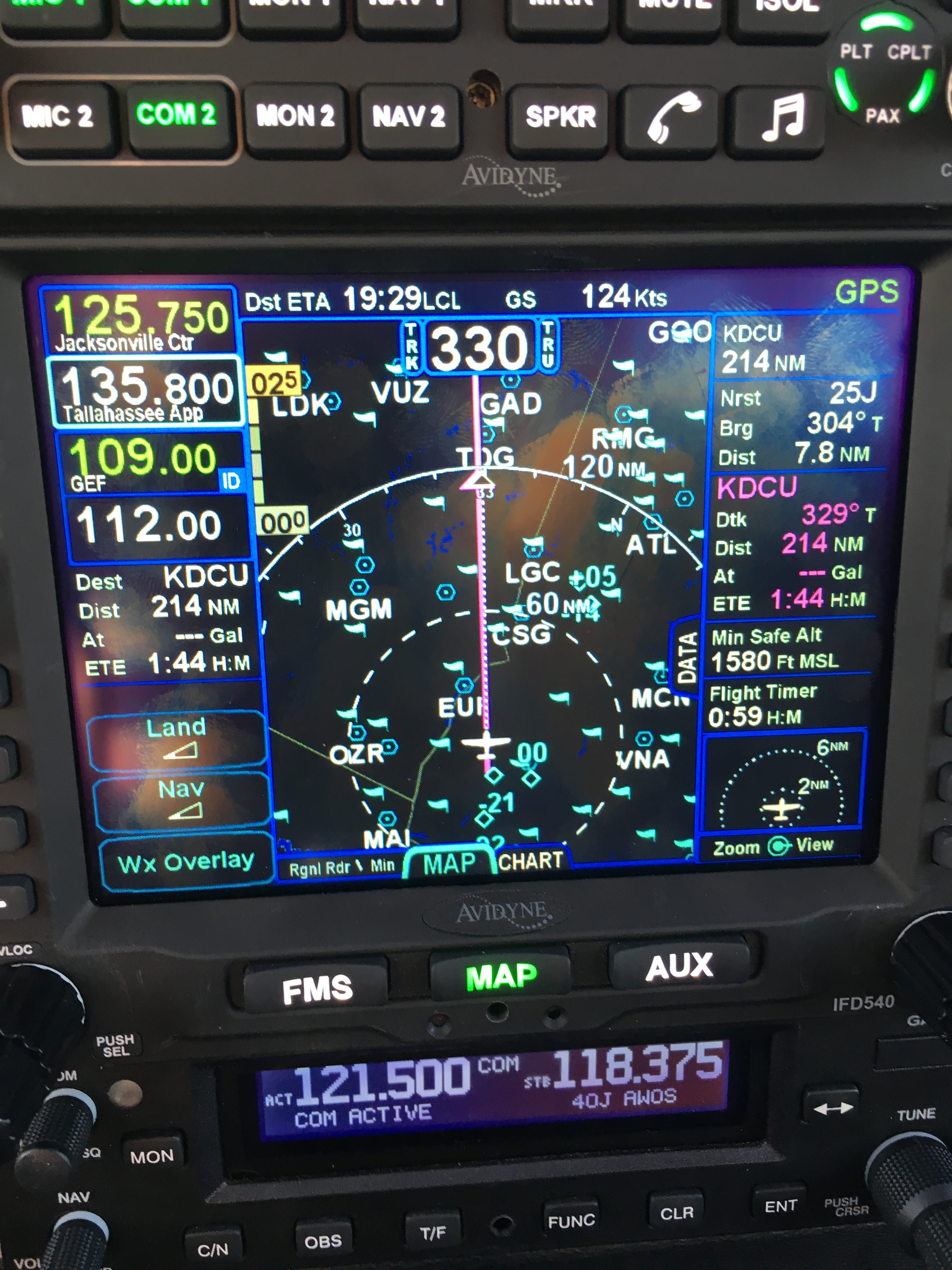
TABIR-with-traffic

  • The magenta line is where I’m going. Note that at the TABIR intersection, the onward path changes to a “candy cane” stripe to indicate the next planned leg. Other legs further on show up as white. This makes it easy to see what the box is planning on doing at all times.
  • The little blue diamonds are other airplanes, with their relative altitude shown and little up or down arrows indicating climbs or descents. The inner dashed ring has a 5nm radius, so I can clearly see where interesting targets are and what they’re doing.
  • The blue flags indicate VMC at those reporting points. this is a bit of a change from Foreflight, which uses little green dots for VMC METARs. However, the FAA specifies the exact symbology and colors that have to be used in certified devices so we’re stuck with those.
  • Just above the “FMS” button you can see a tiny label that says “Rgnl Rdr 9 Min”. That means I have relatively fresh radar data on screen; however, since the sky was completely cloudless when I took the picture, there’s nothing shown.
  • The radio at the bottom of the stack “knows” that 119.275 is the AWOS frequency for Venice. Why? The GNC255 has an onboard frequency database, and now that Sarasota connected it to a GPS position source, it can look up the frequency and aircraft position and use that combination to label who you’re talking to.

There was a stiff (25+kt) headwind and I was burning fuel faster than I liked, so I decided instead to stop at 40J. I landed, took on 62 gallons (meaning I had 20gals left, or a little over an hour’s flying time, in reserve) and set out for home. Along the way, I customized the datablock display– one of the big features of the IFD540 is that you can extensively customize what data is displayed and where it appears, then save that configuration in your own profile. That way Derek and I can each set up things the way we like, then load our own profiles on demand. Here’s what I came up with:

datablocks set up the way I like them

datablocks set up the way I like them

  • The left side top shows me the current communications and navigation frequencies I have tuned. Note that the unit automatically labels the frequency as soon as you tune it. (Not shown is the extremely useful FREQ button, which, when pushed, shows you a list of the frequencies you are most likely to need based on your location and phase of flight).
  • Below the frequency datablocks, I see my destination, distance, and estimated time enroute. I will see fuel remaining on arrival once the fuel flow issue is fixed.
  • The top line shows the current ETA to my destination, my groundspeed, and the current navigation mode. It says “GPS” in this picture, but it could also show other labels depending on whether I have an approach loaded, the type of approach, etc.
  • The right side shows, in order, the destination and distance (which I’ll probably remove), the bearing and distance to the nearest airport, and the track, distance, fuel remaining, and ETE for the next waypoint (that info is shown in magenta, indicating that it’s tied to the current waypoint). Because I am going direct to my destination, this magenta block is the same as the destination data on the left. (You can also see the minimum safe altitude and flight timer, right over the traffic display thumbnail).

On the way home, I decided to do a couple of turns in the hold at the ATHEN intersection. This is normally part of the RNAV 36 approach to Decatur; I didn’t want to fly the whole procedure, but I wanted to see how the IFD540 handled a hold at an arbitrary waypoint. Turns out it’s just about as simple as you can imagine: you pick the waypoint (any one will do: airport, intersection, VOR, whatever), tell the box you want to fly a hold, and then watch it do its stuff. When you want to exit the hold, you sequence the next waypoint as direct and the magic happens. Thanks to GPSS, the plane happily flew the entire hold on its own, including compensating for the winds.

One more squawk: the IFD540 and the other devices are super-bright in their default night modes. I think the dimmer settings are wrong, because the panel light rheostat that controls all the other lighting (including the CGR30p) did nothing to change the brightness of the IFD540, so I had to manually adjust it. All of these squawks will be addressed when we take the plane back to Sarasota’s shop, this time the one in Tullahoma, just a short flight from here. It shouldn’t take more than 15 minutes or so to swap out the IFD540; fixing the other issues might take a bit longer.

First impressions of using the IFD540 for a cross-country IFR flight:

  • I am very impressed with the display brightness and clarity and the overall build quality of the switches and knobs on all of the hardware.  Being able to switch between items using the left/right rocker switches (labeled “FMS”, “MAP’, and “AUX”) is easy and intuitive. Touch response is fast, and multitouch for panning and zooming worked flawlessly.
  • The UI is responsive and the graphics are clear and readable. The screen seems huge compared to my old KLN94.
  • By default, the combination of land and navigation data presented on the map is cluttered, but it’s easy to declutter.
  • Avidyne brags about their “hybrid touch” interface, in which nearly every action can either be performed directly on the touch screen or by using the knobs and buttons. That  flexibility works very well and was most welcome during my bumpy flight home– aiming precisely at a touchscreen in moderate turbulence can be a challenge.
  • Once you get used to the notion that there are sliding tabs (like the “DATA” tab visible next to the “minimum safe altitude” field in the picture above), it becomes very easy to flip between sets of data, such as the flight plan view when in FMS mode.
  • The location awareness features of the IFD540 are a real time saver. The FREQ button knows what frequencies to present based on where you are, the unit can automatically tune (and ID) the next VOR in your flight path, and so on.
  • Speaking of FMS: flight plan entry, approach management, and so on use a metaphor that’s close to, but still different from, the King/Garmin-style interface that most pilots are used to. It’s like the difference between Brazilian Portuguese and Portuguese Portuguese: lots of common vocabulay and idiom, but some very important differences. I’ll have more to say about that once I have more time flying with it and learning the FMS way of doing things. (It’s interesting that Bendix King, whose KSN770 competes with the IFD540, has the same issue in that the KSN77o steals a lot of FMS-style behavior from BK’s jet FMS family.)
  • The top-of-descent (TOD) marker is a really nifty feature; it tells you where to start your descent in order to hit an altitude constraint on the flight path. The audio cue, along with the audio cue for 500′ AGL, are very valuable prompts. I’d love to see Avidyne add an audio prompt indicating when you reached the missed approach point (MAP) for approaches that define them.
  • I think, but have not confirmed, that the IFD540 should be able to drive the STEC PSS so that the autopilot  can follow an LPV-generated glideslope. It will take a little knobology for me to figure out how to set this up, though.
  • There are many things I learned to coax the KLN94 into doing that I don’t yet know how to do on the IFD540, so this learning process will take a little while. On the other hand, there are many, many things that the IFD540 can do that the KLN94 and Garmin GNS-x30 series can’t.

What about the rest of the stack? Well, the transponder just works… not much to say there. It transmits ADS-B Out like it’s supposed to, so I’m delighted. The AMX240 audio panel is a huge improvement in audio quality and functionality over the old KMA20 we had before. I’ll have more to say about those gadgets, and the GDC-31 roll steering converter, in the future. Overall, I’m delighted with the new stack and can’t wait to fly it a bunch more!

Leave a comment

Filed under aviation

Flying Friday: my airplane’s broken, so here’s a blimp

I went to Tampa yesterday to pick up 706 from the shop. I was expecting to write a triumphant post today about flying behind all the new goodies. However, the GPSS steering system is confused and steers the airplane in the opposite direction, so I had to leave it there for further troubleshooting. Instead of my triumphant post, here’s a short video of the DirecTV blimp, which happened to be at the airport at the same time as me.

Leave a comment

Filed under aviation, FAIL

My first in-flight emergency

Yesterday, I had my first in-flight emergency. That sounds more dramatic than it actually was but I thought writing up my experience might be helpful. This is to the best of my recollection; a lot happened in a short time, so I might have muffed some details.

With my plane in the shop, I wanted to get in a few instrument approaches, as well as work on my proficiency on the Cessna 182RG at Redstone. The 182RG is about 20kts faster than my plane, and it’s a great cross-country machine to have as a backup. It’s nicely equipped, with a Garmin GNS530 GPS (WAAS-capable, of course), an MX20 multifunction display, and two glideslope indicators. I called my pal John Blevins, an experienced instrument instructor, and we arranged to meet and go fly.

We briefed a simple instrument proficiency check (IPC) route– we’d fly from Redstone to Muscle Shoals, fly the ILS 29 approach, then turn around and fly the WAAS GPS 36 approach into Decatur, then the non-WAAS GPS 17 back into Redstone. The weather was just right– overcast at about 1900′, with a light wind.

The preflight and runup were normal; I contacted Huntsville departure and we were cleared to take off and head towards Muscle Shoals. I got the airplane to our assigned altitude, cleaned it up for cruise flight, engaged the autopilot, and briefed the approach with John. During that time, we were cleared to the HUPOK intersection and told to expect a straight-in approach to the ILS 29. Our instructions were to cross HUPOK at or above 2500′, so after I had the radios set up to my satisfaction, I started our descent.

A brief explanatory note: on an ILS approach, you tune your navigation radio to the frequency specified for the localizer so that you get lateral and vertical guidance for the approach on the course deviation indicator (CDI). If you tune the wrong frequency (or forget to tune it, which amounts to the same thing), you won’t get that guidance. For that reason, I make a habit of tuning the localizer on both my primary and backup navigation radios. I did that this time, too.

As we started our descent, I noticed that the GPS flickered, then went blank, then said “INITIALIZING SYSTEM” in the upper left corner. Simultaneously, the two guidance needles on the CDI started to bounce. The CDI in this plane looks like the picture below: the needles move independently, so as the GPS went online, it was driving the needles towards the center (where they belonged), but when it dropped offline again, the needles drifted towards the upper left corner. Distracting, but not critical. I immediately disconnected the autopilot and continued hand-flying the descent.

The GI106A course deviation indicator

This first failure was annoying but not critical– an ILS approach doesn’t depend on the GPS, and because I already had the localizer tuned on the other radio, it was a simple matter of looking at the other CDI. We broke out below the clouds, at which point the MFD went blank, along with the GPS. The transponder was flashing “FAIL” instead of the 4-digit code we had been assigned. Then it, and the backup nav radio, all quit. We still had electrical power, but all of our radio navigation instruments had crapped out.

I broke off the approach and turned away from the airport, reasoning that we needed to try troubleshooting the failure. First step: we determined that nothing was on fire and that we had plenty of fuel so there was no huge rush to take action. (There’s a saying, which I will explain another time, that the first thing you do in an emergency is wind the clock– rushing to DO SOMETHING can often be worse than taking no action at all.)

John wisely suggested that we shed some electrical load, so we turned off all the stuff that wasn’t working anyway, verified that the ammeter indicated normally and that no breakers were tripped, turned off the avionics master to do a bus reset, and then started turning things back on.

Nada.

While we were doing all that, I was heading the plane due east, back whence we came, staying at least 500′ below the overcast layer so we could maintain VFR. We spotted the Courtland airport (9A4) off to our south, and I decided to head towards it in case we wanted to make a precautionary landing. John was working through the verrrrry skimpy emergency checklists. I flew us for a straight-in approach to runway 31 at Courtland, but when I extended the gear we didn’t get the “gear down” light and couldn’t verify that the gear were locked– so I initiated a go-around and we started some more troubleshooting, this time with the “emergency gear extension” checklist. We decided it would be better to raise the gear to release any residual pressure in the accumulator, so we did. About this time COM2 started working again, so we called Huntsville to tell them we were heading back to Redstone.

Shortly after I turned us for home, the LOW VOLTAGE panel annunciator lit. I discovered that the alternator circuit  breaker had popped, so I reset it. I have a one-and-done rule for circuit breakers in flight– for a critical system I’ll reset the breaker once, but if it pops again, it’s time to land. The light went out, and the breaker didn’t pop again.

Because we were below the clouds and knew where we were, it was easy to navigate visually to get us pointed in the right direction. On the way home, for no good reason that I could see, the GPS began working normally. We left the transponder off, since we were in radio contact with Huntsville and they could see our aircraft on radar.

The approach and landing were uneventful too, except that I didn’t use any flaps. The Cessna 182 flaps are electrically actuated and we agreed that there was no reason to crank them down, putting extra load on the electrical system.

Here’s a partial map of our flight route.

After we landed, John and I discussed what happened, how we reacted, and what we learned from it. On the positive side, we displayed excellent crew coordination, and I was glad to have an experienced pilot in the other seat. The multiple failures were annoying but not critical; the weather was tolerable, we were in a familiar area, and John and I both had iPads with GPS for backup. On the negative side, I wasn’t as familiar with the emergency procedures for this airplane as I should have been (although part of the flight’s purpose was for me to practice emergency procedures).

This morning, I filed an ASRS report; ASRS is a unique success story, and I plan to write about it for my next Flying Friday. Then I wrote this post. I’ll look forward to seeing what Redstone’s mechanic finds. I don’t think there were any telltale signs that I could have caught during the preflight or runup, but I will continue to keep my eyes very sharply peeled.

1 Comment

Filed under aviation

Flying Friday: a sample of instrument flight

Bonus! Two Flying Friday posts in one day (here’s the other one.)

There’s a difference between flying under instrument flight rules (IFR) and flying in instrument meteorological conditions (IMC).

When you fly IFR, that means you’re flying on an instrument flight plan, along a defined route, in communication with and under positive control of ground-based air traffic control.

When you fly in IMC, that means you are flying “primarily by reference to instruments,” as the FAA puts it. That basically means that you can’t see a discernible horizon. You can fly IFR in good weather or bad. If you’re flying in IMC, you must do so under IFR. If you’re flying in visual meteorological conditions (VMC, what normal people call “good weather”), you can fly under visual or instrument flight rules.

Actually, I should clarify just a bit– VMC isn’t necessarily good, it’s just that IMC is defined as “weather worse than the standard VMC minimum visibility and/or ceiling.”

This whole post is basically just an excuse to post a short video showing one example of flight in IMC. I took it while en route from Decatur to Tampa Executive; on that 3h40min flight I was in the clouds for just under an hour.

You can’t see a visible horizon, although the sun was semi-visible through the clouds. (If you take a look at the iPad screen, you’ll see why it was so cloudy.)  Surprisingly, on a sunny day, the inside of the cloud can be very bright with diffuse light, leading to the somewhat odd behavior of wearing sunglasses while flying inside a cloud that blocks the sun from the ground.


Leave a comment

Filed under aviation, General Stuff

Flying Friday: the avionics brain transplant begins

I fly a 41-year-old airplane. Not that there’s anything wrong with that. As I’ve said before, there’s something to be said for mature technologies, and the economics of general aviation are such that there’s no chance I’ll be buying a new airplane any time soon when even an entry-level Cessna 172 costs north of $400K. Because new aircraft are so expensive, there’s a lively market in refitting and upgrading existing airframes. The engines, paint, interior, and avionics on an airplane can all be replaced or upgraded at pretty much any time, and the longevity of the basic airframe means that I can comfortably expect to get another 20-40 years out of my existing plane if I take good care of it.

With that said, newer airplanes have some major advantages, many of which (built-in cupholders, leather seats, ballistic recovery parachutes) aren’t available for my plane. After flying 706 for about a year, getting my instrument rating, and taking more and longer cross-country trips there were a few things that I wanted to add to make instrument flight easier and safer. My co-owner Derek and I spent a lot of time hashing out what we wanted vs what we could afford vs what we could live with. Here’s what we decided.

First off, we knew we’d have to meet Yet Another Unfunded Mandate. Starting in 2020, all airplanes that operate in controlled airspace (meaning the “Class B” and “Class C” airspace surrounding major airports and most cities) have to use a system called ADS-B. The FAA has delusions that ADS-B, which requires every aircraft to continuously transmit its GPS-derived position and velocity, will replace radar. It probably won’t, but that’s a topic for another post. Equipping a plane for ADS-B  requires two pieces:

  • a GPS system that uses the FAA’s Wide Area Augmentation System (WAAS) to provide high accuracy position and location data. The WAAS system combines satellite GPS data with position data from precisely surveyed ground stations to provide sub-meter accuracy.
  • an ADS-B Out transmitter that sends ADS-B data, including the WAAS GPS data

There are lots of ways to get these two parts, ranging in cost and complexity from “absurd” to “merely unpleasant.” The two most popular ways are to install a new transponder that includes a built-in position source or install a separate WAAS GPS and a little box that transmits ADS-B Out without touching your existing transponder. You can also get weather and traffic data using ADS-B In; that requires an ADS-B receiver and something to display the received data on. Right now, I use a Stratus receiver (the original, not the fancy 2S) and ForeFlight on an iPad for ADS-B In… but, as with many other government programs, there’s a huge catch. You get weather data for free, but you only see ADS-B In traffic if there’s an ADS-B Out-equipped airplane near you. This was supposed to be an incentive to get people to add ADS-B Out, but as a practical matter it means that ADS-B In is currently only useful for passive receivers like my Stratus in areas where there are already lots of ADS-B Out airplanes.

Next, we wanted the ability to use WAAS instrument approaches. I love the precision of ILS approaches, and use them whenever I can, but most airports don’t have an ILS, and those that do won’t typically have more than one. However, a growing number of airports have approaches that offer precision vertical and lateral guidance if you have a WAAS GPS. To be more precise (see what I did there?), we wanted to be able to fly LPV approaches so that we’d get precision vertical guidance for approaches where ILS equipment isn’t available. With WAAS equipment, you can also get an advisory glideslope, which gives you non-precision vertical guidance to help keep you from smashing into things.

Finally, we (well, mostly I) wanted to improve the autopilot’s ability to track instrument approaches. The approach phase of single-pilot IFR is a demanding and busy time, and it’s easy to make mistakes. Our existing autopilot can fly a heading, keep the wings level, and hold an altitude, but when you get to a complex approach, being able to let the autopilot turn the airplane based on GPS steering is very helpful because it frees up time and attention for vertical navigation, approach prep, and other critical tasks.

After a lot of back-and-forth, an immense amount of comparison shopping, and lots of head-scratching, Derek and I decided to send 706 to Sarasota Avionics to have the following installed:

  • An Avidyne IFD540 WAAS GPS. I preordered one of these back in 2012, well before I even had my pilot’s license, on the theory that I could always sell it later. The IFD540 is much more capable than the Garmin GNS530 and, to me, is easier to use than the Garmin GTN750. It’s also less expensive to buy, requires less expensive data subscriptions, and provides some much-needed market competition for Big G.
  • An Avidyne AXP340 transponder. The AXP340 transmits ADS-B Out, but it requires a separate WAAS GPS. In our case, that’d be the IFD540. There’s a whole complex mess of rules for which transponders can be legally used with which GPS position sources– basically, only combinations that have been certified by the manufacturer and registered with the FAA can be installed and used, even though other combinations may work just fine. Avidyne’s products are obviously certified to work with each other.
  • An Avidyne MLB100 ADS-B In receiver. Derek talked the Avidyne guys into giving us one of these for free if we bought the preceding two items. With this, the IFD540 can receive and display traffic and weather information. It is extremely useful to see this data overlaid on your primary map, especially because you can “rubber-band” your flight route to deviate around weather and traffic as needed.
  • A DAC GDC31 roll steering converter (which most people just call a GPS steering, or GPSS, adapter). Our autopilot, bless its heart, is the most analog device I think I currently own. It works by sensing voltage output from the directional gyro and course deviation indicator (CDI). To fly a particular course, you twist a knob on the DG to set the heading indicator, or bug, to the desired course; you can also have the autopilot track a VOR or even an ILS localizer, which it does by looking at the voltage used to drive the deflection on the CDI. One thing it can’t do, though, is track an actual GPS course. If the GPS route calls for you to fly a heading of 175 degrees, and the heading bug is set to 95 degrees, guess where you’re going? The GDC31 fixes that by adapting the digital steering commands output by the IFD540 into voltages that the autopilot can understand. I’ve used GPSS in other airplanes before and it’s a great experience– smooth, solid tracking with no “hunting” and accurate turn anticipation.
  • An Avidyne AMX240 audio panel. We’d been talking about replacing our ancient mono audio panel with a nicer unit that would give us better audio quality, and the marginal cost of adding the panel at the same time as the other equipment was considerably lower than doing it later.

The IFD540 + AXP340 combination gives us ADS-B Out, so we’ll be legal. The IFD540 + MLB100 gives us ADS-B In (with the added bonus that the IFD540 has wifi, so it will be able to feed all sorts of useful data to portable devices in the cockpit). Finally, the IFD540 + GDC31 gives us full two-axis autopilot coupling. I think, but haven’t verified, that it will also give us the ability for the autopilot to track altitude changes as expressed by the glideslope. The existing autopilot can track an ILS glideslope, and the IFD540 can provide a glideslope for LPV approaches (and an advisory glideslope for LNAV+V) so I think it should “just work.”

This seems like a huge list of expensive stuff (and it is)– one question that immediately comes to mind is “why bother with all this stuff when you could just use an iPad?” The problem is spelled F-A-A. First, there are no portable ADS-B solutions that are approved to meet the 2020 mandate in Part 23 aircraft. That’s a fancy way of saying that an experimental or homebuilt airplane can use equipment that’s not approved for factory-built airplanes. That also wouldn’t give us WAAS approach capability; even though there are portable WAAS receivers (including this watch!) you can’t use them to fly approaches. While there’s been lots of flailing in the aviation press about the need for cheaper, better-integrated ADS-B solutions, it’s also true that we’re getting a lot of other capability out of the upgrade that we’d miss if we went with a simpler ADS-B-only installation.

Along with the avionics themselves, of course, there are lots of little things– antennae, cables, and so on– that have to be installed and tested. That’s why we expect the upgrade to take an eye-popping four weeks– and that’s assuming everything goes well. Stay tuned!

2 Comments

Filed under aviation, General Tech Stuff

GATTS days 8 & 9: judgment day(s)

The title of this post gives it away: I didn’t pass my check ride on the first try. Read on to find out why…

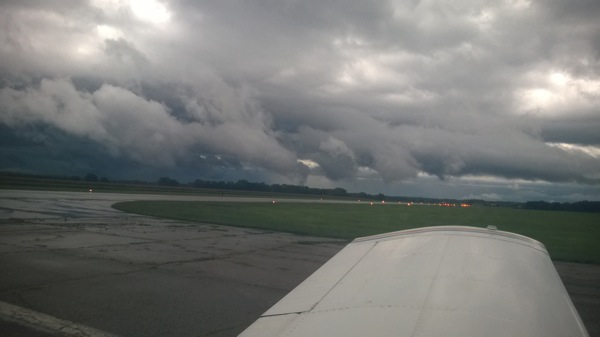
On day 8, I woke up early, loaded the car, and drove to the airport to meet Peter. We’d arranged with Ken to meet early because the weather from Manhattan to Topeka (and the surrounding area) was poor: 1200’ or less ceilings, with lots of wind and a good bit of rain. Peter and I agreed to head east and see what the weather looked like when we got there. Short answer: it was terrible. The entire flight was in clouds, with plenty of bumps, then on arrival, ATC gave us about 20 minutes of holding on the localizer, which was, um, invigorating, not to mention bouncy. We finally landed and this is what we saw:

Paul robichaux net 20140903 001

Ken was there waiting for us, so we went inside and went through the standard check ride prep; he and I both signed into IACRA to complete my check ride paperwork, he briefed me on the Pilot’s Bill of Rights, and so on. Then we spent about an hour on the oral exam, which was perfectly straightforward. I wasn’t surprised by any of his questions, largely thanks to the combination of Peter’s coaching and my own study. The weather wasn’t good enough for us to conduct the practice approaches on the check ride under VFR conditions, so we adjourned to the airport restaurant for a snack (which was interrupted by a business phone call for me, alas). After about an hour and a half, the weather had lifted enough for us to fly. We took off, and Ken had me intercept V4 to give us some distance from the airport. We flew west a bit, then he had me recover from unusual attitudes, which went well… except.

See, I was having a hell of a time keeping to my assigned altitude. I’d like to blame it on the wind, but it wasn’t just that; my scan was deteriorating faster than ever before. I’m still not sure if I was nervous, rattled from the weather, or what, but after a few gentle reminders from Ken (example: “Do you know what the PTS requirements for holding altitude are?”, just in case my poor performance was due to ignorance vice lack of skill), he had me head in to the ILS for runway 13. I flew fairly well despite the wind gusts, intercepting and tracking the localizer without a problem.. but, again, my altitude control was poor, and I let the glideslope needle hit full deflection down. I was too high, and that was that: he had me land, gave me the dreaded letter of discontinuance, and held a short debrief with Peter and me. Then I flew us home, in a funk the whole way; we did some remedial training en route, which I obviously needed but didn’t want. After landing I went back to the apartment, sulked for a while, worked a bit, and then mentally steeled myself to repeat the process the next day… and that’s exactly what happened. The next morning, we went back to the airport, flew to Topeka, met Ken, did the same IACRA stuff, and went out to the airplane.

When you retake a failed (or interrupted) checkride, the examiner doesn’t have to retest you on the portions you passed, although she can. In my case, Ken just wanted me to fly the approaches and holds, which I did, starting with the ILS for 13. It was still breezy, but nowhere near as windy as the preceding day, and/or maybe I was less nervous. In any event, I flew a textbook ILS approach, did a decent job on the hold (despite a stiff and inconvenient crosswind), and followed with the VOR and localizer back course approaches. I landed, taxied in, and Ken shook my hand to congratulate me. Here’s what the airport looked like when we taxied up:

Paul robichaux net 20140901 003After another debrief, in which the often-heard and completely true phrase “license to learn” was tossed around several times, we bade Ken goodbye and headed back to the ramp. After a short and uneventful flight back to Manhattan, I shook hands with Peter for the last time, got a fresh diet Coke, and headed home. The flight home was smooth and clear, so I didn’t actually get to perform any approaches, more’s the pity. After such a long time away, I was delighted to get home, sleep in my own bed, play with the cat, and generally settle in a bit.
Once a little more time has passed, I’ll write up my overall impressions of GATTS. It is safe to say that I’m pleased with what I learned and their teaching methods, but I feel like I need a bit more experience before I form a complete opinion. Meanwhile, I’ll be flying!

8 Comments

Filed under aviation

GATTS day 6: building comfort

[ sorry about the gap in posting the rest of my GATTS writeup; I’ve been kinda busy. ]

Day 5 of my GATTS experience was all about refinement. We started in the classroom, where we covered the rules for filing alternate airports and spent a good bit of time on decoding IFR charts (which, luckily, was one of the areas where I worked extra hard when studying for my written). Then we got in the airplane and flew to Topeka to shoot the ILS runway 32 approach, something that Peter told me would almost certainly be featured in my checkride. The GPS in 706 is not equipped with a WAAS-capable GPS, which means that I can’t fly precision GPS approaches. That means that, if I want a precision approach (and who wouldn’t?), it’s the ILS for me, at least until we can upgrade to a newer GP

Of course, one of the most important parts of flying an approach is the missed approach procedure– the sequence of steps you take when, after flying the approach, you’re unable to land because of poor visibility, runway misalignment, and so on. When you’re practicing an approach, it’s common to tell ATC what you’re going to do after the approach– land, execute the published missed approach procedure, or do something else. In our case, we flew the published miss for the ILS 32 approach, which involves flying to the Topeka VOR and then flying a racetrack holding pattern. For a real missed approach, ATC might send you to the normal missed approach holding point, or they might vector you around for another try, depending on the reasons why you went missed.

After the missed, we flew on to Miami County. No, I’d never heard of it either. It turns out that there is a superb BBQ restaurant at the airport, We B Smokin, so after shooting a good GPS approach, we had lunch. I accidentally ordered enough food to feed two normal humans, so by the time we were done eating I was a slow-moving hazard to navigation. We fueled up and departed for Forbes, flew the VOR/DME, and then went back to Manhattan. This was fortuitous timing, because there was a line of thunderstorms poised to attack from the west, so we called it a day and I went to Manhattan’s only movie theater for November Man (pretty decent; worth the $6) and a large bucket of popcorn, followed by watching the storms roll in from the safety of my balcony.

By this point in the training, I was feeling very comfortable operating “in the system”: my radio calls were concise, I was getting better at visualizing what the approach I’d selected would require me to do, and I was much more comfortable with the workload required to brief and set up the approach, then fly it to either a landing or a missed approach. The steady diet of daily flying, in whatever weather we happened to have, was a key part in building my comfort level. Although the flying weather to this point had been pretty good, the stiff, variable winds we had all week were more than enough to challenge me– just what I was looking for.

3 Comments

Filed under aviation

GATTS day 3: DME arcs and Nebraska

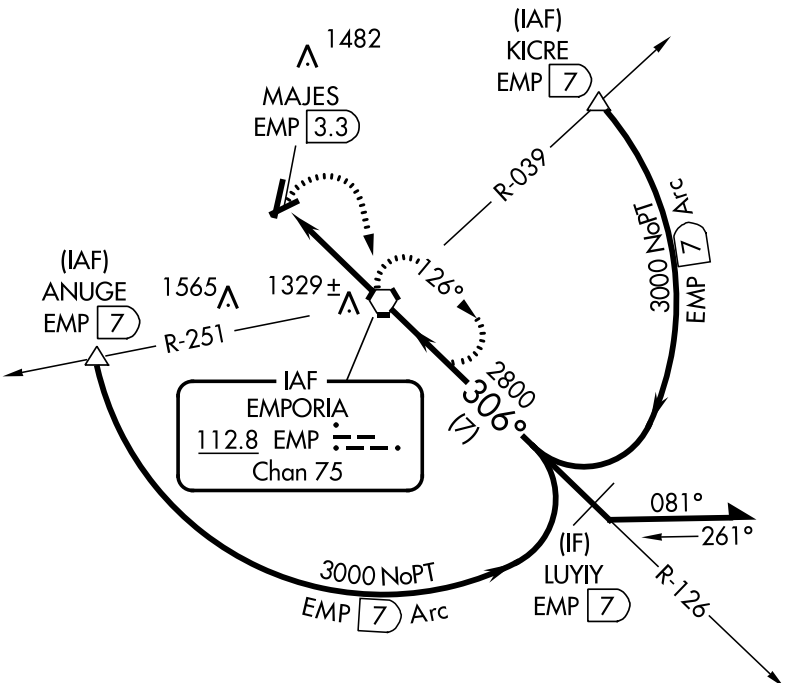
First, I forgot to mention a couple of other things that Peter and I discussed in the day 2 classroom sessions. We talked about IFR currency rules (remember, kids, 6 6 HIT), as well as the procedures to be used if you lose radio contact with ATC. The most interesting topic to me was the discussion of DME arcs on approaches, like the one shown below:

See that arc? It's called a DME arc. Want to know why? Read on.

See that arc? It’s called a DME arc. Want to know why? Read on.

This is the VOR/DME-A approach to Emporia, Kansas.  Depending on where you are when you join the approach, several different things can happen. If you’re approaching from the southeast, you’ll probably get cleared straight to LUYIY, and you can just fly the approach inbound. If you’re coming from the west side of the airport, you might get sent to the triangle labeled ANUGE (those triangles mark intersections, imaginary points in space that you use for navigation); from the northeast or east, you’d probably go to KICRE. In those latter two cases, you’d fly a constant-distance arc from the intersection to the final approach course. They’re called DME arcs because originally they required you to have a special navigation receiver known as distance measuring equipment. Now you can use GPS instead, unless you happen to have a DME receiver. To fly these approaches, you basically fly to the intersection, fly a distance, turn 10 degrees towards the center of the arc, and fly another distance. Think of it like making a circle out of straight lines. (There’s a decent explanatory video here if you’re interested in more detail).

Anyway, on to day 3’s work. Since we’d finished day 2 in the classroom, day 3’s morning was spent in the airplane. We took off from Manhattan and flew to Marysville (where we shot the GPS 16  approach) and then on to Plattsmouth, Nebraska: my first time to visit the Cornhusker State. I flew the GPS 34 approach, but not until Omaha Approach vectored me all over the place to accommodate some KC-135s working the traffic pattern at Offutt AFB. After landing, we borrowed a crew car and went to– no joke– Mom’s Cafe, where I had a chicken-fried steak about the size of my laptop screen. In fact, it was so big that I couldn’t eat the whole thing and declined the offered dessert.

After fueling the plane, it was off to Beatrice (pronounced “BEE-at-riss”), where I flew an approach– can’t for the life of me remember which one though; then we flew back to Manhattan, shot another GPS approach, and spent some time in the sim practicing ILS and VOR approaches into Topeka. Why Topeka? Tune in tomorrow to find out…


2 Comments

Filed under aviation

GATTS day 2: ILS and VOR approaches

Day 2 was a busy day– by this point, I was settled into the apartment and was able to navigate around through Manhattan fairly well. We spent the morning in the classroom talking about various types of approaches, primarily ILS and VOR approaches.

There are two basic types of instrument approaches: precision and non-precision. The method of navigation for the approach determines how precise an approach you can fly. Some approaches give you guidance on whether you’re left or right of the runway centerline (lateral guidance), but you have to figure out your own vertical position. Others give you both lateral and vertical guidance. For example, an LNAV approach gives lateral guidance but no vertical guidance, while an ILS approach gives lateral and vertical guidance. A precision approach is one where vertical guidance is provided by a ground reference, e.g. the glideslope signal transmitted by an ILS. A non-precision approach can still include vertical guidance, but it’s either calculated or measured by something aboard the airplane. For example, my onboard GPS can use barometric pressure differences to calculate the current altitude, and it knows where the airplane is along the approach course. The diagram for each approach includes a profile view that shows what your vertical profile should look like on approach, such as this profile from the ILS to runway 17 at the Montpelier, Vermont airport:

The underline beneath those numbers has a simple meaning: don't go lower than that altitude or you might die.

The underline beneath those numbers has a simple meaning: don’t go lower than that altitude at that point in the approach or you might die.

Let’s say that the GPS sees I am between the REGGI and JIPDO waypoints. It knows that I can descend a maximum of 600′ between the two. By using either GPS altitude data (VNAV) or altitude data derived from the current altimeter setting (Baro-VNAV), it can give me a visual indication of how much I should climb or descend to follow a smooth path along the approach course.

After all that, it was time to go flying in the ancient simulator. This particular sim doesn’t have a GPS but that wasn’t a problem given what we were doing. I (mostly) tamed the roll axis sensitivity and flew pretty well; we flew a couple of approaches and then took a break for lunch at a nearby Mexican place, thence to the airport. Our planned route was pretty interesting: Manhattan-Salina-Newton-Emporia-Manhattan. It makes a pretty square, as you can see below:

Kansas is square. So was our route.

Kansas is square. So was our route.

We flew one approach at each airport; I forgot to note exactly which ones, but I’d guess (based on the approach plate history in my iPad)  the ILS 35 at Salina, the VOR/DME-A at Newton, and one of the GPS approaches at Emporia, plus the GPS at Manhattan. 3 in the sim and 2.6 PIC in the airplane made for another fun-filled day!

1 Comment

Filed under aviation

Database debacle: why aviation GPS systems are different

tl;dr: We’ve all been spoiled, and it’s Google’s fault.

All right, maybe it’s not entirely their fault (though I do love a good Google-bashing session), but the widespread availability of Google Maps put incredible price pressure on vendors of mapping data to drop their prices. That pressure led to today’s bounty of mapping applications: Google, Microsoft, and Apple offer high-quality map data on their mobile and desktop operating systems, and there is a huge number of applications that take advantage of this data and mash it up in interesting ways. Most of the major vendors of portable GPS devices quit charging for map data, given that their competition– smartphones– have instant map updates anytime, anywhere.

Sadly, this revolution in cheap, broadly available map data has largely bypassed the aviation world. In part that’s because the number of data sources are small; in the US, you can get approved digital chart data for aviation use from the US government or from a small number of private providers, many of whom take the government data and format it in various ways for specific applications or devices. The approach plates, sectional charts, and other maps that pilots depend on for planning and flying are generally not free (though, in fairness, some sites, such as SkyVector, make lots of data available for free).

If you have a panel-mounted or handheld GPS that’s certified for aviation use, you’ll be paying for regular database updates, one way or another.

This is true for two reasons. The first is that data quality is super important. Things change all the time: people put up new towers, airports open or close, the FAA changes routes to accommodate changes in air traffic patterns, and so on. If your car GPS doesn’t show the street you’re on, no biggie: you’re still on it, and there are probably signs. At worst, you can stop and ask for directions. On the other hand, if your airplane GPS doesn’t include a newly added TV tower along your route of flight, you may be in for a very unpleasant surprise.

The other reason is that the FAA requires you to use only certified and up-to-date data sources for navigation. You may use some data providers or devices for “reference” or “advisory” use, but you can’t depend on them as the sole source of navigation data. For example, the excellent Foreflight app for iOS has charts that display your aircraft’s position (known as “georeferenced” charts), which provides great situational awareness. For $149/year, you get full access to all the visual and instrument navigation charts for US airspace. But the FAA won’t let you use the iPad as a primary navigational instrument for instrument flight. For that, you need an IFR-certified GPS, and those have strict requirements for data quality and timeliness.

As part of my instrument flight course at GATTS, I’ve been learning to use the Bendix/King KLN94 navigator in my airplane. The KLN94 first shipped in (drum roll) 1991. Think about that for a second: I am flying with a GPS system that dates back to the First Gulf War. That said, it’s pretty capable; it can navigate me through almost all the different types of instrument approaches, and its user interface, while clunky, is not that much worse than the very popular Garmin 430/530 that followed it. (For an example of flying the KLN94, see this video.)  When Derek and I bought the plane, I knew the KLN94 database was out of date, but the owner gave us a Compact Flash card with a map update. (Note: yes, I said “Compact Flash.” Remember those? If so, then you are officially old.)

Today I got ready to install the database update on that card.. only to find that it was valid for 1-28 May of this year. That’s right; the whole card had one lousy month of map data on it.. data that was 3 months out of date. Showing up for my checkride with an outdated database in my GPS would lead to instant failure. But I found out about this about 215p on the Friday before a holiday weekend. I won’t say I peed a little, but I was getting unsettled at the prospect of hosing my checkride schedule. As soon as we landed, I called Bendix/King’s “Wingman” service number.. and got their answering machine. Uh oh.

At this point, I was trying to figure out how long it would take me to drive to Olathe, Kansas (not long) to pick up a new database card. Maybe I could lurk outside the Bendix building like a ticket scalper! Or I could hand-write a cardboard sign: “NEED KLN94 UPDATES PLEASE HELP”.

You might be wondering why I didn’t just download a new database update from Bendix/King’s web site. Fair question. See, there’s another problem with aircraft GPS systems. They often have ridiculous systems for providing data updates. KLN94 database updates can be downloaded from Bendix/King’s web site, but the only supported device for loading the databases is a single model of SanDisk CompactFlash card reader or you need a special cable to use it and the software to use that cable only works on Windows 95. Oh, that one card reader? It needs a firmware update, which requires a machine running Win95 to install. Other systems have their own failings, so I’m not picking on Bendix/King, but sheesh.

A second call to their tech support number got me a super helpful gentleman named Shane. He confirmed that only the Holy SanDisk could be used to load database updates, but he passed me over to Lorie, one of the folks in the database update department. She listened patiently to my explanation, refrained from saying how stupid I was to put off the update, and told me the solution: “Go to our web site, order the card, and I’ll make sure you get it tomorrow.” Whew, that seemed simple enough. I went to the web site, created an account, and found the KLN94 updates. For the low, low price of only $280, I could get a new CompactFlash card with data valid from 21 August to 18 September.

That’s right.

$280.

I ordered it anyway.

It will be here tomorrow. Then I can update my GPS and pass my checkride. After that, I will expedite installing a GPS system that has a lower ongoing maintenance cost. (In fairness, it’s only $120 to download a single month, and there are deep discounts for subscriptions, but I hope not to have the KLN94 long enough to make a subscription worthwhile.)

So, hats off to Shane and Lorie for their help; thanks to Bendix/King for continuing to support a 24-year-old GPS system, and shame on me for waiting until the last minute to check my database. Bet your boots that won’t happen again.

Leave a comment

Filed under aviation

In which I become a repeat offender

Yesterday marked a milestone: my second triathlon, the Tarpon Tri in Houma, Louisiana. I was fooling around one day on TriFind and noticed that there was a race there, so I signed up– I thought it would be a fun trip to see family and visit my hometown again. But you know what they say: one triathlon and you can explain it away as harmless experimentation, or perhaps a temporary indiscretion… run TWO, though, and you’re a repeat offender, well on your way to “serial triathlete” status.

I’d planned to make the 359nm flight from Decatur to Houma on Friday afternoon, so after a great conference call with a potential new customer (more on that next week, I hope), I loaded up the plane. With the two rear seats removed, it was easy to fit my giant road bike, my tri bag, and backpack in; I parked the car and off I went. I’d like to say a lot of neat stuff about how interesting the flight was, but the fact is that it went flawlessly: no major weather, a smooth ride, and some really interesting scenery, including a beautiful crossing of Lake Ponchartrain right alongside the Causeway. After an easy landing, I headed to my hotel to drop off my stuff, plug in all my gadgets, and make plans to see family.

(Side note: I cannot possibly say enough good things about how well the folks at Butler Aviation took care of me. When I arrived, they had a rental vehicle ready because I’d emailed ahead– no mean feat since the nearest rental agency is 10 mi or so away.  When I got ready to come home, the plane was fueled and ready to go, and everyone there was super friendly. Highly recommended.)

Dinner Friday night was excellent: my Aunt Norma, my cousin Ricky, and his wife Tonya went to Dave’s Cajun Kitchen. The name gives it away, of course: it’s Cajun food, but the kind that people actually eat. Gumbo, fried catfish, white and red beans, jambalaya, and so on. I have never had a meal there that was less than excellent. This one was so good that I ate more than I should have, for which I would pay later.

After a visit back to Ricky’s, I headed to the hotel, got my gear ready for the morning, and went to sleep… then spent all night having reflux-y burps of white beans and catfish. Key learning #1: don’t eat so damn much before the next race.

Saturday morning I got up, hit Walgreen’s for some Tums, and headed to the race site for packet pickup. The place was packed! I should’ve gone to get my packet Friday night; after 20 minutes or so in line, I got my packet and chip, got body marked, and headed to set up in transition. Thanks to all the practice with the TRI101 coaches, I had no trouble getting my gear laid out, so I headed to the pool to get in a quick warmup.

This race had staggered pool starts: the fastest swim time was #1, the second-fastest was #2, and so on. If you didn’t put down a swim time, as I didn’t, you went to the back… so I ended up being #180, meaning that I had about a 35-minute wait to get in the water. Key learning #2: put down the right swim time. I had a very pleasant time visiting with the triathletes in line near me, including a multiple half-Ironman finisher and a guy who was running his first race to celebrate his birthday weekend (he didn’t say what birthday but he was no spring chicken!)

The swim went well– 150 yd in the pool in 3:57. Oddly, Movescount showed me with 125 yds (how? it gets its data from my watch, which showed 150 yds!), and the official time for the swim was 4:36:37. The info packet said:

The timing chips are all pre-set as to when they begin your time according to the seeding chart that we give to the timing guy. Please pay attention & listen to the volunteers who are starting you. They have a list of what time each participant is to start his/her swim.

That makes me wonder if for some reason the swim times were off based on the expected time at which I was supposed to get in the water. In any event, the swim felt good. I got through T1 in a leisurely 3 minutes, partly due to my decision to try my new USMC cycling jersey as racewear. Turns out putting on a clingy bike jersey when wet is really hard– and it reminds me of key learning #3: nothing new on race day. (For reference, the fastest T1 time in my age group was 19.9 seconds!) I also forgot to grab my race belt, which turned out to be OK because we were issued number stickers for our helmet, though at first I had paranoid visions of being DQ’d for not having a visible number.

The bike course was great: flat, hot, and sweaty, just like my first girlfriend. We got a steady light rain for about the first 25 minutes I was on the bike, so the pavement was a little damp but not unmanageable. The course runs right along the bayou, so there was lotsto see: egrets, various other birds, cypress trees, and the whole nine yards. There were plenty of volunteers along the course, great course markings on the pavement, and very little traffic. I averaged 15.6mph on the bike course, for a time of 38:28, which was a little frustrating because I thought I’d be faster. I didn’t take the time to mount my Suunto on the handlebars during transition, though, so I couldn’t easily see my cadence or pace. Next race I think I’ll mount the watch during setup and just go without in the pool.

Coming back in from the bike, I got through T2 in 1:02, then headed out for the run, which was also flat. The sun was powering through the clouds by this time, giving runners the sensation of being tucked snugly in Satan’s armpit. Luckily, the organizers had planned for this: there was a water station at the half-mile mark, then again at the turnaround. I spotted a roadside portatunity (that’s a porta-potty for those of you who don’t speak the lingo) and made an emergency diversion, then got back to it. I spent a few stretch breaks walking– more than I wanted to– but still finished the run in 31:51. During the run I noticed some pain on my chest; afterwards I found about a 1/4″ cut on my nipple! I have no idea how it got there, but I bet it was because of the new jersey and/or not using BodyGlide under my HRM strap. Ouch. Key learning #4: you can never have too much BodyGlide.

Overall, I came in 13th in my age group and 96th overall, with a total time of 1:19:00.2. I would have needed to pick up about 2min to move up to the next place. My goals were to finish and to be in the top half, so I was pretty pleased. Swag-wise, I got a nifty tech shirt, a coffee mug, and a can coozie, all of which I can add to my collection.

After the race, I took Ricky and his son Seth for a sightseeing flight. The ceilings at HUM were only about 3500′ and it was drizzling, but we did a couple laps around the pattern and overflew Gulf Island Fabrication, where Ricky works. This might have been the high point of the trip, because the two of them were so clearly enjoying it. I wanted to beat the weather heading north, so after I dropped them off I immediately took off to the north. There was heavy weather directly over the New Orleans airport, which I would have overflown, so I ended up diverting well to the west to get around it. As I worked my way further north, the ADS-B weather from my Stratus showed that there were storms all along my route from about Tuscaloosa north, so I landed at Demopolis to refuel and take a short break. After that, it was a simple matter to dodge a bit (as you can see below) by flying from Demopolis towards Courtland, then turning east once past the storms. Note that the magenta line shows the GPS track, not where I actually was; I had flown well to the west to clear the tail of the storm (the red blocks near the “6nm” label).

20140802_232620000_iOSKey learning #5: datalink weather is strategic, not tactical. It isn’t updated in real-time, so you can’t use it to thread through closely spaced storm cells. The weather was gorgeous when I got to Decatur, so I landed easily, put the plane away, and headed home– with another triathlon and another 7 or so flight hours under my belt. All in all, a great trip, even if I am on my way to a life of crime triathlons.

Leave a comment

Filed under aviation, Fitness

Huntsville familiarization flight, 3 Aug

Because I was in Huntsville without the boys this weekend, I thought it would be fun to scope out the local area from the air. I had previously been to Executive Flight at Madison County Executive Airport (KMDQ) to have a look around; after a couple of transcontinental phone calls, Donna had set me up with a new CFI and a G1000-equipped Cessna 172 for a Friday afternoon flight.

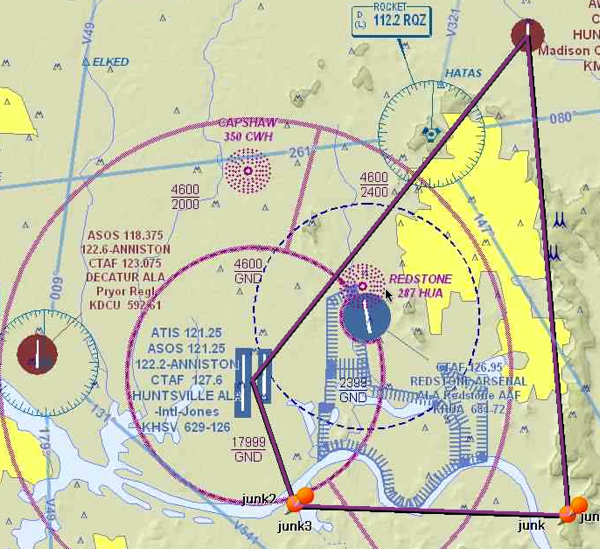
I immediately liked my new CFI: his name is also Paul, and he is also a former Marine (though, lest you think we were twins, he was a UAV pilot rather than a Cobra mechanic… oh yeah, and he’s younger and better-looking then I am too). We had a quick brief on the local area: our route of flight would be south from KMDQ, more or less following US 231 south. This would take us to the east of the restricted areas at Redstone Arsenal, both of which were live at the time of our flight. We would then turn west, roughly paralleling the Tennessee River, until we got near enough to Huntsville International to land. Here’s what our route of flight looked like (except that we didn’t actually have any waypoints named “junk”). The yellow shaded area represents what the FAA refers to as a congested area– normal folks would refer to it as “city” or “urban,” I guess.

LaunchBarScreenSnapz001

Right after takeoff, I called Huntsville Approach and got a transponder code so they could give us radar service and advisories. As we flew, I could see all the familiar landmarks I already knew, like the Von Braun Center, Memorial Parkway, and the Arsenal gates, just with a different perspective. One thing that was immediately evident is how green Alabama is at this time of year compared to California: as far as the eye can see there are fields and forests. Even the built-up areas have lots of green.

Our flight and approach to KHSV went well, though we were sequenced in and around a couple of commercial jets. When we arrived, I was greeted by the sight of a 12,000-foot runway. Bear in mind that I am used to landing at Palo Alto… which has a 2,400 foot runway. That’s right; each of KHSV’s two runways is five times longer than my normal runway. This might not seem like a problem, but it actually is: you judge your height above the runway in part with your peripheral vision. Longer runways tend to be wider, too– Huntsville’s runway is 150′ wide, compared to 50′ at Palo Alto. This was a real challenge; my first landing had way too much float in it. (On the other hand, if you’re gonna float, it’s nice to have 2+ miles of runway to do it on!) The next three were better; we then headed back to KMDQ, where I stuck a nice, squeaky landing.

Although the scenery was different (and that’s mostly what I was looking for), this was a useful refresher on operating in class C airspace, where the controllers largely tell you what to do and when to do it. Of course, as pilot in command, you have both the responsibility and the legal authority to deviate from ATC instructions as required for safety… but you may have to make a report to the FAA Administrator, or his designee, if you do. More on that another time…

Leave a comment

Filed under General Stuff

Solo flight, 1 Aug

I’ve been too busy to fly much lately; my two oldest sons came for separate vists for a week each, during which time I didn’t get to fly. Now that my schedule is normalizing a bit, though, I was eager to get up and knock some of the rust off. I had my usual ride, 191TG, booked for a couple of hours Thursday afternoon. The weather was good: about 30°C, wind 340° at 10kts, and clear skies. I took off, did a right Dumbarton departure, and went to the practice area to work on my steep turns: not necessarily because my performance is bad, but because they’re fun, and I figured I could use the practice. My turns went well; in fact, I learned that if you’re maintaining the correct altitude, you’ll feel a bump as you end your turn because you’re colliding with the wake of turbulent air left by your turn. This is exactly identical in theory, and nearly so in sensation, to what happens when you steer back over the wake generated in a motorboat.

After a few terms, I headed back to Palo Alto to shoot a few landings: a total of six, all of which were very good. As I made my way around the pattern, I reflected on something that is often invisible to non-pilots: the relationship between pitch, power, airspeed, and altitude. I’ve mentioned before that in the pattern, you control airspeed with the amount of upward or downward pitch attitude, and you control altitude with the amount of power you add or remove. For example, suppose that as you approach the traffic pattern, you’re traveling at 100 knots and are at 1500′. Pattern altitude is 800′. The natural instinct of most people would be to pull back on the throttle to slow down, then to nose the aircraft down to lose altitude. Instead, you reduce power and pitch up, adjusting both the amount of power and the amount of pitch to hit your desired speed and altitude.

Even after you get used to this counterintuitive process, there’s something else to remember: these four aspects are all interrelated! Suppose you want to change your speed but hold your altitude, so you pitch up. As the aircraft slows, it will also tend to lose altitude, so you may have to adjust the amount of power you have in to maintain the altitude you want. Most aircraft have elevator trim that can be adjusted to keep the airplane’s pitch attitude level, so the pattern phase becomes a dance of adjusting pitch (both manually and with trim) and power as necessary to get the desired airspeed and altitude. Meanwhile, of course, you must maintain the correct position relative to the runway, adjust for any wind (because remember, as your direction of flight changes, the wind will push you in a different direction), watch for other aircraft, talk to the control tower, deploy the flaps… the list goes on. I finally feel like I am able to multitask effectively in the pattern.

I mentioned a few weeks ago that some knucklehead snatched my headset, and this was my first flight with its replacement. I’d seen the ads for Clarity’s Clarity Aloft headset, a skeletal passive-noise reduction (PNR) headset that uses foam ear tips to seal the ear canal against noise. As it happens, I have some similar earphones that work very well, so I was set to get a Clarity Aloft. Then I took the time to peruse the reviews at Aviation Consumer and found that they liked the Quiet Technologies Halo a bit better, plus it was less expensive– so I ordered one. This was my first flight with it, and it performed very well. It was much lighter and more comfortable than my Pilot Communications Liberty. The sound quality was excellent, as was the noise reduction, and I didn’t have any of the problems with mic placement that I did with the Liberty.

 After my last landing, I put the plane away, went home, and packed my stuff, including the Halo and my logbook, for a trip to Huntsville. More on that later…

Leave a comment

Filed under aviation

Airwork, 19 May

Any time a pilot talks about “airwork,” what they mean is what normal people think of as “flying.” Takeoffs and landings? No; instead, airwork is the performance of the basic maneuvers: climbs, descents, and turns. Saturday I had my first solo flight in the Bay Area; I’d had several in Pensacola, but the environment, airspace, terrain, and weather are different enough here that this felt a little like starting over.

I got to the airport, preflighted my airplane, and then had to wait for a few other airplanes in front of me to get out of the way; in total I spent about half an hour just doing those two things. The weather was a little iffy. Afternoons in Palo Alto tend to be somewhat windy. The runway I was using has a heading of 310°, and the wind was coming from 350° at 12 knots. That means that there was a 6.4 knot crosswind, and my solo privileges are limited to less than a 7 knot crosswind. Luckily the wind didn’t pick up any! 

Once I was cleared for takeoff, I flew a right Dumbarton departure– that means I took off from runway 31 at Palo Alto, flew to the west end of the Dumbarton Bridge, and only then turned to the course I wanted. In this case, about 51° to take me out towards Sunol and the practice area we use. Different airports have different departure procedures. For example, in Pensacola you fly the “Skip departure”, named after Skip Giles (the chief pilot at Pensacola Aviation), which takes you between the toll plaza and the cluster of antennae at Midway, thence to the beach. As I mentioned in my first journal, there are actually two bridges: the one on the left (which is to the north) is the auto bridge, while the rightmost bridge is the train bridge. On arrival, you fly to the train bridge; on departure, to the auto bridge. The departure end of KPAO’s runway 31 is just off the bottom-right corner of this picture. 

pick the correct bridge or face the wrath of air traffic control

Anyway, once I got to the practice area, I spent my time working on two different maneuvers. First is what we call slow flight. That’s just what it sounds like: you slow the aircraft down to minimum controllable airspeed (about 40 knots in this particular airplane), controlling power to climb or descend and using pitch to maintain the desired slow speed. In this flight regime the controls must be handled very gently, as the slow speed and high angle of attack means that they’re not as effective as they are at lower attitudes and higher speeds. It takes a delicate touch to turn, climb, and descend in this configuration, which is why I was practicing it, duh.

The other thing I was working on are steep turns. Normal banked turns in an aircraft use between 10° and 30° of bank. Steep turns per the FAA’s definition use at least 45°. The sharper the bank, the more vertical lift is lost, so you have to apply enough back pressure on the control yoke to keep the aircraft from descending during the turn. The FAA standard is that you should be able to do a 360° turn at a 45° bank angle, rolling out plus or minus 10° and losing or gaining no more than 100′ of altitude. This is harder than it sounds, but I learned the key is to watch the angle at which the horizon meets the cowling or dashboard. If you apply enough control force to keep a constant site picture, then all it takes is an occasional glance at the heading indicator to know when you’re about to roll out again. My turns rapidly improved once I figured this out, although I find it easier to do them to the left than to the right. Something else to work on!

Then I headed from the practice area over to the airport at Hayward, where I also have solo privileges. (In addition to weather and crosswind limits, your flight instructor will allow you to fly into a defined set of airports, which in my case includes Hayward.) KHWD is interesting for a couple of reasons: it has two parallel runways, which means that you must be careful to land on the runway you’re assigned to and not the one next to it. (See this picture to see what I mean.) Another is that it’s right under the approach airspace to Oakland International, which means that when you’re in the Hayward traffic pattern there will often be 737s (or even larger aircraft) 1000′-1500′ above you. I found the airport with no problem, got clear for runway 28L, made a great approach, and then blew it by starting my flare too high. The result: a bouncy landing, probably my worst landing ever. 

I did, however, maintain airspeed control. This is critically important because if the airplane’s speed gets too slow, it enters an aerodynamic stall, which is not what you want to happen on approach. I’ve struggled a bit with this but nailed the approach at a steady 70 knots. The bounce was embarrassing but luckily no one at Hayward knows me– so don’t tell ’em it was me, OK?

After taxiing back, I took off again and flew back towards Palo Alto; the airplane was due back so I only had time to shoot two landings there, plus one go-around. One thing non-pilots sometimes don’t understand is that going around, a procedure in which you follow the “four Cs”, is a pretty normal procedure. You don’t try to salvage bad landings; if your approach speed, angle, or height is bad, or if the runway isn’t clear, just go around and try again. (What are the four Cs, you ask? Cram in power; climb to a safe altitude; communicate to the tower that you’re going around; and comply with whatever they tell you.) In this case, the tower ordered me to go around because the aircraft in front of me was taking too long. My two landings at Palo Alto were good, despite the crosswind, in part because my airspeed control was good, so I felt pretty good about them.

Key learnings from this flight:

  • Use the horizon, not the instruments, and steep turns get much, much easier to perform
  • Performing maneuvers at minimum controllable airspeed is demanding but fun. If you can do it precisely, it’s a good feeling.
  • Bouncing your aircraft is bad.
  • Controlling your airspeed on approach is good.
  • Solo flight is very rewarding.

I have solo time on Tuesday and Wednesday this week– expect more journals! I’ll be doing more steep turns, emergency procedures, and probably some navigation work.

1 Comment

Filed under aviation