Vertical constraints and the Avidyne IFD540

When you file and fly an IFR flight plan, you’ll have an assigned altitude for every segment of the flight. You’re not permitted to deviate from this altitude without permission (except in emergencies); the altitude obviously has to be high enough so that you don’t hit anything on the ground, and it may be capped on top to keep you away from other aircraft, clear of military training airspace, and so on.  (There are several different varieties of minimum altitude that you might be assigned on a route, but that’s a distinction for another day.)

These altitude assignments can often be expressed as constraints. ATC might, for instance, say “N32706, descend pilot’s discretion 4000”, which means I’m cleared to go from whatever altitude I’m at down to 4000′ at whatever rate of descent I want. I’m still not cleared to descend below 4000′ though. And of course, there are lots of constraints on instrument approaches, where we’re commonly told to maintain an altitude between an upper and lower limit at different segments of approach.

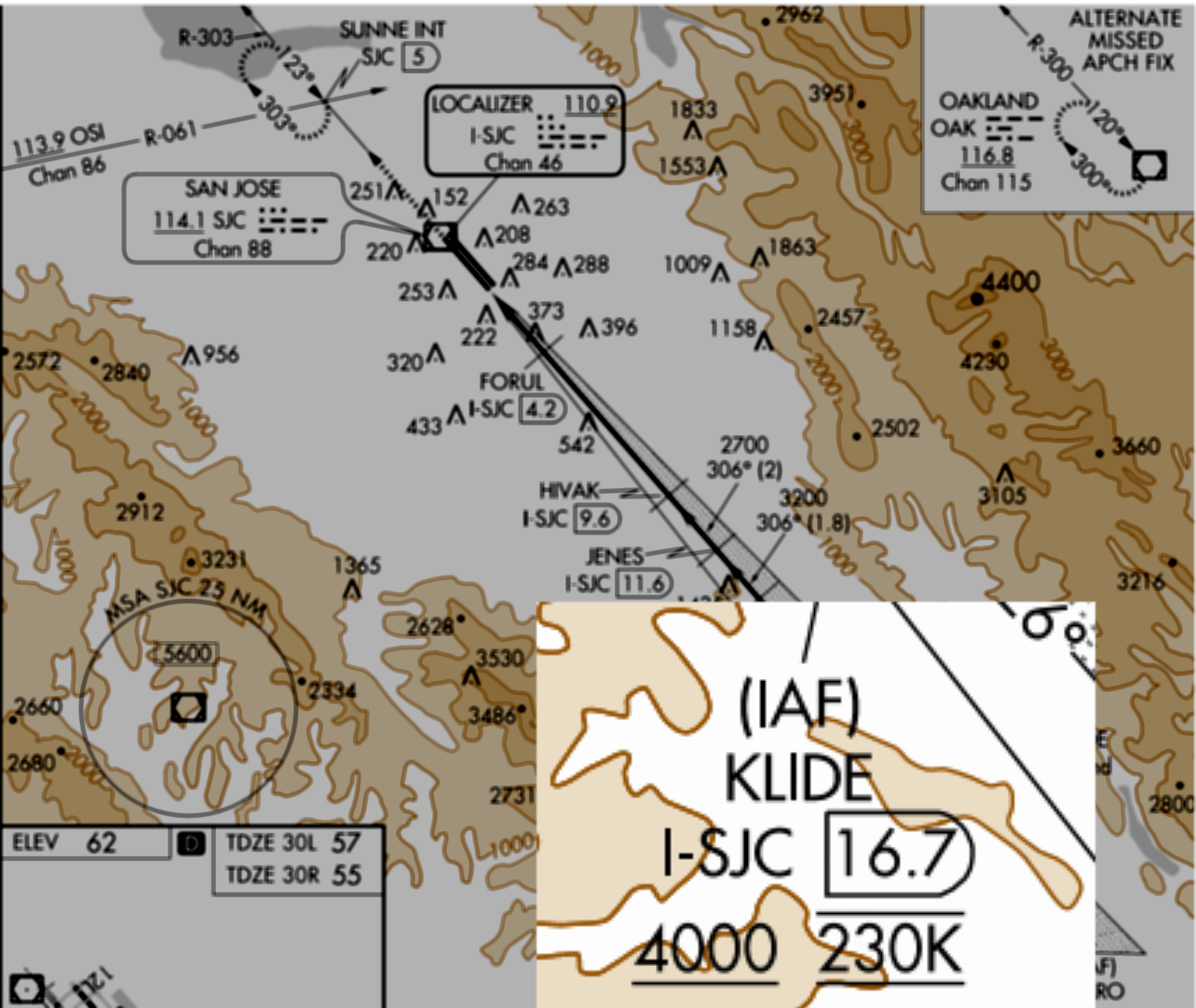
It’s common for air traffic control to give pilots crossing restrictions, too. For example, airplanes flying into Norcal Approach’s airspace will often be told to cross KLIDE “at or above 12000”. If they’re flying the ILS 30L (an excerpt of which is shown below), they’ll be told to “cross KLIDE at or above 4000, reduce speed to 230 knots”. You can tell that there’s a restriction there because of the horizontal line under the altitude– an underline means “at or above”, an overline means “at or below,” and both together mean “at”.

Those horizontal lines are important

Those horizontal lines are important

An example I’m personally familiar with is that, when you fly into McCollum Field in north Atlanta from the west, the Atlanta Center controller will typically tell you to cross 35mi west of the airport at a specific altitude. In days of old, I’d just do this manually, which required a bit of math– “a standard 500 foot/minute descent at X airspeed means I need to start descending at Y minutes.” The IFD540 makes crossing restrictions really simple to track, but the interface for doing so is a little weird.

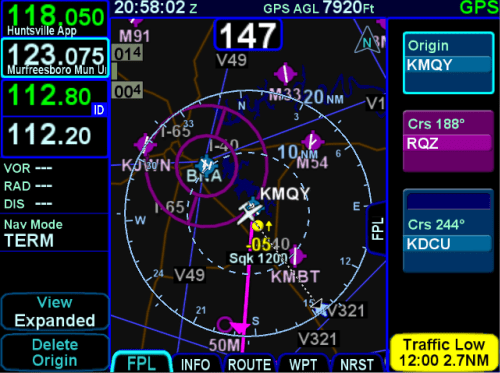
To specify a vertical constraint, you use the FMS page. The problem is that, by default, the FMS page shows the flight plan as a strip along the right edge of the screen, and you can’t see the fields necessary to enter the constraint. The example below (taken from Avidyne’s excellent Windows simulator) shows what I mean– you can see the flight plan in FMS view but, unless you know this One Simple Trick, you can’t put in crossing restrictions.

vc-sim.png

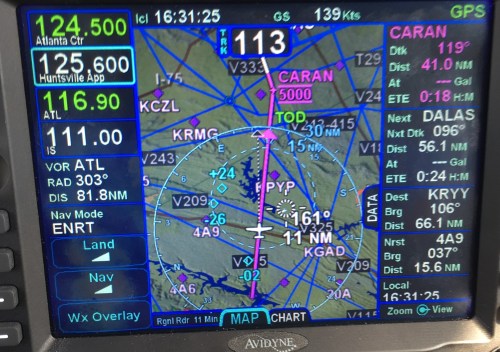
Tapping the “FPL” tab on the left edge of the flight plan data strip changes your view, though. In the expanded view, it’s easy to specify the distance and altitude you want, as you can see in this picture from the actual IFD540. ATC told me “cross CARAN at 5000” and so it was a trivial matter to specify a crossing distance of 0nm and an altitude of 5000 feet. I could just as easily have handled an instruction like “descend to 5000 5nm west of CARAN.”

vc-airplane.jpg

As soon as I put the restriction in place and switched back to the map view, I could see a new “TOD” (top of descent) circle showing me where to start my descent. In addition, notice that CARAN is now bracketed by lines above and below its name– that’s because I specified I wanted to cross at 5000. If I had said “at or above” or “at or below,” the symbology would reflect that.

vc-tod.jpg

There’s also an audio alert which sounds just like a doorbell– so If you start a 500fpm descent when you hear the chime at the indicated TOD, you’ll arrive at the specified crossing point at the right altitude. This is a very handy feature, especially since you can set any combination of distance and altitude. Want to make sure you arrive right at pattern altitude when coming into an unfamiliar airport? Set a restriction for, say, 2nm on the approach side of the airport for pattern altitude and voila!

Leave a comment

Filed under aviation

Office 365 Exposed episode 6, from Las Vegas

Fresh on the episode we did at Microsoft Ignite this year, Tony and I thought it would be fun to do another short episode while we’re both in Vegas for IT/DevConnections… so we did. Topics include a spiffy new profanity filter (for Office 365 Groups, not Tony and me), the triumphant debut of Focused Inbox on desktop Outlook, and a touching closing segment where Tony mourns the loss of a favored gadget.

Leave a comment

Filed under Office 365, Podcasts

Training Tuesday: training with heart rate variability (HRV)

[For some reason this scheduled post didn’t post on Tuesday so I’m manually reposting it day late. Selah.]

Normally, I’m not a big podcast listener because I (thankfully) don’t spend much time in the car, and I find having people talking in the background while I work distracting. However, working on the Office 365 Exposed podcast with Tony has helped me see that lots of people do like them, and that I might be missing out, so I’ve expanded my listening a bit. When I found that my coaching team at Complete Human Performance had a podcast, I subscribed. The most recent episode was with Dr. Mike T. Nelson, and he was discussing something called HRV (heart rate variability). It was a fascinating topic so I want to try to summarize what I (think I) learned:

  • HRV refers to the variance in the amount of time between heartbeats (not your heart rate itself)
  • It’s calculated based on heart rate measurements, from an EKG or other methods.
  • The most commonly used scale gives you a rating from 1-100.
  • You want your HRV to be high. A low HRV is generally a bad sign, and may in some cases even indicate impending heart problems.
  • The trend of your HRV is a useful indicator of fatigue, stress, and so on.
  • People who have low HRV values after heart surgery tend to have worse outcomes

Tracking HRV is especially useful for endurance athletes because it gives you a data point showing the total amount of stress that your cardiovascular system has been under. Mike Nelson, in the podcast, said that you should think of HRV as reflecting the cost of everything you do. Exercise, diet, rest, job stress, and personal stress all add to this cost. Factoring all those in, and measuring your HRV daily, you should be able to intensify or ease your workouts to keep your day-to-day HRV in the desired range.

“You can measure HRV with an app,” he said, so I did– I paused the podcast, grabbed the iThlete app, read its instructions, and took a reading. Mid-50s.

Nelson went on to outline a number of strategies for adjusting training to take HRV data into account– you want to get the most effective training possible, while still not having a long-term negative impact on HRV. I’m not doing that yet because you need a solid baseline of data to see what your “normal” HRV is. Mine looks like it’s hovering around 60ish. I don’t know enough to know if that’s good, bad, or what considering my age and physical condition, and I don’t yet understand the relationship (if any) between my resting heart rate and my HRV. I’ll keep an eye on it for another month or so and then start considering, in consultation with my coaches, what, if anything, I should use it for besides another nerdy data point.


4 Comments

Filed under Fitness

Creating Exchange dynamic distribution groups with custom attributes

You learn something new every day… I guess that means I’m ahead of schedule for the day.

A coworker asked if there was a way to use PowerShell to create a dynamic distribution group using one of the AD customAttributeX values. I didn’t know the answer offhand (since I create new distribution groups about every 5 years), but a little binging turned up the documentation for New-DynamicDistributionGroup. Turns out that the ConditionalCustomAttributeN parameters will do what he wanted:

New-DynamicDistributionGroup -IncludedRecipients mailContacts -ConditionalCustomAttribute6 "PeopleToInclude"

It turns out that wasn’t what he really wanted– he wanted to create a dynamic DG to include objects where the custom attribute value was not set to a particular value. The ConditionalXXX switches can’t do that, so he had to use a RecipientFilter instead:

New-DynamicDistributionGroup -IncludedRecipients mailContacts -RecipientFilter {ExtensionCustomAttribute6 -ne "PeopleToExclude"}...

1 Comment

Filed under Office 365, UC&C

Microsoft Exchange engineering and cloud-scale

The Exchange team (or at least Perry Clarke, its fearless leader) has been known to describe Exchange Online as “the gateway drug to the cloud.” But how did that come to pass?

This week at Ignite, I was lucky enough to have dinner with some folks from the Exchange product team and a very, very large customer where we discussed the various ways in which Exchange engineering has blazed a trail the rest of Microsoft’s server products have eventually followed. After a bracing Twitter discussion this afternoon with @swiftonsecurity and some of her other followers, I thought it would be fun to put together a partial list of some of the things we discussed to illustrate how the Exchange team has built a stairway to heaven, or an elevator to the cloud, or something like that.

Let’s start with PowerShell. Love it or hate it, it is here, so we all have to deal with it. In 2007, the idea that Exchange would be built on PS was both revolutionary and, to many, revolting, but it allowed Microsoft to do several important things (not all of which shipped in Exchange 2007, but all of which are critical to cloud operations):

  • Greatly improve testability, both for the developers themselves but also for administrators, who now got a suite of protocol and endpoint-related tests they could run as part of troubleshooting– critically important when you have to troubleshoot in a global network of data centers hosting tens of millions of mailboxes
  • Fully enable role-based access control, also critical for cloud deployments where customers want to control who can do what with their data
  • Finally decouple the presentation layer of the UI (EMC, EAC, etc) from business logic
  • Massively improve the tools for scripting, including enabling very large-scale bulk operations– an obvious requirement for a cloud-scale service

Requiring PowerShell was a bold move by the Exchange team but one which has both paid off hugely and one that’s been echoed by the Windows, SharePoint, SQL Server and Skype teams, all of whom depend on it for managing their own cloud services. (See also: the Microsoft Graph APIs.)

Then there’s storage performance. In ancient days, getting scale from Exchange pretty much required the use of SANs due to Exchange’s IO requirements. Now, thanks to the IOPS diet imposed by Exchange engineering, it doesn’t. Tony does his usual excellent job of summarizing the actual reductions. Summary: Exchange 2016 requires roughly 96% fewer IOPS than Exchange 2003 did. There have been a ton of storage performance improvements in Exchange’s sister products (notably SQL) but those have their own stories that I’m not competent to tell. The relentless drive to cut IOPS requirements was one of the biggest enablers for Exchange Online, since controlling storage provisioning costs is critical for any type of scaled cloud service.

Of course, data protection is critical too. Exchange moved from having a single monolithic database to one with separate property and MIME databases (Exchange 2000) then to having software-based database replication with clustering (Exchange 2007) to shared-nothing, fully-replicated active/passive database replication (Exchange 2010 and later). Keeping multiple separate database copies (including lagged copies) enables all sorts of DR and HA scenarios that previously had required SANs. The ability to reliably use cheap JBOD disks, which thanks to Moore’s Law have embiggened nicely during Exchange’s lifetime, has been a key enabler for Exchange Online.

Then there’s a bunch of other architectural changes and improvements that are really only interesting to Exchange nerds. For the latest example, I present “read from passive,” but there’s also all the stuff covered by the Preferred Architecture.

Oh, I almost forgot: managed availability gives ExO a fair degree of self-healing, although its behavior sometimes surprises on-prem admins who see it do things on their behalf unexpectedly.

Oh, and let’s not forget the conversion of all the Exchange codebase to managed code– that was an important accelerator for the move to the cloud, as well as serving as a lighthouse for other product groups with code of similar vintage.

There are more examples, I’m sure, but these should get the point across– there’s been a steady stream of architectural changes in the nearly 20 years since Exchange 4.0 shipped that have led directly to the capability, power, and reliability of Exchange Online– which really has been the gateway drug for getting Microsoft’s customers to Office 365.


Leave a comment

Filed under UC&C

Flying Friday: the time I lost the keys

Recently Matt and I went on a jaunt back to Ohio. We flew from KDCU to 1G0, with a quick bathroom stop en route, and that went really well. Our visit with friends in Perrysburg was splendid, and I got to run the Boy Scout Half Marathon as a bonus. The plan was then to fly from 1G0 to Cleveland for the Cleveland National Air Show, departing Sunday morning for a noon show start, then to fly home. That all went really well, and we flew to and landed at Cuyahoga County Airport (KCGF), where the line crew at Cleveland Jet Center promptly and courteously got us parked and fueled. We went to the air show and had a great time watching the Blue Angels. (I got some great pictures that I’ll post on Flickr, eventually.) Thanks to the Cleveland Police Department, we had a long, hot walk to the nearest area where an Uber driver could pick us up, but soon enough we were back at the airport, whereupon I discovered that I had lost the key. It was on a keyfob, which I would have thought would render it unlosable, but no.

A quick visit with the mechanics at the FBO revealed that they had a box full of keys for other people’s airplanes. Little-known true aviation fact: there are relatively few different key patterns for light aircraft, so one airplane’s key can often be used to open the door or start the ignition of another airplane from the same manufacturer. With a little trial and error, we found a Piper key that would turn the ignition switch.. but I still needed to get a replacement made. On Sunday afternoon.

The FBO folks equipped me with a Cadillac SRX and Matt and I went in search of a hardware store. We found a nearby Ace Hardware, screeched into the parking lot 2 minutes before closing time, and walked out 3 minutes later with two replacement keys. Once back at the airport, I was delighted to find that they also turned the ignition switch, so we packed up, started up, and took off, only about an hour behind schedule. That was actually a good thing, as we got to enjoy a gloriously starry and clear night on our way home (with a stop at LEX for cookies and diet Coke).

Thanks to Cleveland Jet Center for helping us not be stranded!

(and yes, I now have a couple of spare keys stashed in strategic places… just in case.)

Leave a comment

Filed under aviation

Office 365 Exposed, episode 5

I hear you now: “Wait! You and Tony record new episodes quarterly! In California! Why are you posting a new episode already?”

Because Microsoft Ignite, that’s why! We were able to steal away to the very nicely equipped Podcast Center at Ignite to talk about some of the big announcements, rumors, and news around Office 365. (Thanks to Julian for the audio production btw.) Hear about changes to Office 365 groups, a new name for a controversial features, and what Atlanta has given the world.

Leave a comment

Filed under Office 365, Podcasts

Flying Friday: bird forecasts? Yep, it’s a thing

A couple years ago, I wrote a post about wildlife collisions at airports. (Spoiler: they happen and are just as hard on airplanes as they are on cars.)

While reviewing the mishap investigation report covering the crash of CAPT Jeff Kuss, I learned something I didn’t know: the USAF maintains a forecasting system to predict the hazards caused by birds. (The report makes for interesting reading because it’s so thorough. I will have more to say about it in another post.)

Read that first sentence again: you can get a bird forecast. Is this a great country, or what?

All joking aside, you have to look no further than Cactus 1549 (or, as you may know it, “The Miracle on the Hudson”) for proof of why birds and airplanes don’t mix. AHAS gives aviators a simple tool to check an airfield or flight route to see how likely it is to contain bird hazards. For example, if you go there, pick “Huntsville International” as the airport, and click the “AHAS Risk” button, you’ll get a nifty report showing what bird-attracting features are nearby (landfills, golf courses, bodies of water, and so on), as well as a historical list of bird strikes.

I’m not sure that I will be regularly checking AHAS before my routine flights but I suspect I will be checking it before I fly into unfamiliar areas. Those damn birds are sneaky, y’know. A fellow can’t be too careful.


Leave a comment

Filed under aviation

Office 365 Exposed, Episode 4

Another trip to California for Tony and me means another episode of Office 365 Exposed! This time, we talked about Microsoft Ignite, Office 365 Groups, why the Saints are my favorite football team, and a host of other topics. (OK, I admit it. We did not actually talk about the Saints. Maybe next episode. I did sneak in a plug for the College Football Hall of Fame though.)


Leave a comment

Filed under Office 365, Podcasts, UC&C

Training Tuesday: Rocketman 2016 Olympic race report (28-Aug-2016)

The fine folks at reddit’s /r/triathlon have started using the format below for race reports, so I thought I’d give it a try.

Race information

  • What? Rocketman
  • When? August 28, 2016
  • How far? Olympic

Goals

Goal Description Completed?
A < 3:15 No
B < 3:30 Yes
C PR bike, swim, or run Yes

BLUF

PR’d the bike and swim. Had a craptastic run. Beat my time on this course but didn’t get the Olympic PR I was hoping for. 3:23 overall.

Race strategy

My first season, I tried to relay this race and DNF’d due to a bike mechanical. Last year I straggled in at 3:30. Earlier this year I PR’d Renaissance Man at 3:17, so my goals were to PR again, or at least beat last year’s time, and to PR at least one of the events.

Pre-race

In the week leading up to the race, I had an unusually tiring business trip– I averaged 12+ hour workdays and had no juice left for training while on the road, so I wasn’t well rested (plus a big “screw you” to the hotel I always stay at for putting me on the noisy I-5-facing side of the hotel this trip). I rented a pair of Reynolds Strike race wheels from the gang at Blevins Bicycle to see how I liked them. Because of travel Thursday and epic thunderstorms Friday, I wasn’t able to ride them until Saturday, when I took them out for a 40-minute ride with Dana. It was supposed to be an easy Z2 cruise but it was more like a mid-Z3, and then to top it off we added a short brick. Probably not a great idea in retrospect, but I didn’t want to go into the race without having ridden the wheels at least once, and I didn’t think the brick would tire me out too much.

Race day prep

I packed everything into my car the night before and went to bed at a reasonable time, after having eaten sensibly and hydrated pretty much nonstop (I probably doubled my normal fluid intake on Friday and Saturday). I’d previously volunteered for body marking, but the RD told me he needed help with parking, so I got up at 0415 to get to Hobbs Island and start directing traffic. That went well, and I had plenty of time to get set up in transition, say hello to my friends, and see the athletes I’d been working with in Fleet Feet’s Tri201 Olympic tri coaching program. It was clear, 78 degrees, and about 80% humidity when I got to the venue before dawn– an omen of how the day’s weather would develop.

Swim

The Tennessee River is warm this time of year– I heard the race morning water temp was 85 degrees, which wouldn’t surprise me. I actually like river swims, so that didn’t bother me.

Because of the swim course layout, the race uses a wave start– you go down a slide (which is covered with carpet, so you don’t slide, you sort of scooch) into the water, assemble near the start mark, and then swim. I purposefully stayed near the back of my wave when getting in the water, both to minimize the amount of time I’d have to tread water at the start and because I didn’t want to get run over by all the faster swimmers behind me.

The first swimmers went into the water about 30min late because, for whatever reason, the buoys weren’t out on time. This was really strange because normally the RD and staff at Rocketman have everything down to a science (this is the 23rd year, after all) and stuff happens promptly when it’s supposed to. Turns out that this delay was important later.

The course is about 500y upstream, then 200y or so cross-current, then the remainder on a long diagonal back to a pier. Partially thanks to the current, I swam a 1:46/100 pace, which for me is stupid fast– but it wasn’t all current; I was working harder on this swim than usual and I felt it when I got out. Unfortunately, because of poor sighting technique, I swam an extra 400y, so my swim time was 35:xx. That was a PR, though, so I’ll take it.

A quick jog into T1 and I was out again on the bike in 2:xx. For this race, I wore a tri top into the water instead of putting on a bike jersey. Thanks to Dana for suggesting that– between that and the tri bucket she suggested I use, my transition in this race was half what it was at RenMan.

Bike

First: I committed what should be a USAT foul when exiting: I started my bike computer but forgot to hit the lap button on my watch, so now Garmin shows my t1 as having an average speed of 16.x mph. Oh well. You may remember I did the same thing at RenMan. Maybe next race I’ll remember.

The bike course is fairly flat L-shaped out-and-back, with a few rollers, but it’s all two-lane and mostly on a busy segment which isn’t closed for the race. At various points I got stuck behind a landscape truck, nearly wiped out by an asshole in an SUV (right in front of a parked sheriff’s deputy, who ran out into the road yelling, pulled the guy over, and ticketed him– thanks, MCSO!), and saw one each dead possum, skunk, and armadillo. The outbound leg on the long part of the L had a quartering headwind, which was fine; I was able to stay in aero most of the time, though I did have a few scary swerves when wind caught my wheels. I finished in 1:27, which was a PR, so yay me. As usual, when I was looking at my times after the race I thought “dang, I should have pushed harder on the bike.”

The run

I thought this was the worst 10K I’ve ever run (I was wrong, but more on that later). The run course is flat and has some shade, but not much: you run out and back along the river for about 2mi total (with an aid station at about 0.5/1.5mi), then take a shadeless leg through the marina, then onto a local greenway for the remaining distance. I couldn’t sustain any kind of run pace; it was more of a shamble, with frequent walk breaks. My arms and hands were tingling by about mile 3, and I was barely sweating, so I slowed way down and tried to drink as much as I could, knowing that there was no way I was going to PR the run or the race. Selah. I saw lots of other tough athletes suffering on the course, too, including many locals who I know are acclimated to typical temperatures– but thanks in part to the late start, it was 95 degrees when I crossed the finish line, and God only knows what the heat index was. Not a great time. (Turns out I was still faster than my time last year but it didn’t feel like it!)

The first aid station had cold towels, which felt awesome, but sadly most of the other aid stations had room-temperature water and Gatorade. I had brought a Headsweats visor, but sort of wished I had a hat. And some ice. And cooling sleeves, like my coach suggested. Some more sunscreen would have been nice too.

Post-race

The post-race expo at Rocketman is always fun, and I enjoyed catching up with my friends who’d raced. This year, the Renaissance Man and Rocketman RDs offered a challenge: complete both races and get a custom transition towel (I’ll try to post a picture later). Along with the excellent Rocketman visor and shirt, this completed my swag haul since I certainly didn’t podium. I visited for a while, then headed home for some Advil and a nap.

I can’t wait for next year! PR, here I come. Thanks to RD Mike Gerrity and his wife Debbie for their many years of making Rocketman such a great race for athletes!

1 Comment

Filed under Fitness

Flying Friday: smorgasboard

I’d be remiss if I didn’t post on National Aviation Day but I’ve been too busy to fly much lately. With luck I’ll get a few hours in this weekend though. Instead of a “real” article, enjoy this list of sentence fragments:

  • My cousin Steven, an aircraft mechanic, likes to point out that the Wright Brothers would have been grounded without Charlie Taylor. If you don’t know who he is, I strongly recommend reading McCullough’s biography of the brothers, which is superb in every way.
  • I’ve been playing with Seattle AvionicsFlyQ app. It definitely has some good points compared to ForeFlight; it will be hard to tell how it stacks up overall until I’ve used it more.
  • Michael Bauer just released a book on how to fly Avidyne’s IFD series of panel-mount GPS devices. It’s in my queue.
  • Want to fly left seat in heavy turbojet equipment? Maybe you should move to China.
  • The recent crash of a Piper Navajo in Tuscaloosa has fired up the speculation engine around these parts. I am glad that we have the NTSB, whose investigations are the undisputed gold standard for all sorts of transportation mishaps. I look forward to seeing the results of their investigation. Meanwhile, I’ll keep asking “what could I learn from that?”
  • Nflightcam still hasn’t sent the replacement audio adapter they promised me on July 8th.

Leave a comment

Filed under aviation

Flying Friday: O Canada! (KDCU-CYTZ and back)

Summary: fantastic trip with good weather; I enjoyed my first venture into Canadian airspace (which is operated and managed very similarly to US airspace, with a few procedural and vocabulary differences that perhaps will make for a good post later). Bishop Toronto City is a fantastic airport with lovely scenery; Toronto is worth another, more leisurely visit; and you should always pay careful attention to customs regulations.

When my boss told me that I needed to be at Microsoft’s Worldwide Partner Conference this year, I was excited, mostly because we were planning on demoing a cool new product to partners, but also because I hadn’t been to Toronto since a 7th-grade church choir trip. On that trip, we took Amtrak from New Orleans to Buffalo, an adventure in itself; this time I planned to fly.

I started by researching the requirements to fly into Canada. AOPA’s list covers it all. I ordered the required Customs & Border Protection sticker, and I already had the required FCC radio station license and a valid passport. I had a bit of a quandary when it came to navigation charts: the Jeppesen charts required for the IFD540 are quite expensive, but the 540 goes completely stupid north of the border without them. I decided instead to add Canada coverage in Foreflight, which would give me georeferenced charts and approach plates, plus airport and frequency information– but on my iPad, not on the panel. With that done, a week or so before the trip I started watching the forecast, checking fuel prices, etc. Because the convention was at the Metro Toronto Convention Centre (MTCC), the nearest airport was the extremely cool-looking Billy Bishop Toronto City Airport, which is on an island in Lake Ontario. (Fun fact: you must either use a submarine tunnel or a ferry to get between the airport and the mainland, where the taxis etc are.)

I’d planned to fly from Decatur to New Philadelphia, Ohio (Clever Field, whose airport ID is PHD.. lol) for fuel, then overfly Erie, PA, then cross the lakes and land just before sunset, with a planned departure about 3p local. I may have failed to mention that I was running an Olympic triathlon that morning, but luckily I hit the airport on time and got en route as planned. Unfortunately, over Kentucky I developed a problem, or, rather, the airplane did: the oil filler door on the engine cowling popped open. It’s  hinged at the front (towards the propeller) so the slipstream was keeping it from opening fully, but it was flapping in the breeze and that made me nervous. I diverted to Somerset (KSME), latched it, and took off– only to have it pop open again.

After landing again, I discovered the problem: the spring that holds the latch button in place no longer generated enough force to keep the door latched. I borrowed some safety wire and pliers from the FBO, wired the door shut, and took off again– but that cost me some time I couldn’t afford to lose.

Once airborne again, I took a close look at the IFD540 to see what my fuel state looked like. The outer green ring represents the maximum range at the current fuel burn, while the inner dashed green circle shows range with the FAA-required reserve. Since my planned fuel stop was comfortably within the reserve ring, I knew I’d have enough fuel to get there or to Erie if needed– very comforting. The range ring is one of my favorite features in the IFD540 because it greatly reduces guesswork: either you have enough fuel, given the current conditions of wind and fuel burn, or you don’t, and this makes it easy to see which.

The fuel range ring is your friend

The fuel range ring is your friend

I landed as planned at KPHD, fueled up, and quickly called Porter, the FBO at Toronto City, to verify what time they closed. “10:30pm” was the answer, so I figured that would leave me enough time to get there just before they closed. This pleasant fantasy remained in my mind, with accompanying scenery…

…until about 9:50pm, when I was overflying the outskirts of Erie with about an hour to go. The city lights were gorgeous, there was a quarter moon, and I could see the dark lake water ahead when I called Porter again to advise my new arrival time of 1115p. (Thanks to the Bluetooth mode of the AMX240 audio panel, I can make in flight calls on my cell phone, provided I have cell service.) Their reply, paraphrased: no thanks, customs won’t allow arrivals after 11pm. I called Erie Approach, got vectors to the airport, landed, and headed for the local Comfort Inn.

After a decent night’s sleep, I fired up the engine and headed north. I’d filed for direct CYTZ, and that’s what I got. Before going to bed, I’d updated both my eAPIS and CANPASS border crossing permissions– the former signaling my departure from the US and the latter requesting permission to cross into Canada. More on that later.

Sunrise + water = awesome

Sun + water = awesome

The first leg of the flight was uneventful, until I wanted to go direct LINNG at ATC’s instructions. The IFD540 didn’t have that waypoint, so I looked it up in Foreflight. That went fine– it was listed with normal degrees/minutes/seconds latitude/longitude, so I plugged it in as a user waypoint, then added the airport’s lat/long and created a route. I did notice one discrepancy: Foreflight defaults to decimal notation, which the IFD540 doesn’t accept. (Since the Nav Canada plate showed the notation I could use, I just went with it, but this will become important later.) The rest of the flight was flawless and beautiful– for example, check out this picture as I overflew the Long Point wildlife area.

DSC_3505

Long Point National Wildlife Area

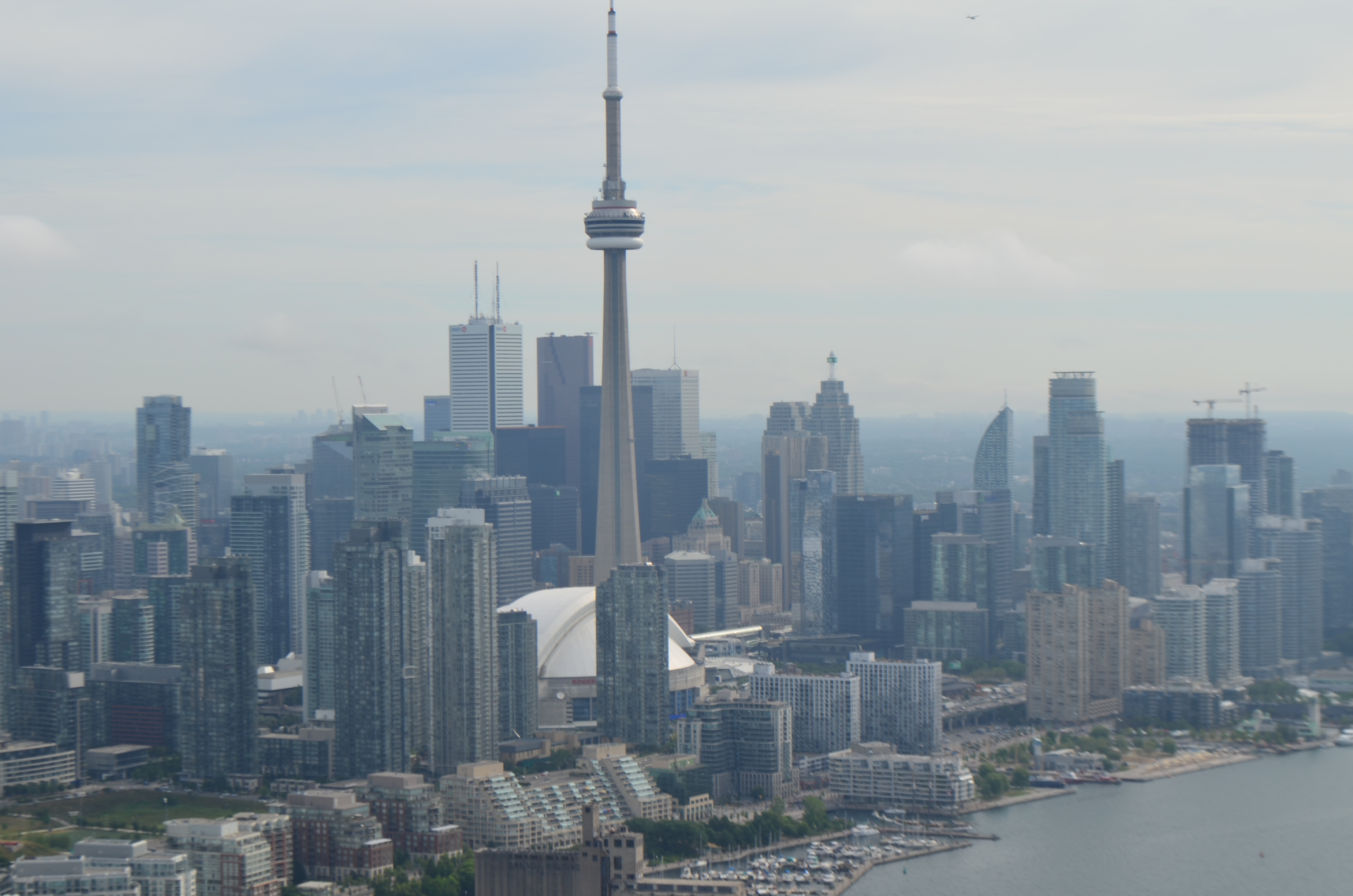
The weather was flawless, so I was expecting the visual approach to CYTZ, and sure enough, that’s what I was assigned. There was a significant volume of traffic going into the airport, as befits its status as Porter’s main hub, so I got vectored around a bit between a series of DHC-8s. This eventually led to a go-around for spacing, as the controller wasn’t able to slow the following DHC-8 down enough to keep me from becoming a hood ornament. The good news is that I was able to get some fantastic pictures of the Toronto skyline:

Beautiful Toronto

Beautiful Toronto

More beautiful Toronto

More beautiful Toronto

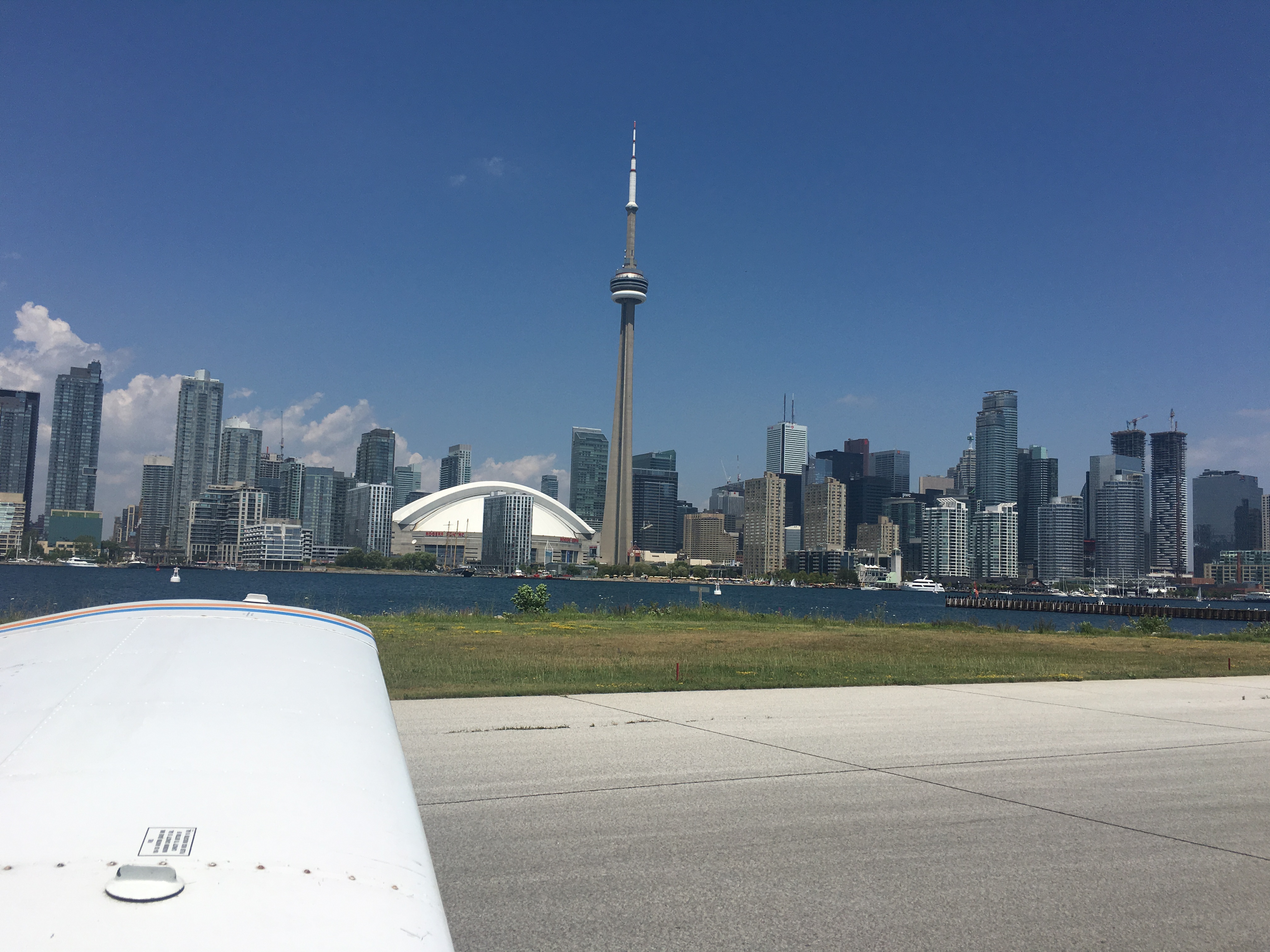
I made a great landing, taxied in to Porter, and called the CANPASS number. After a brief wait, they gave me a reference number (which I duly wrote down) and I was free to exit the airplane and go about my business. So I did.

Here’s where I’d describe all the other stuff I did in Toronto at WPC16, but since this is a Flying Friday post, let’s cut to the flight home… well, OK, maybe one picture first, this one looking towards the airport from the observation deck of the CN Tower.

CYTZ and the National Yacht Club

CYTZ and the National Yacht Club

I’d planned for a 1330 departure on Wednesday, and I arrived right on schedule, but hungry. I had filed CYTZ-KCAK, with a plan to continue on to Jamestown, Kentucky (K24) for fuel, then home. Since I didn’t have any Canadian cash, I skipped buying food at the airport, reasoning that I could eat when I stopped for customers in Akron, Ohio. I picked up my clearance and found a bit of an unpleasant surprise: I was given the OAKVL.1 departure, which referenced the OAKVL intersection, whose lat/long I couldn’t put into the IFD because it was only shown in decimal notation. Since I knew its approximate location and the heading to fly to get there, and because I had Foreflight plates showing me obstacles and terrain, this wasn’t a big deal. I looked at the departure plate but it didn’t give any coordinates at all for OAKVL, so I manually created a waypoint and off I went.

(Brief digression: in the US, waypoints that are used as part of a standard instrument departure (SID) procedure are supposed to be listed on the SID chart. In this case, OAKVL was shown, but its coordinates weren’t. I later learned that the Canada Flight Supplement (CFS) manual has a list of all the enroute waypoints and their coordinates, but not waypoints that are only used for departure procedures. I would have needed to look at the “OAKVL ONE DEP (OAKVL1) DEPARTURE ROUTING” chart. Unlike US charts, in Canada the departure routing is a separate page that’s not included as part of the SID chart. I also learned, later, that Foreflight can toggle its display format (look at More > Settings Units > Time)  to match what the IFD can accept, which would have solved my problem.)

What I did while waiting for my IFR clearance

What I did while waiting for my IFR clearance

In any event, I found OAKVL and was cleared to continue on to Akron/Canton, my planned US port of entry. I had filled out an eAPIS manifest, but I didn’t call Customs and Border Protection (CBP) to advise them of my arrival time. As a result, when I landed at CAK, ground instructed me to taxi to the “penalty box” in front of customs, but no one was there, and it took a few minutes to find an agent. When he got there, I had a brief but thorough customs inspection, during which I learned that I’d made a serious error: you must call US CBP at the port of entry you plan to use, in advance, and advise them of your ETA. 

Somehow I missed that in the AOPA checklist. I mistakenly thought that filing an IFR flight plan and filing an eAPIS manifest was sufficient, but no. The agent who cleared me in was firm on that point and cited me. Now I have to wait to see if they assess a fine for the infraction– not my favorite. I had joked with friends that I’d have about 800lbs of usable weight to bring back stuff from Canada– suggestions included Cuban cigars and Timbits. Thankfully I resisted the temptation.

Anyway, after I sweated my way out of CBP, I refueled and bought a soda at the FBO, but their snack machine was out of order. “No problem,” I thought. “I’ll eat when I stop at Jamestown.” I waited for this guy to arrive and clear…

Hold short for landing traffic

Hold short for landing traffic

…then took off, found a protein bar in my flight bag to tide me over, and off I went. When I arrived at Jamestown, I was crushed to find only a single empty, dusty vending machine with nothing edible nearby (except maybe some dead bugs). I fueled the plane, took off, and let the reassuring noise of the big IO540 up front drown out my stomach’s complaints. After an uneventful flight, I landed at home base, transferred all my junk to the car, went home, and slayed an entire Domino’s pizza while catching up on Game of Thrones— a good ending to a long but fruitful day.


2 Comments

Filed under aviation, Travel

nFlightCam vs Squawk Shoppe cockpit audio adapters

First I bought this adapter from nFlightCam. It didn’t work properly— my phone didn’t recognize that it had a mic plugged in so all I got was loud propeller noise. After testing it, I sent three mails to nFlightcam customer support (since they don’t have a phone number) and got no response. 

Then I ordered this adapter from Squawk Shoppe. Immediately after placing an order, they offered to connect me with their Facebook bot for order status, which worked flawlessly. I got the adapter when promised and it worked perfectly.

Then, just before a cross-country plane trip, nFlightCam answered my support email and offered to send me a replacement. That was 13 days ago and, you guessed it, no replacement has arrived.

Executive summary: don’t buy anything from nFlightcam; despite their heavy advertising, their customer support is slow and unresponsive and (at least for me) their build quality suspect. I see from reddit that other users have been happy with their products so YMMV.

Leave a comment

Filed under aviation, FAIL

Renaissance Man 2016 Olympic triathlon (July 10, 2016)

Last year, I ran my first Olympic-distance race. Although I kept it mostly to myself, I was really disappointed in my performance. I had a goal to finish the race in 3:15 and straggled in at 3:39. This year, I was out for redemption.

First, a good laugh:

renman-overall

(If you don’t know why this is funny, you might not be a triathlete, but I’ll explain later.)

Pre-race

Saturday I packed all my trash. I am a firm believer in “nothing new on race day,” but this year Dana convinced me to try an optimization: a triathlon bucket. She bought me a simple orange Home Depot bucket to use as a stool, and I resolved to give it a try in hopes that it would speed my transition times a bit by helping me not fall over. For nutrition, I packed several bags of Bonk Breakers, premixed some Mercury, and made a Sufferlandrian pain shake (1 scoop Karbolyn, 2 scoops Optimum Nutrition vanilla whey), stuffed my bike into the back of the Soul (it barely fit), and tried to get to sleep early. Too bad Matt and Tom woke me up a total of 3 times between 1030p and 430a. I got up on time, got my stuff together (sorry, no picture this time), and headed out to Florence under about a 12000′ overcast with occasional spotty drizzle.

Once I got to the venue, I got everything staged in transition, got my timing chip, and so on. I hadn’t forgotten anything, for once, so setup was smooth and I had time to chat with some of the many other Huntsvillians who were there. I also got in a short warmup swim.

The swim

renman-swimThe swim went very well except for my perennial sighting malpractice.. and that I forgot to start my watch when I went into the water, so it’s probably 25y or so short. The swim used a rolling start, with predicted swim times governing order of entry. I was #160. At about #125, one of the buoys came unmoored and had to be chased down by a kayaker, but it was in place before I passed it so I can’t blame my course line on that. (The zigzag just under the “T” in “Tennessee River” is a GPS glitch, luckily). I got out of the water, went into T1, and did my business.

T1

Obviously I shouldn’t have had a 6+ mph average in T1. I was concentrating on a smooth toes-to-head flow of gearing up: socks, bike shoes, HR strap, jersey, helmet, glasses. I forgot to include “press the lap button” in my flow so it didn’t get done until I was on the way out.

Bike

I love this bike course. It has several long straights that reward steady cadence, which I am slowly learning to hold. Unfortunately, I dropped my chain on one of those straights and that cost me 5 minutes or so. I also had an unplanned stop to try to get my power meter back online– it was working fine on my shakedown ride Saturday but wouldn’t send any data race morning, so I don’t have cadence or power data. I’m not sure why the bike and T2 times in the picture above are so jacked up, because I didn’t restart or stop the watch (just my ELEMNT bike computer). Thanks, Garmin. I ate some Bonk Breakers and drank nearly two full bottles of Mercury on the ride, which was plenty. Overall the ride was overcast and cool-ish; I had maybe 20 minutes of partial sun and 30 of drizzle.

T2

T2 was blazing fast for me. Belt, snack, running shoes, hat, and boom, I was off. The run course starts off uphill, goes through the UNA campus (so I got to see the famous lions), travels through downtown, and then hits a mostly-downhill course through some pretty, treed neighborhoods for the back half. I was able to hold a fairly steady pace because it wasn’t diabolically hot– in fact, it rained steadily for almost the entire race. Thankfully I had a hat to keep the water off my glasses, since I HATE running with water spots on my lenses. I was completely soaked by the time I made it back to the finish line.

Bottom line

I finished in 3:17:15:

  • 38:22 on the swim
  • 3:13 in T1
  • 1:34:33 on the bike
  • 2:49 in T2
  • 58:28 on the run

That’s a whopping 22 minutes faster than last year, and, had I not dropped my bike chain, I’d’ve come in under 3:15. For me, that’s a stellar time. If I can get my sighting under control and build a bit more power on the bike, I can see myself getting under 3:00 late this season– I think I can pick up 5 min on the swim, a minute each in T1 and T2, at least 2min on the run, and 5+ min on the bike. Onwards!


3 Comments

Filed under Fitness

Microsoft releases updated Office 365 Visio stencil

Yay! Microsoft has updated their downloadable Visio stencil set for Office 365 to include the 2016 versions of the application icons, plus some other visual improvements. Now your Visio diagrams can have that fresh 2016 feel. (Thanks to Samantha Robertson, Dan Fraser, and Tony Smith of Microsoft for making this happen.)

Leave a comment

Filed under UC&C