I am super excited to be back in Orlando. Well, OK; not really. I am excited to be at the return of the Microsoft Exchange Conference, though I certainly wish it were being held in another city. The hotel so far has been quite nice; it is huge, very nicely appointed, and features custom MEC-themed room keys (though the in-room Internet has been a bit flaky; not at all uncommon I arrived too late to make the welcome reception (or registration), and as I am still finalizing my slides I opted to call room service and hole up for the night tonight. However, judging by reports on Twitter it seems that the folks who attended the reception both liked it and scored lots of interesting swag.
Speaking of Twitter, it’s remarkable how the widespread use of social media systems like Twitter have changed the conference-going experience… for the better, in my opinion. Back in the day, it was a novelty when I live-blogged events. Now that’s common– I expect to see Twitter blowing up tomorrow as attendees dissect the keynotes in real time. It can be a bit distracting trying to follow along while watching the keynote at the same time, but it’s well worth the effort. Tomorrow MEC features two keynotes: one given by Michael Atalla, from the Exchange marketing team, and the other a technical keynote presented by Ross Smith IV. The rest of the day is dedicated to other Exchange 2013 sessions delivered by Microsoft folks.
My own sessions are on Tuesday and Wednesday:
E14.303, “10 Things You Didn’t Know About Exchange Unified Messaging,” is at 1:30p on Tuesday and again at 10:15a on Wednesday
E14.302, “Developing Mobile Apps with Exchange Web Services,” is at 10:45a on Tuesday and again at 8:30a on Wednesday
I’ll also be at the MVP Happy Hours on Monday, Tuesday, and Wednesday. I’m looking forward both to seeing familiar faces from the Exchange world and meeting new people… drop by and say hello!
[updated 22 Sept to add 3 new videos that Greg took during the course– they’re at the bottom of the post.]
If you’re going to carry a concealed weapon, you need to know how to do it responsibly and well.
Earlier this year, I got my Florida concealed-carry permit, and I’d been looking for a good training course to complement what I learned in the course I took in Pensacola. That course focused on legality: where are you legally allowed to carry, when and how much force are you legally allowed to use to stop a crime in progress, and so on. That’s critical knowledge, but it doesn’t cover the mechanics of concealed carry: how to carry, draw, and fire a weapon from concealment.
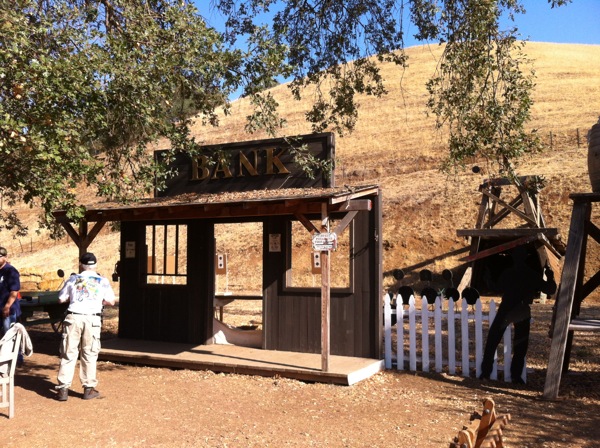
Because California has very few counties that will actually issue licenses to carry (LTCs), there have been very few classes on this topic in California, and most of them have been ad hoc. When I learned that the NRA’s new defensive pistol class was going to be offered by Total Commitment Firearms Training, I signed up. The course was scheduled for two days at Coyote Valley Sporting Clays, a beautiful facility (with excellent BBQ) where I’ve shot skeet and trap before. The course was to be held on their cowboy action range, which is elaborately decked out to resemble an Old West town, complete with hanging tree, saloon, and so on. This was festive but irrelevant, as all our shooting was done on three targets: the standard round target, the Transition II target used by federal law enforcement agencies, and the FBI “Q” target used by the FBI for handgun qualification.
the cowboy-action bank, which we didn’t use; our targets are visible through the right-hand window and door of the bank
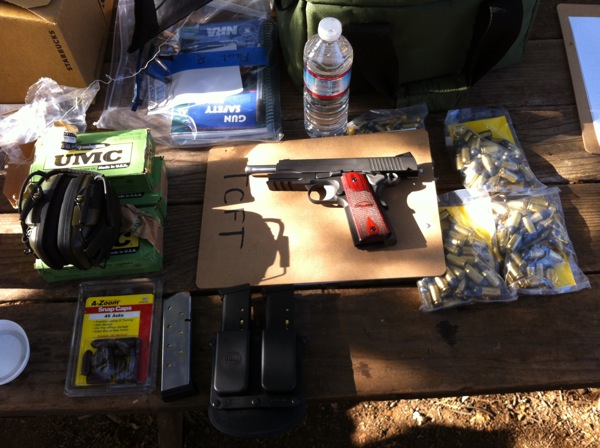
I arrived about 10 minutes before class started and met John Miller, the instructor, and his wife Dottie. They had all the course materials organized and ready: the course manual, a few handouts, and the NRA “Personal Protection Outside the Home” course book. This book is used as the text both for the course of the same name (which focuses mostly on theoretical aspects of armed self-defense) and this course. I laid out all my gear and got ready to go (disclaimer: this picture is actually from day 2). John recommended bringing 300 rounds of ammo; I shot 195 rounds the first day alone, so I needed to buy more. The course also requires 3 magazines, 6 dummy rounds, eye and ear protection, a magazine pouch, and a strong-side belt holster (not shown because I was wearing them.) Oh, and a pistol. I brought my SIG Sauer 1911, although it is probably too big for everyday carry. I wanted to get really comfortable with shooting it (and I did), but something smaller might be better for everyday carry. (The picture’s also a little misleading because at the start of the course, you’re required to keep your live ammo in your car until the first course of fire– that’s why the dummy rounds were required.)
not shown: BBQ, rattlesnakes, the swinging saloon-style doors in the bathroom
We were forewarned by the Coyote Valley folks that there was a good chance of seeing rattlesnakes– on average, about 1 per day shows up at the cowboy action range. Sadly, this was not to happen. Anyway, the first thing we did was talk for an hour or so about what we were going to be doing in the course, what was covered, what the range rules were, and so on. After that, we started practicing draws with and without cover– no shooting, just drawing and presenting the weapon. The NRA teaches that you draw the weapon, leaving it pointed down, then rotate it so your arm is parallel to the ground, then extend the arm and join with your weak-side hand. These are separate motions because you may only need to draw, but not point, your sidearm. John emphasized over and over that the way you practice and train will determine what you do in a real situation, so he was adamant that we practice drawing in the prescribed manner instead of just drawing and indexing, as I’d been taught in the Marines.
Side note: I suspect many of my hoplophobe friends (Martin, I’m looking at you, buddy) would be amazed at the emphasis the NRA’s curriculum puts on the defensive nature of this training. For example, the course guidebook advises you to avoid confrontations by not wearing clothing with offensive slogans or acting like a jerk (that’s my paraphrase, not their words.) This is a far cry from the guns-a-blazin’ stereotype that too many people have. OK, enough editorializing. On with the action.
For our first few courses of fire, we drew and fired, taking our time and concentrating on smooth execution of the mechanics. As the SEALs say, slow is smooth and smooth is fast– a very Zen way to express it, but nonetheless true. We then moved on to mixing dummy rounds into the magazine to simulate failures. Most of the people in the class (there were 8 total) had the same kind of rounds: the A-Zoom aluminum rounds. These proved to be devilishly hard to find on the ground; something with a brighter color probably would have worked better. Having the dummies mixed in with live ammo meant that we all quickly got proficient at clearing jams and misfires using the tap, rack, assess method: tap the magazine up to make sure it’s seated, rack the slide to clear the jam, and assess whether or not to continue firing.
During these drills, John would start us by yelling “THREAT!” or “GUN!” or “KNIFE!” from behind us, at which point we would draw from cover and fire at our targets. Then he got sneaky: he took a piece of tape with “THREAT” written on it, put it on his clipboard, and held it up behind us. This was a very effective way to teach us that you have to be aware of your surroundings, not just on what’s right in front of you. He followed this up by teaching us the “position of sul“, named after the Portuguese word for “south”. The purpose of this position is to get your pistol pointed down (thus “south”) but still in a position where you can very quickly pointed. (It’s also very useful for weapon retention, something we talked a good bit about.) The drills evolved so that we would draw, fire at a threat, go to sul, then reholster once we thought the threat was over with. We shot this way for a while, then it was time to wrap up day 1. (I didn’t mention the excellent BBQ lunch I had with fellow student Masood, but it was as good as ever. I recommend the pulled pork.)
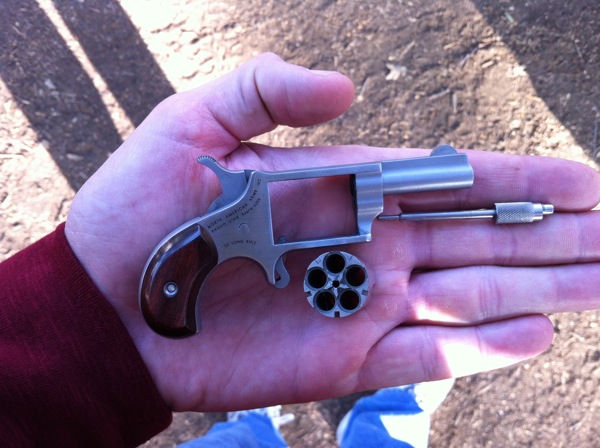
On day 2, we started with the NRA-mandated discussion of different holster styles and types. John and Dan, a fellow instructor, brought in a few different “pocket pistols,” including the one shown below– a 5-shot .22 revolver. That’s too small for me; a Glock 26 is about the right size. In fact, after seeing John’s Kimber compact 1911 I am thinking that a compact 1911 might make a perfect everyday carry gun for me given the size of my hands and my overall build.
On day 1, we’d shot the NRA-mandated course of fire, so on day 2 we shot mostly drills provided by John. We had a lively discussion about the range at which an attacker armed with a knife would begin to be dangerous. For example, suppose someone accosts you with a knife from 30′. That seems like a distance at which a close-in weapon like a knife wouldn’t be too threatening. We ran a drill known as the Tueller drill to test that. If you watch the video below, you’ll see Anne on the firing line with her weapon holstered. Greg is 21′ away from her, offset to the side so that he isn’t in her line of fire. When John shouts “go”, Greg’s supposed to run to Anne and attack her with a cardboard knife. Anne is supposed to draw and fire on her target. Who wins?
Not Anne, I’m afraid. She fired 3 rounds, 1 of which was a solid hit. Meanwhile, Greg was all over her. She would likely have been badly wounded or killed. So would Greg, of course. Thus we learn two things: firing accurately under stress is hard (Anne shot very well overall, so it wasn’t that she’s bad at it) and if someone is waving a knife at me from 21′ away I am going to consider him a serious threat and react accordingly.
Next up: the shoot/no-shoot drill. The idea here is simple: John set up an array of targets, some representing bad guys and some representing bystanders. On command, we’d turn, face the targets, and engage the bad guys. Then after each shooter, the next person would turn their back to the firing line and we’d rearrange the targets so that no one knew where everyone would be. This offered a number of great discussion topics. For example, suppose there are two bad guys: one nearby with a knife and one further away with a gun– what do you do? If you fire at a target that you can’t see behind, how do you know there isn’t an innocent bystander behind it? (Hint: you don’t, so you’d better not shoot unless absolutely necessary.) These drills require a great deal of concentration, as you might expect. In fact, the whole class was much more mentally demanding than I thought it would be; I left each day absolutely worn out.
For our next activity, we practiced shooting with our weak hand. I make a habit of always shooting a few mags worth of ammo with my left hand any time I’m at the range. It’s good practice, so I did well on this stage. That segued into drills to work on instinctive shooting, or shooting from the hip. From a distance of 1 yard, we had to draw and fire aimed shots into a target. This is much, much more challenging than it sounds like because you don’t really have room to extend your arm… nor would you have time to do so if you had to do it for real.
After another excellent lunch (more BBQ, of course), it was time to start shooting on the move. At first we moved either left or right only, then we advanced to moving left, right, and back in combination, then we did it all while using cover and concealment. Oh, and I forgot to mention: all along we had to be reloading as we shot: run out of ammo and you have to quickly drop your empty magazine on the ground, replace it with a fresh one, and let the slide go back into battery. John told us about a shooting in which four California Highway Patrol officers were killed at Newhall back in the 70s. At the time, the SOP for CHP was to pick up their brass on the range or after a shooting. All four officers were found with empty brass in their pockets– while they were gathering their brass after reloading their revolvers, their killers closed range and shot them. This was yet another opportunity for John to point out that the way you train will be the way you react under stress, so he had us dropping our mags and ignoring them until after the course of fire was over. I was well pleased with the Wilson Combat magazines I bought; they were smooth and functioned perfectly even with the cheap range ammo I bought from the Coyote Creek pro shop.
The last stage of the day was shooting for the qualification course. I don’t have the full course of fire handy, but it was seven or eight stages at various distances. For example, from 10 yards we had to fire five rounds, change magazines, and fire five more… in 12 seconds. This is plenty of time but it sure doesn’t seem that way when you’re shooting. To qualify, all 34 fired shots had to be in the “bottle” of the target. I qualified first try, but just barely.
I should note that one of the best aspects of the course was the interplay between the students. John emphasized within the first 10 minutes of the class that ego has no place in the study of pistol skills, and I appreciated the forthright and non-defensive way in which everyone gave, and accepted, constructive criticism. At the same time, we all recognized that this stuff is hard to master, so there was a good mix of encouragement and constructive criticism. I learned something from each and every one of my classmates: Anne had a superb smooth draw, Ross was probably the best at the rack, tap, assess drill, Greg’s accuracy was excellent, Masood was great at timing his shots, Alex was probably the fastest at reloading, Erik shot very well on the move, and Dan was probably the best all-around shooter. Their feedback helped me identify, and fix, many of my own weaknesses– so thanks for that, guys!
Overall, this was a superb course. John was an extremely effective instructor: personable, experienced, and direct. When he corrected my (many) mistakes, he did so calmly and clearly, without being discouraging or belittling. The drills he added to the basic course really added a lot of value. I feel much more comfortable with my skill level after taking the course; in fact I am thinking about taking it again with a different holster and my G26, just for the additional practice. I recommend it very highly.
After I originally posted this, Greg sent me 3 videos that he had taken. The first shows Alex running through the engage-3-bad-guys drill.
Next is Masood doing the move-and-fire drill.
Finally we have Erik doing the move-and-shoot drill.
Well, do ya?
That’s the question I am asking myself right now. I’m scheduled to fly to Huntsville Friday, on American. Only American is having a bit of an issue with their pilots.
See, the pilots are angry (not without justification) that AA has abrogated their contract and imposed a new one. Under the National Railway Labor Act, airline pilots can’t strike without jumping through a bunch of hoops. What they can do, however, is work strictly to rules. That means customer-friendly actions like calling in sick, slowing down taxi speeds, and refusing to leave the gate unless every single open maintenance item, including things like broken armrests, are fixed.
“We’re just following the rules,” say the pilots.
“Grrrrr,” say the passengers.
The result is that American’s on-time performance has cratered. Yesterday a whopping 54% of their flights out of SFO were delayed, with nearly 25% of the delays being longer than 45 minutes. A full third of American’s flights ex DFW were delayed longer than 45 minutes.
Having already done their worst to threaten the pilots, American’s options are limited. They’re proactively starting to cancel flights. This, of course, causes all sorts of problems for passengers… like me.
Here are my choices:
I can stick with my existing flight. It might or might not be delayed due to “maintenance” or other shenanigans. (Of course, since I’m flying out of SFO there’s a non-zero chance that it’d be delayed anyway.) The problem here: a pilot who calls in sick on the, say, BNA-DFW run might delay the airplane that’s supposed to come to SFO and get me, so even if the crews assigned to SFO are behaving themselves I might still get hosed.
I can switch to an earlier flight on American, thus giving myself some insurance in case shenanigans come to pass. I still might get hosed. That would mean I’d miss the planned flyover of Endeavour at Moffett Field, which would really aggravate me; it’s a once-in-a-lifetime deal. Plus I might still get delayed.
I can cancel my American ticket and buy a $400+ one-way ticket on Delta or United (there are no frequent flyer seats available except on the redeye). I wouldn’t get delayed, but I’d probably have to miss the flyover.
None of these are great choices, which is why I still haven’t decided what to do. I guess I’ll keep an eye on FlightStats and see what the cancellation / delay rate looks like tomorrow. The Wall Street Journal’s air travel columnist is telling people to book away from AA, and that’s what I’m leaning towards doing at this point even though it’s expensive; if I have to take a 12+ hour delay and miss that time with the boys, well, you can’t put a price on that.
Historical note: back in 1998, Northwest Airlines went on strike, stranding a member of my then-wife’s family at our house for two excruciating weeks. I swore to stop flying NWA, and I didn’t for nearly 7 years. Hose me, American, and you’ll be next.
Hmmm. iPhone 5, or Lumia 920? I am trying to decide simultaneously whether to upgrade and/or bite the bullet and move over to Verizon. I am unhappy with AT&T’s coverage both in the Bay Area and in Huntsville; I barely get signal in my house, which is no more than 2mi from an actual AT&T store. This decision is complicated by the fact that the boys’ phones are additional lines on my family plan, and they couldn’t use their existing phones if I move to VZW– plus I’d have to eat cancellation fees on some of the lines. Verizon’s shared data plan for 3 smartphones + 1 dumb phone is $240/month; compared to the $220 I pay now for the same 4 devices (5GB for me, 2GB for Tom, unlimited for David) this is not a compelling deal. StraightTalkis an option, except that they apparently cap data at 2GB/line/month. I might just move Dave and Tom to StraightTalk, then keep Matt’s feature phone and my existing AT&T line. Or not!
I mentioned in a meeting today that VMware’s new vSphere client is based on Flash. That mention was greeted with much incredulity, but it is, in fact, true.
The other day I saw a tweet that put it very succinctly: if Obama wins the election it will be because of his campaign and in spite of the economy; if Romney wins, it will be in spite of his campaign and because of the economy.
Recently I was talking to a recruiter for a large consulting company. She was pursuing Exchange talent for a number of consultancy positions, and I was interested in learning more. Our initial conversations went well enough that we got to the point of discussing compensation, like so:
Her: What’s your current compensation? Me: …
This is always a tricky question to handle for a number of reasons. The biggest, of course, is that it puts all the negotiating leverage in the hands of the recruiter. It’s a truism of salary negotiation that the first person to mention a concrete number gives away the advantage. While that may not always be true, in my experience it’s true often enough, and enough advantage is at stake, to treat it as gospel.
Suppose you’re an Exchange expert currently making $100,000/year. You don’t want to leave money on the table, but you also don’t want to blow your chance at the job by coming in too high. The recruiter asks you this question. What do you do?
There are lots of different ways to answer, ranging from the completely blunt (“I’m not going to tell you”) to the slightly coy (“It’s between $100,000 and $150,000”) to the seemingly helpful (“If you said $100,000, you’d be pretty close”) to the direct (“I currently make $100,000”).
My suggestion is to address this in one of two ways:
ignore the question and ask for a counterproposal (“What salary range are you offering for the position?”) This is useful because once the recruiter gives you a range, you have some idea of whether they’re fishing in the same pond as you.
stating a range that would be acceptable (“I’m looking for total compensation between $X and $Y.”) This gives you some flexibility; maybe you’d be willing to take a pay cut to get this particular gig, or maybe you know from talking to someone who works there that their salaries are supplemented by bonus or option programs.
The key for you as a job candidate is to remember this: you are worth what you are worth, and that may not necessarily match what you are being offered. There are lots of other ways to compute the value of a total compensation package, of course. For example, many folks would happily trade away some amount of salary for more telecommuting flexibility. Don’t forget to keep those non-monetary issues in mind when you’re considering what your “total compensation” actually looks like.
So anyway… before I could even answer her previous question, she hit me with another bombshell:
Her: Also, this company is a little different– I’ll need your two most recent pay stubs for income verification. Me: That’s not gonna happen.
An iOS development mailing list I’m on just went through a very vigorous discussion on this very topic; summarizing briefly, the overwhelming consensus among the list members was to run, not walk, away from companies that do this. This appears to be a common tactic at large consulting shops, particularly those that do a lot of offshoring, and most particularly by those companies that are not US-based. Perhaps it’s a cultural thing.
For me personally, being asked to do this signals a distrust of my personal integrity. Why would I want to go to work at a place that starts our work relationship by saying “Because we don’t believe what you told us about salary, you need to show us your pay stubs?” It certainly sets a tone of mistrust that doesn’t bode well for the future. (n.b. note that I don’t blame the recruiter; her company’s policy is what it is, and she’s just doing her job.)
In this case, I was fine with dynamiting the interview by telling her up front that this is a deal-breaker. Other people might feel differently about it. I’m interested to hear from my readers about their insights and experiences with these issues given how common they are in the consulting world. (And, as always, you’re welcome to send me e-mail if you want your comments posted without attribution.
I’ve been working on a couple of iOS applications for my upcoming talk at the Microsoft Exchange Conference. Since MEC starts in just over three weeks, this has become a matter of some importance.
Side note: I often talk about “the Exchange tribe” as a shorthand way to talk about the community with people who aren’t in it. The MEC team has posted a bunch of speaker photos which may help put some faces with the names. These pictures don’t show everything; for example, you can’t see Greg Taylor’s sense of humor, the color of Jeff Mealiffe’s most excellent glasses, exactly how much Scott Schnoll looks like SA Martinez from 311, or what Devin Ganger is trying to karate chop. The pictures are useful for recognizing who’s who, though the rumors that Ross Smith is making a set of MEC speaker trading cards is false as far as I know.
Last night, I unplugged my laptop, tossed it in my bag, and headed for SFO for the redeye to DFW, thence to Huntsville. This morning at DFW, I pulled out the laptop again to work on my code a bit. I had made a stupid mistake the other night: I created a class based on UIViewController instead of UITableViewController, which means that Xcode refused to link the class definition files with the view controller itself in the storyboard editor. That caused a variety of bad behavior, including an inability to link selectors for the “done” and “cancel” buttons in the view
I realized my mistake right after I had deleted the view so that I could recreate it. “No problem,” I thought. “I’ll just restore it with Time Machine.” This, despite the fact that my main Time Machine backup is on a disk back in Mountain View.
So, I tried to do that; I opened Time Machine, found my source folder (/Source/ExOOF in this case), and restored the folder from its most recent update at midnight. Switching back to Finder, I accidentally opened the project in Xcode. I quit Xcode and noticed that Finder was asking me whether I wanted to replace the folder or not. I said “yes” and was greeted by a mysterious Finder error.
Long story short, my working copy is now gone. I can’t restore the Time Machine copy either, as the local replica only contains the project file, not the source code.
“No problem,” says I. “That’s why I have CrashPlan.” A quick trip to the CrashPlan app revealed that… I back up /users/paulr only. When I first set up CrashPlan, I didn’t have anything in /source, so I didn’t back it up. Duh.
So, bottom line: my source code is safe and sound, on a disk on my desk in Mountain View that is completely inaccessible remotely. My app development will have to wait until I get back to Mountain View. I suppose I can work on the accompanying slides, but where’s the fun in that?
Last week’s 311 show was as good as I expected it to be. I’m already looking forward to their tour next year.
Rwanda has an awesome national… I’m not sure what to call it. It’s not a holiday, and it’s more than a tradition. By law, on the last Saturday of every month, everyone cleans. Known as umuganda, it’s a long-standing event that goes back to colonial times. Business close, public transport shuts down, and all able-bodied people between 18 and 65 clean from 8am until 11am. What a fantastic idea.
Last week I wrote about the process of preparing for my checkride. This guy passed his checkride… after two of the blades on his propeller fell off. I bet everything after the emergency landing was easy.
To get a pilot’s license or rating in the US, you have to pass a practical examination with an FAA examiner.
Side note: “What’s the difference between a license and a rating?” you ask. A license gives you flying privileges for a particular category and class, such as “airplane, single-engine, land” or “Zeppelin.” A rating gives you additional privileges for whatever licenses you hold, such as an instrument rating (which you use in conjunction with a single- or multi-engine airplane license, a helicopter license, or whatever.)
The examiner may be an FAA employee, but more often is what the FAA calls a DPE: a designated pilot examiner. Think of the DPE like a sort of super-instructor: a civilian instructor who handles practical exams for the FAA and has the power to grant, or deny, your license based on your exam performance. Each FAA field office has a list of DPEs to which it has delegated this authority (here’s the San Jose list.)
How do you know what the examiner will test you on? There’s a document for each license and rating known as the Practical Test Standard, or PTS, that tells you. For example, the parachute rigger PTS spells out exactly what a parachute rigger must know; likewise the PTS for various pilot licenses. The PTS I’m working on is here; it sets out three things:
What the examiner may and must test the applicant on during the oral exam. Most of these descriptions are very broad, and include the phrase “exhibit knowledge.” The DPE can ask you pretty much anything as a means of seeing whether you can exhibit knowledge; there’s no category of things they cannot ask you.
What maneuvers the examiner may and must test. Most of these are self-evident: climbs, turns, descents, straight-and-level flight, steep turns, and so on. In a few cases, the examiner can choose one (or more) maneuvers from a list.
What performance standards each maneuver requires. For example, a steep turn requires 45° of bank, ±5º, and you must maintain altitude ±100 feet.
The PTS generally doesn’t tell you how to do any maneuver. For example, the PTS for emergency descent says the standard is to [establish] the appropriate airspeed and configuration for the emergency descent,” not what attitude, speed, etc. you must maintain. The overriding requirements, though, are that the completion of a maneuver can’t be unsafe, and its outcome cannot “seriously be in doubt.” In short: scare the examiner, fail the check ride.
Speaking of failing: if you fail any item on the check ride, you’re done. Suppose you get halfway through the ride and are doing well, then blow a simulated emergency approach. The DPE may discontinue the ride on the spot, although if you want to keep going and tackle the other things you haven’t gotten to yet, you can. This is pretty daunting; I plan to handle that situation by not failing anything so obviously that the DPE has to fail me on the spot!
As you might imagine, the practical examination is a big deal. Before you can take it, your CFI has to give you a logbook endorsement indicating that you’re ready. This endorsement means that your instructor thinks you’re prepared for both parts of the check ride: the oral exam and the practical flight test. Preparation is super important. I’ve been studying the PTS so I know the required precision for the maneuvers, practicing the maneuvers both with my instructor and solo, studying the ASA check ride exam prep guide, and watching the King Schools check ride prep course. Of these things, the most important is the flying practice. The two things I need to nail down are crosswind takeoffs and landings and short-field landings; more on those in the next post.
Ever looked at Microsoft’s marketing efforts and said “hey, I can do better than that?” Here’s your chance:
This leadership position has responsibilities for Exchange Server and Exchange Online technical marketing. Scope includes driving the Exchange technical marketing team responsible for product planning in partnership with the Engineering team, the core product content / narrative and demos, industry expertise, ISV partner management, evangelism and press / analyst relations related to Exchange. This leadership role sits within the Office Technical Marketing team within the Office PMG organization. Specific Responsibilities include:
Team Leadership. Coach a high performing team to hit commitments and steward thoughtful career planning with employees. Influence stakeholders across marketing and engineering teams, embracing cross-boundary collaboration to influence peers and senior leaders. This position will also sit on the Office Technical Marketing leadership team, so active participation on driving the overall business is expected.
Defining the product and service value prop. Based on industry expertise and deep product/service understanding, define the positioning and messaging, core content and demos for Exchange Server and Exchange Online.
Product Planning/Strategy. Influence product plan and development strategy based on market data and customer insight. Partner with Engineering leaders, MOD Planning, and MOD PMG teams to defined v.next product/service requirements.
Ensure key ISV support for Exchange and Office 365. This leadership position carries extended commitments across both Exchange and Office 365 to ensure the key ISV partners are actively and properly supporting these offerings.
Competitive Analysis. Drive competitive analysis around industry-specific competitors related to Exchange including security, archiving and mobility. Use insights from analysts, partners, customers, and research to develop competitive response content for the field and product insight for the engineering team.
This sounds like something that would be right up the alley of a number of my regular readers (you know who you are!) Now’s your chance, as I’m sure this position won’t be open for long.
After switching from Dropbox to SkyDrive, I had my first “uh oh” moment yesterday; I updated a file at home Tuesday night, then tried to access it through SkyDrive’s web interface Wednesday morning. The file wasn’t there. Turns out that the SkyDrive app can’t be run at logon unless it’s in the system Applications folder; I’d left it in the Downloads folder.
I’m really excited to see 311 tomorrow in Mountain View. I saw them there last year, and saw them with the boys in Atlanta last month, and they were the two best concerts I’ve ever been to. I expect a repeat performance.
The fifth season of Breaking Bad continues to excel. If you haven’t been watching the show before now, and you appreciate television dramas for adults, you really should be watching it.
And a bonus quote from mathematician and philosopher Bertrand Russell:
If an opinion contrary to your own makes you angry, that is a sign that you are subconsciously aware of having no good reason for thinking as you do. If some one maintains that two and two are five, or that Iceland is on the equator, you feel pity rather than anger, unless you know so little of arithmetic or geography that his opinion shakes your own contrary conviction. The most savage controversies are those about matters as to which there is no good evidence either way. Persecution is used in theology, not in arithmetic, because in arithmetic there is knowledge, but in theology there is only opinion. So whenever you find yourself getting angry about a difference of opinion, be on your guard; you will probably find, on examination, that your belief is going beyond what the evidence warrants.
Application is left as an exercise for the reader.
The new book If Life Is a Game, These Are the Rulessounds suspiciously like Mormon theology, although I rather suspect that was the furthest thing from the author’s mind.
“It seems to me that being an author is a silly way to spend one’s day. ” No less than the great E.B. White said that. Sometimes I definitely think he’s right.
I really like Palo Alto Firefighter hot sauce; it has a solid kick with a slightly sweet aftertaste. Great on eggs in particular. I am eagerly awaiting Honey Badger BBQ sauce, too.
Apropos of honey badgers: I totally missed the Tyrann Mathieu story. Even though it will hurt their prospects for beating Alabama this season, I applaud LSU for firing him for breaking team rules. I don’t think there is enough of that kind of enforcement of team or school rules among top-tier college athletic programs. Ordinary students have to play by those school rules, and so should athletes.
In the last two weeks I’ve seen two horror stories involving failure to back up data: Mat Honan is one, and then shortly afterwards a coworker’s husband had his laptop stolen… while he was in rural Israel doing archeological fieldwork. He lost more than a month of essentially irreplaceable research material. I use, and highly recommend, CrashPlan. Even their free plan is a great deal.
And speaking of things you should do: if you use a Google account, turn on two-factor authentication. It’s easy to do and provides much stronger security than using a password alone.
In related security news: my Dropbox subscription was up for renewal, so I cancelled it and switched to SkyDrive. It’s less expensive ($0 for 25GB), and I trust Microsoft’s security and privacy policies and implementation more than I do Dropbox’s. (Google Drive was never even in the running, as I trust their privacy implementation not at all.)
I’m working on a project that will involve (big surprise) teaching Exchange 2010. That got me to wondering: what skills do commercial administrators and consultants actually need?
To put it in context, some explanation might be in order. I’m working on designing an Exchange 2010 curriculum that will be used with Acuitus’ Digital Tutor. The overall goal of the Tutor is to take someone with no computer skills and turn them into a competent, skilled junior sysadmin– someone who can troubleshoot and fix complex problems with Windows Server, Cisco IOS, and Exchange. We’ve already proven that we can do this with Navy students. Now we’re going to try it with a few different populations.
For Exchange 2003, which is what the Navy’s still using (yeah, yeah, your tax dollars at work), the curriculum design was simple; the Navy asked us to teach the same things they teach in their legacy courses. However, for the new course I have a free hand to include whatever I think a junior Exchange 2010 admin needs to know.
When Tony and I put together the curriculum for the Exchange Maestro classes we focused on what we thought experienced admins needed to know about the new version. In general, all my writing and teaching has focused on explaining new features in version N to admins who were familiar with version N-1 (or N-2). That leaves me with a gap to fill, so I thought I’d ask the Exchange tribe for some feedback.
For a junior administrator— not a hotshot who’s comfortable editing EDB files with WinHex; not someone who remembers what the Exchange 5.5 IMS was for– what do you think the most important skills and concepts are? If you were hiring such a person, what would you expect them to know on day 1? What knowledge or skill would delight you if your new hire turned out to have it? What areas of Exchange 2010, in theory or practice, were most challenging for you to learn?
You can e-mail me your answer directly if you like, but I’d prefer that you leave it in the comments to hopefully stimulate some discussion.
Whoa, I’m behind on my schedule. That’s what comes from being so busy.
Fascinating map that helps explore stereotypes about different US states. Why is California so liberal, broke, expensive, and anti-gun? (Please note that the work was apparently done by a German, so no fair complaining that a particular US political philosophy is behind it.)
I’d never heard of Z-Hire before, but it looks like an extremely useful tool for provisioning Active Directory accounts (and Exchange, and Lync, and anything else that depends on AD) when you hire new employees.
Can’t wait to see Oscar Pistorius run again tomorrow.
I’m excited to be speaking at MEC 2012 but it’s a little daunting when I think of how much work it’s going to take to build quality sessions… the attendees will have justifiably high expectations. I’d better buckle up.
Speaking of buckling up: I’m loving season 5 of Breaking Bad so far. All hail the king.
Some jerk stole my bike. May he crash while riding it, and soon.
I’m not sure which is more surprising: that Google offers a death benefit for the spouse or partner of a deceased employee, or that the oldest Google employee is 83.
Today the Exchange team updated the MECIsBack.com website to share more details of what awaits us in a mere 48 days! The complete schedule is a pretty broad outline, but the session list is quite tantalizing.
Day 1 starts with an opening keynote by Rajesh Jha, but the real goodies start with a technical keynote covering the architecture of what Microsoft is calling “the new Exchange.” (It’s interesting, btw, that SharePoint, Lync, Office 2013, and Windows 8/2012 aren’t calling their products “the new X”. I like the Exchange branding.) There are a total of 8 additional breakout sessions, all on Exchange 2013, scheduled for the rest of day 1. This is definitely a good news/bad news situation, as these 8 sessions are stuffed into three time slots so you cannot attend them all. That means that we’ll all have to choose which sessions seem most interesting. The arrangement reminds me a bit of past MVP summits when we had to make choices such as “would I rather go to the ‘what’s new in PowerShell’ or ‘storage architecture changes’ session?” This is rather jarring given how lame the last few years’ worth of TechEd content has been for Exchange, but it’s a good problem to have. Fortunately the MEC folks will have the Exchange 2013 day-1 sessions recorded for later viewing. (Personally, I think I will probably hit the high availability, security, and “Apps for Outlook and OWA” sessions.)
Days 2 and 3 are all chalk talks. Microsoft is calling them “classroom sessions” but I picture something more informal than the typical lecture sessions, with lots of back-and-forth Q&A. The preview session content list includes a bunch of sessions both on Exchange 2013 and Exchange 2010. There are some interesting tidbits hidden in the session list: “What’s New In Support Programs with Exchange,” for instance, sounds intriguing given that Microsoft has not yet publicly said anything about upcoming support changes. The sessions on site mailboxes, modern public folders, and what’s new in anti-malware (you did know Exchange 2013 includes malware filtering now, right?) look worthwhile as well.
Microsoft hasn’t yet announced exactly which speakers will be presenting the new Exchange 2013 content. However, if you look at the speaker list you can make some informed guesses. I’d expect all of the Exchange 2013 sessions to be covered by Microsoft speakers (I love it that the Microsoft product group folks are listed under the heading of “Exchange Team Personalities”– I can attest that many of the Exchange folks are, in fact, lively personalities), and if you know who does what on the product team you can probably match session titles to personalities pretty easily.
I’m presenting two sessions: E14.302, “Developing Mobile Applications with Exchange Web Services,” and E14.303, “10 Things You Didn’t Know About Exchange Unified Messaging.” Other presenters include unindicted co-conspirator Tony Redmond, fellow MCM instructor Brian Reid, the formidable Glen Scales, ex-3Sharpie Devin Ganger, and a host of others whose names you’ll probably recognize.
Interestingly, Microsoft is still looking for suggestions for sessions– drop mecideas@microsoft.com a line if there are specific things you want to talk about that aren’t covered. The exhibitors list is now up to date as well, with most of the usual suspects represented– Quest, Binary Tree, Sherpa, and so on.
One open question: there are two evening events, plus an option post-event activity… I wonder what the MEC planners have up their sleeves for us? I can’t wait to find out. See you there!


 sounds suspiciously like Mormon theology, although I rather suspect that was the furthest thing from the author’s mind.


