Returning to Huntsville, sort of

This was my first weekend in Huntsville without the boys.

A quick review: my sons moved back to Alabama with their mother last summer. Since then, I have been commuting about every other weekend to see them. This has been an expensive hassle, but it’s been worth it to spend time with them. Recently I started investigating rental houses, on the theory that renting a house might be in the same cost ballpark as renting hotel rooms and buying restaurant food. After some digging, I found that Zillow has a fairly comprehensive set of tools for searching rental properties, and that led me to Trish Hagin, a REALTOR in Huntsville. (Side note: REALTOR is always supposed to be capitalized. I only know this since my grandfather was one, but that’s no reason not to inflict my trivia knowledge on you.) Trish and her husband Jeff were prompt, personable, and effective; they helped me find a great place in a fairly new development in Madison. It’s about a mile from Matt’s elementary school, and within easy distance of David and Tom’s respective high schools. 

Last week, Tom helped me pack up two ABF ReloCubes. These are  6′ x 7′ x 8′ containers. ABF drops off the empties; you pack them with your stuff, then ABF comes to fetch them and deliver them where and when you tell them to. The first cube was around $2600; adding a second cube only added $900 or so. Compared to the cost of renting a truck, fueling it on a cross-country drive, paying for hotels, and taking time off work, the cubes were a much better deal, and ABF both picked up and delivered where and when they promised.

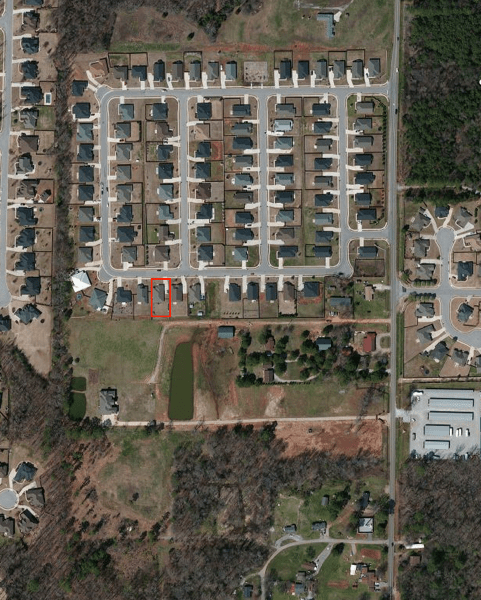
We stuffed the cubes full of all the stuff that had been in my mini-storage unit, and ABF had the cubes spotted in my driveway about 10:15 Friday morning. I’d arrived on the redeye about 30 minutes before that, met the leasing agent to get the keys, and welcomed a 3-man crew from the Huntsville “Two Men and a Truck” franchise. The movers did a superb job; I’ll be calling them back next time I need to move in metro Huntsville. Anyway, within a couple of hours, everything was out of the pods and in the house. I spent the entire rest of the weekend unpacking boxes, assembling furniture, buying supplies (you know, important stuff like diet Coke, peaches, and an HDMI cable). By the time I left, both bathrooms, the kitchen, and the laundry room were all functional, and I’d slept in my own bed (with clean sheets), watched some Olympics on the wall-mount TV that came with the house, and fired Comcast as a potential ISP because they took my installation order without bothering to tell me that they don’t serve my neighborhood. Speaking of neighborhood: my house is the one with the red rectangle. From my back porch, I can see a huge yard/pasture that has a couple of resident horses, a nice-looking pond, and a semi-rustic green sheet-metal barn. The street name has a large number of anagrams, but the best one is “Madcap Male Rest”, an eponym so good that I’m thinking of having a sign made.

Aerial

Anyway, the house is just about ready for the boys; I need beds for Dave and Tom, and we need a sofa of some kind, plus a vacuum cleaner. The boys will be coming out for a visit in a week or two, and we’ll go back a couple of days early to get the rest squared away. I should note that at present I’ll be commuting to the house to stay with the boys; I am not, at present, moving permanently to Huntsville, although I’ve made no secret to my boss of the fact that my goal is to do exactly that.

It was very odd to be driving around Huntsville and Madison without the boys; I’ve gotten more used to being without them in California. Luckily I’ll be seeing them soon.

A few bonus observations:

  • The Huntsville Times Sunday sports section had no mention of the Olympics. And they wonder why people don’t read the printed paper.
  • We had a great thunderstorm Saturday afternoon, with huge raindrops and plenty of dazzle and boom. I miss storms like that. With the front and back storm doors open, I got a nice breeze through the house, too.
  • AT&T’s cell service in my neighborhood ranges from “not great” to “no service.” This is not encouraging. 
  • Everywhere I went– Costco, Best Buy, restaurants, grocery stores, the U-Haul place, the airport– I was reminded how friendly and open the majority of folks in Huntsville are. Not just the staff, either; the customers as well. This is a lovely contrast to some other places I’ve lived.
  • Fish tacos? Nope. Not a Huntsville thing.

4 Comments

Filed under Friends & Family

Huntsville familiarization flight, 3 Aug

Because I was in Huntsville without the boys this weekend, I thought it would be fun to scope out the local area from the air. I had previously been to Executive Flight at Madison County Executive Airport (KMDQ) to have a look around; after a couple of transcontinental phone calls, Donna had set me up with a new CFI and a G1000-equipped Cessna 172 for a Friday afternoon flight.

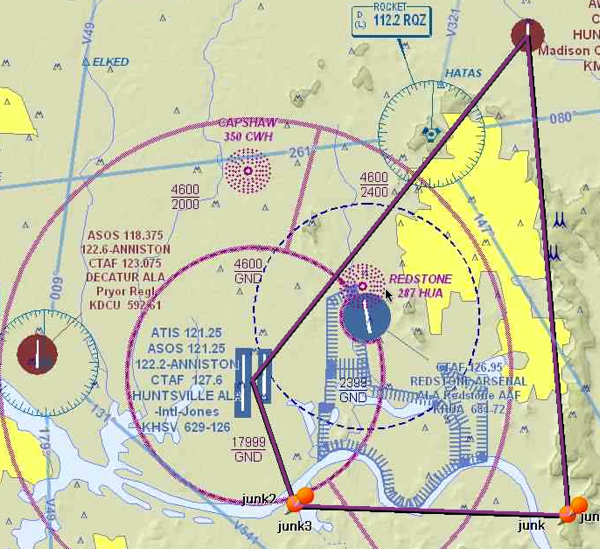
I immediately liked my new CFI: his name is also Paul, and he is also a former Marine (though, lest you think we were twins, he was a UAV pilot rather than a Cobra mechanic… oh yeah, and he’s younger and better-looking then I am too). We had a quick brief on the local area: our route of flight would be south from KMDQ, more or less following US 231 south. This would take us to the east of the restricted areas at Redstone Arsenal, both of which were live at the time of our flight. We would then turn west, roughly paralleling the Tennessee River, until we got near enough to Huntsville International to land. Here’s what our route of flight looked like (except that we didn’t actually have any waypoints named “junk”). The yellow shaded area represents what the FAA refers to as a congested area– normal folks would refer to it as “city” or “urban,” I guess.

LaunchBarScreenSnapz001

Right after takeoff, I called Huntsville Approach and got a transponder code so they could give us radar service and advisories. As we flew, I could see all the familiar landmarks I already knew, like the Von Braun Center, Memorial Parkway, and the Arsenal gates, just with a different perspective. One thing that was immediately evident is how green Alabama is at this time of year compared to California: as far as the eye can see there are fields and forests. Even the built-up areas have lots of green.

Our flight and approach to KHSV went well, though we were sequenced in and around a couple of commercial jets. When we arrived, I was greeted by the sight of a 12,000-foot runway. Bear in mind that I am used to landing at Palo Alto… which has a 2,400 foot runway. That’s right; each of KHSV’s two runways is five times longer than my normal runway. This might not seem like a problem, but it actually is: you judge your height above the runway in part with your peripheral vision. Longer runways tend to be wider, too– Huntsville’s runway is 150′ wide, compared to 50′ at Palo Alto. This was a real challenge; my first landing had way too much float in it. (On the other hand, if you’re gonna float, it’s nice to have 2+ miles of runway to do it on!) The next three were better; we then headed back to KMDQ, where I stuck a nice, squeaky landing.

Although the scenery was different (and that’s mostly what I was looking for), this was a useful refresher on operating in class C airspace, where the controllers largely tell you what to do and when to do it. Of course, as pilot in command, you have both the responsibility and the legal authority to deviate from ATC instructions as required for safety… but you may have to make a report to the FAA Administrator, or his designee, if you do. More on that another time…

Leave a comment

Filed under General Stuff

Solo flight, 1 Aug

I’ve been too busy to fly much lately; my two oldest sons came for separate vists for a week each, during which time I didn’t get to fly. Now that my schedule is normalizing a bit, though, I was eager to get up and knock some of the rust off. I had my usual ride, 191TG, booked for a couple of hours Thursday afternoon. The weather was good: about 30°C, wind 340° at 10kts, and clear skies. I took off, did a right Dumbarton departure, and went to the practice area to work on my steep turns: not necessarily because my performance is bad, but because they’re fun, and I figured I could use the practice. My turns went well; in fact, I learned that if you’re maintaining the correct altitude, you’ll feel a bump as you end your turn because you’re colliding with the wake of turbulent air left by your turn. This is exactly identical in theory, and nearly so in sensation, to what happens when you steer back over the wake generated in a motorboat.

After a few terms, I headed back to Palo Alto to shoot a few landings: a total of six, all of which were very good. As I made my way around the pattern, I reflected on something that is often invisible to non-pilots: the relationship between pitch, power, airspeed, and altitude. I’ve mentioned before that in the pattern, you control airspeed with the amount of upward or downward pitch attitude, and you control altitude with the amount of power you add or remove. For example, suppose that as you approach the traffic pattern, you’re traveling at 100 knots and are at 1500′. Pattern altitude is 800′. The natural instinct of most people would be to pull back on the throttle to slow down, then to nose the aircraft down to lose altitude. Instead, you reduce power and pitch up, adjusting both the amount of power and the amount of pitch to hit your desired speed and altitude.

Even after you get used to this counterintuitive process, there’s something else to remember: these four aspects are all interrelated! Suppose you want to change your speed but hold your altitude, so you pitch up. As the aircraft slows, it will also tend to lose altitude, so you may have to adjust the amount of power you have in to maintain the altitude you want. Most aircraft have elevator trim that can be adjusted to keep the airplane’s pitch attitude level, so the pattern phase becomes a dance of adjusting pitch (both manually and with trim) and power as necessary to get the desired airspeed and altitude. Meanwhile, of course, you must maintain the correct position relative to the runway, adjust for any wind (because remember, as your direction of flight changes, the wind will push you in a different direction), watch for other aircraft, talk to the control tower, deploy the flaps… the list goes on. I finally feel like I am able to multitask effectively in the pattern.

I mentioned a few weeks ago that some knucklehead snatched my headset, and this was my first flight with its replacement. I’d seen the ads for Clarity’s Clarity Aloft headset, a skeletal passive-noise reduction (PNR) headset that uses foam ear tips to seal the ear canal against noise. As it happens, I have some similar earphones that work very well, so I was set to get a Clarity Aloft. Then I took the time to peruse the reviews at Aviation Consumer and found that they liked the Quiet Technologies Halo a bit better, plus it was less expensive– so I ordered one. This was my first flight with it, and it performed very well. It was much lighter and more comfortable than my Pilot Communications Liberty. The sound quality was excellent, as was the noise reduction, and I didn’t have any of the problems with mic placement that I did with the Liberty.

 After my last landing, I put the plane away, went home, and packed my stuff, including the Halo and my logbook, for a trip to Huntsville. More on that later…

Leave a comment

Filed under aviation

Thursday trivia #67

  • C.J. Chivers is one of my favorite reporters. Why? Check out this well-sourced and well-argued article on US arms transfers to Libya. I wish all articles in the mainstream press were as thoroughly sourced as this one.
  • Check out this cool interactive graph of box office vs budget for all the Bond movies.
  • I installed Mountain Lion (dog!) last week and have had a smooth experience with it; I really like the new notification behavior in particular. However, I didn’t have a recovery partition on my SSD, and the Mountain Lion install wouldn’t create one. To try to fix this, I reinstalled it on an external USB drive… which also didn’t get a recovery partition. At least that’s what it looked like. However, holding down Option on boot gave me the option to boot into the partition! It still doesn’t show up in Disk Utility, even with the debug menu enabled, so I must be missing something simple.
  • Longtime acquaintance Tom Negrino is tired of the gun religion. It won’t surprise many folks to know that I don’t agree with much of what he says, but I respect the fact that he and I can have a civil debate about it. We could use more of that.
  • “@shunsukeiwai: Like a woman, Airbus is a complex creature with many buttons. (Don’t push the wrong ones.) – @KarlenePetitt”. Yeah, that. (Also, Karlene frequently writes about the Airbuses, as in this article on stalling them.)
  • Great Paul Cunningham article on mail flow in Exchange 2013.
  • I was gutted to see that the Hubig’s Pies factory in New Orleans burned down. As a gesture of support, I ordered some stuff from their online store; if you’re a pie lover, I encourage you to do the same.
  • The new Posts app for the iPad looks pretty cool. I wonder if I’d blog more if I switched to using the iPad (or, really, started using it as an adjunct.) Might be worth a try.
  • Olympics! And season 5 of Breaking Bad! My TV may explode.

Leave a comment

Filed under General Stuff

Man-in-the-middle attacks against Exchange ActiveSync

I love the BlackHat security conference, although it’s been a long-distance relationship, as I’ve never been. The constant flow of innovative attacks (and defenses!) is fascinating, but relatively few of the attacks focus on things that I know enough about to have a really informed opinion. At this year’s BlackHat, though, security researcher Peter Hannay presented a paper on a potential vulnerability in Exchange ActiveSync that can result in malicious remote wipe operations. (Hannay’s paper is here, and the accompanying presentation is here.)

In a nutshell, Hannay’s attack depends on the ability of an attacker to impersonate a legitimate Exchange server, then send the device a remote wipe command, which the device will then obey. The attack depends on the behavior of the EAS protocol provisioning mechanism, as described in MS-ASPROV.

Before discussing this in more detail, it’s important to point out three things. First, this attack doesn’t provide a way to retrieve or modify data on the device (apart from erasing it, which of course counts as “modifying” it in the strictest sense.) Second, the attack depends on use of a self-signed certificate. Self-signed certificates are installed and used by Exchange 2007, 2010, and 2013 by default, but Microsoft doesn’t recommend their use for mobile device sync (see the 2nd paragraph here); contrary to Hannay’s claim in the paper, my experience has been that relatively few Exchange sites depend on self-signed certs.

The third thing I want to highlight: this is an interesting result and I’m sure that the EAS team is studying it closely to ensure that the future attacks Hannay contemplates, like stealing data off the device, are rendered impossible. There’s no current cause for worry.

The basis of this attack is that EAS provides a policy update mechanism that allows the server to push an updated security policy to the device when the policy changes. There are 3 cases when the EAS Provision command can be issued by the server:

  • when the client contacts the server for the first time. In this case, the client should pull the policy and apply it. (I vaguely remember that iOS devices prompt the user to accept the policy, but Windows Phone devices don’t.)
  • when the policy changes on the server, in which case the server returns a response indicating that the client needs to issue another Provision command to get the update.
  • when the server tells the device to perform a remote wipe.

The client sends a policy key with each command it sends to the server, so the server always knows what version of the policy the device has; that’s how it knows when to send back the response indicating that the device should reprovision.

If the client doesn’t have a policy, or if the policy has changed on the server, the client policy key won’t match the current server policy key, so the server sends back a response indicating that the client must reprovision before the server will talk to it.

There seems to be a flaw in Hannay’s paper, though.

The mechanism he describes in the paper is that used by EAS 12.0 and 12.1, as shipped in Exchange 2007. In that version of EAS, the server returns a custom HTTP error, 449, to tell the device to get a new policy. A man-in-the-middle attack in this configuration is simple: set up a rogue server that pretends to be the victim’s Exchange server, using a self-signed certificate, then when any EAS device attempts to connect, send back HTTP 449. The client will then request reprovisioning, at which time the MITM device sends back a remote wipe command.

Newer versions of Exchange return an error code in the EAS message itself; the device, upon seeing this code, will attempt to reprovision. (The list of possible error codes is in the section “When should a client provision?” in this excellent MSDN article). I think this behavior would be harder to spoof, since the error code is returned as part of an existing EAS conversation.

In addition, there’s the whole question of version negotiation. I haven’t tested it, but I assume that most EAS devices are happy to use EAS 12.1. I don’t know of any clients that allow you to specify that you only want to use a particular version of EAS. It’s also not clear to me what would happen if you send a device using EAS 14.x (and thus expecting to see the policy status element) the HTTP 449 error.

Having said all that, this is still a pretty interesting result. It points to the need for better certificate-management behavior on the devices, since Hannay points out that Android and iOS devices behaved poorly in his tests. Windows Phone seems to do a better job of handling unexpected certificate changes, although it’s also the hardest of the 3 platforms to deal with from a perspective of installing and managing legitimate certificates.

More broadly, Hannay’s result points out a fundamental flaw in the way all of these devices interact with EAS, one that I’ve mentioned before: the granularity of data storage on these devices is poor. A remote-wipe request from a single Exchange account on the device arguably shouldn’t wipe out data that didn’t come from that server. The current state of client implementations is that they erase the entire device– apps, data, and all– upon receiving a remote wipe command. This is probably what you want if your device is lost or stolen (i.e. you don’t want the thief to be able to access your personal or company data), but when you leave a company you probably don’t want them wiping your entire device. This is an area where I hope for, and expect, improvement on the part of EAS client implementers.

1 Comment

Filed under Security, UC&C

Thursday trivia #66

  • I always thought of nutria as being primarily a Louisiana problem, but it turns out they’re elsewhere– including the Delmarva Peninsula. Even the New York Times says so.
  • Batman tonight! David and I are headed to see all 3 movies, back to back. (Don’t tell anyone but I may take a nap toward the middle of Batman Begins.)
  • This is a really interesting article about the design process behind how Microsoft supports touch in Office 2013, but I agree with what Gruber said: users don’t care about design, they care about efficacy.
  • So AT&T now has a shared data plan… that would actually cost me more than what I pay now for the same amount of data on the same devices: 10GB on 3 smartphones and 1 dumb phone (that currently has no data) would cost me $240, a $35 increase. Thanks, guys, but no thanks.
  • Tony weighs in on the multi-mailbox search licensing changes. I hope Microsoft takes the opportunity in Exchange 2013 to fix all of the scripts that count ECALS, etc., including the one that gathers data for the organizational health summary. Still no word, of course, on Exchange 2013 licensing. Experience suggests that license terms and requirements will be one of the very last things Microsoft discloses.
  • How to sell an airplane. First, of course, you have to buy one.
  • The McLaren dealership was every bit what I hoped it would be, at least as far as cars are concerned. What beauties.
  • Oshkosh is next week, but I can’t go. I have high hopes for next year though.

Leave a comment

Filed under Musings

Exchange 2013 preview ships

Yay! Microsoft has released the preview version (which us normal humans might refer to as a beta) of Exchange 2013, SharePoint 2013, Office 2013, and Lync 2013.

I don’t have time to write a full summary of all the changes, but a few highlights:

  • One big piece of news: there are now only two server roles: client access and mailbox. (Raise your hand if that reminds you of the Exchange 2000/2003 front-end/back-end split.) CAS now has a new service, Front-End Transport, that doesn’t do what you probably think. In addition, the RPC Client Access service (RCA) is now gone.
  • MAPI may not officially be dead, but the fact that Outlook 2013 can use Exchange ActiveSync sure makes it look that way.
  • The new Exchange Administration Center (EAC) is going to be polarizing; some admins will love it, while others will hate it.
  • No more multi-master replication for public folders. You should read this FAQ if you’re a public folder aficionado.
  • This is the first release of Exchange or SharePoint that really enables the “better together” story. In-place discovery searches and site mailboxes (about which, more later) will really make a huge difference in how SharePoint and Exchange are used for data management.
  • “By default, malware filtering is enabled in Microsoft Exchange Server 2013 Preview.” Yay!
  • Not a ton of unified messaging changes, but a few welcome ones, including better Voice Mail Preview accuracy and some UI improvements.

There’s a list of “what’s new in this release” items, of course. Keep in mind, though, that Microsoft frequently adds features between preview releases and RTM, so there may well be additional features, or changes to existing features, between this release and the final release later this year.

Download and enjoy!

2 Comments

Filed under UC&C

Licensing change for Exchange multi-mailbox search

Microsoft today announced that you no longer need an enterprise client access license (ECAL) to use the multi-mailbox search feature. This is a welcome change, of course, since it means that it is now OK to run multi-mailbox searches against mailboxes that are licensed with a standard CAL. In essence, Microsoft is giving standard CAL holders something for free that formerly cost money. ECAL holders, of course, aren’t getting anything extra out of the deal, but I’d argue that the other ECAL features (including legal hold and the Personal Archive feature) probably make up for that.

The interesting question to me is: why this change at all, and why now? It’s common for Microsoft to adjust licensing terms with new releases of Exchange, so my guess is that we’ll see some differences in how the data loss prevention (DLP) and information management features of Exchange 2013 are licensed and which specific mix of CALs you need to use them.

Stay tuned…

1 Comment

Filed under UC&C

On re-kerberizing services on Mac OS X Server

Wow, this week has been a productive one for finding new and interesting blog topics, mostly based on things that broke!

As much as I rely on Apple hardware and software for my work and personal life, that doesn’t mean I’m ready to give them a free pass on issues like cost (note to self: update the laptop price comparison with the latest models) or capability. I’ve mentioned before how much I dislike Apple’s sloppy approach to system administration on OS X Server. The logging is poor, with log entries scattered all over the place; the documentation is hit-or-miss (both in terms of coverage and quality), and there can be a wide range of behavior between different tools– some give you lots of detail (or at least more verbose messages on demand), while others don’t.

Our primary OS X server is bound to our Active Directory domain, and the services on it are “kerberized” so that users can use their AD accounts, via Kerberos, to ssh into the machine, log in to the wiki, and so on. After a bit of initial flailing around, this has worked steadily for a year or so.

We have recently been working to set up single sign-on (SSO) for Subversion on Mac OS X. This has proved challenging for lots of reasons that are too tedious to go into here (and speaking of tedious: please don’t bother telling me we should be using Git instead, kthxbai). As part of that process, someone accidentally deleted the machine account that the OS X server had been using and replaced it with a user account, with the same name, for use with a manually-kerberized service.

In the Windows world, deleting a computer’s account causes all sorts of fairly immediate breakage. To OS X’s credit, it didn’t seem to be bothered that the computer account was gone.. I mean, it didn’t log any errors or anything, so it must have been happy, right? (That’s sarcasm, in case you were wondering.) The server kept right on working, except that the previously-kerberized services would no longer accept AD credentials.

The fix for this seemed straightforward: first, remove the OS X server from the domain, then add it back. This would re-establish its machine account. That step went swimmingly, although we first had to rename the user account that was created for SSO.

The only problem was that after doing this, single sign-on still didn’t work.

It turns out that when you remove an OS X server from AD, the services are essentially un-kerberized. This seems like it would be easy to fix with the “Kerberize” button in Server Manager... except that it’s apparently broken, or something, given that no combination of inputs would be accepted. So, my next attempt was to use sso_util from the command line, which also didn’t work; I got a nondescript message telling me that there was a communications error, and that was it.

The correct answer, at least on Snow Leopard: use dsconfigad -enablesso. You can be excused for not knowing that, because if you go to Apple’s own documentation, it says to run a command called “disconfigad,” whatever the hell that is. Once I ran that command, Kerberos logons for the wiki, ssh, and console logon immediately started working, yay. Now with any luck I won’t have to fool with this stupid server for another year or so.

Comments Off on On re-kerberizing services on Mac OS X Server

Filed under General Tech Stuff

Stalking the wily ADAccess event 2112

Timing is everything.

A week ago, I got a late-night phone call about a problem with an Exchange server that seemed to be related to an expired certificate; the admin had replaced the expired cert on one member of a two-node DAG, but not the other. He noticed the errors in the event log when troubleshooting a seemingly unrelated problem, installed the new cert, and then boom! Bad stuff started happening.  Problem was, the reported problem was that inbound SMTP from a hosted filtering service that doesn’t use TLS wasn’t flowing, so it didn’t seem likely that certificate expiration would be involved. By the time he called me, he had installed the new certificate and rebooted the affected server, and all seemed to be well.

Fast forward to Sunday night. I’d planned to patch these same servers to get them on to Exchange 2010 SP2 UR3, in part because I’d noticed a worrisome number of events generated by the MSExchange ADAccess service, chiefly event ID 2112:

Process MSEXCHANGEADTOPOLOGYSERVICE.EXE (PID=8356). The Exchange computer HQ-EX02.blahblah does not have Audit Security Privilege on the domain controller HQ-DC01.blahblah. This domain controller will not be used by Exchange Active Directory Provider.

This was immediately followed by MSExchange ADAccess event ID 2102 with the rather ominous message that

Process MSEXCHANGEADTOPOLOGYSERVICE.EXE (PID=8356). All Domain Controller Servers in use are not responding:

However, the event ID 2080 logged by ADAccess indicated that all but 1 of the GCs were up and providing necessary services, including indicating that their SACL allowed Exchange the necessary access. I couldn’t puzzle it out in the time I had allotted, so I decided to take a backup (see rule #3) and  wait to tackle the patching until I could be physically present. That turned out to be a very, very good idea.

Last night, I sat down to patch the affected systems. I began with the passive DAG node, updating it to SP2 and then installing UR3. I half-thought that this process might resolve the cause of the errors (see rule #2), but after a reboot I noticed they were still being logged. I suspected that the reported 2102 errors might be bogus, since I knew all of the involved GCs were running and available. As I started to dig around, I learned that this error often appears when there’s a problem with permissions; to be more specific, this SCOM article asserts that the problem is that the Exchange server(s) don’t have the SeSecurityPrivilege user right on the domain controllers. However, I was still a little skeptical. I checked the default DC GPO and, sure enough, the permissions were present, so I moved on to do some further investigation.

Another possible cause is that the Exchange servers’ computer accounts aren’t in the Exchange Servers group, or that permissions on that group were jacked up somehow, but they appeared to be fine so I discounted that as a likely cause.

Along the way I noticed that the FBA service wouldn’t start, but its error message was meaningless– all I got from the service control manager was a service-specifc error code that resisted my best attempts to Bing it. Without that service, of course, you can’t use OWA with FBA mode, which would be a problem so I made a mental note to dig into that later.

A little more searching turned up this article, which is dangerously wrong: it suggests adding the Exchange computer accounts to the Domain Admins security group. Please, please, don’t do this; not only does it not fix the problem, it can cause all sorts of other tomfoolery that you don’t want to have to deal with.

Still more digging revealed two common problems that were present on this server: the active NIC wasn’t first in the binding order and IPv6 was disabled on the two enabled NICs. Now, you and I both know that IPv6 isn’t required to run Exchange.. but Microsoft does not support disabling or removing IPv6 on Windows servers. And you know what they say about what “unsupported” means! So, I enabled IPv6 on the two adapters and got the binding order sorted out, then bounced the AD topology service and…

… voila! Everything seemed to be working normally, so I ran some tests to verify that *over was working as it should, then started patching the DAG primary– only to have setup fail partway through. Upon reboot, w3svc was caught in an endless loop of trying to load some of the in-proc OWA DLLs; it kept trying endlessly until I power-cycled the server. The problem with this is that the Active Manager service was starting, so the current active node would try to sync with it before mounting its copy of the DAG databases, but it never got an answer! Net result, no mounted databases on either server, and an unhappy expression on my face as the clock ticked past 11pm.

I put the primary member server in safe mode, then set the Exchange and w3svc services to manual star and rebooted it. Rather than spend a lot of time trying to pin down exactly what happened, I ran setup in recovery mode; it installed the binaries, after which the services restarted normally. I did a switchover back to the original primary node, verified mail flow, and went home. Life was good.

Until, that is, this morning, when I got an e-mail: “OWA is down.” I checked the servers and, sure enough, the errors were back and the FBA service was again refusing to start. After some creative swearing, I once again started digging around in the guts of the server. I couldn’t shake the feeling that this was a legitimate permissions problem of some kind.

At that point, I found this article, which pointed out something critical about GPOs: you have to check the effective policy, not just the one defined in the default policy. Sure enough, when I used RSoP to check the effective policy on the DCs, the Exchange servers did not have SeSecurityPrivilege on the DCs because there was a separate GPO to control audit logging permissions, and it had recently been changed to remove the Exchange Servers group. That was easy to fix: I added the Exchange Servers group to the GPO, ran gpudate, rebooted the passive node, and found that the services all started normally and ran without error. A quick switchover let me restart the topology service on the primary DAG member, after which it too ran without errors. End result: problem solved.

It’s still not entirely clear to me why that particular service needs to have the SeSecurityPrivilege right assigned. I’m trying to find that out and will update this post once I do. In the meantime, if you have similar symptoms, check to verify that the effective policy is correct.

4 Comments

Filed under UC&C

Long solo cross-country, 4 July

What better way to celebrate Independence Day than to exercise my Constitutional right of free travel? That’s right: “free” as in “not encumbered by TSA or any of their baloney.”

The FAA requires that private pilots know how to plan and safely execute what they call “cross-country” flights. I’d already flown one with Andy from Palo Alto to Columbia, but the FAA requires that private pilots plan and carry out a cross-country flight of at least 150nm total distance, with one leg being at least 50nm and landings at 3 separate airports.

Andy had originally asked me to plan a flight from Palo Alto (KPAO) to Paso Robles (KPRB) to Salinas (KSNS) and back to KPAO. The first leg to Paso Robles is 129nm, so the total trip distance would meet all the FAA’s requirements. In my earlier post I gave a quick summary of what it means to construct a VFR flight plan; here’s a slightly more detailed list:

  • Puled out a bunch of paper charts: my San Francisco and Los Angeles sectional charts and my San Franciscoterminal chart. Sectional charts are large-scale charts that show terrain features, airports, roads, navigation aids, and other useful items at 1:500,000 scale. Terminal charts show a smaller area at double the scale, so they’re great for navigation planning in urban areas.
  • Used the paper charts to plot a direct route of flight, using a straightedge and a Sharpie marker to lay out my course. Paper charts cost about $9 each, so you might wonder why I’d be willing to deface them with a Sharpie. The truth is, they expire after about 5 months, so you may as well mark on them.
  • Used the route of flight to identify checkpoints– visual features on the ground that I can look at to tell where I am and what my progress along the course is. There are some well-known visual checkpoints already marked on the sectionals. For example, VPSUN is the golf course at Sunol, while VPMOR is the LDS temple in Oakland. You can use these as reporting points; for example, I can call the Palo Alto tower and say “Palo Alto, Cessna One Niner One Tango Golf, overhead Leslie Salt, landing Palo Alto with Juliet.” That doesn’t mean Juliet’s in the airplane; rather, it means that I’m reporting being overhead the Leslie Salt Company’s salt refinery with ATIS information— a radio broadcast telling me what the current airport weather and runway conditions are– Juliet. 
  • Measured the distance between checkpoints and put that into my navigation log.
  • Got a weather forecast showing the projected winds aloft and used those to calculate the amount of wind correction necessary for each leg.
  • Used the wind and airspeed data to figure out how long each leg would take to fly, or, in other words, the ETA to go between each pair of checkpoints
  • Used the ETA data to estimate fuel consumption for each leg
  • Reviewed the airport data, including which runways exist, whether they were open or closed, any restrictions on their use, what the standard traffic patterns and altitudes were, and so on.

After doing all that, I reviewed the weather forecast and saw that Salinas and Monterey were both fogged in. That didn’t bode well for my planned route, but I went to the airport anyway to meet with Andy and discuss my flight plan. Student pilots have to have an instructor’s logbook endorsement to legally do the long cross-country, you see, so meeting with him was a precondition to taking off. I reviewed the route of flight with him and pointed out some alternate options given that I couldn’t overfly the fog areas. He suggested a completely different route: over the hills to Tracy (KTCY), then down to Los Baños (KLSN), then to KPRB, and then back either direct (if the fog was gone) or by reversing that route. I replanned the route, got his endorsement, and went to check out the airplane I’d reserved… except that it was gone.

OK, OK, I exaggerate… a bit. The automated scheduling system that Advantage uses expects that you’ll sign out the airplane at the scheduled time. If you don’t do so within 30 minutes of your scheduled time, the system puts the airplane back in the available pool. I had an 0800 reservation, but at 0830 I was still meeting with Andy, so the plane became available and someone else grabbed it. Luckily there was another G1000-equipped 172 available at noon, so I took it instead.

Before I took off, I asked Palo Alto ground control for VFR flight following. This is essentially radar surveillance; air traffic control assigns you a unique transponder code that identifies your aircraft on radar. ATC will issue traffic and safety advisories, notifying you of other aircraft in your vicinity and so on. As you leave each bubble of radar surveillance, ATC hands you off to the next one. For my flight, I started out with Palo Alto and was handed off to NORCAL Approach, the TRACON (or terminal radar approach control center) that owns the airspace over most of northern California. I stayed with NORCAL until I got to an area outside their control, at which point they handed me over to Oakland Center, the air route traffic control center (ARTCC) that provides radar services outside of TRACON-controlled areas.

Anyway, one of the benefits of flight following is that you get traffic advisory calls. I got several on my route towards Tracy; that airspace is heavily traveled as people fly into and out of Palo Alto, Hayward, San Carlos, and the other airports in the area. My favorite call? That’s easy: “Cessna Two Hotel Golf, traffic your 1 o’clock, 2 miles, 5000 feet northbound, flight of two F-18. Hobo 51, traffic your 11-o’clock, 2 miles, 3000 feet eastbound, Cessna 172.” Sure enough, there went two F-18s zipping past, too fast for me to unlimber the camera and get a picture.

The flight itself was great! Good visibility on the outbound leg; I took off from Palo Alto, made a right Dunbarton, overflew Sunol, overflew the Livermore area, and headed to Tracy. AsHere’s what the Tracy airport looks like from 5500′ up; it looks small from the ground, but those two runways are 4000′ each.

Overhead KTCY


My route of flight from metropolitan Tracy (!) down to Los Baños took me roughly along Interstate 5. To the west there are all kinds of interesting hills; to the east there are a string of smallish towns, plus lots and lots of cultivated land. From the air, the patchwork of different shades of green is absolutely gorgeous.

Somewhere in the Central Valley

that salad you’re eating? it probably came from the Central Valley

My approach and landing at Los Baños were uneventful, with a good landing on their runway. The Los Baños airport is uncontrolled, meaning there’s no control tower or radar service. Each aircraft is required to vigorously “see and avoid,” of course, but there’s also a radio frequency on which aircraft in the vicinity announce their location and intentions. So you call to tell anyone listening that you’re approaching the airport, where you’re going, and where you are… i.e. “Los Baños traffic, Cessna Two Hotel Golf, 5 miles north of the field, two thousand five hundred, entering the pattern for landing runway 32”, or whatever. Then you call again when you get closer; meanwhile, other aircraft, if any, are making their own calls. I landed well, taxied back on the parallel taxiway, waited a minute for another aircraft to take off and clear the pattern, and took off to the south.

The route of flight that Andy and I had planned called for me to go from KLSN to New Coalingua airport, then turn southwest for Paso Robles.. so that’s what I did, being careful to stay out of the Lemoore military operating areas (MOAs). Andy warned me that I’d know when I was getting close to New Coalingua because I’d be able to smell Harris Ranch. I thought he was pulling my leg, but, sure enough, I could smell the stockyards from more than a mile up and several miles lateral distance. I made the turn before C80 and found Paso Robles right where it was supposed to be. I landed, taxied in to a parking spot, and went inside to find out if they had any food, having neglected to pack anything. They didn’t, but the kind folks at Paso Robles Jet Center loaned me a crew car so I could drive into town and eat at Margie’s Diner. As advertised, the diner had extremely large portions, which suited me just fine. I had a delicious grilled ham-and-cheese and two large diet Pepsis; meanwhile, the line crew refueled my plane so that when I got there (after a brief encounter with the airport’s resident cat) I was ready to go. I took off and headed to the northwest, towards Salinas, but there was a huge layer of haze that looked like it covered pretty much my entire route of flight. 

Haze, of course, diminishes visibility rather than eliminating it. It wouldn’t have been legal for me to overfly an area of fog that obscured the ground completely, whereas I could have legally flown over the haze. However, “legal” and “prudent” don’t always mean the same thing, so I elected to go back the way that I came, mostly. Instead of going back to C80, I cut the corner by flying to the Priest VOR, then to the Panoche VOR, then telling the G1000 to take me back towards Tracy and thence to Palo Alto. On the way back, I practiced using the GFC700 autopilot in the airplane a bit. This might seem contradictory– why use the autopilot at all as a student? There are several good reasons. First, I want to know how every piece of equipment in the airplane works so that I can get the most utility from it. Second, for instrument flying the autopilot is a tremendous aid because it can keep the aircraft pointed in the right direction at the right altitude while the pilot aviates, navigates, and communicates. Third, one of the things you’re required to demonstrate on the FAA check ride is what the FAA calls “lost procedures”– in other words, what do you do if you get lost? I want the option to be able to tell the autopilot to keep the wings level and altitude steady while I’m rooting around looking for charts or whatever. Fourth, it’s cool. Anyway, I spent some time refreshing my knowledge of how to set up the autopilot to track a heading and maintain an altitude. There are many more sophisticated things it can do that I haven’t started exploring yet, like fly a profile such that you end up at a specific altitude over a specific point on the ground. That will come with time.

Coming back I had a great view of the San Luis reservoir, near Los Baños; see below. 

San Luis Reservoir

There was a bit of haze, but off to the west I could still see heavy haze on my original planned route, and I was perfectly happy to see it over there instead of underneath me. My approach through the hills and the east side of the Bay went well, and I nailed the landing back at Palo Alto. 4.0 hours of pilot-in-command and solo cross-country time for the books!

3 Comments

Filed under aviation, California

The case of the stolen stereo

So last Thursday, some knucklehead broke into my car and stole my stereo, my flight headset, and a few other small items. This post is about the process of replacing and/or repairing those losses, so you can consider it somewhat in the nature of a review.

The car was in the “secure” [sic] parking area at my apartment complex. However, it’s fairly easy to get into the parking area, so generally I lock the car. I left the driver’s rear window open about 2″, and that was apparently sufficient for the thief to get in. Another nearby car was burgled by the expedient of a brick thrown through the window (the owner had left spare keys in the ashtray so he lost the whole car!), so I suppose it’s a good thing that I’d left the window open.

I immediately called the Mountain View police non-emergency number; they told me to file a report online, which I did. That part of the process was painless and quick; the CopLogic system that MVPD uses worked well.

Next stop: insurance company. I use USAA for car insurance, and their online claim system worked just as well as CopLogic. I was able to file the claim in less than 10 minutes and got a call back from an adjuster about two hours later. She explained that in California, only items that are powered by the vehicle (or could be) are covered by auto insurance. Your GPS? Covered. Your laptop? Covered. Stereo? Covered. Headset? Nope. She punched a few buttons and told me that I’d be hearing from a company called Premier Services, and that I could get the dash repaired anywhere I liked but, OBTW, there was a USAA-approved shop right up the road in Palo Alto.

Sure enough, I got a call from Premier about an hour later. When I bought this car in December of 2009, I removed the factory stereo and replaced it with a Pioneer AVIC U310BT, the lowest-end Pioneer that had navigation and an iPod/iPhone input. It cost me about $400, plus cables and adapters and so on. I installed it myself, so my total cost including cables, etc., was probably about $550 or so. Pioneer discontinued that model, so the replacement cost they’re offering is substantially more, meaning I can buy something a little nicer. Off to Crutchfield I went, where I ordered a JVC KW-NT500HDT receiver. I’ve been buying from Crutchfield for nearly 20 years and have never had anything less than a great experience with them, so their recommendation of this particular deck carried a lot of weight. The Pioneer unit I had was slow and buggy, and Pioneer’s customer support is terrible, so I wasn’t about to buy another one.

I’m not sure why the thief took my headset, given that it’s only useful for flying in planes– maybe he thought it was a cool set of DJ headphones or something. The headset in question was a Pilot USA PA-1771T Liberty that I bought from Pilot USA as a refurb last year. It isn’t the most comfortable or fanciest headset, but it did a good enough job of providing active noise reduction (ANR) and was reasonably comfortable. I’d planned to treat myself to a newer, nicer ANR headset after I got my actual license, thinking that I’d consign the Liberty to passenger use. Rather than lay out the big bucks for a Bose or Lightspeed, though, I remembered how happy I’ve been with passive noise blocking for music on commercial airplanes, and I decided to try an in-ear headset instead. At first I was leaning towards the Clarity Aloft, but a little research at Aviation Consumer led me towards the Quiet Technologies Halo, which is nearly $200 cheaper than the Clarity. I promptly ordered one, asking on the order form whether it could be shipped faster. Sure enough, about two hours later I got a phone call from Quiet Tech offering me better shipping and a discount because the owner felt sorry for me. Wow.

Next came the body shop. USAA pointed me at Mathews Carlsen in Palo Alto, although they took pains to emphasize that I could use any body shop I liked. I drove to Mathews Carlsen Friday morning and walked out again in 10 minutes, estimate in hand.

Saturday I had planned to install the stereo myself, but I decided against it– I didn’t know what the thieves might have broken or otherwise jacked up when they pulled the old unit and I wasn’t at all interested in spending my time finding out. Luckily I found Custom Audio, which is about a mile from my apartment. I was there about 10 minutes after they opened on Saturday, and about three hours later I had a flawlessly-working stereo.

Over the weekend, I found out that the thieves also snagged my Contour HD camera, and that they’d managed to break the remote trunk release. A quick Monday call to USAA elicited the information that they needed a purchase receipt for the camera and an updated police report. MVPD makes it possible to edit police reports online, so I did, then uploaded the PDF of the report and the camera receipt to USAA’s web site. By Thursday, I’d received a payment from them for all of my expenses (exclusive of my deductible.)

Sadly, I haven’t had a chance to try my new headset yet; it hadn’t arrived by the time of my planned cross-country, but I’ll be testing it tomorrow night.

There are still a few things left to fix; Mathews Carlsen hasn’t gotten the replacement dash parts yet, so the dash isn’t back together, and I still need to get the remote trunk release fixed. However, I am delighted with how easy USAA made it to file and handle a claim, as well as with the speed of their payment. Crutchfield came through, as always, and I am happy with the job that Custom Audio did for me as well. All things considered, this was about as hassle-free an episode as you can reasonably expect.

(Side note: my apartment complex management company is now putting surveillance cameras in the parking area. Yay!)

1 Comment

Filed under General Stuff

Thursday trivia #65

3 Comments

Filed under Musings

RIP Exchange UPDATE

I am sad to report that I just got an e-mail from the lovely and talented Amy Eisenberg, executive editor at Windows IT Pro, letting me know that they are ending the publication of the Exchange UPDATE newsletter that I’ve been writing since 2002.

  The original UPDATE was delivered only via e-mail, and it was advertising-supported so that it made money for the magazine. Over time, the market shifted, with a much greater emphasis placed on delivery via RSS and a sea change in how advertisers spend (and how media outlets package and sell advertising.) Because of these changes, it doesn’t make sense for Penton to continue to publish Exchange UPDATE, so it has been moved to the great folder in the sky (and, no, I’m not talking about SkyDrive.) It’s a business decision, and not one lightly taken, but I understand the reasoning and don’t bear the magazine folks any ill will.

On the contrary– writing the UPDATE has been a terrific growth opportunity over the last 10 (!) years. When I first started writing it, I took over from the redoubtable Jerry Cochran, who had recently moved to a new role at Microsoft. At first I found the demands of writing a weekly column on Exchange to be almost insurmountable, but I soon came to realize that there’s always something going on in the Exchange world to write about. Companies introduce new products or leave the market altogether; Microsoft ships or delays products; interesting people create interesting things. This cycle will go on, of course, and I’ll still be writing about it here and for Windows IT Pro. Don’t be surprised if you also see some of my writing in new outlets as well, either…

Leave a comment

Filed under Musings, UC&C

Thursday trivia #63

  • From the department of giant robots: an industrial robot with an industrial laser. I know what I want for Christmas.
  • They don’t make ’em like these guys anymore: Watson’s Whizzers.
  • Knolling: something I’d like to do with my toolbox. I wouldn’t dare attempt it with my desks at work or home.
  • This interactive chart of the top 10 causes of death in the US from 1900-2010 is absolutely engrossing. The killers of yore– tuberculosis, influenza, “gastrointestinal infections”– have been supplanted by heart disease, cancer, and airway diseases.
  • What I hope everyone who reads this blog understands: the military has people whose job it is to plan for every imaginable contingency, from Plan Orange to Plan Red to Iraq. So this article shouldn’t surprise you too much. Don’t take the fact that we have contingency plans for attacking Iran as evidence that anyone in the military wants to do so, or thinks it’s a good idea.

Leave a comment

Filed under Musings