Category Archives: aviation

Writings about aviation, including chronicles of my flight lessons, product reviews, and so on.

First impressions: flying the Avidyne IFD540

cShort version: The transplant was a success and the patient made it home.

Now, the longer version.

I originally dropped the plane off on 31 December at Sarasota Avionics at Tampa Executive (KVDF). The plan was to have the plane ready by late January. That didn’t happen. When I went to pick the plane up on February 10th, it wasn’t ready as promised: the GPS steering steered the plane in the opposite direction as commanded, the interconnection between the new GPS and our engine monitor didn’t work, and the plane failed its initial FAA ADS-B Out automated compliance report (ACR) check. I was really unhappy, flew back to Huntsville, and started firing off emails to get the problem fixed. Long story short, Kirk Fryar, the co-owner of Sarasota, moved the plane to their Venice location, fixed everything that was wrong, tested the plane thoroughly, and had it ready for me on the 25th. (I note with some irritation that I still haven’t ever had an experience with any aircraft maintenance shop that resulted in the plane being ready when it was promised.)

I met Leonard, Sarasota’s check pilot and flight instructor, at KVDF and we flew the plane down to KVNC, stopping along the way to hand-fly the ILS 32 at KSRQ. It was a windy, bumpy day and ATC was vectoring me all over the place (including nearly to the Gulf ADIZ). I was a little rusty, and it showed. Another thing that showed: the localizer flag on the NAV1 CDI (we’ll call this squawk #1). This little flag is supposed to pop out to indicate that the associated signal is unreliable. It’s definitely not supposed to appear in a brand-new avionics installation, especially not when my secondary nav radio didn’t show the flag. We flew a missed approach and then took the RNAV 5 approach into KVNC. This time I let the autopilot and GPSS fly the approach, which it did flawlessly.

While I barricaded myself in their conference room to get some work done, Kirk investigated the cause of the localizer flag problem. It turned out to be simple, stupid, and Avidyne’s fault. There’s a known compatibility issue between early hardware revisions of the IFD540 and the King KI209A CDI we have. Sarasota sent our original unit back to Avidyne to have the hardware modification installed– we needed mod 14 but, for some unknown reason, we got a unit back that only had mod 11. This means that we have to take the plane back to the shop to swap in the new IFD540 unit when it arrives, which is a hassle… but more on that later.

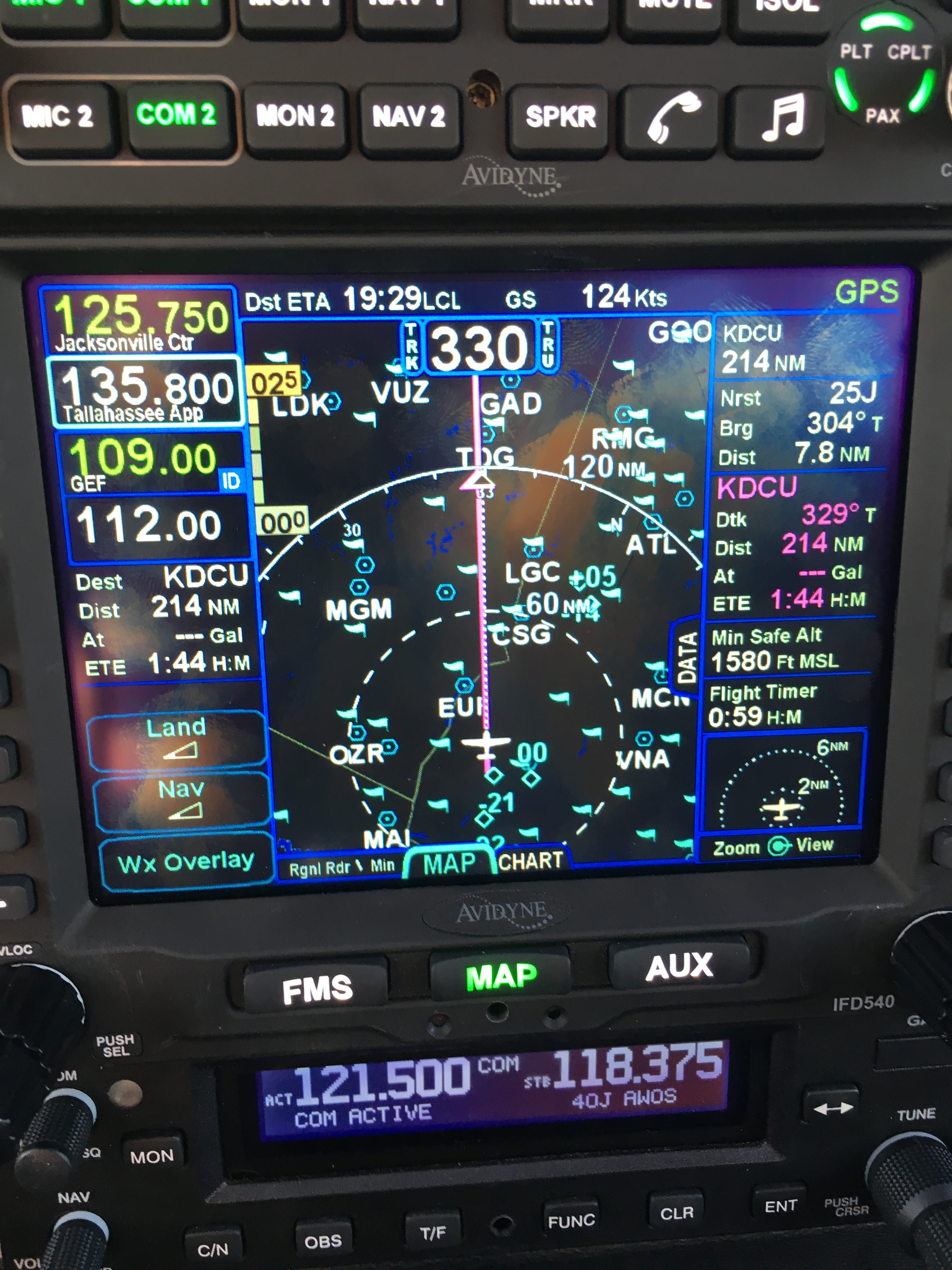
After a thorough preflight, during which I confirmed that the fuel flow data presented to the IFD540 was intermittent (and that’s squawk #2, but not a huge deal since there’s a workaround: power-cycle both the CGR30P and the IFD540), I took off and picked up my clearance to Grady County. They gave me a route out over the water: direct TABIR, then direct 70J. I plugged it in, climbed out, and engaged GPSS. It flew smoothly to TABIR. There’s a lot going on in the picture below:

TABIR-with-traffic

  • The magenta line is where I’m going. Note that at the TABIR intersection, the onward path changes to a “candy cane” stripe to indicate the next planned leg. Other legs further on show up as white. This makes it easy to see what the box is planning on doing at all times.
  • The little blue diamonds are other airplanes, with their relative altitude shown and little up or down arrows indicating climbs or descents. The inner dashed ring has a 5nm radius, so I can clearly see where interesting targets are and what they’re doing.
  • The blue flags indicate VMC at those reporting points. this is a bit of a change from Foreflight, which uses little green dots for VMC METARs. However, the FAA specifies the exact symbology and colors that have to be used in certified devices so we’re stuck with those.
  • Just above the “FMS” button you can see a tiny label that says “Rgnl Rdr 9 Min”. That means I have relatively fresh radar data on screen; however, since the sky was completely cloudless when I took the picture, there’s nothing shown.
  • The radio at the bottom of the stack “knows” that 119.275 is the AWOS frequency for Venice. Why? The GNC255 has an onboard frequency database, and now that Sarasota connected it to a GPS position source, it can look up the frequency and aircraft position and use that combination to label who you’re talking to.

There was a stiff (25+kt) headwind and I was burning fuel faster than I liked, so I decided instead to stop at 40J. I landed, took on 62 gallons (meaning I had 20gals left, or a little over an hour’s flying time, in reserve) and set out for home. Along the way, I customized the datablock display– one of the big features of the IFD540 is that you can extensively customize what data is displayed and where it appears, then save that configuration in your own profile. That way Derek and I can each set up things the way we like, then load our own profiles on demand. Here’s what I came up with:

datablocks set up the way I like them

datablocks set up the way I like them

  • The left side top shows me the current communications and navigation frequencies I have tuned. Note that the unit automatically labels the frequency as soon as you tune it. (Not shown is the extremely useful FREQ button, which, when pushed, shows you a list of the frequencies you are most likely to need based on your location and phase of flight).
  • Below the frequency datablocks, I see my destination, distance, and estimated time enroute. I will see fuel remaining on arrival once the fuel flow issue is fixed.
  • The top line shows the current ETA to my destination, my groundspeed, and the current navigation mode. It says “GPS” in this picture, but it could also show other labels depending on whether I have an approach loaded, the type of approach, etc.
  • The right side shows, in order, the destination and distance (which I’ll probably remove), the bearing and distance to the nearest airport, and the track, distance, fuel remaining, and ETE for the next waypoint (that info is shown in magenta, indicating that it’s tied to the current waypoint). Because I am going direct to my destination, this magenta block is the same as the destination data on the left. (You can also see the minimum safe altitude and flight timer, right over the traffic display thumbnail).

On the way home, I decided to do a couple of turns in the hold at the ATHEN intersection. This is normally part of the RNAV 36 approach to Decatur; I didn’t want to fly the whole procedure, but I wanted to see how the IFD540 handled a hold at an arbitrary waypoint. Turns out it’s just about as simple as you can imagine: you pick the waypoint (any one will do: airport, intersection, VOR, whatever), tell the box you want to fly a hold, and then watch it do its stuff. When you want to exit the hold, you sequence the next waypoint as direct and the magic happens. Thanks to GPSS, the plane happily flew the entire hold on its own, including compensating for the winds.

One more squawk: the IFD540 and the other devices are super-bright in their default night modes. I think the dimmer settings are wrong, because the panel light rheostat that controls all the other lighting (including the CGR30p) did nothing to change the brightness of the IFD540, so I had to manually adjust it. All of these squawks will be addressed when we take the plane back to Sarasota’s shop, this time the one in Tullahoma, just a short flight from here. It shouldn’t take more than 15 minutes or so to swap out the IFD540; fixing the other issues might take a bit longer.

First impressions of using the IFD540 for a cross-country IFR flight:

  • I am very impressed with the display brightness and clarity and the overall build quality of the switches and knobs on all of the hardware.  Being able to switch between items using the left/right rocker switches (labeled “FMS”, “MAP’, and “AUX”) is easy and intuitive. Touch response is fast, and multitouch for panning and zooming worked flawlessly.
  • The UI is responsive and the graphics are clear and readable. The screen seems huge compared to my old KLN94.
  • By default, the combination of land and navigation data presented on the map is cluttered, but it’s easy to declutter.
  • Avidyne brags about their “hybrid touch” interface, in which nearly every action can either be performed directly on the touch screen or by using the knobs and buttons. That  flexibility works very well and was most welcome during my bumpy flight home– aiming precisely at a touchscreen in moderate turbulence can be a challenge.
  • Once you get used to the notion that there are sliding tabs (like the “DATA” tab visible next to the “minimum safe altitude” field in the picture above), it becomes very easy to flip between sets of data, such as the flight plan view when in FMS mode.
  • The location awareness features of the IFD540 are a real time saver. The FREQ button knows what frequencies to present based on where you are, the unit can automatically tune (and ID) the next VOR in your flight path, and so on.
  • Speaking of FMS: flight plan entry, approach management, and so on use a metaphor that’s close to, but still different from, the King/Garmin-style interface that most pilots are used to. It’s like the difference between Brazilian Portuguese and Portuguese Portuguese: lots of common vocabulay and idiom, but some very important differences. I’ll have more to say about that once I have more time flying with it and learning the FMS way of doing things. (It’s interesting that Bendix King, whose KSN770 competes with the IFD540, has the same issue in that the KSN77o steals a lot of FMS-style behavior from BK’s jet FMS family.)
  • The top-of-descent (TOD) marker is a really nifty feature; it tells you where to start your descent in order to hit an altitude constraint on the flight path. The audio cue, along with the audio cue for 500′ AGL, are very valuable prompts. I’d love to see Avidyne add an audio prompt indicating when you reached the missed approach point (MAP) for approaches that define them.
  • I think, but have not confirmed, that the IFD540 should be able to drive the STEC PSS so that the autopilot  can follow an LPV-generated glideslope. It will take a little knobology for me to figure out how to set this up, though.
  • There are many things I learned to coax the KLN94 into doing that I don’t yet know how to do on the IFD540, so this learning process will take a little while. On the other hand, there are many, many things that the IFD540 can do that the KLN94 and Garmin GNS-x30 series can’t.

What about the rest of the stack? Well, the transponder just works… not much to say there. It transmits ADS-B Out like it’s supposed to, so I’m delighted. The AMX240 audio panel is a huge improvement in audio quality and functionality over the old KMA20 we had before. I’ll have more to say about those gadgets, and the GDC-31 roll steering converter, in the future. Overall, I’m delighted with the new stack and can’t wait to fly it a bunch more!

Leave a comment

Filed under aviation

Flying Friday: my airplane’s broken, so here’s a blimp

I went to Tampa yesterday to pick up 706 from the shop. I was expecting to write a triumphant post today about flying behind all the new goodies. However, the GPSS steering system is confused and steers the airplane in the opposite direction, so I had to leave it there for further troubleshooting. Instead of my triumphant post, here’s a short video of the DirecTV blimp, which happened to be at the airport at the same time as me.

Leave a comment

Filed under aviation, FAIL

My first in-flight emergency

Yesterday, I had my first in-flight emergency. That sounds more dramatic than it actually was but I thought writing up my experience might be helpful. This is to the best of my recollection; a lot happened in a short time, so I might have muffed some details.

With my plane in the shop, I wanted to get in a few instrument approaches, as well as work on my proficiency on the Cessna 182RG at Redstone. The 182RG is about 20kts faster than my plane, and it’s a great cross-country machine to have as a backup. It’s nicely equipped, with a Garmin GNS530 GPS (WAAS-capable, of course), an MX20 multifunction display, and two glideslope indicators. I called my pal John Blevins, an experienced instrument instructor, and we arranged to meet and go fly.

We briefed a simple instrument proficiency check (IPC) route– we’d fly from Redstone to Muscle Shoals, fly the ILS 29 approach, then turn around and fly the WAAS GPS 36 approach into Decatur, then the non-WAAS GPS 17 back into Redstone. The weather was just right– overcast at about 1900′, with a light wind.

The preflight and runup were normal; I contacted Huntsville departure and we were cleared to take off and head towards Muscle Shoals. I got the airplane to our assigned altitude, cleaned it up for cruise flight, engaged the autopilot, and briefed the approach with John. During that time, we were cleared to the HUPOK intersection and told to expect a straight-in approach to the ILS 29. Our instructions were to cross HUPOK at or above 2500′, so after I had the radios set up to my satisfaction, I started our descent.

A brief explanatory note: on an ILS approach, you tune your navigation radio to the frequency specified for the localizer so that you get lateral and vertical guidance for the approach on the course deviation indicator (CDI). If you tune the wrong frequency (or forget to tune it, which amounts to the same thing), you won’t get that guidance. For that reason, I make a habit of tuning the localizer on both my primary and backup navigation radios. I did that this time, too.

As we started our descent, I noticed that the GPS flickered, then went blank, then said “INITIALIZING SYSTEM” in the upper left corner. Simultaneously, the two guidance needles on the CDI started to bounce. The CDI in this plane looks like the picture below: the needles move independently, so as the GPS went online, it was driving the needles towards the center (where they belonged), but when it dropped offline again, the needles drifted towards the upper left corner. Distracting, but not critical. I immediately disconnected the autopilot and continued hand-flying the descent.

The GI106A course deviation indicator

This first failure was annoying but not critical– an ILS approach doesn’t depend on the GPS, and because I already had the localizer tuned on the other radio, it was a simple matter of looking at the other CDI. We broke out below the clouds, at which point the MFD went blank, along with the GPS. The transponder was flashing “FAIL” instead of the 4-digit code we had been assigned. Then it, and the backup nav radio, all quit. We still had electrical power, but all of our radio navigation instruments had crapped out.

I broke off the approach and turned away from the airport, reasoning that we needed to try troubleshooting the failure. First step: we determined that nothing was on fire and that we had plenty of fuel so there was no huge rush to take action. (There’s a saying, which I will explain another time, that the first thing you do in an emergency is wind the clock– rushing to DO SOMETHING can often be worse than taking no action at all.)

John wisely suggested that we shed some electrical load, so we turned off all the stuff that wasn’t working anyway, verified that the ammeter indicated normally and that no breakers were tripped, turned off the avionics master to do a bus reset, and then started turning things back on.

Nada.

While we were doing all that, I was heading the plane due east, back whence we came, staying at least 500′ below the overcast layer so we could maintain VFR. We spotted the Courtland airport (9A4) off to our south, and I decided to head towards it in case we wanted to make a precautionary landing. John was working through the verrrrry skimpy emergency checklists. I flew us for a straight-in approach to runway 31 at Courtland, but when I extended the gear we didn’t get the “gear down” light and couldn’t verify that the gear were locked– so I initiated a go-around and we started some more troubleshooting, this time with the “emergency gear extension” checklist. We decided it would be better to raise the gear to release any residual pressure in the accumulator, so we did. About this time COM2 started working again, so we called Huntsville to tell them we were heading back to Redstone.

Shortly after I turned us for home, the LOW VOLTAGE panel annunciator lit. I discovered that the alternator circuit  breaker had popped, so I reset it. I have a one-and-done rule for circuit breakers in flight– for a critical system I’ll reset the breaker once, but if it pops again, it’s time to land. The light went out, and the breaker didn’t pop again.

Because we were below the clouds and knew where we were, it was easy to navigate visually to get us pointed in the right direction. On the way home, for no good reason that I could see, the GPS began working normally. We left the transponder off, since we were in radio contact with Huntsville and they could see our aircraft on radar.

The approach and landing were uneventful too, except that I didn’t use any flaps. The Cessna 182 flaps are electrically actuated and we agreed that there was no reason to crank them down, putting extra load on the electrical system.

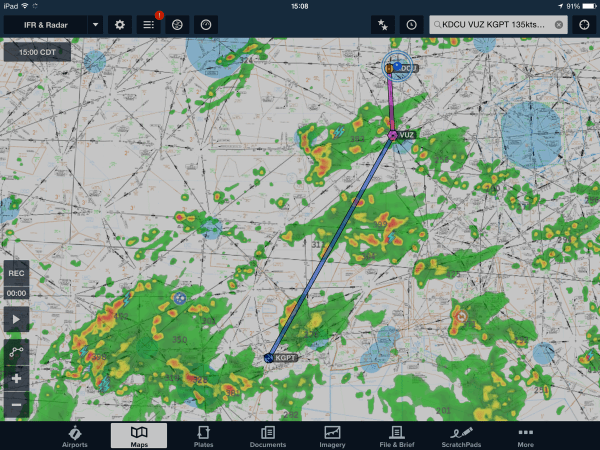
Here’s a partial map of our flight route.

After we landed, John and I discussed what happened, how we reacted, and what we learned from it. On the positive side, we displayed excellent crew coordination, and I was glad to have an experienced pilot in the other seat. The multiple failures were annoying but not critical; the weather was tolerable, we were in a familiar area, and John and I both had iPads with GPS for backup. On the negative side, I wasn’t as familiar with the emergency procedures for this airplane as I should have been (although part of the flight’s purpose was for me to practice emergency procedures).

This morning, I filed an ASRS report; ASRS is a unique success story, and I plan to write about it for my next Flying Friday. Then I wrote this post. I’ll look forward to seeing what Redstone’s mechanic finds. I don’t think there were any telltale signs that I could have caught during the preflight or runup, but I will continue to keep my eyes very sharply peeled.

1 Comment

Filed under aviation

Flying Friday: a sample of instrument flight

Bonus! Two Flying Friday posts in one day (here’s the other one.)

There’s a difference between flying under instrument flight rules (IFR) and flying in instrument meteorological conditions (IMC).

When you fly IFR, that means you’re flying on an instrument flight plan, along a defined route, in communication with and under positive control of ground-based air traffic control.

When you fly in IMC, that means you are flying “primarily by reference to instruments,” as the FAA puts it. That basically means that you can’t see a discernible horizon. You can fly IFR in good weather or bad. If you’re flying in IMC, you must do so under IFR. If you’re flying in visual meteorological conditions (VMC, what normal people call “good weather”), you can fly under visual or instrument flight rules.

Actually, I should clarify just a bit– VMC isn’t necessarily good, it’s just that IMC is defined as “weather worse than the standard VMC minimum visibility and/or ceiling.”

This whole post is basically just an excuse to post a short video showing one example of flight in IMC. I took it while en route from Decatur to Tampa Executive; on that 3h40min flight I was in the clouds for just under an hour.

You can’t see a visible horizon, although the sun was semi-visible through the clouds. (If you take a look at the iPad screen, you’ll see why it was so cloudy.)  Surprisingly, on a sunny day, the inside of the cloud can be very bright with diffuse light, leading to the somewhat odd behavior of wearing sunglasses while flying inside a cloud that blocks the sun from the ground.


Leave a comment

Filed under aviation, General Stuff

Flying Friday: the avionics brain transplant begins

I fly a 41-year-old airplane. Not that there’s anything wrong with that. As I’ve said before, there’s something to be said for mature technologies, and the economics of general aviation are such that there’s no chance I’ll be buying a new airplane any time soon when even an entry-level Cessna 172 costs north of $400K. Because new aircraft are so expensive, there’s a lively market in refitting and upgrading existing airframes. The engines, paint, interior, and avionics on an airplane can all be replaced or upgraded at pretty much any time, and the longevity of the basic airframe means that I can comfortably expect to get another 20-40 years out of my existing plane if I take good care of it.

With that said, newer airplanes have some major advantages, many of which (built-in cupholders, leather seats, ballistic recovery parachutes) aren’t available for my plane. After flying 706 for about a year, getting my instrument rating, and taking more and longer cross-country trips there were a few things that I wanted to add to make instrument flight easier and safer. My co-owner Derek and I spent a lot of time hashing out what we wanted vs what we could afford vs what we could live with. Here’s what we decided.

First off, we knew we’d have to meet Yet Another Unfunded Mandate. Starting in 2020, all airplanes that operate in controlled airspace (meaning the “Class B” and “Class C” airspace surrounding major airports and most cities) have to use a system called ADS-B. The FAA has delusions that ADS-B, which requires every aircraft to continuously transmit its GPS-derived position and velocity, will replace radar. It probably won’t, but that’s a topic for another post. Equipping a plane for ADS-B  requires two pieces:

  • a GPS system that uses the FAA’s Wide Area Augmentation System (WAAS) to provide high accuracy position and location data. The WAAS system combines satellite GPS data with position data from precisely surveyed ground stations to provide sub-meter accuracy.
  • an ADS-B Out transmitter that sends ADS-B data, including the WAAS GPS data

There are lots of ways to get these two parts, ranging in cost and complexity from “absurd” to “merely unpleasant.” The two most popular ways are to install a new transponder that includes a built-in position source or install a separate WAAS GPS and a little box that transmits ADS-B Out without touching your existing transponder. You can also get weather and traffic data using ADS-B In; that requires an ADS-B receiver and something to display the received data on. Right now, I use a Stratus receiver (the original, not the fancy 2S) and ForeFlight on an iPad for ADS-B In… but, as with many other government programs, there’s a huge catch. You get weather data for free, but you only see ADS-B In traffic if there’s an ADS-B Out-equipped airplane near you. This was supposed to be an incentive to get people to add ADS-B Out, but as a practical matter it means that ADS-B In is currently only useful for passive receivers like my Stratus in areas where there are already lots of ADS-B Out airplanes.

Next, we wanted the ability to use WAAS instrument approaches. I love the precision of ILS approaches, and use them whenever I can, but most airports don’t have an ILS, and those that do won’t typically have more than one. However, a growing number of airports have approaches that offer precision vertical and lateral guidance if you have a WAAS GPS. To be more precise (see what I did there?), we wanted to be able to fly LPV approaches so that we’d get precision vertical guidance for approaches where ILS equipment isn’t available. With WAAS equipment, you can also get an advisory glideslope, which gives you non-precision vertical guidance to help keep you from smashing into things.

Finally, we (well, mostly I) wanted to improve the autopilot’s ability to track instrument approaches. The approach phase of single-pilot IFR is a demanding and busy time, and it’s easy to make mistakes. Our existing autopilot can fly a heading, keep the wings level, and hold an altitude, but when you get to a complex approach, being able to let the autopilot turn the airplane based on GPS steering is very helpful because it frees up time and attention for vertical navigation, approach prep, and other critical tasks.

After a lot of back-and-forth, an immense amount of comparison shopping, and lots of head-scratching, Derek and I decided to send 706 to Sarasota Avionics to have the following installed:

  • An Avidyne IFD540 WAAS GPS. I preordered one of these back in 2012, well before I even had my pilot’s license, on the theory that I could always sell it later. The IFD540 is much more capable than the Garmin GNS530 and, to me, is easier to use than the Garmin GTN750. It’s also less expensive to buy, requires less expensive data subscriptions, and provides some much-needed market competition for Big G.
  • An Avidyne AXP340 transponder. The AXP340 transmits ADS-B Out, but it requires a separate WAAS GPS. In our case, that’d be the IFD540. There’s a whole complex mess of rules for which transponders can be legally used with which GPS position sources– basically, only combinations that have been certified by the manufacturer and registered with the FAA can be installed and used, even though other combinations may work just fine. Avidyne’s products are obviously certified to work with each other.
  • An Avidyne MLB100 ADS-B In receiver. Derek talked the Avidyne guys into giving us one of these for free if we bought the preceding two items. With this, the IFD540 can receive and display traffic and weather information. It is extremely useful to see this data overlaid on your primary map, especially because you can “rubber-band” your flight route to deviate around weather and traffic as needed.
  • A DAC GDC31 roll steering converter (which most people just call a GPS steering, or GPSS, adapter). Our autopilot, bless its heart, is the most analog device I think I currently own. It works by sensing voltage output from the directional gyro and course deviation indicator (CDI). To fly a particular course, you twist a knob on the DG to set the heading indicator, or bug, to the desired course; you can also have the autopilot track a VOR or even an ILS localizer, which it does by looking at the voltage used to drive the deflection on the CDI. One thing it can’t do, though, is track an actual GPS course. If the GPS route calls for you to fly a heading of 175 degrees, and the heading bug is set to 95 degrees, guess where you’re going? The GDC31 fixes that by adapting the digital steering commands output by the IFD540 into voltages that the autopilot can understand. I’ve used GPSS in other airplanes before and it’s a great experience– smooth, solid tracking with no “hunting” and accurate turn anticipation.
  • An Avidyne AMX240 audio panel. We’d been talking about replacing our ancient mono audio panel with a nicer unit that would give us better audio quality, and the marginal cost of adding the panel at the same time as the other equipment was considerably lower than doing it later.

The IFD540 + AXP340 combination gives us ADS-B Out, so we’ll be legal. The IFD540 + MLB100 gives us ADS-B In (with the added bonus that the IFD540 has wifi, so it will be able to feed all sorts of useful data to portable devices in the cockpit). Finally, the IFD540 + GDC31 gives us full two-axis autopilot coupling. I think, but haven’t verified, that it will also give us the ability for the autopilot to track altitude changes as expressed by the glideslope. The existing autopilot can track an ILS glideslope, and the IFD540 can provide a glideslope for LPV approaches (and an advisory glideslope for LNAV+V) so I think it should “just work.”

This seems like a huge list of expensive stuff (and it is)– one question that immediately comes to mind is “why bother with all this stuff when you could just use an iPad?” The problem is spelled F-A-A. First, there are no portable ADS-B solutions that are approved to meet the 2020 mandate in Part 23 aircraft. That’s a fancy way of saying that an experimental or homebuilt airplane can use equipment that’s not approved for factory-built airplanes. That also wouldn’t give us WAAS approach capability; even though there are portable WAAS receivers (including this watch!) you can’t use them to fly approaches. While there’s been lots of flailing in the aviation press about the need for cheaper, better-integrated ADS-B solutions, it’s also true that we’re getting a lot of other capability out of the upgrade that we’d miss if we went with a simpler ADS-B-only installation.

Along with the avionics themselves, of course, there are lots of little things– antennae, cables, and so on– that have to be installed and tested. That’s why we expect the upgrade to take an eye-popping four weeks– and that’s assuming everything goes well. Stay tuned!

2 Comments

Filed under aviation, General Tech Stuff

Flying Friday: 2015 flying year in review

It’s fitting that as I write this, I’m sitting on a Delta 717 coming back from Tampa, where I just dropped the plane off for a month or so in the avionics shop (more on that in the near future). I closed out my flying year today with 3.7 hours of cross-country time from Decatur to Tampa Executive, during which I got 0.8 actual instrument time, found some rain, and battled a misbehaving engine monitor. (And yes, I know it’s not Friday.)

For the year, I flew a total of 89 hours, considerably down from my 2014 total. Of that, a respectable 8.5 hours was actual instrument time, and I logged 20 instrument approaches. This reflects my typical mission of moderate-distance cross-country trips. Those trips gave me some great experiences– I flew to Chattanooga, New Orleans, and Austin to compete in races, visited family in friends in Louisiana, Texas, Georgia, and North Carolina, and went on a number of business trips that would have been boring and/or unpleasant if I’d had to drive.

During the year, I am happy to report that a) I didn’t do anything egregiously stupid in the air and b) none of the squawks I encountered in the air were serious. Despite that, I’ve learned a few valuable lessons that I plan to apply in 2016.

In 2016, I plan to pursue my commercial license, build my understanding of weather patterns and forecasting, and improve my airmanship skills. Ideally I’d like to fly at least an average of 10 hours/month, including some long cross-country flights to the west coast and some trips to see my sons at their various colleges. I’m looking forward to another great year in the air.


Leave a comment

Filed under aviation

Flying Friday: looking stupid now vs stupid later

Remember this Fram commercial?

The concept it highlights is a fundamental part of many different aspects of life. Technical debt, TiVo guilt, and my own growing backlog of Kindle books are just three of the many manifestations of the now-versus-later principle. Here’s another great one: “It’s better to look a little stupid now, than a lot stupid later.” 

I don’t really have anything to add to this article; it very neatly captures the principle and provides an excellent cautionary tale for all of us, but especially pilots and most especially those who are entrusted with the role of pilot in command.


3 Comments

Filed under aviation

Flying Friday: This ain’t Delta

Every pilot has different reasons for flying. For me, a big part of my love of flying is the ability to travel, relatively quickly, where and when I want. The values of “quickly,” “where,” and “when” are all subject to a variety of constraints, though. Some are self-imposed and some are limitations imposed by the FAA, the laws of physics and aerodynamics, or my desire to live to be a grumpy old man.

Let’s take one simple example: time. It would certainly be possible for me to fly from Alabama to southern California for a business trip, but I wouldn’t do it for a short trip— in my particular airplane, that would take me about 11 hours of flight time, which translates into something like 14 hours of total time when you factor in fuel stops… and that really means it would take two days, since flying for that length of time in a single day would make it difficult for me to maintain the focus and energy required for a safe journey. Likewise, I could easily fly from here to Birmingham for dinner, but when you factor in the time required to preflight and prepare the plane, conduct the flight, get to and from the restaurant, and return home, it would be quicker to drive over the short distance. For me personally, with the airplane I have now, the sweet spot is trips of about 150 miles up to about 1000 miles. Shorter or longer trips are possible, but when time is important, taking another means of transport is usually more sensible.

We can lump all the other constraints together into the general heading of “dispatch reliability.” That is, for a planned trip, how often are you actually able to complete it without bumping up against those constraints? It’s critical to keep in mind the difference between a commercial airline (which flies under Part 135 of the Federal Aviation Regulations) and my airplane, which flies under Part 91 of the FAR. There are 3 major factors that influence dispatch reliability in both of those worlds: weather, equipment, and regulation.

The ability to deal with weather, of course, is a huge part of dispatch reliability. I once was stuck away from home for 3 days because the weather was poor and I didn’t have an instrument rating, so I couldn’t leave when I wanted to. Sometimes the weather, or the forecast, is just too crummy to safely complete the planned flight. This happens more often in some places than others, of course; east of the Mississippi, we have lots more thunderstorms than in, say, California or Washington.

Equipment influences dispatch reliability in two different ways. First is redundancy. Unless it were truly urgent, I wouldn’t make an extended night flight in IFR over rough terrain in my airplane— not because it’s inherently unsafe but because, with only one engine and one vacuum system, there are several single points of failure that could make such a flight more exciting than I’d like. Waiting for daylight or better weather would be a smart play. On the other hand, commercial planes flying under Part 135 have doubly- or triply-redundant systems, ranging from engines to hydraulics to avionics. As you spend more money on an airplane, the number of redundant systems (and the reliability of the systems you have) tends to increase. The capability of your equipment also influences reliability. If you have onboard weather radar or in-cockpit radar data through XM Radio or ADS-B, for example, you may be able to complete flights that you wouldn’t without that data. More sophisticated aircraft that have jet engines and pressurized cabins can fly above many regions of bad weather; aircraft with icing protection can fly through moist clouds without picking up a killing load of ice. Most piston-engine singles (mine included) aren’t pressurized, don’t have anti-icing equipment, and don’t have onboard radar— meaning that there are conditions that are no problem for Delta or United but render general aviation flight impossible or unsafe. Both airliners and general aviation aircraft have lists of requirement equipment. Although the contents of the lists are very different, the concept is the same: if something on that list isn’t working, you can’t legally fly. (Keep that in mind the next time you’re on a commercial flight and the pilot tells you that some seemingly unimportant gadget isn’t working so they have to wait for a mechanic— if they’re waiting to fix it, it’s probably because it’s on that minimum list.)

Regulation is the third category. Without going into all the differences between different parts of the FARs, I can still say that there are some conditions that are legal for me but not an airline, or vice versa. For example, thanks to my instrument rating, it is literally legal for me to take off with such poor visibility that I can’t see the propeller while sitting in the pilot’s seat, while Part 135 flights have specific runway visual range (RVR) requirements that must be met before they can depart. On the other hand, a suitably equipped and crewed Part 135 flight can use Category III autoland to land in zero visibility, whereas I have to honor a higher minimum ceiling and visibility limits. There’s sometimes a huge difference between what’s legal and what’s safe, and the FARs that I fly under give a great deal of latitude to the pilot in command in most cases. That can be good or catastrophically bad, depending on your judgement.

In general, the rule I use is simple: if it is critical that I be somewhere, and I’m planning on flying, I’ll always have a backup. Last week, the boys and I were going down to the Voodoo Music Festival in New Orleans. We’d planned to fly, but when I preflighted the airplane, this is what I found: a broken alternator belt. 

WP 20151030 14 35 28 Pro

I didn’t have a spare, the shop didn’t have a spare, and even if we had, on my plane, you have to remove the propeller to replace the belt. We drove instead, but we still got to see the headline act because we’d built enough slack into the schedule. Likewise for weddings, funerals, or critical business meetings— if it’s really important, I’ll have a backup airline ticket in my pocket (or enough time to drive). If it’s not critical, I’ve learned to accept that sometimes the weather or the airplane may conspire against going. A couple of months ago, Dana and I had planned to fly down to Gulfport for the day to see Mom, Charlie, and Grandma. Here’s what the weather looked like:

20150816 200809000 iOS

Score that one in the “nope!” column. It would have been perfectly legal to pick my way around those storms, since I didn’t have the equipment to fly over them, but it would have been uncomfortable at best and criminally dangerous at worst. Driving would have taken too long, so we reluctantly cancelled; it wasn’t a critical trip.

Having a backup plan or the willingness to say “we’ll do this another time” is critical because it eliminates the pressure to attempt a flight when weather, equipment, or regulation might dictate otherwise. The hoary old saying “it’s better to be on the ground wishing you were flying than flying and wishing you were on the ground” applies in spades. Even when it’s difficult to tell your boss, your family, or your customer that you won’t be somewhere at the appointed time, it’s a hell of a lot easier than explaining yourself to the FAA, the NTSB, or St. Peter.

2 Comments

Filed under aviation, Travel

Fuel shenanigans

The saying goes that “you can never have too much fuel unless it’s on fire.” I have always been a believer in that truism, so I always fill the tanks before I go anywhere… except on a recent trip, which just confirmed the wisdom of whomever came up with the old chestnut.

I was flying DCU-IGX, which I flight planned as 394nm, just under 3:00 of flying time, and about 48 gallons of fuel. Sure enough, when I arrived, I’d drained one main tank, one tip tank, and about half of the other tip tank. The CGR-30p engine monitor, my analog gauges, and my eyeball inspection all agreed.

Fuel at IGX was $5.28/gallon. Fuel at my home airport is $4.80/gallon. “Hey,” I thought. “I have enough fuel to get home if I just fill the tip— that will give me 59gal on board, which still gives me a VFR reserve.” Visions of dollar signs dancing in my head, I filled out the fuel ticket and went into town to lift all the weights with Alex. When I returned, I verified the fill, sumped the tanks, and headed to the departure end of the runway with 59 gal on board.

Once airborne, the problems started. ATC wanted to vector me well north of where I wanted to go because of weather, and to keep me out of the RDU arrival corridor. They also gave me a higher altitude, so I burned more fuel in the climb than I’d expected. Once I got past the first waypoint, I had to divert around more weather… see where this is going? About 40 minutes into the flight it became clear that I didn’t have enough fuel to get home without a stop.

I’m not talking “had enough fuel if I ate into my reserve,” I’m talking “engine monitor shows negative fuel remaining on landing.” Noooope.

A little head scratching ensued, and I determined that I had plenty of fuel to make Winchester, where fuel is only $4.09/gallon. When I landed, I took on 71 gallons out of the 82-gallon usable capacity— within my 45-min reserve requirement, but just barely.

Lesson learned: by not filling that tank in Chapel Hill, I saved (25 gal * $0.48/gal)… a whopping $12. Then I cost myself another 30-40 minutes of diverting to Winchester, landing, fueling, and returning home. In this specific case, I was lucky because Winchester is open 24/7 and is easy to get into and out of, and their fuel is cheap. I probably netted a few dollars of savings filling up there as opposed to filling all 4 tanks in Decatur— but that unpleasant feeling of not having enough fuel aboard is one I don’t care to repeat.

Fill ‘er up!

2 Comments

Filed under aviation

Flying Friday: first flights with the CGR30p

Good news: we finally got the long-awaited CGR-30P instrument installed in our plane! Back in February, I said we’d put the plane in the shop for the actual install and, rather optimistically, said that I thought we’d probably get it out within a week or two. I could write a long, sad story about the various difficulties we had, including the unexpected departure of the shop manager, his failure to tell us we needed to do a pre-install maintenance check flight, and so on, but the details are both boring and depressing. Enough to say that the install is done, there have been no major problems with it so far, and we’ll probably find another shop to use in the future.

Anyyyyyway, here’s what the finished product looks like. We had it installed in the panel in the spot formerly occupied by a defunct Stormscope, in the upper left corner of the panel. The plastic cover that Piper uses on its panels obscures the tachometer redline, which is annoying but not insurmountable.

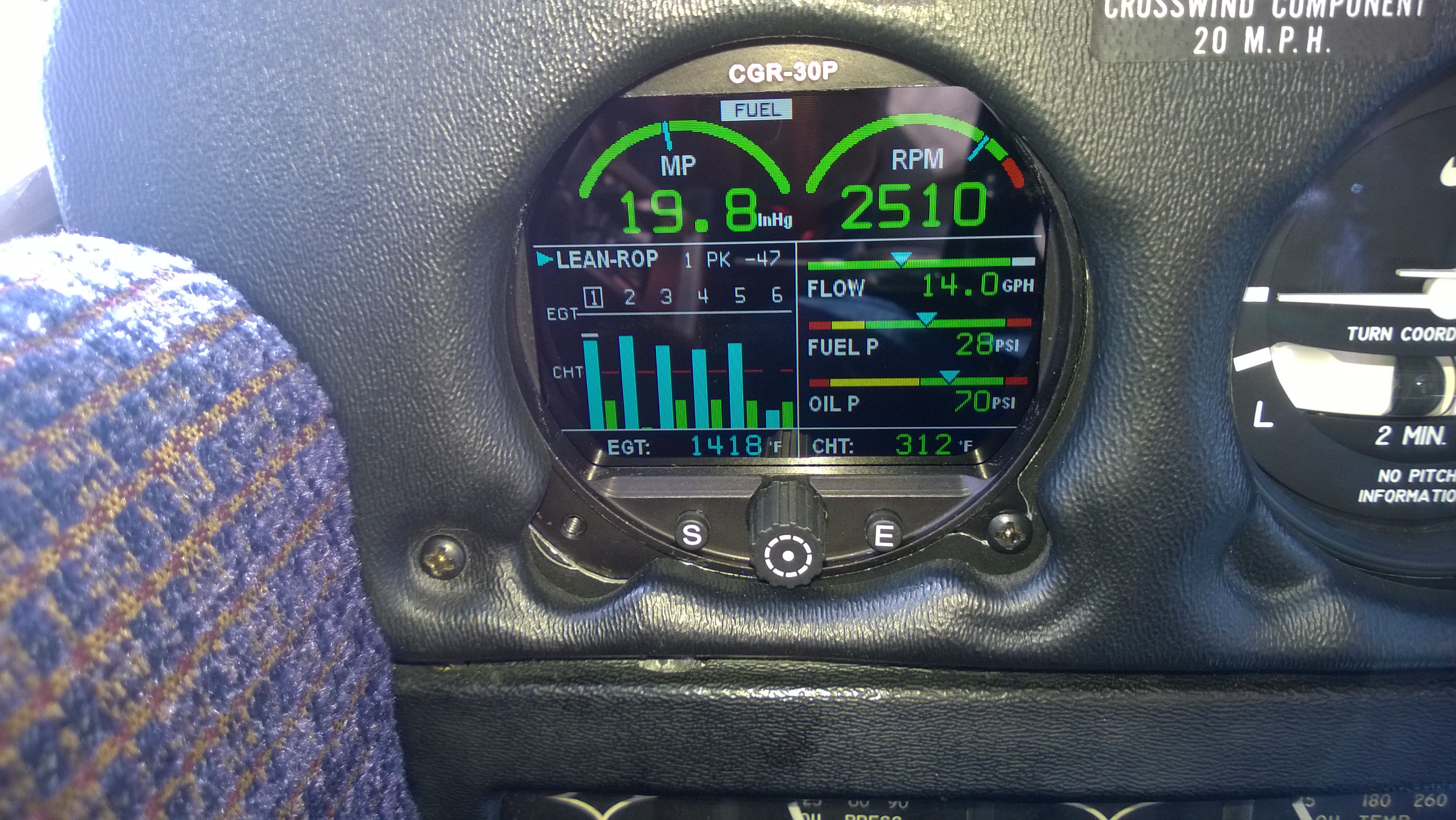
WP_20150328_001The rest of the installation is unremarkable; the CGR unit uses a small box known as the EDC (for “engine data computer”) that’s installed in the baggage compartment. All of the temperature probes and transducers feed data to the EDC, and a simple single cable runs from the EDC to the panel. In the engine compartment, there are six probes each for cylinder head and exhaust gas temperatures, a fuel pressure transducer, a fuel flow transducer, oil pressure and temperature transducers, plus an outside air temperature (OAT) probe mounted on the pilot’s side of the fuselage. The picture above shows manifold pressure and propeller RPM at the top, an EGT/CHT bar graph in the lower left side, and fuel flow, fuel pressure, and oil pressure on the lower right.

The CGR30P is connected to the master bus, not the avionics bus, so when you power on the master switch it comes on. Although it’s possible to use it as a fuel tank gauge, that would require a bunch of additional wiring, so we kept the analog fuel tank gauges and use the CGR to monitor fuel flow. When it boots, you can specify how much fuel you’ve added and then it will track both the flow (by using the flow transducer) and your fuel remaining (by subtraction).

The control scheme is simple; the “S” pushbutton sequences between different screens on the lower half of the instrument. The rotary knob (which can be pushed to select) moves a small carat cursor around between fields. The “E” button exits what you’re currently doing. This takes a little practice, but it’s easy to learn. For example, if I want to lean the engine, I press S until I see the CHT display, then use the rotary knob to select the CHT display type, press the knob in, and dial it until it reads “CGT ROP” or “CGT LOP.” Easier said than done.

At first, it took me a minute to remember that the old analog fuel flow gauge had been disconnected while I was priming the engine. Luckily I caught on, and that gauge is now placarded as inoperative so I won’t keep looking at it. Apart from the novelty of looking at a color screen instead of a 1950s-era analog instrument, engine start, taxi, runup, and takeoff are completely unchanged. Leaning the engine for cruise will take some getting used to; because EGT6 is wrong (see below), the lean-of-peak and rich-of-peak methods are just guesswork, so I stuck with setting approximately the same fuel flow I used back when the analog gauges were connected. I was very pleased to see that setting the throttle so that the CGR read 16″ of manifold pressure gave the same steady 500fpm descent rate that 16″ of MP would on the analog gauge. In fact, the only discrepancy I noticed was that the electronic tach reads 80-100rpm faster than the mechanical tach, probably due to flex or looseness in the mechanical tach cable.

The refresh rate, quality, clarity, and lighting of the CGR30P screen are all superb; it was easy to read it in all lighting conditions, including direct sunlight (though I haven’t flown with it at night yet).

Sharp-eyed readers may notice that the cylinder head temperature bars (the green ones) don’t seem to show much of a temperature on cylinder 6. During my first test flight, I found that the EGT for that cylinder was suspiciously low, although the engine functions just fine. We think there’s a loose connection, which we’ll troubleshoot once we get the airplane back from annual. For a while, I was sure that CHTon cylinder 2 was wrong, but no, it was just that I’d chosen to display the differentials for CHT, so that the coolest cylinder reads as zero and the other cylinders show how many degrees above the coolest they’re running.

I had to fix a few other things; the CGR30P didn’t know what the analog tach’s total hour reading was, and it didn’t know that it was connected to our KLN94B GPS. The GPS feeds the distance to the current waypoint and the total flight plan to the CGR, which can use it to show how much fuel you’ll have when you get there. The CGR is also supposed to feed fuel data back to the GPS, but ours is old and doesn’t know how to use that data. Newer GPS units can display a range ring that shows graphically exactly how far you can fly– and as you change fuel burn by changing the throttle or mixture settings, the ring dynamically changes to show how far you can go. The GPS integration still isn’t working quite right, though; I need to tweak it a bit more.

By about 30 minutes into my flight to New Orleans, incorporating the CGR into my scan was second nature, and I feel comfortable operating it. I’m looking forward to downloading engine performance data and having it analyzed to see what we can learn about the health of the engine and how to operate it for the greatest efficiency and longevity– the real reason behind getting the monitor. So far, it’s a solid device and I’m happy with it.


1 Comment

Filed under aviation, Reviews

Flying Friday: “When Penguins Flew and Water Burned” (review)

I don’t bother to review very many books, in part because I read a lot and in part because writing reviews takes time away from reading. However, I recently received the Kindle version of When Penguins Flew and Water Burned and wanted to quickly recommend it. The book is a recap of the career of Jim Clonts, a B-52 navigator (and, later, radar navigator) during the tail end of the Cold War. Clonts writes in an engaging style, and his tales of life on a bomber crew are absolutely fascinating if you’re at all interested in military aviation. Although his crew position is navigator, he’s also a pilot and so there’s a fair bit of inside-baseball talk. The book is moderately heavy on jargon, as you might expect, but it’s still pretty approachable even if you don’t know anything about bombers or the USAF in general. Well worth a read if you’re flight-minded.

2 Comments

Filed under aviation, Reviews

Flying Friday: of shops and annuals

I haven’t been flying much lately, sad to say. This is mostly because of weather, but partly because I have been busy with other things. However, as spring approaches, I’ve been eager to get back in the air. A couple of weeks ago, I went flying with John, my CFII, and shot some practice instrument approaches. While I was a bit rusty, I was still able to fly a good ILS, even in the winds, but I had a little bit of trouble making the KLN94 do what I wanted to get set up for the GPS approach into Huntsville… its time is coming, though, and I hope to finally get the Avidyne IFD540 installed in early summer. That’s still some time away, though. There are two hurdles to cross first: getting our engine monitor installed and getting the plane through its required annual inspection.

First, the engine monitor. Like almost all other airplanes of this vintage, 706 has a battery of analog gauges that report on the engine health. There’s nothing wrong with this, as these instruments tend to be very reliable. The tachometer, manifold pressure gauge, and fuel flow gauge are all very important. However, the standard engine instruments have several shortcomings. First, our plane had a conventional single gauge for reporting exhaust gas temperature (EGT), and the aftermarket cylinder head temperature (CHT) gauge wasn’t working. The problem with single-channel EGT and CHT instruments is that they only tell you what one cylinder is doing, so there’s no way to see what’s going on with the other five cylinders. Second is that the gauges are scattered all around the panel; besides the EGT and CHT indicators, there’s a suction gauge (which tells you whether the engine-driven vacuum pump that drives the gyros is working), the fuel gauges, and so on. Third is that these gauges only show instantaneous data, not trends, and they don’t alert you to unusual conditions.

The solution: get an engine monitor. After much shopping and head-scratching, we settled on the CGR-30P from Electronics International. The video below will give you an idea of what this magic box does:

From my perspective, the CGR-30P does two critical things: it alerts you when an engine parameter goes out of limits (say, if the oil pressure decreases unexpectedly), and it logs data that can be used for later analysis. As a nice side benefit, it monitors CHT and EGT for all six cylinders, which has the dual benefit of giving early indication of potential misbehavior and providing the data we need to operate the engine as efficiently as possible.

(Brief digression: there is a lot of religious argument over the “correct” way to adjust the fuel/air mixture in piston engines. This article by noted mechanic Mike Busch explains the topic, and the debate, very well, along with recommending the approach that I will be using once I have accurate CHT and EGT data).

Getting the CGR-30P installed, though, requires an avionics shop. Derek and I have struggled with finding a good local shop. There’s no avionics shop at our home field, and C-Cubed, which used to be at Huntsville,  closed a few months ago. Their spot was taken over by a company called Advanced Technical Avionics (ATA). After a brief period of confusion occasioned by a management change (translation: someone got fired), we got the plane into the shop on Tuesday to start the installation. With any luck, in a week or so, the plane will be back in the air– which is good, as I have a trip planned to New Orleans next month for the New Orleans Sprint triathlon, my first of the year.

Right after I get back from New Orleans, the plane needs to go in for its annual inspection. Every general aviation aircraft is required to undergo a comprehensive airworthiness inspection each year. There are specific things that the shop will check based on the engine and airframe manufacturer’s recommendations, and there can be other things that need checking or adjustment based on how much the plane has been flown. For example, some components need to be checked every 100 or 500 hours. (This example inspection checklist gives you an idea of some of the things that must be inspected.) Then, because this is a 40-year-old airplane, there will inevitably be some things that need to be repaired or replaced because they’re worn out or broken. For example, our air conditioner doesn’t work any longer, so we’ll have the shop take a look at it as long as they’re crawling around inside the plane.

On the advice of Savvy, our maintenance management company, we’re using a Piper service center for the annual– DLK Aviation in Kennesaw, Georgia. That means that we’ll have to ferry the plane there and back again; I’ll probably rent a plane from Redstone and pick Derek up after he drops the plane off, but driving isn’t out of the question. Once the plane arrives, after one to two weeks (and some unknown amount of money, depending on whether there are any expensive surprises), we’ll have the plane back and be good for another year.

Leave a comment

Filed under aviation

Developing apps for the Garmin ConnectIQ SDK

Early on this triathlon season, I bought a Suunto Ambit 2s. I loved the idea of having accurate workout data for my training, plus more accurate time/distance data for my races, and the Suunto has delivered. But it’s missing a few things: its support for interval workouts is poor, and the Movescount website is less reliable than I’d like. Luckily Suunto added export to Strava, but you still have to use their computer-based app to transfer workouts from the watch to the computer to the Movescount site, so when the site’s down you can’t see your workout data. (There are also various website bugs, including one in computing swim distance that means that the results on the website don’t match the results on the watch, but I digress). Having said all that, I was planning on sticking with the Suunto because I like the industrial design; it’s comfortable to wear, looks good, and has all the basic functionality I need.

Then I read this: Garmin announces ability to develop apps on wearables, with Connect IQ.

Coupled with my native lust for all shiny gadget things, the availability of the SDK opened a whole range of possibilities, not only for apps I could get for the watch but for apps I could write. I immediately started pondering what kinds of useful apps I could build and came up with one that I thought would be very useful: a flight timer. There are at least two different flight times that I need to log for every flight: how long the propeller was turning (because that drives how much money I put into our engine reserve fund) and how long I was actually in the air (which is what I actually log as flight time).

The GPS in 706 can automatically calculate flight time from takeoff to touchdown… provided you remember to look at it after landing and before turning off the avionics master switch. We also have a Hobbs meter that measures the time when the propeller’s actually turning. However, an app that automatically records time in flight, along with the origin and destination airports, would be useful. CloudAhoy does something similar, based on ForeFlight track data (and for all I know, ForeFlight can do this already). However, a timer that’s not tied to the aircraft would have the advantage of not losing its data when you turn off the airplane, and not being tied to a phone, external GPS, or iPad greatly reduces the risk of losing data due to battery or device failures.

So, I ordered a Garmin 920XT and downloaded the Garmin SDK. On first inspection, it looks like the SDK and development model are both pretty tractable for what I want to do. I’ll be blogging about my development efforts as they progress. For now, if I can get basic logging to work in the device simulator, I’ll be happy. There are a few features I’d like to have in the app to make it useful: it should automatically log flight time from takeoff to touchdown, geocode the origin and destination points so that the log file reflects airports and not just GPS points, and provide a timer function for things such as switching fuel tanks in flight. If I can extend that to include automatically logging flights into Safelog, that’d be even better but that might be some time away.

The 920XT itself will be a nice upgrade from the Suunto, which I am going to loan to my pal Jay for use in his training, but it won’t ship until sometime in November, so I’ll be running on the simulator for a while yet (and using the Suunto to log workouts, too!)

The SDK includes a comprehensive set of API docs, the device simulator, an Eclipse plugin that runs the command-line compiler, and assorted sample apps. I’ll have ore to say about it once I get my environment set up and running and start playing with the samples. Garmin’s clearly thinking about this the right way, though; in addition to their own developer forum, they are actively encouraging the use of StackOverflow.

Stay tuned for updates!

3 Comments

Filed under aviation, Fitness

Disney and Universal 2014 wrapup

A few more-or-less random thoughts about our recent trip to Disney World and Universal Studios Florida:

  • Universal is a see-it-once park, I think. We enjoyed it but there was nothing so compelling that I think we’d want to go back again in five years. On the other hand, all four of us had specific things at Disney that we looked forward to doing (among them: turkey legs, the Winnie the Pooh ride, Tower of Terror, and Space Mountain).
  • Having said that, the Harry Potter attractions are superbly done: decoration, character acting, costuming, and all the little touches come together to provide a very immersive experience. Just don’t expect to be able to drink a whole mug of butterbeer. (And don’t be surprised if the Forbidden Adventure ride leaves you nauseated for a couple of hours afterwards.) Getting early access by virtue of staying in a Universal property was well worth it.
  • We didn’t buy, nor did we miss, the front-of-the-line ride access benefit that Universal sells for $60+ per person, per day.
  • Disney’s MagicBands system works extremely well and made paying for things much easier– which, I suppose, is the point.
  • The FastPass+ system takes a little getting used to because you can get multiple passes at once, but there are limits on which rides you can stack passes for. Read up on it before you go.
  • We stayed at two “value” hotels: Universal’s Cabana Bay and Disney’s All-Star Music Resort. Both had nicely equipped, clean “family suite” rooms. Both claimed to sleep six: Universal provided two double beds and a twin pull-out sofa, while Disney provided a queen, a twin sofabed, and two single fold-out sleep chairs: not ideal for six-foot teenagers, but workable.
  • Disney’s on-property wifi was great at the parks, as was Universal’s. However, the Disney in-room wifi was unusuable– worse even than the worst of the Microsoft conference hotels I’ve had to use in the past.
  • EPCOT’s International Food and Wine Festival was going on, so we got some primo foods when we ate dinner there. I’d like to do the festival again, but with more time to savor the food.
  • Tom, Matt, and I all ran into friends at the parks. It’s a small world indeed.
  • We didn’t rent a car, so we used Uber for the move from the Kissimmee airport to Universal, then a cab from Universal to Disney, then Uber again. Orlando’s taxis are about a million percent cleaner than in most other cities, but Uber was cheaper and faster.

Overall, a successful trip (good flight, too!) but boy, am I glad to be home!


1 Comment

Filed under aviation, General Stuff, Travel

My first real IFR trip: Decatur-Manassas and back

My trip to DC to compete in the Nation’s Triathlon was my first “real” IFR flight. I say “real” because it combined flight in actual instrument conditions with busy airspace and a long cross-country—conditions I expect to encounter often as I fly around.

Earlier in the summer, I had signed up for the tri.The timing was such that I would come home from GATTS, have a couple of days to pack, and then fly up to DC, hopefully with my instrument rating. That turns out to be what happened.

Flight planning was straightforward. The DC metro area has a number of general aviation airports scattered around, but it also has significant restrictions on its airspace. Without going into all of the gory details, it’s enough to point out that the airports that are closest to central DC are heavily restricted. In order to fly to the so-called “Maryland 3”, you have to go to either Dulles or BWI, get fingerprinted, have security interviews with the FAA and TSA, and then get a PIN that you use when filing flight plans. I didn’t have time to do that, so I settled on Manassas, which is further out but would provide a reverse commute into and out of the city—it also helped that the route from Manassas to the hotel passed right by the bike shop where I’d made arrangements to rent a road bike.

I planned an early departure Saturday morning. Because I’d been out of the office for most of the week, I couldn’t leave earlier than about 5pm, and I didn’t want to fly night IFR in unfamiliar, complex airspace after a full, and tiring, day at work—that’s how accidents happen. My original plan was to fly from Decatur to KGEV, fuel up with avgas and diet Coke, and then continue on to Manassas. The weather at Decatur at departure time was OK, with an overcast layer about 2000’, and Huntsville Approach quickly cleared me to my target altitude. The first hour or so of the flight was smooth on top, then things got a bit bouncy because there were clouds at my filed altitude—with some light rain and a fair bit of chop. Once past that, though, things were looking good until I looked at the weather at my destination airport and alternate . Both were below minimums, so instead I flew a bit further east and landed at Winston-Salem, which was nicely VFR. It turns out that the airport there has self-service or full-service fuel, with a whopping $1.69/gal price difference—but getting to the self-service pump from the FBO is an adventure that involves runway crossings and, in my case, aggravating the pilot of a Malibu who had to hold short while I taxied. Such is life.

The flight into Manassas was perfectly uneventful, just the way I like. I had filed direct from Winston-Salem to Manassas, but I didn’t expect to get that routing, and sure enough, I didn’t; Potomac Approach sent me direct to the Casanova VOR, then direct Manassas. It was fun watching the Foreflight traffic display en route, since I could see a ton of traffic into Reagan.

Watch out for the big iron!

Watch out for the big iron!

Going to CSN first wasn’t much of a diversion, so it was no big deal. Manassas was VFR, but storms were expected later, so after I landed, the fine folks at Dulles Aviation hangared the plane. (I also want to point out that they provided stellar service: the rental car was ready when I got there, saving me a commute to the nearest Avis office some 12 miles away, and they treated me like I had just flown in on a Gulfstream.)

The return trip looked simple enough too. I filed direct Manassas to Greenbriar, WV. The race was on Sunday, and I needed to be at work Monday morning, so I had to leave late in the afternoon, meaning that several of the airports I would normally have considered as fuel stops were either closed, or would be. Greenbriar was reporting 900’ overcast, which was fine with me, so I filed, preflighted, and started up, then called Manassas Ground to get my clearance.

Here’s what I was naively expecting: “N32706, Manassas Ground, cleared as filed to LWB, climb and maintain 9000’, departure frequency…”

Here’s what I got instead: “N32706, Manassas Ground, cleared to LWB via the ARSENAL FOUR departure, thence the Montebello transition, then direct NATTS, then direct LWB; departure frequency…” Thus we see how ATC deals with the expectations of a novice IFR pilot. This set off a frantic burst of knob-twiddling as I tried to set up the KLN94 for that departure (which it didn’t have, since its onboard database was too old). I eventually got it set up, was cleared for takeoff, and then got a series of ridiculous vectors from Potomac Approach that sent me well north of where I wanted to be. However, the flight to Greenbriar was nice and smooth between layers, and, as advertised, the weather on arrival necessitated shooting the ILS, which I did smoothly. After taking on fuel, it was off to Decatur; the rest of the flight was unremarkably smooth except for a great sunset and some tasty snacks (yay vanilla wafers!) I considered it a very successful trip!

A great sunset to cap off a great trip

A great sunset to cap off a great trip. Not shown: vanilla wafers.

Leave a comment

Filed under aviation