Tag Archives: Flying Friday

Flying Friday: happy birthday, N32706!

Three years ago this week, John Blevins and I flew Delta to Salt Lake City to pick up N32706 and fly her home. I was perusing my logbook earlier in the week and realized that more than half of my total flying time (318 hours of my total 611) has been sitting in the left seat of this particular airplane. I’ve traveled for races/events (DC, Vermont, Texas, North Carolina, Ohio, West Virginia), family visits (Louisiana, Florida), business (Toronto, Missouri, Kentucky), and fun with the kids (Georgia, Mississippi, Tennessee), and flight training (Utah, New Mexico, Kansas, Oklahoma, Nebraska).

where I’ve been in years 1-3

There are times when I think it’s silly to own an airplane instead of renting– like a horse or a boat, you’re always paying the maintenance and fixed costs even on days when the weather is bad, you’re busy, and so on. But the freedom and flexibility of being able to travel where and when I want to, and the comfort of knowing that I’m flying a well-maintained, well-equipped airplane that hasn’t been neglected or operated improperly, more than make up for it.

My next trip is later today, from Decatur to Orlando (well, Kissimmee) for a weightlifting meet. Later in the year, I’ve got Tuscaloosa, Biloxi, New Orleans, and a few other places on my to-go list. I can’t wait!

Leave a comment

Filed under aviation

Flying with Avidyne’s version 10.2 software

If you think updating the software on your phone is hard, try it with avionics.

Avidyne has been promising a new release of the software for their IFD line of WAAS GPS units for a while now. Originally announced on April Fool’s Day last year, version 10.2 packs a pretty impressive list of features, including synthetic vision, support for a bunch of new devices (including digital radar and FLIR cameras), display of more ADS-B weather and traffic data, and a new “IFD100” iPad app that essentially acts as a second screen for your IFD. They generously made the update available for free, but with a catch: it has to be installed by an avionics shop. The FAA lets aircraft owners make “minor repairs and alterations” (a phrase which has a very specific set of parameters around it), and avionics software updates aren’t considered “minor.” When they finally announced that 10.2 was available, the first order of business was to find a shop to install it. None of the local shops are Avidyne dealers, so we decided to head back to XP Services in Tullahoma. A quick phone call to schedule an appointment was all it took.

The flight to Tullahoma was pleasant, and the XP team had the upgrade done in about 2 hours– right about the amount of time Avidyne says it should take. The update procedure is very detailed and specific, with lots of dire warnings about what happens if you do it wrong, so I’m glad they didn’t. They also upgraded the software in our SkyTrax 100 ADS-B receiver, which will become important a little later in the story. I can’t say enough good things about XP’s staff: they did good work, quickly, at a fair price, and were very friendly. Be forewarned if you go there though: there are no vending machines nearby so bring your own snacks.

On the way home I got to start playing with the new features, but it wasn’t until last week’s Easter trip from Decatur to New Smyrna Beach that they really came into their own. Here’s a partial list of the new goodness in this release.

Let’s start with synthetic vision. The IFD540 doesn’t have a way to sense the attitude of the airplane, so its syn vis feature is limited to showing a “plane in trail” (Avidyne calls it exocentric) view of you, your route, and the surrounding terrain. In this case, I’ve programmed the ILS 18 Y approach into my home airport. You can see the magenta line indicating that I’m on the final approach segment. The white line-and-loop to the upper right is the missed approach procedure that I’d fly if I couldn’t land. There’s another airplane in the area, at 1900 feet and descending. The synthetic vision display makes very clear what the surrounding terrain and obstacles look like, and how my planned flight path would interact with them. This is not a huge deal in the flat riverine terrain near Decatur but in someplace like Montpelier, with more significant terrain, it could literally be a lifesaver.

heading for the approach

Another nifty new feature: temporary flight restrictions (like the one shown below, for firefighting in southern Georgia near Waycross) and winds aloft data (the little white flag-looking things in the second picture) can now be shown along with all the other flight data. You can see that we have about a 20kt headwind. It’s important to remember that, like all other ADS-B weather data, the wind data comes from the ground and may not reflect what’s truly happening in the air at that moment.

Don’t fly in TFRs unless you want to meet the FAA in person

The direction of the wind barb shows which way it’s blowing; the number of little flags shows how strong it is

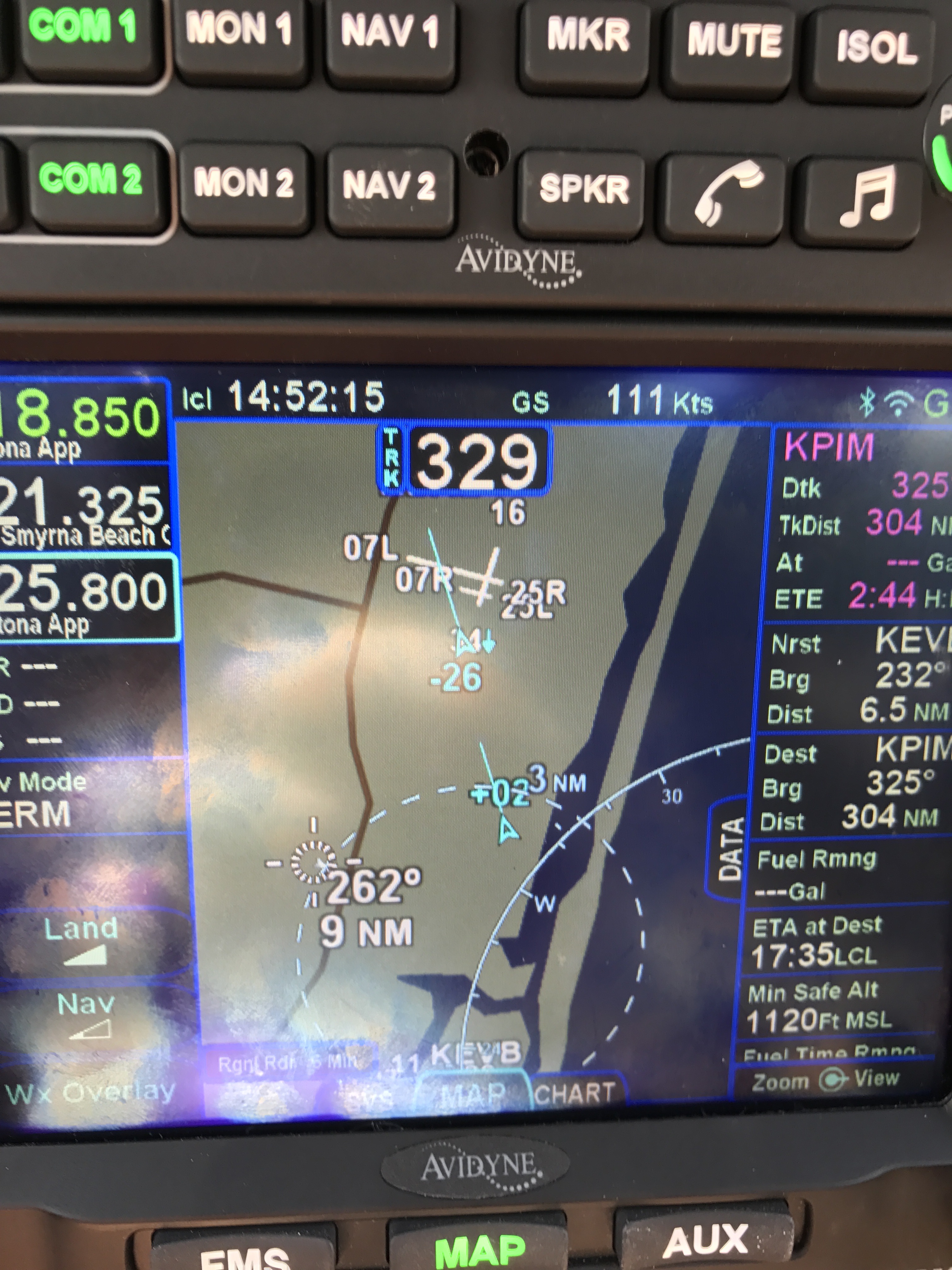
Traffic display is greatly improved in two ways. First, you can now see trend lines showing you where a traffic target is going (along with its N number, if it’s transmitting one). This is really helpful in crowded airspace, like the area around the Daytona Beach airport. You can see that both airplanes on the display are headed in the same direction as we are, one at roughly our same altitude and the other descending.

In 10.2, you can see where traffic targets are going

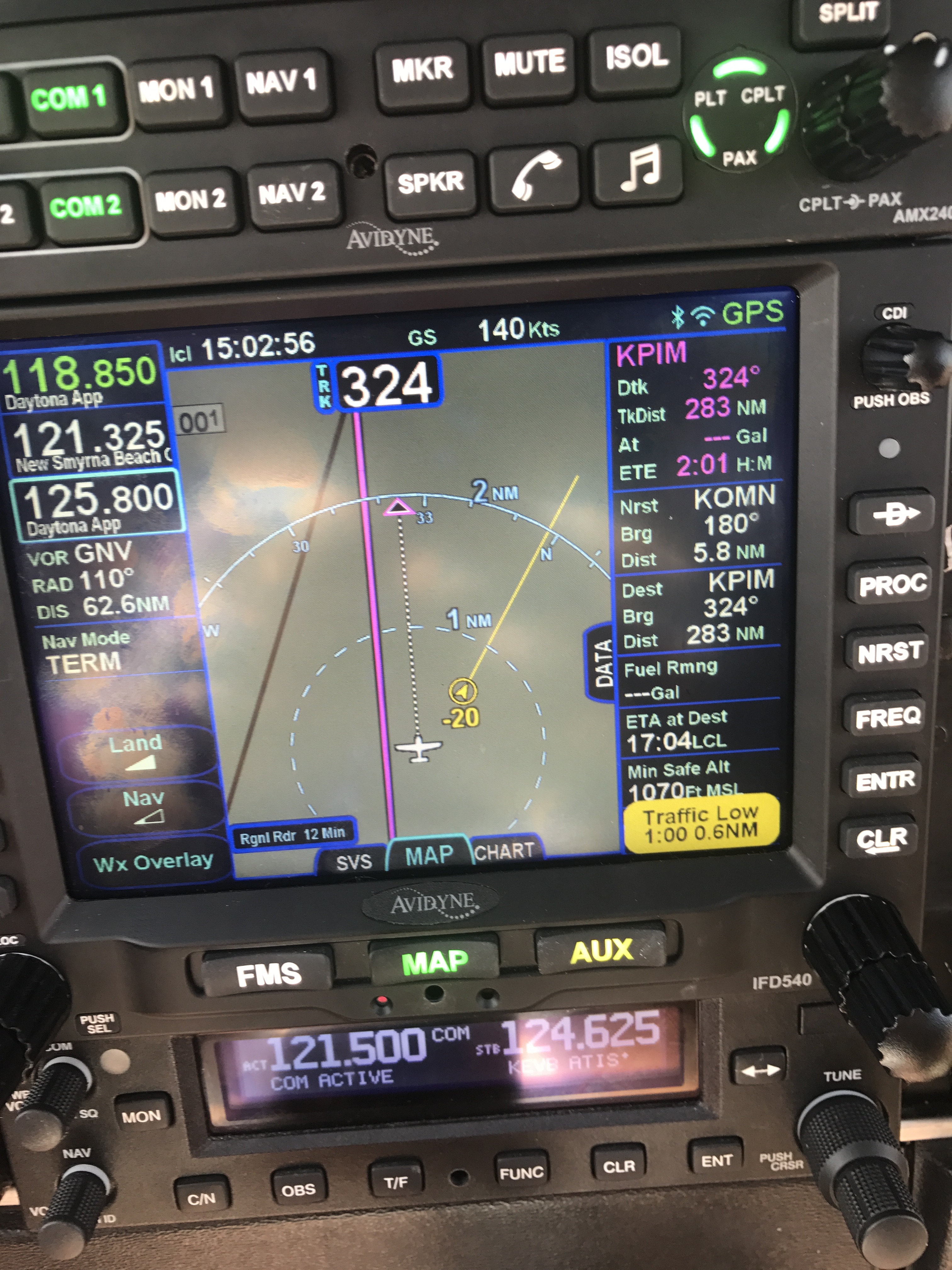
I also now get traffic alerts when there’s a potential conflict, i.e. someone else is flying towards me. An aural alert (“bong! TRAFFIC”) comes first, then the screen changes to show the conflicting traffic. This is an extremely valuable feature.

When you hear “TRAFFIC,” you’d better start looking around

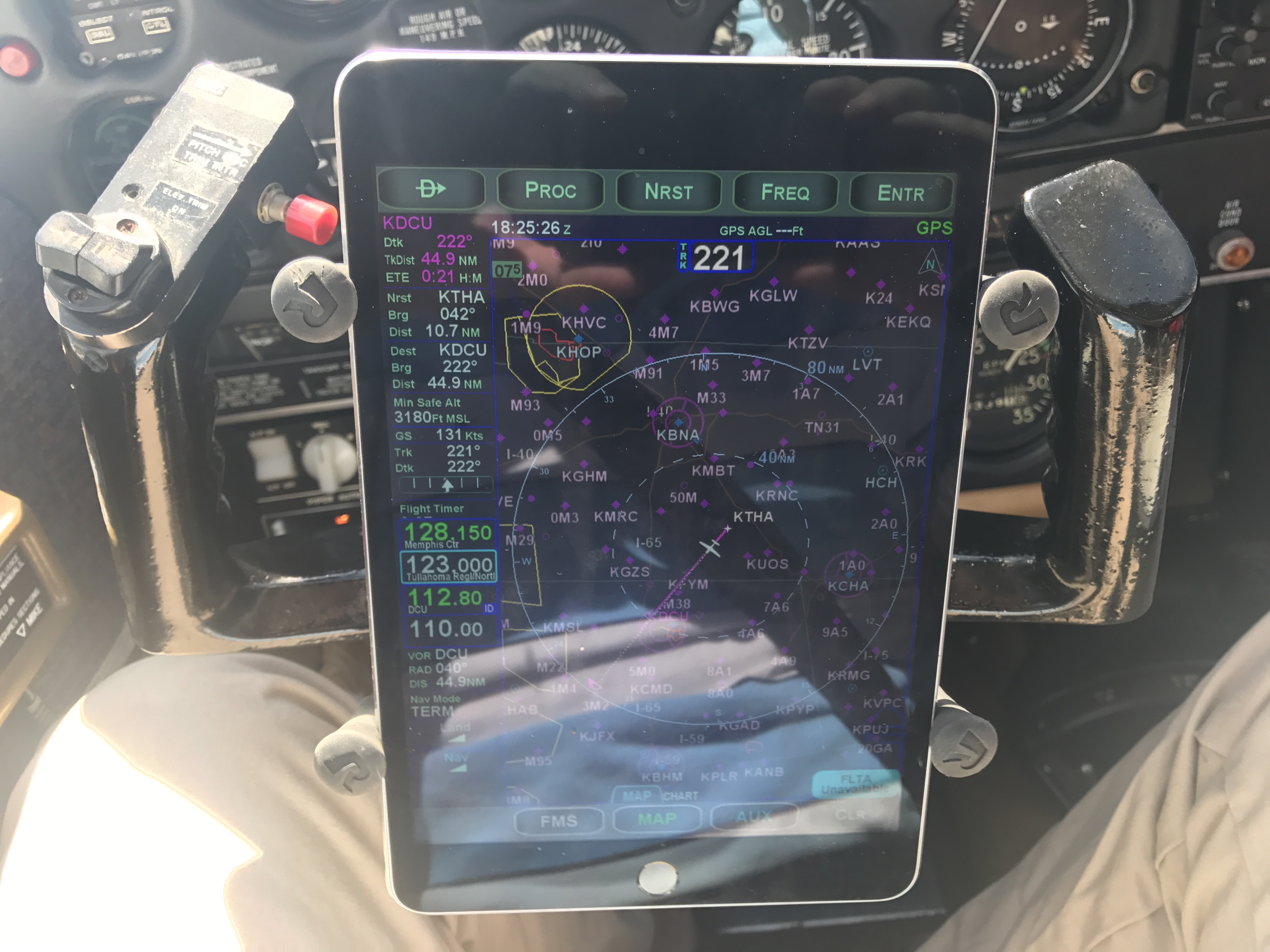
The IFD100 app does what it promises: it lets you control the physical IFD, but it also lets you configure its display completely independently of the one on the panel. It does about 80% of what the “real” IFD hardware does. For example, you can load a flight plan into the iPad app while the panel is showing you the map/weather/traffic page, then push a button and activate that flight plan from the iPad. You can see and tune frequencies (but not activate them), zoom in and out on maps, and in general act like you have a second IFD540. It’s pretty neat, although there are some quirks to it that I’m still figuring out.

Not quite a replacement for Foreflight

The IFD100 app isn’t a replacement for FlyQ or Foreflight though; it doesn’t let you anything that the physical IFD can’t do, so no looking up fuel prices or FBO reviews, no satellite imagery display, and so on. ForeFlight has all sorts of useful planning features like terrain mapping, wind estimation, and flight plan filing that the IFD100 doesn’t, and won’t. I don’t think Avidyne intends the app to replace a true electronic flight bag (EFB) app, but rather to give you more options and flexibility with using the in-panel hardware.

I haven’t been able to test one of the signature features of 10.2 yet, though: its ability to do two-way sync over Wi-Fi between the panel device and a tablet. I can already stream a flight plan, and GPS position data, from the IFD to ForeFlight or FlyQ. 10.2 adds the ability for the IFD to send traffic, weather, and TFR data (which means I won’t need my Stratus receiver to see that stuff in ForeFlight), but also the ability to load a flight plan from the iPad to the panel. That means I can plan a complex route at my leisure in my armchair, file it, brief it, get my expected route, and push the route to the airplane when I get to the airport with a single button press. That’s going to be glorious when it finally arrives.

It speaks well of Avidyne that they made this major feature release available for free, and I’m excited to see how they continue to build on the wireless connectivity built into the IFD line.

4 Comments

Filed under aviation, General Stuff

Flying Friday: the great Gulfstream migration

Y’all may have heard of a little thing called Hurricane Matthew (or, as the Weather Channel continually called it, to the great amusement of my son Matthew, “DEADLY HURRICANE MATTHEW.”) And you may have heard of Gulfstream, the wildly successful purveyor of extremely expensive and capable business jets. But did you know that, for a while, our own Huntsville International Airport hosted nearly a billion dollars worth of Gulfstream hardware?

See, Gulfstream is based in Savannah, Georgia. They have a large factory there, with a satellite facility at Brunswick where they do paint and interior work. With a category 4 hurricane headed their way, Gulfstream made the very wise decision to find another place to park their airplanes until the storm passed, and Huntsville won the toss. On October 6th, I was listening to LiveATC and noticed a few airplanes checking in to Huntsville Approach with callsigns of “Gulftest XXX.” Neat, I thought. These must be test or acceptance flights. Then I heard a few more. Then one of the controllers asked a pilot how many more flights to expect– the pilot nonchalantly replied “oh, 30 or so.” That led me to check FlightRadar24 and, sure enough, the migration was well underway. (Sadly I didn’t think to capture any screen shots).

Last Sunday I drove out to the airport to take a few pictures of the shiny goodness on the ramp. These are links to my Flickr stream, which has lots of other airplane pictures if you’re into that sort of thing:

I was out of town this past week, so I missed the return flight, but sadly they’re gone now. It was fun to see them here, as that’s probably the closest I’ll ever be to such expensive hardware.

Leave a comment

Filed under aviation

Flying Friday: bird forecasts? Yep, it’s a thing

A couple years ago, I wrote a post about wildlife collisions at airports. (Spoiler: they happen and are just as hard on airplanes as they are on cars.)

While reviewing the mishap investigation report covering the crash of CAPT Jeff Kuss, I learned something I didn’t know: the USAF maintains a forecasting system to predict the hazards caused by birds. (The report makes for interesting reading because it’s so thorough. I will have more to say about it in another post.)

Read that first sentence again: you can get a bird forecast. Is this a great country, or what?

All joking aside, you have to look no further than Cactus 1549 (or, as you may know it, “The Miracle on the Hudson”) for proof of why birds and airplanes don’t mix. AHAS gives aviators a simple tool to check an airfield or flight route to see how likely it is to contain bird hazards. For example, if you go there, pick “Huntsville International” as the airport, and click the “AHAS Risk” button, you’ll get a nifty report showing what bird-attracting features are nearby (landfills, golf courses, bodies of water, and so on), as well as a historical list of bird strikes.

I’m not sure that I will be regularly checking AHAS before my routine flights but I suspect I will be checking it before I fly into unfamiliar areas. Those damn birds are sneaky, y’know. A fellow can’t be too careful.


Leave a comment

Filed under aviation

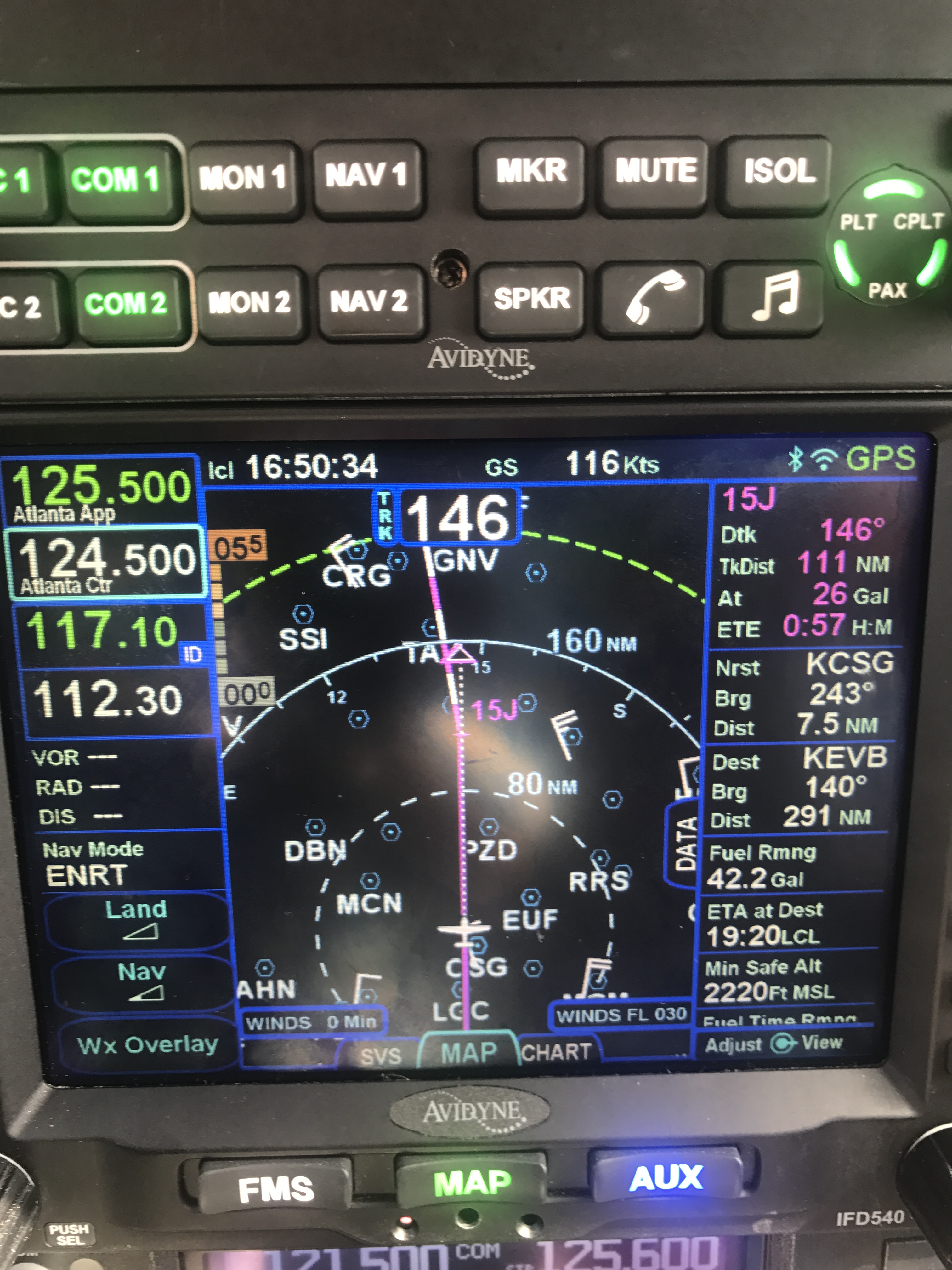
First impressions: flying the Avidyne IFD540

cShort version: The transplant was a success and the patient made it home.

Now, the longer version.

I originally dropped the plane off on 31 December at Sarasota Avionics at Tampa Executive (KVDF). The plan was to have the plane ready by late January. That didn’t happen. When I went to pick the plane up on February 10th, it wasn’t ready as promised: the GPS steering steered the plane in the opposite direction as commanded, the interconnection between the new GPS and our engine monitor didn’t work, and the plane failed its initial FAA ADS-B Out automated compliance report (ACR) check. I was really unhappy, flew back to Huntsville, and started firing off emails to get the problem fixed. Long story short, Kirk Fryar, the co-owner of Sarasota, moved the plane to their Venice location, fixed everything that was wrong, tested the plane thoroughly, and had it ready for me on the 25th. (I note with some irritation that I still haven’t ever had an experience with any aircraft maintenance shop that resulted in the plane being ready when it was promised.)

I met Leonard, Sarasota’s check pilot and flight instructor, at KVDF and we flew the plane down to KVNC, stopping along the way to hand-fly the ILS 32 at KSRQ. It was a windy, bumpy day and ATC was vectoring me all over the place (including nearly to the Gulf ADIZ). I was a little rusty, and it showed. Another thing that showed: the localizer flag on the NAV1 CDI (we’ll call this squawk #1). This little flag is supposed to pop out to indicate that the associated signal is unreliable. It’s definitely not supposed to appear in a brand-new avionics installation, especially not when my secondary nav radio didn’t show the flag. We flew a missed approach and then took the RNAV 5 approach into KVNC. This time I let the autopilot and GPSS fly the approach, which it did flawlessly.

While I barricaded myself in their conference room to get some work done, Kirk investigated the cause of the localizer flag problem. It turned out to be simple, stupid, and Avidyne’s fault. There’s a known compatibility issue between early hardware revisions of the IFD540 and the King KI209A CDI we have. Sarasota sent our original unit back to Avidyne to have the hardware modification installed– we needed mod 14 but, for some unknown reason, we got a unit back that only had mod 11. This means that we have to take the plane back to the shop to swap in the new IFD540 unit when it arrives, which is a hassle… but more on that later.

After a thorough preflight, during which I confirmed that the fuel flow data presented to the IFD540 was intermittent (and that’s squawk #2, but not a huge deal since there’s a workaround: power-cycle both the CGR30P and the IFD540), I took off and picked up my clearance to Grady County. They gave me a route out over the water: direct TABIR, then direct 70J. I plugged it in, climbed out, and engaged GPSS. It flew smoothly to TABIR. There’s a lot going on in the picture below:

TABIR-with-traffic

  • The magenta line is where I’m going. Note that at the TABIR intersection, the onward path changes to a “candy cane” stripe to indicate the next planned leg. Other legs further on show up as white. This makes it easy to see what the box is planning on doing at all times.
  • The little blue diamonds are other airplanes, with their relative altitude shown and little up or down arrows indicating climbs or descents. The inner dashed ring has a 5nm radius, so I can clearly see where interesting targets are and what they’re doing.
  • The blue flags indicate VMC at those reporting points. this is a bit of a change from Foreflight, which uses little green dots for VMC METARs. However, the FAA specifies the exact symbology and colors that have to be used in certified devices so we’re stuck with those.
  • Just above the “FMS” button you can see a tiny label that says “Rgnl Rdr 9 Min”. That means I have relatively fresh radar data on screen; however, since the sky was completely cloudless when I took the picture, there’s nothing shown.
  • The radio at the bottom of the stack “knows” that 119.275 is the AWOS frequency for Venice. Why? The GNC255 has an onboard frequency database, and now that Sarasota connected it to a GPS position source, it can look up the frequency and aircraft position and use that combination to label who you’re talking to.

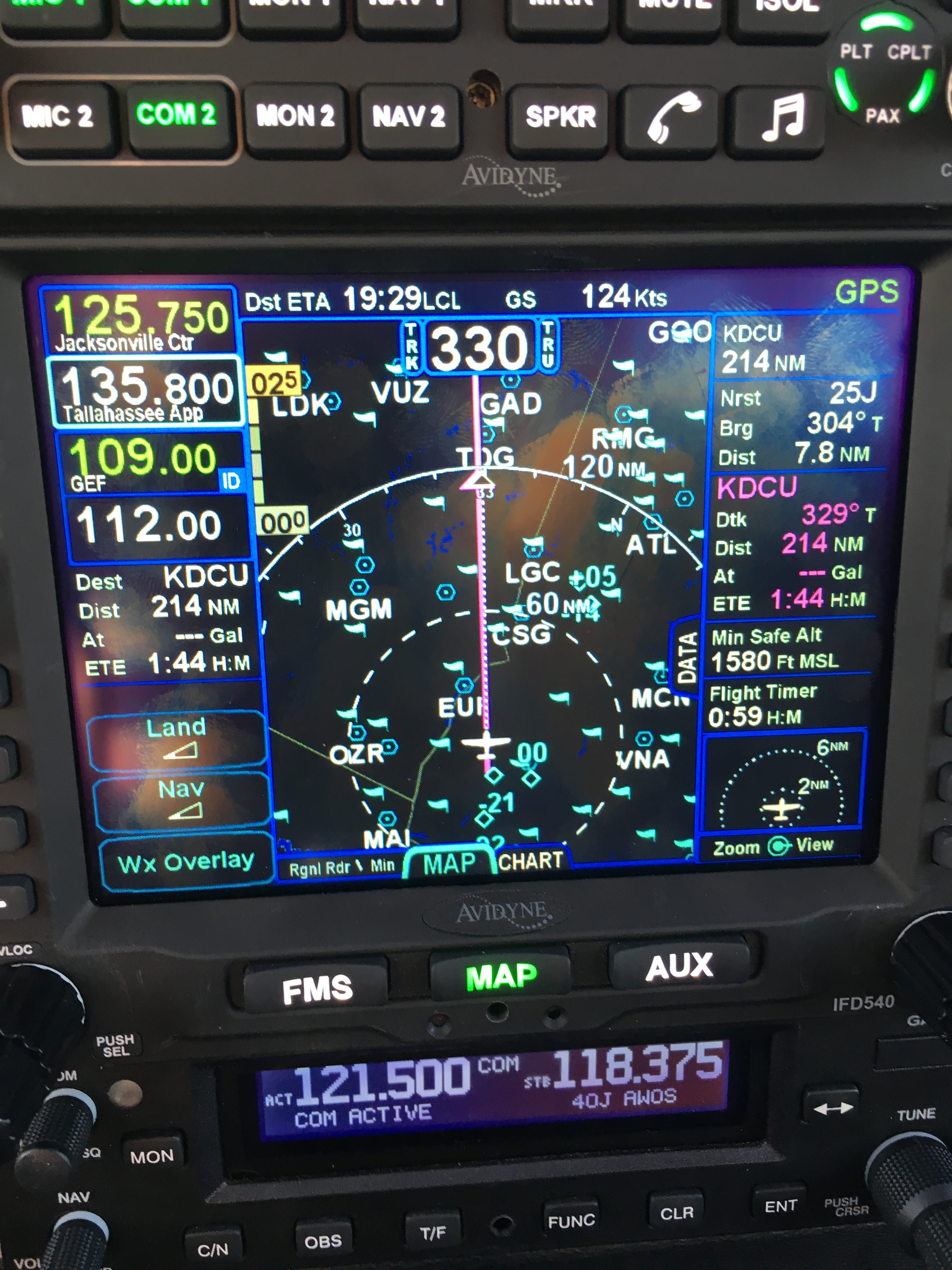
There was a stiff (25+kt) headwind and I was burning fuel faster than I liked, so I decided instead to stop at 40J. I landed, took on 62 gallons (meaning I had 20gals left, or a little over an hour’s flying time, in reserve) and set out for home. Along the way, I customized the datablock display– one of the big features of the IFD540 is that you can extensively customize what data is displayed and where it appears, then save that configuration in your own profile. That way Derek and I can each set up things the way we like, then load our own profiles on demand. Here’s what I came up with:

datablocks set up the way I like them

datablocks set up the way I like them

  • The left side top shows me the current communications and navigation frequencies I have tuned. Note that the unit automatically labels the frequency as soon as you tune it. (Not shown is the extremely useful FREQ button, which, when pushed, shows you a list of the frequencies you are most likely to need based on your location and phase of flight).
  • Below the frequency datablocks, I see my destination, distance, and estimated time enroute. I will see fuel remaining on arrival once the fuel flow issue is fixed.
  • The top line shows the current ETA to my destination, my groundspeed, and the current navigation mode. It says “GPS” in this picture, but it could also show other labels depending on whether I have an approach loaded, the type of approach, etc.
  • The right side shows, in order, the destination and distance (which I’ll probably remove), the bearing and distance to the nearest airport, and the track, distance, fuel remaining, and ETE for the next waypoint (that info is shown in magenta, indicating that it’s tied to the current waypoint). Because I am going direct to my destination, this magenta block is the same as the destination data on the left. (You can also see the minimum safe altitude and flight timer, right over the traffic display thumbnail).

On the way home, I decided to do a couple of turns in the hold at the ATHEN intersection. This is normally part of the RNAV 36 approach to Decatur; I didn’t want to fly the whole procedure, but I wanted to see how the IFD540 handled a hold at an arbitrary waypoint. Turns out it’s just about as simple as you can imagine: you pick the waypoint (any one will do: airport, intersection, VOR, whatever), tell the box you want to fly a hold, and then watch it do its stuff. When you want to exit the hold, you sequence the next waypoint as direct and the magic happens. Thanks to GPSS, the plane happily flew the entire hold on its own, including compensating for the winds.

One more squawk: the IFD540 and the other devices are super-bright in their default night modes. I think the dimmer settings are wrong, because the panel light rheostat that controls all the other lighting (including the CGR30p) did nothing to change the brightness of the IFD540, so I had to manually adjust it. All of these squawks will be addressed when we take the plane back to Sarasota’s shop, this time the one in Tullahoma, just a short flight from here. It shouldn’t take more than 15 minutes or so to swap out the IFD540; fixing the other issues might take a bit longer.

First impressions of using the IFD540 for a cross-country IFR flight:

  • I am very impressed with the display brightness and clarity and the overall build quality of the switches and knobs on all of the hardware.  Being able to switch between items using the left/right rocker switches (labeled “FMS”, “MAP’, and “AUX”) is easy and intuitive. Touch response is fast, and multitouch for panning and zooming worked flawlessly.
  • The UI is responsive and the graphics are clear and readable. The screen seems huge compared to my old KLN94.
  • By default, the combination of land and navigation data presented on the map is cluttered, but it’s easy to declutter.
  • Avidyne brags about their “hybrid touch” interface, in which nearly every action can either be performed directly on the touch screen or by using the knobs and buttons. That  flexibility works very well and was most welcome during my bumpy flight home– aiming precisely at a touchscreen in moderate turbulence can be a challenge.
  • Once you get used to the notion that there are sliding tabs (like the “DATA” tab visible next to the “minimum safe altitude” field in the picture above), it becomes very easy to flip between sets of data, such as the flight plan view when in FMS mode.
  • The location awareness features of the IFD540 are a real time saver. The FREQ button knows what frequencies to present based on where you are, the unit can automatically tune (and ID) the next VOR in your flight path, and so on.
  • Speaking of FMS: flight plan entry, approach management, and so on use a metaphor that’s close to, but still different from, the King/Garmin-style interface that most pilots are used to. It’s like the difference between Brazilian Portuguese and Portuguese Portuguese: lots of common vocabulay and idiom, but some very important differences. I’ll have more to say about that once I have more time flying with it and learning the FMS way of doing things. (It’s interesting that Bendix King, whose KSN770 competes with the IFD540, has the same issue in that the KSN77o steals a lot of FMS-style behavior from BK’s jet FMS family.)
  • The top-of-descent (TOD) marker is a really nifty feature; it tells you where to start your descent in order to hit an altitude constraint on the flight path. The audio cue, along with the audio cue for 500′ AGL, are very valuable prompts. I’d love to see Avidyne add an audio prompt indicating when you reached the missed approach point (MAP) for approaches that define them.
  • I think, but have not confirmed, that the IFD540 should be able to drive the STEC PSS so that the autopilot  can follow an LPV-generated glideslope. It will take a little knobology for me to figure out how to set this up, though.
  • There are many things I learned to coax the KLN94 into doing that I don’t yet know how to do on the IFD540, so this learning process will take a little while. On the other hand, there are many, many things that the IFD540 can do that the KLN94 and Garmin GNS-x30 series can’t.

What about the rest of the stack? Well, the transponder just works… not much to say there. It transmits ADS-B Out like it’s supposed to, so I’m delighted. The AMX240 audio panel is a huge improvement in audio quality and functionality over the old KMA20 we had before. I’ll have more to say about those gadgets, and the GDC-31 roll steering converter, in the future. Overall, I’m delighted with the new stack and can’t wait to fly it a bunch more!

Leave a comment

Filed under aviation

Flying Friday: my airplane’s broken, so here’s a blimp

I went to Tampa yesterday to pick up 706 from the shop. I was expecting to write a triumphant post today about flying behind all the new goodies. However, the GPSS steering system is confused and steers the airplane in the opposite direction, so I had to leave it there for further troubleshooting. Instead of my triumphant post, here’s a short video of the DirecTV blimp, which happened to be at the airport at the same time as me.

Leave a comment

Filed under aviation, FAIL

Flying Friday: a sample of instrument flight

Bonus! Two Flying Friday posts in one day (here’s the other one.)

There’s a difference between flying under instrument flight rules (IFR) and flying in instrument meteorological conditions (IMC).

When you fly IFR, that means you’re flying on an instrument flight plan, along a defined route, in communication with and under positive control of ground-based air traffic control.

When you fly in IMC, that means you are flying “primarily by reference to instruments,” as the FAA puts it. That basically means that you can’t see a discernible horizon. You can fly IFR in good weather or bad. If you’re flying in IMC, you must do so under IFR. If you’re flying in visual meteorological conditions (VMC, what normal people call “good weather”), you can fly under visual or instrument flight rules.

Actually, I should clarify just a bit– VMC isn’t necessarily good, it’s just that IMC is defined as “weather worse than the standard VMC minimum visibility and/or ceiling.”

This whole post is basically just an excuse to post a short video showing one example of flight in IMC. I took it while en route from Decatur to Tampa Executive; on that 3h40min flight I was in the clouds for just under an hour.

You can’t see a visible horizon, although the sun was semi-visible through the clouds. (If you take a look at the iPad screen, you’ll see why it was so cloudy.)  Surprisingly, on a sunny day, the inside of the cloud can be very bright with diffuse light, leading to the somewhat odd behavior of wearing sunglasses while flying inside a cloud that blocks the sun from the ground.


Leave a comment

Filed under aviation, General Stuff

Flying Friday: the avionics brain transplant begins

I fly a 41-year-old airplane. Not that there’s anything wrong with that. As I’ve said before, there’s something to be said for mature technologies, and the economics of general aviation are such that there’s no chance I’ll be buying a new airplane any time soon when even an entry-level Cessna 172 costs north of $400K. Because new aircraft are so expensive, there’s a lively market in refitting and upgrading existing airframes. The engines, paint, interior, and avionics on an airplane can all be replaced or upgraded at pretty much any time, and the longevity of the basic airframe means that I can comfortably expect to get another 20-40 years out of my existing plane if I take good care of it.

With that said, newer airplanes have some major advantages, many of which (built-in cupholders, leather seats, ballistic recovery parachutes) aren’t available for my plane. After flying 706 for about a year, getting my instrument rating, and taking more and longer cross-country trips there were a few things that I wanted to add to make instrument flight easier and safer. My co-owner Derek and I spent a lot of time hashing out what we wanted vs what we could afford vs what we could live with. Here’s what we decided.

First off, we knew we’d have to meet Yet Another Unfunded Mandate. Starting in 2020, all airplanes that operate in controlled airspace (meaning the “Class B” and “Class C” airspace surrounding major airports and most cities) have to use a system called ADS-B. The FAA has delusions that ADS-B, which requires every aircraft to continuously transmit its GPS-derived position and velocity, will replace radar. It probably won’t, but that’s a topic for another post. Equipping a plane for ADS-B  requires two pieces:

  • a GPS system that uses the FAA’s Wide Area Augmentation System (WAAS) to provide high accuracy position and location data. The WAAS system combines satellite GPS data with position data from precisely surveyed ground stations to provide sub-meter accuracy.
  • an ADS-B Out transmitter that sends ADS-B data, including the WAAS GPS data

There are lots of ways to get these two parts, ranging in cost and complexity from “absurd” to “merely unpleasant.” The two most popular ways are to install a new transponder that includes a built-in position source or install a separate WAAS GPS and a little box that transmits ADS-B Out without touching your existing transponder. You can also get weather and traffic data using ADS-B In; that requires an ADS-B receiver and something to display the received data on. Right now, I use a Stratus receiver (the original, not the fancy 2S) and ForeFlight on an iPad for ADS-B In… but, as with many other government programs, there’s a huge catch. You get weather data for free, but you only see ADS-B In traffic if there’s an ADS-B Out-equipped airplane near you. This was supposed to be an incentive to get people to add ADS-B Out, but as a practical matter it means that ADS-B In is currently only useful for passive receivers like my Stratus in areas where there are already lots of ADS-B Out airplanes.

Next, we wanted the ability to use WAAS instrument approaches. I love the precision of ILS approaches, and use them whenever I can, but most airports don’t have an ILS, and those that do won’t typically have more than one. However, a growing number of airports have approaches that offer precision vertical and lateral guidance if you have a WAAS GPS. To be more precise (see what I did there?), we wanted to be able to fly LPV approaches so that we’d get precision vertical guidance for approaches where ILS equipment isn’t available. With WAAS equipment, you can also get an advisory glideslope, which gives you non-precision vertical guidance to help keep you from smashing into things.

Finally, we (well, mostly I) wanted to improve the autopilot’s ability to track instrument approaches. The approach phase of single-pilot IFR is a demanding and busy time, and it’s easy to make mistakes. Our existing autopilot can fly a heading, keep the wings level, and hold an altitude, but when you get to a complex approach, being able to let the autopilot turn the airplane based on GPS steering is very helpful because it frees up time and attention for vertical navigation, approach prep, and other critical tasks.

After a lot of back-and-forth, an immense amount of comparison shopping, and lots of head-scratching, Derek and I decided to send 706 to Sarasota Avionics to have the following installed:

  • An Avidyne IFD540 WAAS GPS. I preordered one of these back in 2012, well before I even had my pilot’s license, on the theory that I could always sell it later. The IFD540 is much more capable than the Garmin GNS530 and, to me, is easier to use than the Garmin GTN750. It’s also less expensive to buy, requires less expensive data subscriptions, and provides some much-needed market competition for Big G.
  • An Avidyne AXP340 transponder. The AXP340 transmits ADS-B Out, but it requires a separate WAAS GPS. In our case, that’d be the IFD540. There’s a whole complex mess of rules for which transponders can be legally used with which GPS position sources– basically, only combinations that have been certified by the manufacturer and registered with the FAA can be installed and used, even though other combinations may work just fine. Avidyne’s products are obviously certified to work with each other.
  • An Avidyne MLB100 ADS-B In receiver. Derek talked the Avidyne guys into giving us one of these for free if we bought the preceding two items. With this, the IFD540 can receive and display traffic and weather information. It is extremely useful to see this data overlaid on your primary map, especially because you can “rubber-band” your flight route to deviate around weather and traffic as needed.
  • A DAC GDC31 roll steering converter (which most people just call a GPS steering, or GPSS, adapter). Our autopilot, bless its heart, is the most analog device I think I currently own. It works by sensing voltage output from the directional gyro and course deviation indicator (CDI). To fly a particular course, you twist a knob on the DG to set the heading indicator, or bug, to the desired course; you can also have the autopilot track a VOR or even an ILS localizer, which it does by looking at the voltage used to drive the deflection on the CDI. One thing it can’t do, though, is track an actual GPS course. If the GPS route calls for you to fly a heading of 175 degrees, and the heading bug is set to 95 degrees, guess where you’re going? The GDC31 fixes that by adapting the digital steering commands output by the IFD540 into voltages that the autopilot can understand. I’ve used GPSS in other airplanes before and it’s a great experience– smooth, solid tracking with no “hunting” and accurate turn anticipation.
  • An Avidyne AMX240 audio panel. We’d been talking about replacing our ancient mono audio panel with a nicer unit that would give us better audio quality, and the marginal cost of adding the panel at the same time as the other equipment was considerably lower than doing it later.

The IFD540 + AXP340 combination gives us ADS-B Out, so we’ll be legal. The IFD540 + MLB100 gives us ADS-B In (with the added bonus that the IFD540 has wifi, so it will be able to feed all sorts of useful data to portable devices in the cockpit). Finally, the IFD540 + GDC31 gives us full two-axis autopilot coupling. I think, but haven’t verified, that it will also give us the ability for the autopilot to track altitude changes as expressed by the glideslope. The existing autopilot can track an ILS glideslope, and the IFD540 can provide a glideslope for LPV approaches (and an advisory glideslope for LNAV+V) so I think it should “just work.”

This seems like a huge list of expensive stuff (and it is)– one question that immediately comes to mind is “why bother with all this stuff when you could just use an iPad?” The problem is spelled F-A-A. First, there are no portable ADS-B solutions that are approved to meet the 2020 mandate in Part 23 aircraft. That’s a fancy way of saying that an experimental or homebuilt airplane can use equipment that’s not approved for factory-built airplanes. That also wouldn’t give us WAAS approach capability; even though there are portable WAAS receivers (including this watch!) you can’t use them to fly approaches. While there’s been lots of flailing in the aviation press about the need for cheaper, better-integrated ADS-B solutions, it’s also true that we’re getting a lot of other capability out of the upgrade that we’d miss if we went with a simpler ADS-B-only installation.

Along with the avionics themselves, of course, there are lots of little things– antennae, cables, and so on– that have to be installed and tested. That’s why we expect the upgrade to take an eye-popping four weeks– and that’s assuming everything goes well. Stay tuned!

2 Comments

Filed under aviation, General Tech Stuff

Flying Friday: 2015 flying year in review

It’s fitting that as I write this, I’m sitting on a Delta 717 coming back from Tampa, where I just dropped the plane off for a month or so in the avionics shop (more on that in the near future). I closed out my flying year today with 3.7 hours of cross-country time from Decatur to Tampa Executive, during which I got 0.8 actual instrument time, found some rain, and battled a misbehaving engine monitor. (And yes, I know it’s not Friday.)

For the year, I flew a total of 89 hours, considerably down from my 2014 total. Of that, a respectable 8.5 hours was actual instrument time, and I logged 20 instrument approaches. This reflects my typical mission of moderate-distance cross-country trips. Those trips gave me some great experiences– I flew to Chattanooga, New Orleans, and Austin to compete in races, visited family in friends in Louisiana, Texas, Georgia, and North Carolina, and went on a number of business trips that would have been boring and/or unpleasant if I’d had to drive.

During the year, I am happy to report that a) I didn’t do anything egregiously stupid in the air and b) none of the squawks I encountered in the air were serious. Despite that, I’ve learned a few valuable lessons that I plan to apply in 2016.

In 2016, I plan to pursue my commercial license, build my understanding of weather patterns and forecasting, and improve my airmanship skills. Ideally I’d like to fly at least an average of 10 hours/month, including some long cross-country flights to the west coast and some trips to see my sons at their various colleges. I’m looking forward to another great year in the air.


Leave a comment

Filed under aviation

Fuel shenanigans

The saying goes that “you can never have too much fuel unless it’s on fire.” I have always been a believer in that truism, so I always fill the tanks before I go anywhere… except on a recent trip, which just confirmed the wisdom of whomever came up with the old chestnut.

I was flying DCU-IGX, which I flight planned as 394nm, just under 3:00 of flying time, and about 48 gallons of fuel. Sure enough, when I arrived, I’d drained one main tank, one tip tank, and about half of the other tip tank. The CGR-30p engine monitor, my analog gauges, and my eyeball inspection all agreed.

Fuel at IGX was $5.28/gallon. Fuel at my home airport is $4.80/gallon. “Hey,” I thought. “I have enough fuel to get home if I just fill the tip— that will give me 59gal on board, which still gives me a VFR reserve.” Visions of dollar signs dancing in my head, I filled out the fuel ticket and went into town to lift all the weights with Alex. When I returned, I verified the fill, sumped the tanks, and headed to the departure end of the runway with 59 gal on board.

Once airborne, the problems started. ATC wanted to vector me well north of where I wanted to go because of weather, and to keep me out of the RDU arrival corridor. They also gave me a higher altitude, so I burned more fuel in the climb than I’d expected. Once I got past the first waypoint, I had to divert around more weather… see where this is going? About 40 minutes into the flight it became clear that I didn’t have enough fuel to get home without a stop.

I’m not talking “had enough fuel if I ate into my reserve,” I’m talking “engine monitor shows negative fuel remaining on landing.” Noooope.

A little head scratching ensued, and I determined that I had plenty of fuel to make Winchester, where fuel is only $4.09/gallon. When I landed, I took on 71 gallons out of the 82-gallon usable capacity— within my 45-min reserve requirement, but just barely.

Lesson learned: by not filling that tank in Chapel Hill, I saved (25 gal * $0.48/gal)… a whopping $12. Then I cost myself another 30-40 minutes of diverting to Winchester, landing, fueling, and returning home. In this specific case, I was lucky because Winchester is open 24/7 and is easy to get into and out of, and their fuel is cheap. I probably netted a few dollars of savings filling up there as opposed to filling all 4 tanks in Decatur— but that unpleasant feeling of not having enough fuel aboard is one I don’t care to repeat.

Fill ‘er up!

2 Comments

Filed under aviation

Flying Friday: of shops and annuals

I haven’t been flying much lately, sad to say. This is mostly because of weather, but partly because I have been busy with other things. However, as spring approaches, I’ve been eager to get back in the air. A couple of weeks ago, I went flying with John, my CFII, and shot some practice instrument approaches. While I was a bit rusty, I was still able to fly a good ILS, even in the winds, but I had a little bit of trouble making the KLN94 do what I wanted to get set up for the GPS approach into Huntsville… its time is coming, though, and I hope to finally get the Avidyne IFD540 installed in early summer. That’s still some time away, though. There are two hurdles to cross first: getting our engine monitor installed and getting the plane through its required annual inspection.

First, the engine monitor. Like almost all other airplanes of this vintage, 706 has a battery of analog gauges that report on the engine health. There’s nothing wrong with this, as these instruments tend to be very reliable. The tachometer, manifold pressure gauge, and fuel flow gauge are all very important. However, the standard engine instruments have several shortcomings. First, our plane had a conventional single gauge for reporting exhaust gas temperature (EGT), and the aftermarket cylinder head temperature (CHT) gauge wasn’t working. The problem with single-channel EGT and CHT instruments is that they only tell you what one cylinder is doing, so there’s no way to see what’s going on with the other five cylinders. Second is that the gauges are scattered all around the panel; besides the EGT and CHT indicators, there’s a suction gauge (which tells you whether the engine-driven vacuum pump that drives the gyros is working), the fuel gauges, and so on. Third is that these gauges only show instantaneous data, not trends, and they don’t alert you to unusual conditions.

The solution: get an engine monitor. After much shopping and head-scratching, we settled on the CGR-30P from Electronics International. The video below will give you an idea of what this magic box does:

From my perspective, the CGR-30P does two critical things: it alerts you when an engine parameter goes out of limits (say, if the oil pressure decreases unexpectedly), and it logs data that can be used for later analysis. As a nice side benefit, it monitors CHT and EGT for all six cylinders, which has the dual benefit of giving early indication of potential misbehavior and providing the data we need to operate the engine as efficiently as possible.

(Brief digression: there is a lot of religious argument over the “correct” way to adjust the fuel/air mixture in piston engines. This article by noted mechanic Mike Busch explains the topic, and the debate, very well, along with recommending the approach that I will be using once I have accurate CHT and EGT data).

Getting the CGR-30P installed, though, requires an avionics shop. Derek and I have struggled with finding a good local shop. There’s no avionics shop at our home field, and C-Cubed, which used to be at Huntsville,  closed a few months ago. Their spot was taken over by a company called Advanced Technical Avionics (ATA). After a brief period of confusion occasioned by a management change (translation: someone got fired), we got the plane into the shop on Tuesday to start the installation. With any luck, in a week or so, the plane will be back in the air– which is good, as I have a trip planned to New Orleans next month for the New Orleans Sprint triathlon, my first of the year.

Right after I get back from New Orleans, the plane needs to go in for its annual inspection. Every general aviation aircraft is required to undergo a comprehensive airworthiness inspection each year. There are specific things that the shop will check based on the engine and airframe manufacturer’s recommendations, and there can be other things that need checking or adjustment based on how much the plane has been flown. For example, some components need to be checked every 100 or 500 hours. (This example inspection checklist gives you an idea of some of the things that must be inspected.) Then, because this is a 40-year-old airplane, there will inevitably be some things that need to be repaired or replaced because they’re worn out or broken. For example, our air conditioner doesn’t work any longer, so we’ll have the shop take a look at it as long as they’re crawling around inside the plane.

On the advice of Savvy, our maintenance management company, we’re using a Piper service center for the annual– DLK Aviation in Kennesaw, Georgia. That means that we’ll have to ferry the plane there and back again; I’ll probably rent a plane from Redstone and pick Derek up after he drops the plane off, but driving isn’t out of the question. Once the plane arrives, after one to two weeks (and some unknown amount of money, depending on whether there are any expensive surprises), we’ll have the plane back and be good for another year.

Leave a comment

Filed under aviation

Database debacle: why aviation GPS systems are different

tl;dr: We’ve all been spoiled, and it’s Google’s fault.

All right, maybe it’s not entirely their fault (though I do love a good Google-bashing session), but the widespread availability of Google Maps put incredible price pressure on vendors of mapping data to drop their prices. That pressure led to today’s bounty of mapping applications: Google, Microsoft, and Apple offer high-quality map data on their mobile and desktop operating systems, and there is a huge number of applications that take advantage of this data and mash it up in interesting ways. Most of the major vendors of portable GPS devices quit charging for map data, given that their competition– smartphones– have instant map updates anytime, anywhere.

Sadly, this revolution in cheap, broadly available map data has largely bypassed the aviation world. In part that’s because the number of data sources are small; in the US, you can get approved digital chart data for aviation use from the US government or from a small number of private providers, many of whom take the government data and format it in various ways for specific applications or devices. The approach plates, sectional charts, and other maps that pilots depend on for planning and flying are generally not free (though, in fairness, some sites, such as SkyVector, make lots of data available for free).

If you have a panel-mounted or handheld GPS that’s certified for aviation use, you’ll be paying for regular database updates, one way or another.

This is true for two reasons. The first is that data quality is super important. Things change all the time: people put up new towers, airports open or close, the FAA changes routes to accommodate changes in air traffic patterns, and so on. If your car GPS doesn’t show the street you’re on, no biggie: you’re still on it, and there are probably signs. At worst, you can stop and ask for directions. On the other hand, if your airplane GPS doesn’t include a newly added TV tower along your route of flight, you may be in for a very unpleasant surprise.

The other reason is that the FAA requires you to use only certified and up-to-date data sources for navigation. You may use some data providers or devices for “reference” or “advisory” use, but you can’t depend on them as the sole source of navigation data. For example, the excellent Foreflight app for iOS has charts that display your aircraft’s position (known as “georeferenced” charts), which provides great situational awareness. For $149/year, you get full access to all the visual and instrument navigation charts for US airspace. But the FAA won’t let you use the iPad as a primary navigational instrument for instrument flight. For that, you need an IFR-certified GPS, and those have strict requirements for data quality and timeliness.

As part of my instrument flight course at GATTS, I’ve been learning to use the Bendix/King KLN94 navigator in my airplane. The KLN94 first shipped in (drum roll) 1991. Think about that for a second: I am flying with a GPS system that dates back to the First Gulf War. That said, it’s pretty capable; it can navigate me through almost all the different types of instrument approaches, and its user interface, while clunky, is not that much worse than the very popular Garmin 430/530 that followed it. (For an example of flying the KLN94, see this video.)  When Derek and I bought the plane, I knew the KLN94 database was out of date, but the owner gave us a Compact Flash card with a map update. (Note: yes, I said “Compact Flash.” Remember those? If so, then you are officially old.)

Today I got ready to install the database update on that card.. only to find that it was valid for 1-28 May of this year. That’s right; the whole card had one lousy month of map data on it.. data that was 3 months out of date. Showing up for my checkride with an outdated database in my GPS would lead to instant failure. But I found out about this about 215p on the Friday before a holiday weekend. I won’t say I peed a little, but I was getting unsettled at the prospect of hosing my checkride schedule. As soon as we landed, I called Bendix/King’s “Wingman” service number.. and got their answering machine. Uh oh.

At this point, I was trying to figure out how long it would take me to drive to Olathe, Kansas (not long) to pick up a new database card. Maybe I could lurk outside the Bendix building like a ticket scalper! Or I could hand-write a cardboard sign: “NEED KLN94 UPDATES PLEASE HELP”.

You might be wondering why I didn’t just download a new database update from Bendix/King’s web site. Fair question. See, there’s another problem with aircraft GPS systems. They often have ridiculous systems for providing data updates. KLN94 database updates can be downloaded from Bendix/King’s web site, but the only supported device for loading the databases is a single model of SanDisk CompactFlash card reader or you need a special cable to use it and the software to use that cable only works on Windows 95. Oh, that one card reader? It needs a firmware update, which requires a machine running Win95 to install. Other systems have their own failings, so I’m not picking on Bendix/King, but sheesh.

A second call to their tech support number got me a super helpful gentleman named Shane. He confirmed that only the Holy SanDisk could be used to load database updates, but he passed me over to Lorie, one of the folks in the database update department. She listened patiently to my explanation, refrained from saying how stupid I was to put off the update, and told me the solution: “Go to our web site, order the card, and I’ll make sure you get it tomorrow.” Whew, that seemed simple enough. I went to the web site, created an account, and found the KLN94 updates. For the low, low price of only $280, I could get a new CompactFlash card with data valid from 21 August to 18 September.

That’s right.

$280.

I ordered it anyway.

It will be here tomorrow. Then I can update my GPS and pass my checkride. After that, I will expedite installing a GPS system that has a lower ongoing maintenance cost. (In fairness, it’s only $120 to download a single month, and there are deep discounts for subscriptions, but I hope not to have the KLN94 long enough to make a subscription worthwhile.)

So, hats off to Shane and Lorie for their help; thanks to Bendix/King for continuing to support a 24-year-old GPS system, and shame on me for waiting until the last minute to check my database. Bet your boots that won’t happen again.

Leave a comment

Filed under aviation

Getting geared up for GATTS

So far, since Derek and I bought 706, I’ve logged just over 45 hours flying it. Solo, I’ve gone to Louisiana and Vermont; the boys and I have gone to Pigeon Forge, Demopolis, Atlanta, Anniston, and Tuscaloosa. Now it’s time to step my game up a notch: on Monday, I’m flying to Manhattan, Kansas, for a week of accelerated instrument training with GATTS. A few of the folks I’ve talked to (including family members and coworkers) have asked lots of good questions about this plan, so I thought a quick Q&A might be in order.

Q: What’s an instrument rating?
A: With an instrument rating, you can fly under what the FAA calls “instrument flight rules.” Basically, you can fly in and around clouds, fog, and rain, or in conditions of poor visibility– all by using only the instruments in your cockpit, without being able to see any landmarks or the horizon.

Q: So you can fly in bad weather!
A: Nope. An instrument rating allows you to take off, fly, and land under certain conditions. For example, to legally land at Huntsville’s airport, you must have at least a 200′ ceiling and 1/2 mile visibility. That doesn’t mean it would be safe to do so, just that if the weather is worse than that, you can’t land there. It’s not a license to fly in thunderstorms, blizzards, high winds, and the like, although each year a few people die from confusing “legal” and “safe” and taking off or flying through visible or embedded thunderstorms.

Q: Then why bother?
A: Think of a typical summer day in the South: partly cloudy in the morning, building thunderstorms in the mid-afternoon, then partly cloudy again in the evening. With an instrument rating, you can (legally and safely) penetrate the clouds, fly on top of them, then descend and land lately. You also get guaranteed routing and safety services from air traffic control, whereas when you fly visually those services are available on a best-effort basis.

Q: Kansas? Couldn’t you find a local instructor?
A: I love my instructors here in Huntsville. (Hi, John! Hi, Caroline!) But the big advantage of the GATTS program is that you spend the entire time flying. When I got my private license, my training dragged out because I had to line up 4 factors: my schedule, my instructor’s schedule, the airplane’s schedule, and the weather. By blocking out the time as one chunk, I should be able to build my skills much faster. Kansas is different enough from here that I will have to master the skills of navigation and approach management (in other words, I can’t depend on my knowledge of the local Huntsville area), but it doesn’t have a lot of demanding terrain or complex airspace.

Q: Is it like boot camp, then?
A: Wow, I hope not. There was a lot of yelling when I was in boot camp, for one thing. GATTS says their typical day is from about 830a to 6p. During that time, I’ll be in the classroom with my instructor, flying in the simulator, or flying my airplane. Oh, and eating lunch. The schedule varies from day to day, depending on what we’re working on. We’ll do this every day– weekends and Labor Day included– so that I get the most out of the time. I’ve already been able to carve out time for a few scheduled webcasts and conference calls that I couldn’t move.

Q: Is it expensive?
A: The answer to this question is always “yes” when it comes to aviation.

Q: No, really.
A: Yes, really. If you factor in just the instructor’s time alone, GATTS is more expensive. However, there’s no way on earth that I could get a local instructor to fly with me day in, day out long enough to learn what I need to know. Then I’d end up having to repeat lessons to knock the rust off. The GATTS program also includes lodging in Manhattan and a car to use. Plus, I’ve never been to Kansas.

Q: Why an accelerated program?
A: The best way to get proficient at flying is to fly. The best way to get, and keep, instrument proficiency is to compress your training, then use your instrument privileges regularly. I’ve already had to delay or change travel plans many times to account for vagaries of weather; being instrument-qualified doesn’t eliminate that (hello, thunderstorms!) but it gives me many more options. Ultimately, the airplane is a time machine: it lets me travel to places, and in time windows, where I otherwise couldn’t, so having the ability to fly in weather is really important to me. I want to do it as safely and proficiently as possible.

I’m planning, time and energy level permitting, to keep a daily journal of my experience at GATTS. Stay tuned…

Leave a comment

Filed under aviation

Huntsville to Vermont

As some of you may have noticed, I am planning to run a triathlon in a couple of days. This of course requires me to get to where the triathlon is, which in this case happens to be Vermont— several hundred nautical miles away from where I live. Luckily I had a solution for that problem. I took off from Decatur, stopped briefly at Winchester to fuel up, and headed north. Why Winchester? Fuel there is about $1/gal cheaper than it is at Decatur, and that makes a big difference when you’re buying 50+ gallons. Plus the staff there are super friendly and their facility is nearly brand-new: great, well-marked runway with a nice building. I saw an AgCat there filling his spray tanks and met Zachary, who just bought a Piper Lance a couple of months ago. We had a nice visit while I waited for my starter to cool down; I am still getting the hang of hot-starting the engine in this plane. The best technique seems to be to prime it just a tiny bit, then open the throttle full, set mixture to idle, and crank. You just have to be aggressive about enriching the mixture and closing the throttle when it does catch.

My flight northwards could not have gone better. I set up the autopilot, climbed to 7500’, and spent an hour or so dodging built-up clouds before settling on a steady course. During that time, I learned that the floor air vents can be opened or closed; when you open them, they work great at cooling down the cabin. This was handy because it was super hot on the ground— hot enough to melt my stash of protein bars inside my flight bag. I brought a cooler along so I could enjoy diet Coke on demand, which was a wonderful bonus.

On the first leg, I spent some of my time in flight reading the manual for my ancient panel-mounted GPS, which was installed in 2001, and I was surprised to find how capable it actually is; it just isn’t very user-friendly, so I still have a lot to learn, but I did get the time zone set, figure out how the altitude alerting function works, and learn how to set up complex flight plans instead of just using the “direct to” button. Originally I’d planned to stop at Rostraver (just outside Monongahela; try saying “Rostraver Monongahela” five times fast) but I noticed in flight that they close before I would have gotten there, so I decided to divert to Allegheny County instead. Fuel is a little more expensive, but that was offset by the fact that the airport was still open when I arrived. I parked the plane, hopped across the street to the Holiday Inn, and enjoyed a delicious calzone delivery from Mama Pepino’s. Then I hit the sack, intending to leave early this morning. The weather was not great when I awoke, so I did a bit of work and headed to the airport about 0900.

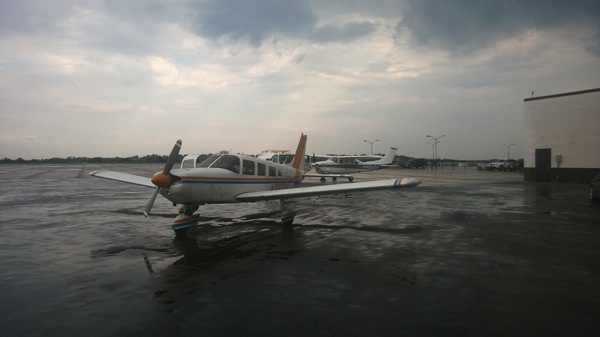
WP 20140703 001

706 on the ground at Allegheny County on Thursday morning

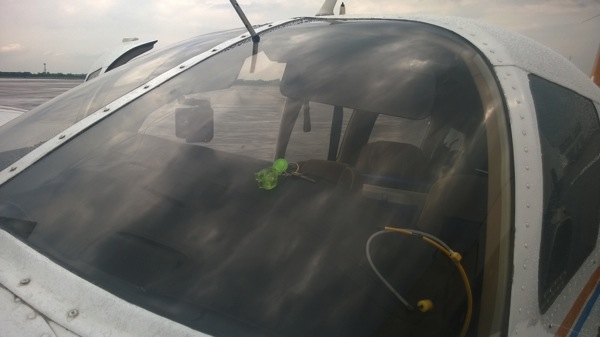
You can’t see it in the picture above, but the keys are on the dashboard, as shown below. This serves the extremely useful purpose of making it easy for everyone around to visually confirm that the keys aren’t in the ignition and that the airplane is therefore not startable. No one wants to tangle with an 84” propeller. This keychain has sentimental value, too; it came from Custer State Park on our 2005 trip to Sturgis. It was a Christmas present for Matt that year and he gave it back to me for the plane. The attached buffalo is named Pappy, after Pappy Boyington, not to mention Grandfather Buffalo, a family favorite book. Pappy is not quite as famous as The Lego Pilot but maybe he’ll get there someday.

Buffalo keychain

Corporate Air had taken good care of the plane overnight, so after a thorough preflight I launched with the intent to go direct to Montpelier, with Rome as an intermediate stop if the weather further north was still iffy. Pittsburgh limited me to 3000’ until I got further to the east, then I got 5500’, which was comfortably above the tops of the scattered clouds in that area. I went up to 7500’ about 50nm to the northeast and even then ended up having to dodge some higher buildups, but the clouds were gorgeous and by the time I got to Ticonderoga (see below) they were widely scattered.

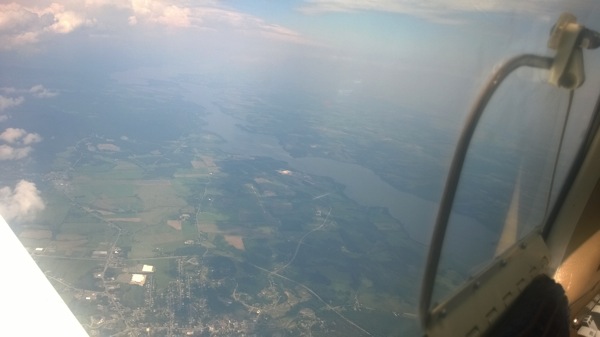
Ticonderoga

Overhead Ticonderoga, NY; that’s Lake George 


My flight into Montpelier was completely uneventful (except that I got to talk to Boston Center, which was kinda cool). Julie and her boys were waiting for me, and I had a great time giving them a tour of the plane while we unloaded. Then it was back to her house for a nap, the Montpelier Mile, and the town’s fireworks.

Interestingly, I had a ton of different female air traffic controllers along my route. I’ve never had that happen before; I’m not sure why, but Nashville approach, Indianapolis Center, Pittsburgh Approach, and a couple of smaller approach control centers en route all had women working the tower cab.

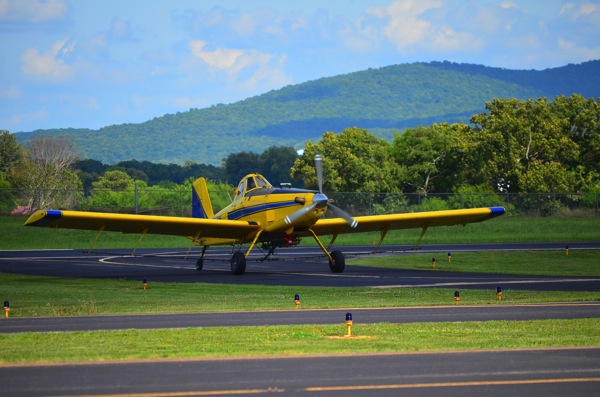
Bonus picture: I saw this crop-dusting plane (an AirTractor AT802) when I refueled at Winchester. That might be my ideal job…

DSC 2394

2 Comments

Filed under aviation

Instructor-induced stupidity

First, a quick recap: this past weekend I had two flights planned. One of them went off OK, the other didn’t. My original plan was to fly 706 down to Louisiana with the boys to see my mom, grandmother, and family in Houma, Baton Rouge, and Alexandria. However, David and Tom were both working each day of the long weekend, so that wasn’t going to work. Instead, I planned to take Matt for a $100 hamburger, then take all 3 boys to Atlanta to eat at Ted’s on Monday after Cotton Row.

Matt and I flew to Anniston and had a fantastic meal at Mata’s (thanks to Bo for the recommendation!)  That gave me the opportunity to practice hot starts, which are a little tricky with fuel-injected Lycoming engines, at least until you get used to them. Sadly, the weather on Monday worsened before we were able to go anywhere, and this weekend is looking pretty crappy too.

Anyway, enough about that. This week’s FLYING LESSONS newsletter was typically excellent– it put a name to a phenomenon I’ve both seen and demonstrated: instructor-induced stupidity.

That the pilot raised the landing gear even while continuing to flare and touch down suggests what may really have been going on was a condition I call Instructor-Induced Stupidity. I credit a student of mine with coining the phrase “instructor-induced stupidity” to describe the tendency of a flight student to defer decision-making or responding to aircraft indications when there’s an instructor on board.

As a student pilot, it’s natural to defer to the instructor; after all, that’s why you’re there. If you read the entire article (which isn’t very long), you’ll see that the possible outcomes of IIS include gear-up landings, unsafe maneuvers, and general tomfoolery. It is fairly easy to unlearn this habit during initial training, but I can see how it might persist when flying with a new instructor, or in a different type of airplane, even with a well-experienced pilot. I did it once on my private-pilot checkride; the examiner called for a power-on stall, and I gave her one, all right, of such degree that we got to see the chevrons (see this video at about 0:22, except that I was pitching up, not down). The hell of it was, I knew better: a classic case of induced stupidity.

This phenomenon isn’t limited to flight instruction, either; I’ve seen it many times when teaching otherwise intelligent and capable people about Exchange, Windows, and other related topics, and I’ve seen it in consulting engagements too: sometimes people seem to just lose their decision-making ability and judgment when placed in a situation where there is someone who (at least on paper) is more knowledgable or experienced. Maybe a better phrase for it would be “authority-induced stupidity”.

To counteract it, you have to remember to own what you own: when you’re pilot-in-command, or in charge of an Exchange deployment, or responsible for planning an event, don’t turn off your brain just because an authority is present or involved. Like so many aspects of human behavior, this is easy to say but harder to do!

Leave a comment

Filed under aviation