
Yay for code reuse! Tom Arbuthnot wrote a nifty script to download all the Lync Conference 2014 presentations, and since Microsoft used the same event management system for MEC 2014, I grabbed his script and tweaked it so that it will download the MEC 2014 session decks and videos. It only works if you are able to sign into the MyMEC site, as only attendees can download the presentations and videos at this time. I can’t guarantee that the script will pull all the sessions but it seems to be working so far— give it a try. (And remember, the many “Unplugged” sessions weren’t recorded so you won’t see any recordings or decks for them). If the script works, thank Tom; if it doesn’t, blame me.
The value of lagged copies for Exchange 2013
Let’s talk about… lagged copies.
For most Exchange administrators, the subject of lagged database copies falls somewhere between “the Kardashians’ shoe sizes” and “which of the 3 Stooges was the funniest” in terms of interest level. The concept is easy enough to understand: a lagged copy is merely a passive copy of a mailbox database where the log files are not immediately played back, as they are with ordinary passive copies. The period between the arrival of a log file and the time when it’s committed to the database is known as the lag interval. If you have a lag interval of 24 hours set to a database, a new log for that database generated at 3pm on April 4th won’t be played into the lagged copy until at least 3pm on April 5th (I say “at least” because the exact time of playback will depend on the copy queue length). The longer the lag interval, the more “distance” there is between the active copy of the mailbox database and the lagged copy.
Lagged copies are intended as a last-ditch “goalkeeper” safety mechanism in case of logical corruption. Physical corruption caused by a hardware failure will happen after Exchange has handed the data off to be written, so it won’t be replicated. Logical corruption introduced by components other than Exchange (say, an improperly configured file-level AV scanner) that directly write to the MDB or transaction log files wouldn’t be replicated in any event, so the real use case for the lagged copy is to give you a window in time during which logical corruption caused by Exchange or its clients hasn’t yet been replicated to the lagged copy. Obviously the size of this window depends on the length of the lag interval, and whether or not it is sufficient for you to a) notice that the active database has become corrupted b) play the accumulated logs forward into the lagged copy and c) activate the lagged copy depends on your environment.
The prevailing sentiment in the Exchange world has largely been “ I do backups already so lagged copies don’t give me anything.” When Exchange 2010 first introduced the notion of a lagged copy, Tony Redmond weighed in on it. Here’s what he said back then:
For now, I just can’t see how I could recommend the deployment of lagged database copies.
That seems like a reasonable stance, doesn’t it? At MEC this year, though, Microsoft came out swinging in defense of lagged copies. Why would they do that? Why would you even think of implementing lagged copies? It turns out that there are some excellent reasons that aren’t immediately apparent. (It may help to review some of the resiliency and HA improvements delivered in Exchange 2013; try this this excellent omnibus article by Microsoft’s Scott Schnoll if you want a refresher.) Here are some of the reasons why Microsoft has begun recommending the use of lagged copies more broadly.
1. Lagged copies are better in 2013
Exchange 2013 includes a number of improvements to the lagged copy mechanism. In particular, the new loose truncation feature introduced in SP1 means that you can prevent a lagged copy from taking up too much log space by adjusting the the amount of log space that the replay mechanism will use; when that limit is reached the logs will be played down to make room. Exchange 2013 (and SP1) also make a number of improvements to the Safety Net mechanism (discussed fully in Chapter 2 of the book), which can be used to play missing messages back into a lagged copy by retrieving them from the transport subsystem.
2. Lagged copies are continuously verified
When you back up a database, Exchange checks the page checksum of every page as it is backed up by computing the checksum and comparing it to the stored checksum; if that check fails, you get the dreaded JET_errReadVerifyFailure (-1018) error. However, just because you can successfully complete the backup doesn’t mean that you’ll be able to restore it when the time comes. By comparison, the Exchange log playback mechanism will log errors immediately when they are encountered during log playback. If you’re monitoring event logs on your servers, you’ll be notified as soon as this happens and you’ll know that your lagged copy is unusable now, not when you need to restore it. If you’re not monitoring your event logs, then lagged copies are the least of your problems.
3. Lagged copies give you more flexibility for recovery
When your active and passive copies of a database become unusable and you need to fall back to your lagged copy, you have several choices, as described in TechNet. You can easily play back every log that hasn’t yet been committed to the database, in the correct order, by using Move-ActiveMailboxDatabase. If you’d rather, you can play back the logs up to a certain point in time by removing the log files that you don’t want to play back. You can also play messages back directly from Safety Net into the lagged copy.
4. There’s no hardware penalty for keeping a lagged copy
Some administrators assume that you have to keep lagged copies of databases on a separate server. While this is certainly supported, you don’t have to have a “lag server” or anything like unto it. The normal practice in most designs has been to store lagged copies on other servers in the same DAG, but you don’t even have to do that. Microsoft recommends that you keep your mailbox databases no bigger than 2TB. Stuff your server with a JBOD array of the new 8TB disks (or, better yet, buy a Dell PowerVault MD1220) and you can easily put four databases on a single disk: the active copy of DB1, the primary passive copy of DB2, the secondary passive copy of DB3, and the lagged copy of DB4. This gives you an easy way to get the benefits of a 4-copy DAG while still using the full capacity of the disks you have: the additional IOPS load of the lagged copy will be low, so hosting it on a volume that already has active and passive copies of other databases is a reasonable approach (one, however, that you’ll want to test with jetstress).
It’s always been the case that the architecture Microsoft recommends when a new version of Windows or Exchange is released evolves over time as they, and we, get more experience with it in the real world. That’s clearly what has happened here; changes in the product, improvements in storage hardware, and a shift in the economic viability of conventional backups mean that lagged copies are now much more appropriate for use as a data protection mechanism than they were in the past. I expect to see them deployed more and more often as Exchange 2013 deployments continue and our collective knowledge of best practices for them improves.
Filed under UC&C
MEC 2014 wrapup
BLUF: it was a fantastic conference, far and away the best MEC I’ve attended. The quality of the speakers and technical presentations was very high, and the degree of community interaction and engagement was too.
I arrived in Austin Sunday afternoon and went immediately to dinner at County Line on the Lake, a justly famous Austin BBQ restaurant, to put on a “thank you” dinner for some of the folks who helped me with my book. Unfortunately, the conference staff had scheduled a speakers’ meeting at the same time, and a number of folks couldn’t attend due to flight delays or other last-minute intrusions. Next time I’ll poll invitees for their preferred time, and perhaps that will help. However, the dinner and company were both excellent, and I now have a copy of the book signed by all in attendance as a keepsake— a nice reversal of my usual pattern of signing books and giving them away.
Monday began with the keynote. If you follow me (or any number of other Exchange MVPs) on Twitter, you already know what I think: neither the content of the presentation nor its actual presentation was up to snuff when compared either to prior MEC events or other events such as Lync Conference. At breakfast Monday, Jason Sherry and I were excitedly told by an attendee that his Microsoft account rep insisted that he attend the keynote, and for the life of me I couldn’t figure out why until the tablet giveaway. That raised the energy level quite a bit! I think that for the next MEC, Julia White should be handed the gavel and left to run the keynote as she sees fit; I can guarantee that would result in a more lively and informative event. (For another time: a review of the Venue 8 Pro, which I like a great deal based on my use of it so far). One area where the keynote excelled, though, was in its use of humor. The video vignette featuring Greg Taylor and David Espinoza was one of the funniest such I’ve ever seen, and all of the other bits were good as well— check them out here. The keynote also featured a few good-natured pokes at the community, such as this:
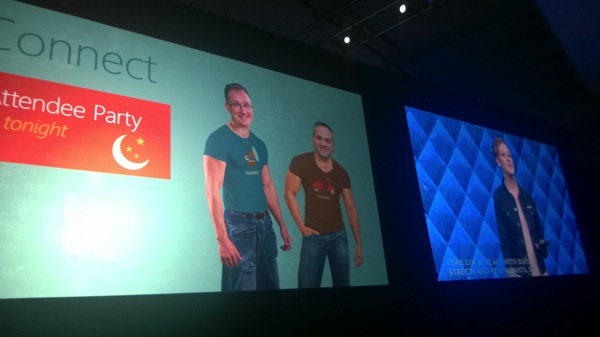
For the record, although I’ve been lifting diligently, I am not (yet) built like the guy who’s wearing my face on screen… but there’s hope.
I took detailed notes on each of the sessions I attended, so I’ll be posting about the individual sessions over the next few days. It’s fair to say that I learned several valuable things at each session, which is sort of the point behind MEC. I found that the quality of the “unplugged” sessions I attended varied a bit between sessions; the worst was merely OK, while the best (probably the one on Managed Availability) was extremely informative. It’s interesting that Tony and I seemed to choose very few of the same sessions, so his write-ups and mine will largely complement each other. My Monday schedule started with Kamal Janardhan’s session on compliance and information protection. Let me start by saying that Kamal is one of my favorite Microsoft people ever. She is unfailingly cheerful, and she places a high value on transparency and openness. When she asks for feedback on product features or futures, it’s clear that she is sincerely seeking honest feedback, not just saying it pro forma. Her session was great; from there, I did my two back-to-back sessions, both of which went smoothly. I was a little surprised to see a nearly-full room (I think there were around 150 people) for my UM session, and even more surprised to see that nearly everyone in the room had already deployed UM on either Exchange 2010 or 2013. That’s a significant change from the percentage of attendees deploying UM at MEC 2012. I then went to the excellent “Unplugged” session on “Exchange Top Issues”, presented by the supportability team and moderated by Tony. After the show closed for the day, I was fortunate to be able to attend the dinner thrown by ENow Software for MVPs/MCMs and some of their key customers. Jay and Jess Gundotra, as always, were exceptional hosts, the meal (at III Forks) was excellent, and the company and conversation were delightful. Sadly I had to go join a work conference call right after dinner, so I missed the attendee party.
Tuesday started with a huge surprise. On my way to the “Exchange Online Migrations Technical Deep Dive” session (which was good but not great; it wasn’t as deep as I expected), I noticed the picture below flashing on the hallway screens. Given that it was April Fool’s Day, I wasn’t surprised to see the event planners playing jokes on attendees, I just wasn’t expecting to be featured as part of their plans. Sadly, although I’m happy to talk to people about migrating to Office 365, the FAA insists that I do it on the ground and not in the air. For lunch, I had the good fortune to join a big group of other Dell folks (including brand-new MVP Andrew Higginbotham, MCM Todd Hawkins, Michael Przytula, and a number of people from Dell Software I’d not previously met) at Iron Works BBQ. The food and company were both wonderful, and they were followed by a full afternoon of excellent sessions. The highlight of my sessions on Tuesday was probably Charlie Chung’s session on Managed Availability, which was billed as a 300-level session but was more like a 1300-level. I will definitely have to watch the recording a few times to make sure I didn’t miss any of the nuances.

This is why I need my commercial pilot’s license— so I can conduct airborne sessions at the next MEC.
Tony has already written at length about the “Exchange Oscars” dinner we had Tuesday night at Moonshine. I was surprised and humbled to be selected to receive the “Hall of Fame” award for sustained contributions to the Exchange community; I feel like there are many other MVPs, current and past, who deserve the award at least as much, if not more. It was great to be among so many friends spanning my more than 15 years working with Exchange; the product group turned out en masse and the conversation, fellowship, and celebration was the high point of the entire conference for me. I want to call out Shawn McGrath, who received the “Best Tool” award for the Exchange Remote Connectivity Analyzer, which became TestExchangeConnectivity.com. Shawn took a good idea and relentlessly drove it from conception to implementation, and the whole world of Exchange admins has benefited from his effort.
Wednesday started with the best “Unplugged” session I attended: it covered Managed Availability and, unlike the other sessions I went to, featured a panel made mostly of engineers from the development team. There were a lot of deep technical questions and a number of pointed roadmap discussions (not all of which were at my instigation). The most surprising session I attended, I think, was the session on updates to Outlook authentication— turns out that true single sign-on (SSO) is coming to all the Office 2013 client applications, and fairly soon, at least for Office 365 customers. More on that in my detailed session write-ups. The MVPs were also invited to a special private session with Perry Clarke. I can’t discuss most of what we talked about, but I can say that I learned about the CAP theorem (which hadn’t even been invented when I got my computer science degree, sigh), and that Perry recognizes the leadership role Exchange engineering has played in bringing Microsoft’s server products to high scale. Fun stuff!
Then I flew home: my original flight was delayed so they put me on one leaving an hour earlier. The best part of the return trip might have been flying on one of American’s new A319s to Huntsville. These planes are a huge improvement over the nasty old MD80s that AA used to fly DFW-HSV, and they’re nicer than DL’s ex-AirTran 717s to boot. So AA is still in contention for my westbound travel business.
A word about the Hilton Austin Downtown, the closest hotel to the conference center: their newly refurbished rooms include a number of extremely practical touches. There’s a built-in nightlight in the bathroom light switch, and each bedside table features its own 3-outlet power strip plus a USB port, and the work desk has its own USB charging ports as well. Charging my phone, Kindle, Venue 8 Pro, and backup battery was much simpler thanks to the plethora of outlets. The staff was unfailingly friendly and helpful too, which is always welcome. However, the surrounding area seemed to have more than its share of sirens and other loud noises; next time I might pick a hotel a little farther away.
I’ll close by saying how much I enjoyed seeing old friends and making new ones at this conference. I don’t have room (or a good enough memory) to make a comprehensive list, but to everyone who took the time to say hello in the hall, ask good questions in a session, wave at me across the expo floor, or pass the rolls at dinner— thank you.
Now to get ready for TechEd and Exchange Connections…
Filed under UC&C
Getting ready for MEC 2014
Wow, it’s been nearly a month since my last post here. In general I am not a believer in posting stuff on a regular schedule, preferring instead to wait until I have something to say. All of my “saying” lately has been on behalf of my employer though. I have barely even had time to fly. For another time: a detailed discussion of the ins and outs of shopping for an airplane. For now, though, I am making my final preparations to attend this year’s Microsoft Exchange Conference (MEC) in Austin! My suitcase is packed, all my devices are charged, my slides are done, and I am prepared to overindulge in knowledge sharing, BBQ eating, and socializing.
It is interesting to see the difference in flavor between Microsoft’s major enterprise-focused conferences. This year was my first trip to Lync Conference, which I would summarize as being a pretty even split between deeply technical sessions and marketing focused around the business and customer value of “universal communications”. In reviewing the session attendance and rating numbers, it was no surprise that the most-attended sessions and the highest-rated sessions tended to be 400-level technical sessions such as Brian Ricks’ excellent deep-dive on Lync client sign-in behavior. While I’ve never been to a SharePoint Conference, from what my fellow MVPs say about it, there was a great deal of effort expended by Microsoft on highlighting the social features of the SharePoint ecosystem, with a heavy focus on customization and somewhat less attention directed at SharePoint Online and Office 365. (Oh, and YAMMER YAMMER YAMMER YAMMER YAMMER.) Judging from reactions in social media, this focus was well-received but inevitably less technical given the newness of the technology.
That brings us to the 2014 edition of MEC. The event planners have done something unique by loading the schedule with “Unplugged” panel discussions, moderated by MVP and MCM/MCSM experts and consisting of Microsoft and industry experts in particular technologies. These panels provide an unparalleled opportunity to get, and give, very candid feedback around individual parts of Exchange and I plan on attending as many of them as I can. This is in no way meant to slight the many other excellent sessions and speakers that will be there. I’d planned to summarize specific sessions that I thought might be noteworthy, but Tony published an excellent post this morning that far outdoes what I had in mind, breaking down sessions by topic area and projected attendance. Give it a read.
I’m doing two sessions on Monday: Exchange Unified Messaging Deep Dive at 245p and Exchange ActiveSync: Management Challenges and Best Practices at 1145a. The latter is a vendor session with the folks from BoxTone, during which attendees both get lunch (yay) and the opportunity to see BoxTone’s products in action. They’re also doing a really interesting EAS health check, during which you provide CAS logs and they run them through a static analysis tool that, I can almost guarantee, will tell you things you didn’t know about your EAS environment. Drop by and say hello!
Filed under UC&C
“Ceres” Search Foundation install error in Exchange 2013 SP1
When deploying the RTM build of Exchange 2013 SP1, I found that one of my servers was throwing an error I hadn’t seen before during installation. (The error message itself is below for reference,) I found few other reports, although KB article 2889663 reports a similar problem with CU1 and CU2, caused by a trailing space in the PSModulePath environment variable. That wasn’t the problem in my case. Brian Reid mentioned that he’d had the same problem a few times, and that re-running setup until it finished normally was how he fixed it. So I tried that, and sure enough, the install completed normally. In most cases I wouldn’t bother to post a blog article saying “this problem went away on its own,” but the error seemed sufficiently unusual that I thought it might be helpful to document it for future generations.
Warning:
An unexpected error has occurred and a Watson dump is being generated: The following error was generated when "$error.Clear();
            if ($RoleProductPlatform -eq "amd64")
            {
                $fastInstallConfigPath = Join-Path -Path $RoleBinPath -ChildPath "Search\Ceres\Installer";
                $command = Join-Path -Path $fastInstallConfigPath -ChildPath "InstallConfig.ps1";
                $dataFolderPath = Join-Path -Path $RoleBinPath -ChildPath "Search\Ceres\HostController\Data";

                # Remove previous SearchFoundation configuration
                &$command -action u -silent;
                try
                {
                    if ([System.IO.Directory]::Exists($dataFolderPath))
                    {
                        [System.IO.Directory]::Delete($dataFolderPath, $true);
                    }
                }
                catch
                {
                    $deleteErrorMsg = "Failure cleaning up SearchFoundation Data folder. - " + $dataFolderPath + " - " + $_.Exception.Message;
                    Write-ExchangeSetupLog -Error $deleteErrorMsg;
                }

                # Re-add the SearchFoundation configuration
                try
                {
                    # the BasePort value MUST be kept in sync with dev\Search\src\OperatorSchema\SearchConfig.cs
                    &$command -action i -baseport 3800 -dataFolder $dataFolderPath -silent;
                }
                catch
                {
                    $errorMsg = "Failure configuring SearchFoundation through installconfig.ps1 - " + $_.Exception.Message;
                    Write-ExchangeSetupLog -Error $errorMsg;

                    # Clean up the failed configuration attempt.
                    &$command -action u -silent;
                    try
                    {
                        if ([System.IO.Directory]::Exists($dataFolderPath))
                        {
                            [System.IO.Directory]::Delete($dataFolderPath, $true);
                        }
                    }
                    catch
                    {
                        $deleteErrorMsg = "Failure cleaning up SearchFoundation Data folder. - " + $dataFolderPath + " - " + $_.Exception.Message;
                        Write-ExchangeSetupLog -Error $deleteErrorMsg;
                    }
                }
            }
        " was run: "Error occurred while uninstalling Search Foundation for Exchange.System.Exception: Cannot determine the product name registry subkey, neither the 'RegistryProductName' application setting nor the 'CERES_REGISTRY_PRODUCT_NAME' environment variable was set
   at Microsoft.Ceres.Common.Utils.Registry.RegistryUtils.get_ProductKeyName()
   at Microsoft.Ceres.Exchange.PostSetup.DeploymentManager.DeleteDataDirectory()
   at Microsoft.Ceres.Exchange.PostSetup.DeploymentManager.Uninstall(String installDirectory, String logFile)
   at CallSite.Target(Closure , CallSite , Type , Object , Object )".
Filed under UC&C
Stuck! (or, why I need an instrument rating)
Earlier this week I suffered an indignity common to all VFR pilots who fly cross-country: I got stuck someplace by weather.
I’d flown into Houston on Saturday evening, planning to hop down to Corpus Christi the next day and then back to Alexandria Sunday night. The weather Saturday night when I arrived (after a loooong flight featuring a steady 40kt headwind) was marginal VFR, with ceilings of just under 3000’, but the weather cleared a good bit Sunday afternoon to the west. I wasn’t able to get to Corpus, but I had hopes that the weather would clean up Monday morning so I could make it to Alex to surprise Julie before she arrived.
Long story short: not only did the weather not improve, it got quite a bit worse and stayed that way until midmorning Wednesday.
This picture from Tuesday morning sums it up nicely. In the foreground on the left, you see N1298M, my trusty steed. Pretty much everywhere else, you see clouds. The weather at the time I took this was 600’ ceilings with visibility of 3/4 statute miles. Needless to say, that is not legal weather for flying under visual flight rules. Later that day, it started to rain, and rain, and RAIN. I wasn’t the only plane stuck on the ground, but at least the FBO operated by Gill Aviation had a good restaurant (try the pecan-crusted catfish!) and free cookies.

Wednesday morning the weather cleared a bit; it was 2800’ broken and 7SM visibility when I took off. I had to pick my way around a bit; instead of going direct I first went north to Conroe/Lone Star Executive, thence more or less direct to Bastrop (which has an almost deserted airport with a super helpful attendant), thence direct to Redstone. The flight home was perfectly uneventful, with weather steadily clearing as I got further to the east. But being pinned on the ground was aggravating, and it’s clear that I need to work on getting my instrument rating sooner rather than later. Luckily I have a plan…
Thursday trivia #106
Busy, busy, busy. Just a few quick hits this week:
- Great article on Mountain View, my former home in California. I agree with its characterization of MTV as “Googletown,” and anyone who’s been there for more than about 15 minutes can testify that the traffic problems mentioned in the article are a) real b) worsening and c) largely a result of Google’s campus location and size.
- Could Columbia have been rescued on orbit?
- MEC is just a few weeks away— I need to get to work on my slides.
- I note that all 3 panes of the animation now showing on the MEC home page talk about Office 365 and none mention on-prem. I’m sure that’s just an oversight.
- My most recent cross-country trip put me over the 250-hour flying mark, with 141 hours as pilot-in-command and nearly 101 hours of cross-country time. Not much, but it’s a start.
Filed under aviation, General Stuff
Office 365 Personal Archives limited to 100GB
There’s a bit of misinformation, or lack of information, floating around about the use of Office 365 Personal Archives. This feature, which is included in the higher-end Office 365 service plans (including E3/E4 and the corresponding A3/A4 plans for academic organizations), is often cited as one of the major justifications for moving to Office 365. It’s attractive because of the potential savings from greatly reducing PST file use and eliminating (or at least sharply reducing) the use of on-premises archiving systems such as Enterprise Vault.
Some Microsoft folks have been spreading the good news that archives are unlimited (samples here and here), and so have many consultants, partners, and vendors– including me. In fact, I had a conversation with a large customer last week in which they expressed positive glee about being able to get their data out of on-prem archives and into the cloud.
The only problem? Saying the archives are unlimited isn’t quiiiiite true.
If you read the service description for Exchange Online (which we all should be doing regularly anyway, as it changes from time to time), you’ll see this:
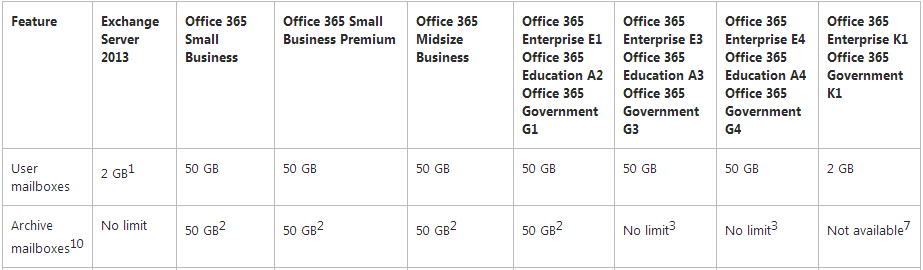
Clip from Nov 2013 O365 service description
See that little “3”? Here’s its text:
Each subscriber receives 50 GB of storage in the primary mailbox, plus unlimited storage in the archive mailbox. A default quota of 100 GB is set on the archive mailbox, which will generally accommodate reasonable use, including the import of one user’s historical email. In the unlikely event that a user reaches this quota, a call to Office 365 support is required. Administrators can’t increase or decrease this quota.
So as an official matter, there is no size limit. As a practical matter, the archive is soft-limited to 100GB, and if you want to store more data than that, you’ll have to call Microsoft support to ask for a quota increase. My current understanding is that 170GB is the real limit, as that is the maximum size to which the quota can currently be increased. I don’t know if Microsoft has stated this publicly anywhere yet but it’s certainly not in the service descriptions. That limit leads me to wonder what the maximum functional size of an Office 365 mailbox is– that is, if Microsoft didn’t have the existing 100GB quota limit in place, how big a mailbox could they comfortably support? (Note that this is not the same as asking what size mailbox Outlook can comfortably support, and I bet those two numbers wouldn’t match anyway.) I suppose that in future service updates we’ll find out, given that Microsoft is continuing to shovel mailbox space at users as part of its efforts to compete with Google.
Is this limit a big deal? Not really; the number of Office 365 customers who will need more than 100GB of archive space for individual user mailboxes is likely to be very small. The difference between “unlimited” and “so large that you’ll never encounter the limit” is primarily one of semantics. However, there’s always a danger that customers will react badly to poor semantics, perhaps because they believe that what they get isn’t what they were promised. While I would like to see more precision in the service descriptions, it’s probably more useful to focus on making sure that customers (especially those who are heavy users of on-premises archives or PST files) know that there’s currently a 100GB quota, which is why I wrote this post.
For another time: a discussion of how hard, or easy, it is to get large volumes of archive data into Office 365 in the first place. That’s one of the many topics I expect to see explored in great depth at MEC 2014, where we’ll get the Exchange team’s perspective, and then again at Exchange Connections 2014, where I suspect we’ll get a more nuanced view.
Filed under Office 365, UC&C
Getting ready for Lync Conference 2014 (bonus Thursday Trivia #106)
So, first: here’s the view from my second-floor home office:

Actually, I had to walk across the street to get this particular shot, but it was worth it. We got about 4” or so of snow in my neighborhood; I got out of Raleigh just in time to miss their snowmageddon, which suits me fine. The boys and I had a good time about 10pm last night throwing snowballs and watching big, fat flakes fall. The roads are passable now and will get better as it warms, but tonight it’ll be cold again and they’ll probably refreeze.
I’m making my final preparations for Lync Conference 2014 next week. I’m presenting a total of four times:
- VOICE401, “Deep Dive: Exchange 2013 and Lync 2013 Unified Messaging Integration”, is on Wednesday at 1pm in Copperleaf 10. This session will cover some of the internals of Exchange UM; it’s targeted at Lync admins who may not have much knowledge of Exchange but are already familiar with SIP signaling and the like.
- SERV301, “Exchange 2013 and Lync 2013: ‘Better Together’ Demystified”, is on Tuesday at 2pm in Copperleaf 9, and there is a repeat scheduled for Wednesday at 430p (also in Copperleaf 9). This session covers all the places where Exchange and Lync tie together so that you get a bette experience when both are deployed.
- On Tuesday at 430p, I’m taking part in an informal session on Exchange-y stuff at the Microsoft booth in the exhibit hall. This is super informal, so it’s probably the best place to drop by and say hello if you can.
Dell has a pretty heavy presence at the show; Michael Przytula is presenting a session covering the Lync device ecosystem (Wednesday, 230p, Bluehorn 1-3) that I think will be pretty neat, because who doesn’t love shiny devices? George Cordeiro and Doug Davis are both doing sessions around how to identify the actual ROI of a Lync deployment, which is something customers often ask about before deployment. Even if that doesn’t sound interesting, the Dell booth will be staffed by some of our hotshot Lync guys (including Louis Howard and Scott Moore), and we’re giving away a Venue 11 Pro and a bunch of very nice Jabra and Plantronics headsets.
Now, your trivia for the week:
- Watch this video and you’ll see why I want to be an airline pilot
- Now that I like guacamole (and that’s probably worth a blog post on its own), I’m eager to make some Oaxacan guacamole sauce
- Apropos of the fact that the kids here in Huntsville had three snow days this week, here’s a map showing the estimated amount of snow required to close schools across the country.
- Buying an airplane is hard. I’ll have much more to say about that another time.
- The Unwritten Laws of Engineering have a lot of useful lessons for engineers and non-engineers alike
Filed under General Stuff, UC&C
A flight simulator primer
I had originally planned to write more about engines this week, but reality— or simulated reality— has intruded, and this week I’m going to talk about flight simulators.
For your convenience, I’ll skip the part of this post where I would wax lyrical about how cool it was the first time I played Sublogic’s old Flight Simulator on an Apple II. It was cool but it wasn’t much of a simulator experience. Fast forward from the mid-80s to today and the state of the art in PC-based simulators is X-Plane, an almost infinitely customizable simulator that can handle aircraft from gliders up to the Space Shuttle. (The demo video on their web site is well worth a look to see some of what can be done with suitable hardware). There are hundreds of different airplane types available, including military, general aviation, biz jets, and big iron such as the Boeing 7×7 line. Each aircraft has its own customized flight model and appearance, so what you see can be as realistic as the designer of that model feels like building in (and as realistic as your graphics hardware can support). Here’s a fair example of what the sim looks like on my setup:

Daylight approach to runway 32 at Alexandria International Airport
This is a daylight approach (created by checking the box that says “use the current date, time, and weather”) to runway 32 at Alexandria International. You can see the runways, taxiways, other airport stuff, ground features, and the Red River. The more powerful your computer, the more graphical features you can turn on. Since I am running on a 3-year-old MacBook Pro, I have the detail level set to “medium” but perhaps one day I’ll have enough hardware to turn up some of the visual fidelity knobs.
However, visual fidelity isn’t why I wanted a simulator. There are people, including many non-pilots, who like to hop in the sim and pretend that they are airline pilots, fighter pilots, or whatever. I wanted one as a means to practice instrument flying, which often involves being in conditions where you can’t see a darn thing outside. For example, right now the weather at KMGY (Dayton-Wright Brothers) is 1.5 miles visibility, an overcast layer at 300 feet, and light snow. Here’s what the approach to runway 2 there looks like right now; It doesn’t take much GPU horsepower to draw solid gray, as you can see:

Same daylight, different weather, this time at KMGY
So why bother? If you take a look at the approach plate for the GPS approach to runway 18R at Huntsville, you’ll see that there are specific lateral and vertical points to hit: inbound on the approach, you fly to the JASEX intersection, and you cannot arrive there below 3000’. From there, you fly a course of 182° to GETEC, where you arrive at 2500’, and so on. Understanding where you need to be during the approach, and then putting the airplane in that position, is the key to a safe arrival. Practicing the skill of mentally visualizing your aircraft position and orientation relative to the approach layout, then controlling the aircraft as needed, is really valuable, and in a simulator you can repeat it as often as necessary without delay, even pausing it when needed. For that reason, the FAA has allowed you to log up to 20 hours of simulator time as part of the requirements for an instrument rating, provided you spend that time with an instructor and are using an approved simulator. (They recently announced that they will only allow 10 hours of time to count, effective February 3, but the AOPA and other groups are fighting that proposed rule change.)
Without going into all the boring details, suffice it to say that there are many different gadgets to practice your flying with, from the massive, super-high-fidelity simulators used by airlines to the home-brew rig I’m using, with a $50 piece of software and another $200 in controllers, all running on a commodity laptop. This article from IFR Refresher explains the difference nicely: a simulator is a full-size replica of a specific type of aircraft cockpit, with motion and high visual fidelity. Training devices (TDs) don’t have to have motion, and there are several subtypes, including PC-based devices (PCATDs) and basic and advanced training devices (BATDs and AATDs, respectively).
For your simulator practice time to be loggable, you need a PCATD, BATD (such as this Redbird TD or FlyThisSim TouchTrainer), or AATD. My slapped-together rig is not FAA-certified as any of these, so I can’t log the practice time, and therefore it doesn’t count towards the requirements for my rating. However, being able to practice approaches before I fly them is invaluable, and I plan to make heavy use of the ability to do so. To help with that, I’ll probably spring for the FlyThisSim analog Cessna pack, which includes higher-fidelity models for several of the aircraft I normally fly. In particular, the pack includes the Garmin G430 and G530 GPS systems, which are very useful when flying approaches since they give you a moving-map rendition of your location and position and they can be coupled to the autopilot so that the GPS provides lateral guidance (though the airplanes I fly don’t have vertical coupling so the pilot still has to control altitude). Coupled with judicious use of the expensive and fancy Redbird FMX AATD at Wings of Eagles, this should help me (eventually) master the complex process of safely flying an IFR approach.
Filed under aviation
1Fit Fitness (Madison)
Over the summer, I was looking for a gym. Since I hadn’t been a member of a gym in probably 20 years, I wasn’t really sure what criteria I should use to pick one, but I liked Brian’s review strategy of testing gyms before signing up, so I started with the gym that was closest to my house: 1Fit Fitness on County Line Road in Madison. I met with Chuck, the owner, and got a quick tour. First, a word about Chuck, who is a retired Army officer and super nice guy. He and his staff keep the gym clean and neat, which was apparent when I waked in the door. The gym is divided into two large areas: on the left, there are dumbbells (12.5-100 lbs), a Smith machine, a squat rack, and a couple of benches. On the right, there’s an incline bench, a big combo cable machine, a rack for doing pull-ups and dips, a variety of selectorized machines, and half-a-dozen assorted pieces of cardio gear. Each side has at least one TV, and the left side has a counter area with a small fridge with drinks for sale. The decor is extremely basic, although there are plenty of mirrors, which always bugs me a little bit. However, there are none of the typical meathead trappings: no diamond plate or posters of gigantic ripped dudes.
I signed up for their family plan, which is about $40/month for me plus two kids. For that price, I get unlimited, 24/7 use of the gym. It is rarely busy; I’ve never seen more than 4 other people there, and most of the time when I go I’m by myself. If you want a social gym, this probably isn’t the best choice. The place is staffed in the afternoons, Monday through Saturday— while “afternoon” sounds vague, I chose it because the actual hours seem to start anywhere between noon and 4pm and end at 6pm. I’ve seen the owner in a few times outside that time, but that’s unpredictable. However, since your key fob gets you 24/7 access, unless you need company, staffing hours are pretty much irrelevant.
There are a variety of classes offered, and several personal trainers who work out of the gym, but I don’t have anything to say about them because I haven’t used them.
Cons? Sure, a few. The gym doesn’t have some equipment that I wish it did: there’s no leg press machine, no trap bars, and only one curl bar (which is broken). This isn’t a huge deal, but it does point out the drawback of using a small locally-owned gym; at least in this case, Chuck can’t afford to invest the same kind of money as the big-box gyms. However, the ease of access makes up for that in my opinion; I love having a nearby gym that I can go to whenever I want, and I prefer supporting the locals. It might be easier to sign up for a chain such as Anytime Fitness so that I have better gym access when I travel, but for now I’ve had good luck finding gyms in each city where I travel.
In the meantime, I’m toying with the idea of adding a second membership at Workout Anytime or Planet Fitness just up the road; $10/month or so would get me some equipment I don’t currently have access to, plus better gym access when I travel. However, when I start triathlon training in the spring, I’ll want access to a pool, which means I’ll probably be stuck with switching to a bigger gym (or the local Y), so I’ll probably wait.
Bottom line: 1Fit is a solid gym and I’m happy with the value I get for the cost. I recommend it.
140608 update: 1Fit closed in March 2014 and has been replaced by an IronTribe location.
Thursday trivia #105
Welcome, 2014! So far my year’s off to a great start; I ran a race at midnight New Year’s Eve; I have some idea of what my major 2014 goals are, and I now have a pet again. I hope you’ll join me in welcoming Pancake the cat to the blog. I promise not to be one of those tiresome people who regales unwilling audiences with tales of their pet’s accomplishments and behavior, but I must say the boys and I are excited to have a family pet again.

- I bit the bullet and signed up for an accelerated IFR ground school with Aviation Ground Schools. Why them in particular? They had a schedule that fit my needs, they got good reviews, and then they had a one-day sale. Expect a full report once I attend the seminar next month.
- The hardest thing I ever had to do as a business owner was fire people. Firing people in your personal life can be just as difficult, but sometimes it’s necessary.
- After nearly six months I am finally feeling settled into the house: everything is unpacked, there are doormats, pictures are hung, and so on. I celebrated New Year’s Day by replacing the fill mechanisms in all 3 toilets. (Cue the “you know you’re a homeowner when…” jokes)
- I’m excited to start the next round of group training with Roman and Mike Vacanti. Here’s to crazy gainzzzz.
Filed under Musings


