Training Tuesday: a few odds and ends

No time for a real post this week, so instead you get the dreaded random-list-of-bullets…

  • I’m still loving the Garmin 920xt. After teaching it about my phone’s tethered wifi network, I can now upload workouts from wherever I happen to be, which is handy when I’m on the road. The ability to set high/low alerts for pace and heart rate is very useful too.
  • I’ve been working with Alex Viada and his posse at Complete Human Performance for about six weeks now and I am already seeing some differences that I really like. I thrive on structure so having a training plan to follow works really well for me: I just show up, do whatever workout I’m assigned according to my TrainingPeaks calendar, and call it good.
  • The other day I deadlifted 315 lbs. While this is a small amount in the grand scheme of the powerlifting universe, it was a huge milestone for me. The bar actually bent when I lifted the weight. I had a huge ear-to-ear grin after completing the lift, and it inspired my 13-year-old (who was trying to reverse-psych me before the lift by saying “I don’t think you can do it, Dad”) to hit 135 x 5 for his own deadlift PR. Then I followed that up by setting a new bench PR of 135×2. Headed in the right direction!
  • Last night I had a 45-minute run where my target was to keep my heart rate in zone 2. I set a high/low alert on my watch and kept it right around 150 for a steady 45 minutes without stopping. If you had told me a year ago that I could run 4.5 miles without stopping I would’ve laughed in your face.
  • My Z2 pace is about 10:00/mi, while my flat-out race pace is about 8:30/mi for 5Ks. I need to do some more 10K distances to see what feels good at that distance; I’ll get the opportunity when I start my half-marathon training in a few weeks. My tentative goal for my first half is to get it under 2:15.
  • I need to spend more time in the pool. I always say that, and yet I rarely do it.
  • Working in an office has made it harder for me to consistently eat well. Since we have a full kitchen, this is more of an excuse than an actual problem; I can cook proteins, mix shakes, and so on at work just like I can at home, assuming a) I remember to bring the ingredients and b) my coworkers don’t eat them.
  • Is it triathlon season yet?

Leave a comment

Filed under Fitness

Microsoft sneaks out Mac Outlook update

Good news: Microsoft just issued an updated version of Outlook for Mac. (I guess that’s the official name, as opposed to the older Outlook 2011). The list of fixes is pretty nondescript: you can change calendar colors, add alt-text to images, and use custom AD RMS templates. I suspect most of the effort for this release was actually focused on the “Top crashes fixed” item in the KB article.

Bad news: you have to manually download it from the Office 365 portal. The AutoUpdate mechanism shipped with Office 2011 doesn’t yet know how to handle updates for Outlook for Mac. I suppose Microsoft could either update the Office 2011 AU mechanism or ship a new one as part of a future Outlook update; presumably the latter choice would actually deliver the Office 2015 update mechanism, since there’s undoubtedly going to be one.

The real news here is how quickly Microsoft released this update. While this is only one release, it’s an excellent sign that we got it quickly, and it makes me hopeful that we’ll see a steady stream of updates and fixes for the Mac Office apps in the future— with a cadence more akin to the Lync Mobile clients releases than the glacial pace of past Mac Office updates.

1 Comment

Filed under OS X, UC&C

Training Tuesday: Upgrading to the Garmin Forerunner 920xt

When I saw that Garmin had a new triathlon watch on the way that included an SDK, I thought “hey, that might make a neat upgrade” and ordered one. Unfortunately, production delays dragged the release date out, so I ended up canceling my original order and reordering. I got the new watch about two weeks ago and have been putting it through its paces since. I’ve used it on the bike indoors and out, for outdoor runs, and while weightlifting. It’s also an activity tracker that tracks steps and sleep and uses that data to estimate calorie burn. Here are a few of my thoughts based on my experience so far.

First, IMHO it is ugly compared to the Suunto. That’s partly a result of the white/red color scheme but also because there are lots of little 1970s-style touches (the GARMIN logo, the little red pinstripes around the bezel) that don’t need to be there. It is substantially smaller than the Garmin 910t and about the same thickness as the Suunto. The band is comfortable enough for daily wear.

Paul robichaux net 20141214 001

Side by side, I prefer the appearance of the Suunto.

Setup was very straightforward. I signed up for a Garmin Connect account, plugged in the watch, and that was about it. Suunto requires that you set up most aspects of its watches (including which activity types will be available on the watch) using their web site. This is very flexible, and generally easier than punching buttons on the watch, but it means that you can’t customize anything on the watch itself— a drawback if you get to a race and notice “oops, I forgot to enable open water swim mode” (which I’ve done!)

As typical, the first thing I did with the watch was play with all the settings. For example, at first I thought I’d want the “auto scroll” option on so that the watch would flip through all available data pages. It turns out that auto scroll means whenever I looked at the watch, it was likely to be showing me anything other than the data items I was most interested in at that point in time, so I turned it back off.

A few things I particularly liked:

  • Garmin’s Connect web site is much more attractive and more useful than Suunto’s. I love seeing weather conditions recorded along with my workout. (Take a look at this workout as an example).
  • Being able to set a target pace, then have the watch buzz / beep any time I deviated from it, is a great help. I’m still not quite sure at what interval the watch checks pace.
  • Wireless sync via wifi is brilliant. I was on the street corner outside my house, walking back in, and the watch buzzed to tell me it had uploaded my workout.
  • It was trivial to pair the watch with my bike sensors, my HRM band, and the TrainerRelay feature in TrainerRoad.
  • GPS acquisition seems just as fast as the Ambit 2s, which is noteworthy for its fast sync.

The watch has a few drawbacks, too. I don’t have a phone that works with the 920xt’s Bluetooth features, which means I don’t get notifications on my wrist, can’t use live tracking, and so on. The chances that Garmin will support Windows Phone are just about nil, so I have to decide if I am willing to switch to a supported platform if I want to have these features. The jury is still out; there are lots of things I prefer about WP compared to iOS, and I am loath to give them up just to have wrist notifications. I suppose that’s not the watch’s fault though, especially since the Ambit 2s lacks those features altogether.

Another annoyance: you can’t customize the data fields in the same way that you can with the Suunto. There I was able to set up a custom screen that had exactly the data fields I wanted, no more and no less. On the 920xt it looks like you can enable individual data pages, but you can’t customize the fields that appear in those pages. For example, when cycling I want a page that shows current speed, current cadence, and total distance. The 920xt has all that data, but not in a single page.

There are some things I don’t understand about creating workouts in Garmin Connect and sending them to the watch, too. It looks like the workflow is to log in to GC, create the workout, then plug your watch in for USB sync. When I do this, sometimes I get the workout on the watch and sometimes I don’t. This may be a watch problem, a Mac sync connector problem, a GC problem, or some combination thereof. I haven’t done it enough yet to have a really solid repro case.

The social features of Garmin Connect are poor, too. In fairness they are no worse than Suunto’s, but compared to the features in Strava, MapMyRun, RunKeeper, and Fitocracy, they stink. It’s hard to find friends, to name just one flaw. I’d love to see them fix this in a near-term update.

A few tips for things that were not obvious to me at first:

  • You turn the backlight on by pressing the power button. By default, it shuts back off after 8 seconds. This is adjustable: go to Settings > System > Backlight and you can change the delay. The Ambit 2s had a lock button that you could use to lock the light on; there doesn’t seem to be an equivalent.
  • On the Suunto, you define a multisport activity on the web site, load it to the watch, and transition between activities. You can do that on the Garmin as well, but you can also just switch modes on the watch— so you can go from weightlifting to running to open water swim to cycling all within a single activity. The Garmin Connect web site still seems to have some issues dealing with multi-activity files, or it’s possible that I have something set up wrong.
  • The activity monitor knows when you’re moving your body, but it doesn’t know when you’re unable to move, e.g. sitting in a car in traffic, so it will buzz you anyway. Such is life.

Overall I’m delighted with the watch so far. Garmin has been the gold standard for multi-sport watches and I expect that, as I learn to use it, I’ll get more useful training data from it. The ability to easily do intervals and to track my pace are already making a different. Bring on race season!

14 Comments

Filed under Fitness

My first week with Office 365 Clutter

Immediately after Microsoft announced that Clutter was available, I enabled it in all my personal tenants and started training it. As you may recall, you can train Clutter in two ways: implicitly (as it sees how you interact with mail from particular senders, such as by ignoring it or deleting it without reading it) or explicitly (by moving messages into or out of the Clutter folder). Because I’m fairly impatient, I set about explicit training by moving messages to the Clutter folder. I’ve done this with all of the clients I use: Outlook for Mac, OWA, Outlook 2013, the iOS mail app, and Outlook Mobile. Whenever possible I move the message while leaving it unread, so as not to make Clutter think I’m interested.

The upshot: it works reasonably well, but it seems to have trouble learning about messages from some sources. For example, both Strava and Twitter alerts remain resolutely un-Cluttered even though I’ve been moving 100% of those messages, unread, to the folder. I think that’s because the message subject for these messages often changes to reflect the message contents (e.g. “@jaapwess retweeted a Tweet you were mentioned in!”) and that confuses the algorithm in some way. It may be that the algorithm used to categorize these messages needs more data to act on before it can decide. The downside of machine learning systems is that, as an end user, you often can’t see just what the machine has learned, only the actions it takes. In this regard, machine learning is somewhat like owning a cat. I can see that Clutter isn’t moving some messages I think it should, but I don’t have any way to see why, nor any way to effectively correct it. This reminds me of the good old days of training neural networks from HNC Software to do various interesting things and sometimes being bewildered by the resulting behavior.

One bit of good news: I have been very pleased to see no false positives; that is, Clutter has not taken any mail I wanted to read and treated it as clutter. If the price of zero false positives is that some real clutter isn’t treated as such, I’m OK with that.

The junk mail filtering infrastructure continues to catch some messages that might more properly be treated as clutter, e.g. the flood of marketing crap I get from GameStop. I don’t mind such messages being treated as junk, though.

One unexpected side effect is that I have been much more diligent than usual about unsubscribing from newsletters or marketing mails that I no longer care about. This has helped to cut the volume of clutter I have to deal with.

In closing, I note that no matter how many times I tell Clutter that notifications from Yammer should be treated as clutter, they keep going right into my Inbox. I suspect a conspiracy.

3 Comments

Filed under Office 365, UC&C

Why the Outlook for Mac folder pane changes colors

I mentioned in my review of the new Outlook for Mac client that the background of the folder list seemed to randomly change colors:

It may also be a feature that there is a color gradient fill in the folder list. At first I thought the color was the same as the color of the category of my current calendar appointment, but after changing all the category colors, waiting for sync, and quitting and relaunching Outlook, the color didn’t change, so I’m not sure what Microsoft had in mind here, and there doesn’t seem to be a way to turn it off.

Thanks to the most excellent Bill Smith, long-time Mac Office MVP, now I know the answer:

You’re seeing translucency in the navigation pane. So long as you have a window or other white object behind Outlook you’ll see a whitish background, but arrange Outlook over your Desktop picture and you’ll see those colors peeking through it. Choose Outlook menu > Hide Others to quickly show Outlook over your Desktop.

Sure enough, that explains it. I use SatelliteEyes to update my desktop background, and as I move around (and thus get new satellite maps), or as change the Z order of other open windows, voilà color changes. I normally don’t mind window translucency, but I don’t care for the combination of OS X Yosemite and this effect. Looks like I’m stuck with it, though.

8 Comments

Filed under OS X, UC&C

The difference between supportability and patching

I’m at the annual MVP Summit this week, and everything we hear and see is pretty much NDA (except for pictures of Flat Tony). However, we just had a really interesting discussion that I think is safe to abstract here.

A couple years ago I wrote a post about what it means to be supported or unsupported. What I wrote then still stands: when Microsoft says something is unsupported, there can be multiple reasons for that label, and you do whatever-it-is at your own risk.

Microsoft’s support policy for Exchange 2013 can be summed up as “N-1”: when they release a new cumulative update (CU) or service pack, that version and the previous version are considered to be supported. So, in the fullness of time, when we get Exchange 2013 CU7, then CU6 and CU7 will be the officially supported versions.

It’s very clear that there’s a lot of confusion about what “supported” means in this context. Microsoft product support will always support you if you call for help with a product that’s within its lifecycle window. Call them today and ask how to configure Exchange ActiveSync on Exchange 2010 RU2, they’ll help you. Call to ask about an issue you’re seeing with DAG failover in Exchange 2013 CU2, they’ll help you. Call for help with Exchange 2003, and they may even help you on a best-effort basis.

What they won’t do is create fixes for bugs or problems in unsupported versions.

If you call them and say “hey, I’m having this problem with Exchange 2013 SP1,” they will help you troubleshoot it. If it’s a known problem, they may tell you “update to CU5 or later”– but Microsoft will not create a hotfix or IU that fixes that problem in SP1, or any other older version that’s outside that N-1 boundary.

So: help always, bug fixes only within the support boundary. Tell your friends.


1 Comment

Filed under Office 365, UC&C

Microsoft announces data loss prevention, mobile device management for Office 365

Microsoft made a slew of Office 365 announcements at TechEd Europe this week. Taken collectively, they’re clear evidence of how Microsoft is executing their strategy of cross-linking capabilities across Windows, the Office suite, and Office 365.

Let’s start with data loss prevention (DLP), a feature first introduced in Exchange 2013. (Side note: I love it that yet another marquee feature in Office 365 was first shipped as part of Exchange.) The idea behind DLP is that you can have an automated system that will detect when users send out sensitive information (for certain selected values of “sensitive”) and take appropriate action, ranging from warning the user through a Policy Tip to journaling the message to notifying a person or group to blocking the message. DLP shipped with a template engine that allows Microsoft and its partners to build templates for different policies, along with a set of templates for common policies such as US HIPAA and PCI. However, Exchange 2013 DLP suffered from some limitations, chiefly that it only worked with messages sent through Exchange. Users only get Policy Tip warnings in OWA 2013 and Outlook 2013, and the template system seems primarily intended for use by a few specialized partners and not the general population.

Microsoft is addressing these problems by extending DLP into SharePoint Online and OneDrive for Business. While they haven’t discussed the specifics of how this will work, it seems reasonable that both SharePoint and ODB will consume the same policy templates used in Exchange, so that you can apply a consistent set of policies across the three products. Conspicuously absent from the announcement was any mention of bringing this capability to on-prem SharePoint. Maybe that was just an oversight.

The OneDrive for Business capability will be of huge interest to several of my large customers. Microsoft’s messaging around large, low-cost personal storage for business users is getting a lot of traction, with both users and enterprises eager to take advantage of it, but organizations have a reasonable concern that users will, accidentally or on purpose, put stuff in their ODB libraries that they shouldn’t. Assuming that you can define a DLP policy that covers what you don’t want stored in ODB, having this enforcement mechanism could potentially be very valuable.

In addition to these DLP extensions, Microsoft is giving Office 365 DLP the ability to recognize and act on tags created in the Windows Server file classification infrastructure (FCI). With this support, the automated metadata tags generated by FCI can be recognized by Exchange Online, SharePoint Online, and OneDrive for Business—so if you have, say, an Excel spreadsheet that’s classified as protected health information (PHI), the DLP infrastructure will recognize and treat it as such. I don’t have a good feel for how pervasive FCI is in the enterprise, since I don’t normally deal with file/print deployments, but I suspect that this is a nice 2-for-1 play for Microsoft: they can sell the benefits of FCI to cloud customers and sell the benefits of DLP that’s driven by FCI to entrenched on-prem customers.

Another major DLP improvement is coming in Office: Word, PowerPoint, and Excel will get support for Policy Tips. While it would be technically possible to roll this out into Office 2013, it wouldn’t surprise me at all to see this offered as a feature only in Office 16.

I’ll have a lot more to say about the details of these features once Microsoft releases more public details. While I’ll look forward to picking the collective brains of the Office 365 PM team at the MVP Summit, I don’t expect them to share any public details beyond what they’re showing in Barcelona. In the meantime, though, Microsoft is clearly trying to reinforce the ties between their core Office and Windows Server customers and Office 365, while at the same time providing some more tasty cloud-only features in an attempt to entice customers into drinking the 365 Kool-aid.

For another day, a more detailed analysis of Microsoft’s announcement that mobile device management (MDM) capabilities are being added to almost all of the existing Office 365 plans.

3 Comments

Filed under Office 365, UC&C

Developing apps for the Garmin ConnectIQ SDK

Early on this triathlon season, I bought a Suunto Ambit 2s. I loved the idea of having accurate workout data for my training, plus more accurate time/distance data for my races, and the Suunto has delivered. But it’s missing a few things: its support for interval workouts is poor, and the Movescount website is less reliable than I’d like. Luckily Suunto added export to Strava, but you still have to use their computer-based app to transfer workouts from the watch to the computer to the Movescount site, so when the site’s down you can’t see your workout data. (There are also various website bugs, including one in computing swim distance that means that the results on the website don’t match the results on the watch, but I digress). Having said all that, I was planning on sticking with the Suunto because I like the industrial design; it’s comfortable to wear, looks good, and has all the basic functionality I need.

Then I read this: Garmin announces ability to develop apps on wearables, with Connect IQ.

Coupled with my native lust for all shiny gadget things, the availability of the SDK opened a whole range of possibilities, not only for apps I could get for the watch but for apps I could write. I immediately started pondering what kinds of useful apps I could build and came up with one that I thought would be very useful: a flight timer. There are at least two different flight times that I need to log for every flight: how long the propeller was turning (because that drives how much money I put into our engine reserve fund) and how long I was actually in the air (which is what I actually log as flight time).

The GPS in 706 can automatically calculate flight time from takeoff to touchdown… provided you remember to look at it after landing and before turning off the avionics master switch. We also have a Hobbs meter that measures the time when the propeller’s actually turning. However, an app that automatically records time in flight, along with the origin and destination airports, would be useful. CloudAhoy does something similar, based on ForeFlight track data (and for all I know, ForeFlight can do this already). However, a timer that’s not tied to the aircraft would have the advantage of not losing its data when you turn off the airplane, and not being tied to a phone, external GPS, or iPad greatly reduces the risk of losing data due to battery or device failures.

So, I ordered a Garmin 920XT and downloaded the Garmin SDK. On first inspection, it looks like the SDK and development model are both pretty tractable for what I want to do. I’ll be blogging about my development efforts as they progress. For now, if I can get basic logging to work in the device simulator, I’ll be happy. There are a few features I’d like to have in the app to make it useful: it should automatically log flight time from takeoff to touchdown, geocode the origin and destination points so that the log file reflects airports and not just GPS points, and provide a timer function for things such as switching fuel tanks in flight. If I can extend that to include automatically logging flights into Safelog, that’d be even better but that might be some time away.

The 920XT itself will be a nice upgrade from the Suunto, which I am going to loan to my pal Jay for use in his training, but it won’t ship until sometime in November, so I’ll be running on the simulator for a while yet (and using the Suunto to log workouts, too!)

The SDK includes a comprehensive set of API docs, the device simulator, an Eclipse plugin that runs the command-line compiler, and assorted sample apps. I’ll have ore to say about it once I get my environment set up and running and start playing with the samples. Garmin’s clearly thinking about this the right way, though; in addition to their own developer forum, they are actively encouraging the use of StackOverflow.

Stay tuned for updates!

3 Comments

Filed under aviation, Fitness

Disney and Universal 2014 wrapup

A few more-or-less random thoughts about our recent trip to Disney World and Universal Studios Florida:

  • Universal is a see-it-once park, I think. We enjoyed it but there was nothing so compelling that I think we’d want to go back again in five years. On the other hand, all four of us had specific things at Disney that we looked forward to doing (among them: turkey legs, the Winnie the Pooh ride, Tower of Terror, and Space Mountain).
  • Having said that, the Harry Potter attractions are superbly done: decoration, character acting, costuming, and all the little touches come together to provide a very immersive experience. Just don’t expect to be able to drink a whole mug of butterbeer. (And don’t be surprised if the Forbidden Adventure ride leaves you nauseated for a couple of hours afterwards.) Getting early access by virtue of staying in a Universal property was well worth it.
  • We didn’t buy, nor did we miss, the front-of-the-line ride access benefit that Universal sells for $60+ per person, per day.
  • Disney’s MagicBands system works extremely well and made paying for things much easier– which, I suppose, is the point.
  • The FastPass+ system takes a little getting used to because you can get multiple passes at once, but there are limits on which rides you can stack passes for. Read up on it before you go.
  • We stayed at two “value” hotels: Universal’s Cabana Bay and Disney’s All-Star Music Resort. Both had nicely equipped, clean “family suite” rooms. Both claimed to sleep six: Universal provided two double beds and a twin pull-out sofa, while Disney provided a queen, a twin sofabed, and two single fold-out sleep chairs: not ideal for six-foot teenagers, but workable.
  • Disney’s on-property wifi was great at the parks, as was Universal’s. However, the Disney in-room wifi was unusuable– worse even than the worst of the Microsoft conference hotels I’ve had to use in the past.
  • EPCOT’s International Food and Wine Festival was going on, so we got some primo foods when we ate dinner there. I’d like to do the festival again, but with more time to savor the food.
  • Tom, Matt, and I all ran into friends at the parks. It’s a small world indeed.
  • We didn’t rent a car, so we used Uber for the move from the Kissimmee airport to Universal, then a cab from Universal to Disney, then Uber again. Orlando’s taxis are about a million percent cleaner than in most other cities, but Uber was cheaper and faster.

Overall, a successful trip (good flight, too!) but boy, am I glad to be home!


1 Comment

Filed under aviation, General Stuff, Travel

SharePoint task list shows “read only” when opened in Project 2013

SharePoint Online has a nifty set of features for managing project tasks, but I don’t like its web interface. I prefer Microsoft Project (which makes me a bit of a heretic, but there you have it). SharePoint has a button that will take the current task list and give it to you as an .mpp file, then open it in Project so you can edit it. Sadly, this button only works in IE for Windows; it doesn’t work on my machine when I use Chrome, and of course since there’s no Project version for Mac OS X, it doesn’t work there either.

Anyway, I’ve been using this button a lot, but the other day it just quit working. I’d click the button, the .mpp would open, but Project would see it as read-only, so I couldn’t save edits back to the SharePoint site. I did some digging and found that other users had reported success opening the .mpp directly from the “recently used” file list, but that didn’t work for me. So I posted this thread. Meanwhile, as I waited for an answer, I tried a variety of things, none of which worked. Then, in a completely unrelated set of operations, I signed out of Office 365, changed my account password, and signed back in… and then it worked. Perhaps this fix will prove useful for future generations.

3 Comments

Filed under Office 365

A few quick notes on Office 365 Groups

Today the Office 365 team announced the rollout of the first phase of the Groups feature. I hadn’t been playing close attention to the roadmap for this particular feature, so I decided to play around with it and report my findings. Rather than the kind of carefully reasoned analysis you might expect from Tony or Van Hybrid, this is sort of a stream-of-consciousness record of my initial exploration. However, it probably reflects how most customers will discover and use the feature. Remember that this is written within a few hours after the feature launched, so things that I call out as not working or missing may not be lit up in my tenant yet.

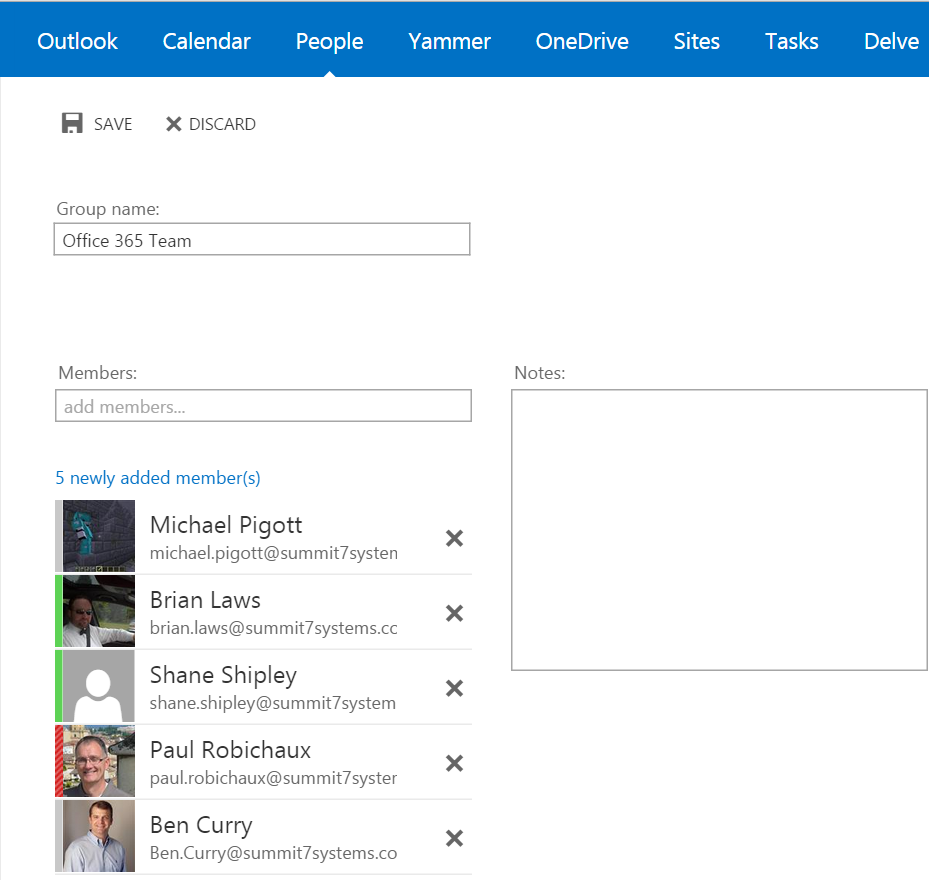
  • First, I looked around to figure out how to create a new group. The screenshot in the online help shows Groups appearing in the left-side folder nav bar. I didn’t see that in my tenant. When I switched to the People view, I noticed that the People search selector had a “Groups” item available, but since there were no groups that wasn’t super helpful. Clicking the “New” icon at the upper right of the People view gave me a modal pop-up asking me whether I wanted to create a new group or person. The interface for creating new groups is straightforward: give your group a name, add some people to it, and off you go. Here’s what it looks like:
Creating a new group is straightforward.

Creating a new group is straightforward.

Note that there’s no way to specify an email address for the group object. You can send mail to it from within OWA, or by clicking the envelope icon in the group information sheet, but there’s no visible external SMTP address to, send to. This seems like an oversight.

  • The group documentation says that newly created groups get their own OneDrive for Business folder and group mailbox, but I haven’t yet seen any signs of those objects in my tenant. However, the docs also say that group members will get a “welcome to your new group” email once those objects have been created, and because that hasn’t shown up yet, I’m guessing that there’s just a short provisioning delay.
  • I created a new group named “Managing Consultants”. I picked that name on purpose, because I already had a mail-enabled security group with the same name. The Groups interface happily let me create a duplicate. The existing USG doesn’t show up in the Groups interface in OWA, nor does the new Group show up in Outlook’s online GAL (which may just be an artifact of AD latency). The help topic for creating and navigating groups shows a number of settings that aren’t visible in my tenant. For example, you can supposedly change the URL used to access the group or set the group to either private or public– those options aren’t available to me yet.
  • I clicked on the mail icon to create a message and sent it off; it arrived immediately in the target mailboxes. Interestingly, though, the group name doesn’t show up in Outlook; instead, the individual group members’ names appear.
  • Even after creating two groups and sending a message to one of them, neither group appeared in the OWA left navigation bar. Surprisingly, they didn’t appear in the OneDrive nav bar either:
Where'd my groups go?

Where’d my groups go?

  • Bizarrely, clicking the “Browse groups” item opens a new OWA window, which opens in mail view, not the People view. The new OWA window’s left nav bar has a People section, but it’s empty– even though the original OWA window I kept open still correctly shows unread mail from people in my Inbox.
  • When I create a Group, it doesn’t appear as an available group in Yammer. I presume this is by design.
  • I didn’t test Group conversations because there are no visible Group objects in OWA where the docs say they should be.

From the bumpy state of feature display and behavior at this point, I infer that there’s a multi-step provisioning task that runs when a new Group is created, and that at least the ODB step hasn’t run yet. This might confuse users who wonder why they can use a group for one purpose (sending mail) but not another (ODB). I’ll wait a day or so for the provisioning and loop back to see which of these items are bugs and which are just caused by setup delays.

6 Comments

Filed under Office 365, UC&C

Training Tuesday: a new bike and my first long bike ride

Wow, lots has happened since my last Training Tuesday entry. Maybe I should call it “Triathlon Tuesday,” since not every post is about training? But then again, not every post is about triathlon, either, as you’ll soon see.

I’d been wanting a new bike for some time. My previous ride, a Specialized Crosstrail Sport Disc, is a big, heavy beast of a bike. Its gearing is designed for trails; it has 3 chainrings (more on which later) with 9 gears in each. In addition, the frame geometry is such that you sit up straight and tall, which is fine for riding to work (the reason why I bought it) but not so great for riding fast in races or training. After my debacle at Rocketman, and my successful experience at Nation’s Tri with a rented Cannondale road bike, I knew I wanted to try to find a road bike before my last two races: Racin’ the Station and Rocketman Florida.

To save you lots of tedium, I’ll cut my description of the shopping process short. Suffice to say I did a ton of research, hit all the local bike shops, test rode a bunch of bikes, and spent an unhealthy amount of time looking at bikes on SearchTempest and eBay. The keys to finding the perfect bike are that you should pick a bike:

  • that fits you. This is a bit of a problem since I am tall. Bike geometry is complicated, so I quit trying to predict what would fit me in favor of riding bikes to see. how they felt
  • that’s in your price range. You can spend many thousands of dollars on super-fast racing bikes with all kinds of fancy crap, but that wouldn’t do me much good. To get faster, I need more time riding, not an uber-bike. All I wanted was a basic entry-level road bike, so I set a budget limit of $1000.
  • that you like. This was tricky. I saw lots of bikes that I liked that weren’t in my price range, and some that I liked and were in my price range didn’t fit me (including a really sweet all-carbon Douglas).

I pretty much struck out at the local bike shops. The model year for bikes changes over in August or September, so there were very few 2014 bikes in my size left, and most manufacturers hadn’t shipped many 2015 bikes in my size and price range. So I narrowed things down to a couple of 2014 models at two local shops– a Trek Madone 2.1 and a Cannondale CADD9–  and was planning on going to pick one out when I got back from Exchange Connections. In the meantime, though, a mechanic who works for one of the local shops told me about a sweet-sounding bike he had: a 2013 Giant Defy 1. It was in my price range, and I liked the idea of getting a slightly used bike for less than retail. We met Wednesday, I test-rode the bike for a few laps around the parking lot, and made the deal. Thus this picture from Wednesday night:

What a sexy beast! And the bike is nice too.

What a sexy beast! And the bike is nice too.

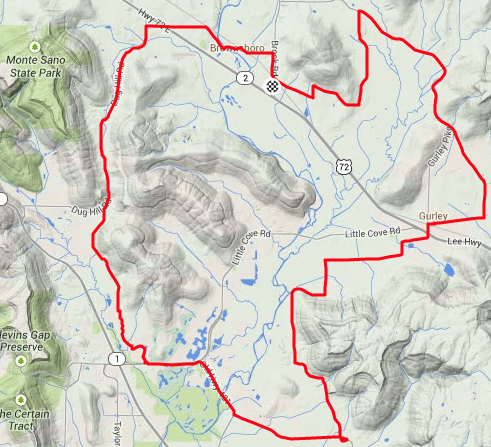
I didn’t get a chance to ride Thursday, but Friday afternoon after work I put on my SPD pedals and speed/cadence sensors and got in about a 2-mile ride. After a few tweaks to the seat position, I packed up the bike and went to bed. Saturday morning, I got up bright and early to meet Wendy (one of my Tri101 coaches), her husband, Teresa (another 101 alum), and her husband to convoy over to the All You Can Eat ride sponsored by the Spring City Cycling Club. I hadn’t really planned on riding this ride, but after I told Wendy that I bought the bike, she encouraged me to give it a shot. I decided to go for it. I only signed up the 34-mile loop, but I figured that would be plenty. The 50-, 67-, and 103-mile groups rolled out at 8am, and I joined them so I could ride with Wendy and Mike. The weather was absolutely perfect: mid-70s, with a nice breeze and plenty of sunshine. The first 6 miles or so were pretty slow, as we were riding in a big mob. However, about mile 7, there was a long downhill (with a sharp left at the bottom, yikes), and that spread the group out a good bit. I hit about 30mph downhill and could easily have gone faster if I weren’t so chicken!

Doesn't look like much from here…

Doesn’t look like much from here…

This ride was much different from what I’m used to. In triathlons, you’re not allowed to bunch up or draft, and everyone rides hell-for-leather. In this kind of ride, you can ride abreast, clump up, ride right of the centerline, and pretty much do what you want as long as you’re not unsafe. It was great to be able to ride along chatting with people, the more so because I actually knew some of the people I was talking to!

Another big difference: in this kind of ride, there are rest stops WITH FOOD. That’s right: we rode about 15 miles, stopped for a snack, rode another 8 miles, snacked again, and then rode about 9 miles to the finish. At the first stop, I had half a PB&J, a banana, a big cup of Gatorade, four or five Fig Newtons, and a brownie. Longer distances thus mean more snacks, giving you a built-in incentive to push your distance. As it was, 34 miles is about double my previous long ride distance, so that was enough pushing for me.

After rest stop 2, the ride went fine until we turned onto Salty Bottom Road (great name, huh?) The turn put us into the teeth of a stiff headwind, which slowed me down, and then I had to stop and walk up about half the hill around mile 32– I was just gassed at that point. I definitely felt the difference in chainrings on this hill; on the Crosstrail I would have just dropped to the lowest ring and blasted up the hill (well, OK, “blasted” probably isn’t the right verb). Having only 2 rings is going to take some getting used to.

The scenery was incredible: a hundred shades of green in the grass and fields, a squadron of planes overhead flying into Moontown for the EAA 190 pancake breakfast, and mountains, or at least what passes for mountains here, in the background. The course was very well marked and the support volunteers did a wonderful job of feeding us, providing a sag wagon, and handling all the pesky logistics.

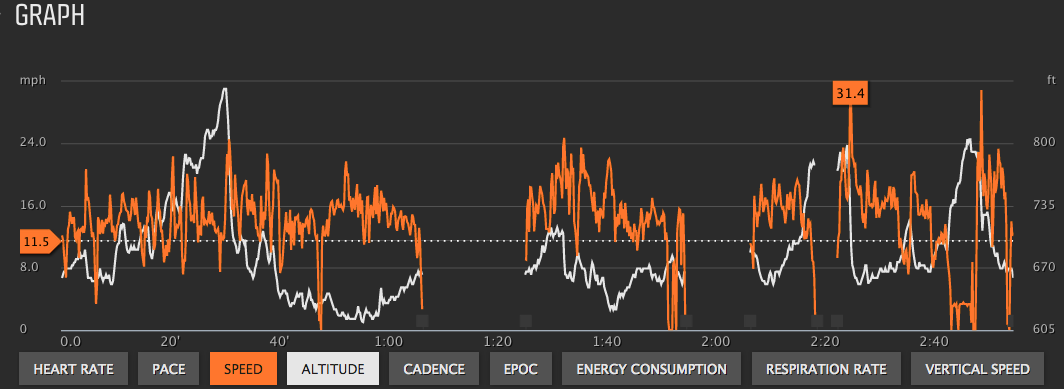
This graph nicely summarizes the overall ride for me. The white line is elevation; the orange line is speed. The gaps indicate rest stops. You can clearly see the big downhill around mile 7 (look for the steep white cliff), plus a few later hills. My average speed was 14.3mph, which was pulled down by the long stretch of chat-riding  at the start. I was routinely hitting 20+ mph on the flats, something that would have been improbable, if not impossible, on the Crosstrail, so I’m really pleased with the results.

Tale of the tape

Tale of the tape

Now I need to log some more miles before Rocketman Orlando, which features a 32-mile bike course. On Sunday, I rode the Racin’ the Station course with a group, just to get a feel for it; I wasn’t pushing hard at all and averaged around 14.5mph. I need to get a few more rides in this week (along with RtS this Saturday). I’ll definitely be on the lookout for other sub-metric-century rides– I may have accidentally caught the club-ride bug!

Leave a comment

Filed under Fitness

My first real IFR trip: Decatur-Manassas and back

My trip to DC to compete in the Nation’s Triathlon was my first “real” IFR flight. I say “real” because it combined flight in actual instrument conditions with busy airspace and a long cross-country—conditions I expect to encounter often as I fly around.

Earlier in the summer, I had signed up for the tri.The timing was such that I would come home from GATTS, have a couple of days to pack, and then fly up to DC, hopefully with my instrument rating. That turns out to be what happened.

Flight planning was straightforward. The DC metro area has a number of general aviation airports scattered around, but it also has significant restrictions on its airspace. Without going into all of the gory details, it’s enough to point out that the airports that are closest to central DC are heavily restricted. In order to fly to the so-called “Maryland 3”, you have to go to either Dulles or BWI, get fingerprinted, have security interviews with the FAA and TSA, and then get a PIN that you use when filing flight plans. I didn’t have time to do that, so I settled on Manassas, which is further out but would provide a reverse commute into and out of the city—it also helped that the route from Manassas to the hotel passed right by the bike shop where I’d made arrangements to rent a road bike.

I planned an early departure Saturday morning. Because I’d been out of the office for most of the week, I couldn’t leave earlier than about 5pm, and I didn’t want to fly night IFR in unfamiliar, complex airspace after a full, and tiring, day at work—that’s how accidents happen. My original plan was to fly from Decatur to KGEV, fuel up with avgas and diet Coke, and then continue on to Manassas. The weather at Decatur at departure time was OK, with an overcast layer about 2000’, and Huntsville Approach quickly cleared me to my target altitude. The first hour or so of the flight was smooth on top, then things got a bit bouncy because there were clouds at my filed altitude—with some light rain and a fair bit of chop. Once past that, though, things were looking good until I looked at the weather at my destination airport and alternate . Both were below minimums, so instead I flew a bit further east and landed at Winston-Salem, which was nicely VFR. It turns out that the airport there has self-service or full-service fuel, with a whopping $1.69/gal price difference—but getting to the self-service pump from the FBO is an adventure that involves runway crossings and, in my case, aggravating the pilot of a Malibu who had to hold short while I taxied. Such is life.

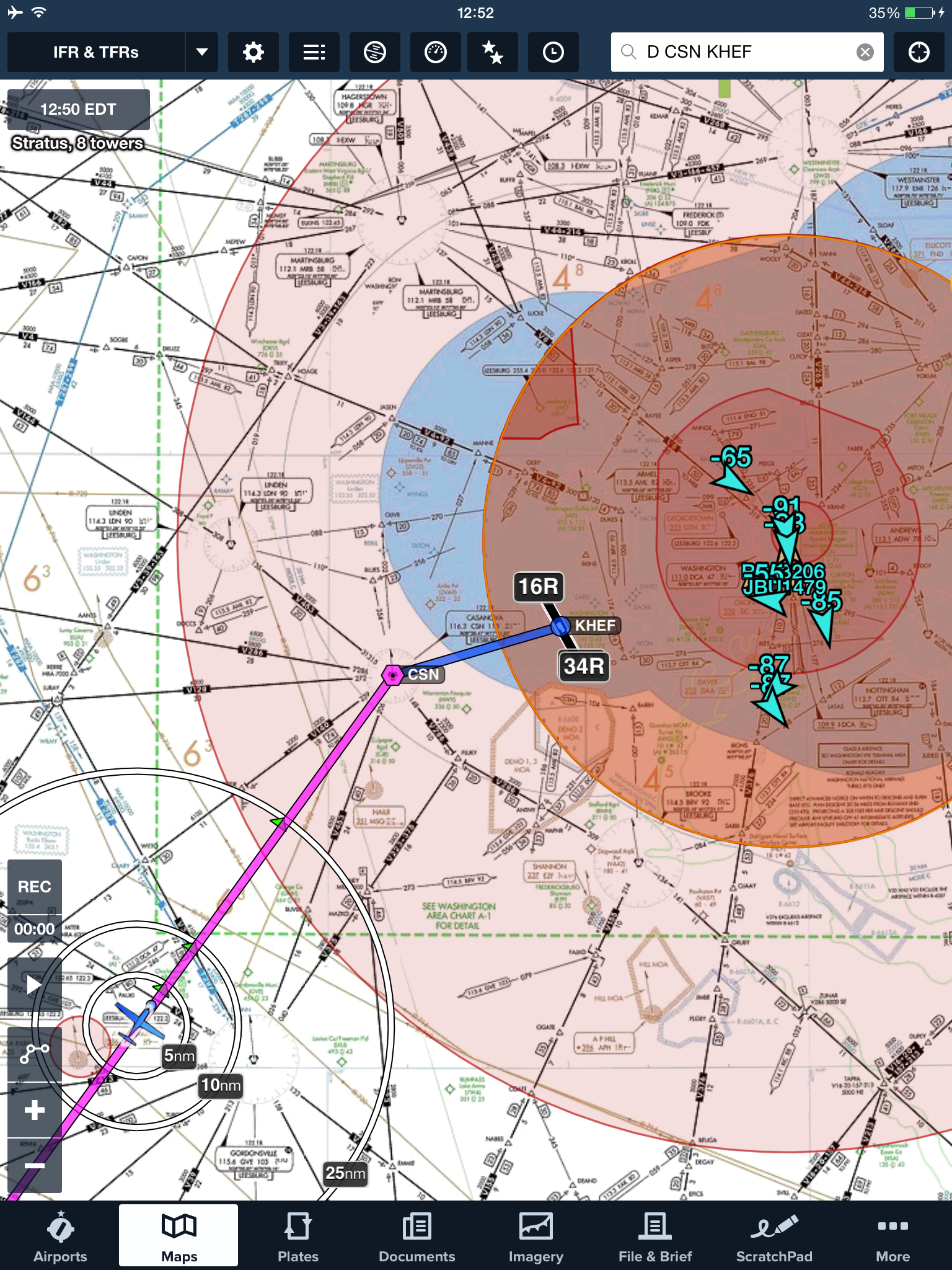
The flight into Manassas was perfectly uneventful, just the way I like. I had filed direct from Winston-Salem to Manassas, but I didn’t expect to get that routing, and sure enough, I didn’t; Potomac Approach sent me direct to the Casanova VOR, then direct Manassas. It was fun watching the Foreflight traffic display en route, since I could see a ton of traffic into Reagan.

Watch out for the big iron!

Watch out for the big iron!

Going to CSN first wasn’t much of a diversion, so it was no big deal. Manassas was VFR, but storms were expected later, so after I landed, the fine folks at Dulles Aviation hangared the plane. (I also want to point out that they provided stellar service: the rental car was ready when I got there, saving me a commute to the nearest Avis office some 12 miles away, and they treated me like I had just flown in on a Gulfstream.)

The return trip looked simple enough too. I filed direct Manassas to Greenbriar, WV. The race was on Sunday, and I needed to be at work Monday morning, so I had to leave late in the afternoon, meaning that several of the airports I would normally have considered as fuel stops were either closed, or would be. Greenbriar was reporting 900’ overcast, which was fine with me, so I filed, preflighted, and started up, then called Manassas Ground to get my clearance.

Here’s what I was naively expecting: “N32706, Manassas Ground, cleared as filed to LWB, climb and maintain 9000’, departure frequency…”

Here’s what I got instead: “N32706, Manassas Ground, cleared to LWB via the ARSENAL FOUR departure, thence the Montebello transition, then direct NATTS, then direct LWB; departure frequency…” Thus we see how ATC deals with the expectations of a novice IFR pilot. This set off a frantic burst of knob-twiddling as I tried to set up the KLN94 for that departure (which it didn’t have, since its onboard database was too old). I eventually got it set up, was cleared for takeoff, and then got a series of ridiculous vectors from Potomac Approach that sent me well north of where I wanted to be. However, the flight to Greenbriar was nice and smooth between layers, and, as advertised, the weather on arrival necessitated shooting the ILS, which I did smoothly. After taking on fuel, it was off to Decatur; the rest of the flight was unremarkably smooth except for a great sunset and some tasty snacks (yay vanilla wafers!) I considered it a very successful trip!

A great sunset to cap off a great trip

A great sunset to cap off a great trip. Not shown: vanilla wafers.

Leave a comment

Filed under aviation

GATTS days 8 & 9: judgment day(s)

The title of this post gives it away: I didn’t pass my check ride on the first try. Read on to find out why…

On day 8, I woke up early, loaded the car, and drove to the airport to meet Peter. We’d arranged with Ken to meet early because the weather from Manhattan to Topeka (and the surrounding area) was poor: 1200’ or less ceilings, with lots of wind and a good bit of rain. Peter and I agreed to head east and see what the weather looked like when we got there. Short answer: it was terrible. The entire flight was in clouds, with plenty of bumps, then on arrival, ATC gave us about 20 minutes of holding on the localizer, which was, um, invigorating, not to mention bouncy. We finally landed and this is what we saw:

Paul robichaux net 20140903 001

Ken was there waiting for us, so we went inside and went through the standard check ride prep; he and I both signed into IACRA to complete my check ride paperwork, he briefed me on the Pilot’s Bill of Rights, and so on. Then we spent about an hour on the oral exam, which was perfectly straightforward. I wasn’t surprised by any of his questions, largely thanks to the combination of Peter’s coaching and my own study. The weather wasn’t good enough for us to conduct the practice approaches on the check ride under VFR conditions, so we adjourned to the airport restaurant for a snack (which was interrupted by a business phone call for me, alas). After about an hour and a half, the weather had lifted enough for us to fly. We took off, and Ken had me intercept V4 to give us some distance from the airport. We flew west a bit, then he had me recover from unusual attitudes, which went well… except.

See, I was having a hell of a time keeping to my assigned altitude. I’d like to blame it on the wind, but it wasn’t just that; my scan was deteriorating faster than ever before. I’m still not sure if I was nervous, rattled from the weather, or what, but after a few gentle reminders from Ken (example: “Do you know what the PTS requirements for holding altitude are?”, just in case my poor performance was due to ignorance vice lack of skill), he had me head in to the ILS for runway 13. I flew fairly well despite the wind gusts, intercepting and tracking the localizer without a problem.. but, again, my altitude control was poor, and I let the glideslope needle hit full deflection down. I was too high, and that was that: he had me land, gave me the dreaded letter of discontinuance, and held a short debrief with Peter and me. Then I flew us home, in a funk the whole way; we did some remedial training en route, which I obviously needed but didn’t want. After landing I went back to the apartment, sulked for a while, worked a bit, and then mentally steeled myself to repeat the process the next day… and that’s exactly what happened. The next morning, we went back to the airport, flew to Topeka, met Ken, did the same IACRA stuff, and went out to the airplane.

When you retake a failed (or interrupted) checkride, the examiner doesn’t have to retest you on the portions you passed, although she can. In my case, Ken just wanted me to fly the approaches and holds, which I did, starting with the ILS for 13. It was still breezy, but nowhere near as windy as the preceding day, and/or maybe I was less nervous. In any event, I flew a textbook ILS approach, did a decent job on the hold (despite a stiff and inconvenient crosswind), and followed with the VOR and localizer back course approaches. I landed, taxied in, and Ken shook my hand to congratulate me. Here’s what the airport looked like when we taxied up:

Paul robichaux net 20140901 003After another debrief, in which the often-heard and completely true phrase “license to learn” was tossed around several times, we bade Ken goodbye and headed back to the ramp. After a short and uneventful flight back to Manhattan, I shook hands with Peter for the last time, got a fresh diet Coke, and headed home. The flight home was smooth and clear, so I didn’t actually get to perform any approaches, more’s the pity. After such a long time away, I was delighted to get home, sleep in my own bed, play with the cat, and generally settle in a bit.

Once a little more time has passed, I’ll write up my overall impressions of GATTS. It is safe to say that I’m pleased with what I learned and their teaching methods, but I feel like I need a bit more experience before I form a complete opinion. Meanwhile, I’ll be flying!

8 Comments

Filed under aviation

GATTS day 7: checkride prep, plus a race

Day 7 of my GATTS experience happened to be Labor Day. That didn’t really make any difference to the flight schedule, but I did talk Peer into a later start time so that I’d have time to go run the Summer Send-Off 5K race in nearby Chapman, Kansas. The race was a lot of fun; I ran well despite getting lost on the way there and arriving literally 30 seconds before the starting gun. (Irony of the day: just as I was passing the high school demolished by a 2008 tornado, my iPod served up Flux Pavilion’s “Blow the Roof”).

Race in Kansas? Sure, why not? One more state on my list that I can cross off.

Race in Kansas? Sure, why not? One more state on my list that I can cross off.

After the race and a quick shower, I met Peter at the airport for a mock checkride. Checkrides are normally administered by people who hold the role of DPE, or designated pilot examiner. They’re not FAA employees; many of them are very high-time instructors, often retired. Every instructor knows, or should, the local DPEs: what they think is important, what they emphasize in the oral and practical exams, what their habits and idiosyncracies are. Although Peter didn’t attempt to imitate the DPE’s mannerisms or anything, he did tell me that I should expect to take off, intercept the V4 airway westbound, return to do the ILS 31 approach at Topeka, execute the published missed approach, transition to the VOR 22 approach, and then come back to do the localizer backcourse for 13. This last was necessary because of FedEx’s failure to deliver my updated GPS card on time, the dirty rats– I couldn’t legally fly a GPS approach without the updated data card, so I was stuck with the backcourse.

The first part of any FAA checkride, of course, is the oral exam, so Peter quizzed me for an hour or so on weather, procedures, approaches, lost communications procedures, and pretty much everything else we had discussed at any time during the preceding week. That went well, I thought; I felt well prepared by the combination of my study and his teaching. Then we went out to the ramp, fired up the airplane, and flew to Topeka to simulate the flight check portion. The flight went very well, although it was windy and bumpy, so I had trouble maintaining the nice oval shape we all associate with a well-flown holding pattern. Part of the goal of the simulated checkride is to put the applicant at ease with the flow of the ride, and it definitely helped; despite the blustery winds, I flew within the PTS and felt good once we got back on the ground and put the plane away. I had an easy night, packing and making one last visit to Hibachi Hut for bread pudding and a sandwich, then went to bed, eager to face the DPE on the morrow…

Leave a comment

Filed under aviation