
Via my inbox, I found a very interesting blog post that outlines the timeline for fixing the recent shell: vulnerability in Mozilla. I tip my hat to the Mozilla team for their speedy response.. except that they forgot a couple of important things.
“Working with Exchange Server” Entourage white paper released
Microsoft’s released a white paper on how to make Entourage work with Exchange. That’s good. Unfortunately, some of the guidance in the troubleshooting section is frustratingly generic. For example, check this note: “In an Active Directory or network infrastructure that is heavily secured, Entourage 2004 Exchange clients can experience difficulty in locating the Active Directory global access server and authenticating the user account. Environments where the servers are locked down and the required ports are closed will experience these problems, and Entourage auto-configure might not work.” So, it might not work, but you’re not going to tell me why it might not work, nor what to do about it.
Comments Off on “Working with Exchange Server” Entourage white paper released
Filed under General Stuff, Musings
Mass Destruction (Faithless)
This is by far the catchiest message song I’ve ever heard. Check the lyrics:
Whether long range weapon or suicide bomber
Wicked mind is a weapon of mass destruction
Whether you’re soar away sun or BBC 1
Misinformation is a weapon of mass destruc
You could a Caucasian or a poor Asian
Racism is a weapon of mass destruction
Whether inflation or globalization
Fear is a weapon of mass destruction
Comments Off on Mass Destruction (Faithless)
Filed under Reviews
Yet another information disclosure vulnerability
Information disclosure vulnerabilities can be quite serious, and they often generate lots of press interest. Sometimes this interest is fanned by organizations that make their living selling security advisories. mi2g has definitely been a major force in publicizing some past vulnerabilities, and now they’ve found a new one that has worldwide impact.
Comments Off on Yet another information disclosure vulnerability
Filed under General Stuff
Media Center Eye for the TiVo Guy
Welcome /. readers! I added a section on customization because I somehow forgot to mention that in the original article.
Summary: “It’s pretty good except for a few bugs, right, Dad?” — David, my 9-year-old son
Connected Home asked me to write an article on Microsoft’s Windows Media Center Edition (MCE). Through the generous help of the MCE PR team (thanks, Tom!) I recently spent a month with a Gateway 610XL, a nifty all-in-one PC with a 17″ widescreen LCD display, 802.11g, and a DVD burner. This unit took the place of my bedroom TiVo, the trusty Sony SVR-2000 I’ve had for about four years now. It’s been hackedenhanced with a larger drive, TiVoWeb, and TyTools. I’d been reading a lot about MCE, and wanted to see how it stacked up for casual consumer use. Unfortunately, Connected Home is cutting back their publication schedule, so they don’t want my article. Instead, this is a more informal version of my thoughts after using MCE for a month. I’ve had a TiVo since 2000 (and that’s after writing an early review of the units right after they shipped), so I can’t help viewing MCE in comparison with TiVo.
First, a note on the hardware: MCE is sold only with computers from selected OEMs. This is to provide an Apple-like experience: the hardware and software should Just Work™ without any descents into driver or DLL hell. Gateway did a great job stuffing lots of functionality into the 610XL, and I was generally pleased with it. Except as noted, all of my comments would pertain equally to MCE machines from any other vendor.
Setup
Setup was very painless. I’m accustomed to the lengthy TiVo process of running their Guided Setup utility; this requires a long phone call and an even longer (nay, interminable) pause while the TiVo digests the initial set of program guide data. With MCE, the process was trivial: set it up on my wireless LAN, then click the button to download program guide data. I did hit a snag with setting up the 610XL to control my Philips DSX-5000 satellite box, but it was easy to work around (and, as it turns out, the MCE remote did the trick just fine). It was easy to make the Media Center machine see pictures and music from my home network, although the MCE machine can’t be joined to an Active Directory domain [ed: I got this wrong. MCE 2003 couldn’t domain join; MCE 2004 and later can]
Interface
Microsoft refers to the MCE interface as their “10′” interface, because it was designed to be usable from that distance. The interface is clean and well-designed. It doesn’t have as much background motion as TiVo’s interface, which I consider to be a plus. One of the coolest interface features is that every element can be operated via keyboard, mouse, or remote, so you can do things like remove redeye from digital photos using only the remote (more on that in a minute). In addition, third-party programs like Sonic Primetime and Napster can use the same interface. Other developers have created add-ons, too, including the elusive “MyWeather” that provides local weather data with the cool 10′ look. Since the first thing my wife usually asks me in the morning is what the forecast is, this would be a valuable thing to have.
The MCE remote worked well enough; it features separate buttons for live and recorded TV, stored photos, and music. It lacks the brilliant industrial design of the TiVo “peanut” remote, though (but who cares; so does my Sony unit.) The Gateway’s remote sensor had a pretty narrow receive angle, which was a little frustrating but not MCE’s fault.
Plumbing
The TiVo can record from two sources: cable/antenna and S-Video. This means I can use one unit to record cable and satellite channels. Unfortunately, MCE can’t yet do this. The 610XL has digital audio inputs and outputs, but I didn’t test them; my satellite receiver doesn’t decode Dolby Digital, so I also didn’t test MCE’s surround sound functionality. As with TiVo units, the inputs and outputs you get may vary according to what kind of MCE hardware you buy.
Live TV and guide
We didn’t watch much live TV on this unit, for two reasons: a) it was in the bedroom and b) we have a TiVo so we don’t have to watch live TV. However, the MCE unit handled this quite well. I prefer the MCE program guide format to TiVo’s; it’s much easier to read from across the room. As with the TiVo, the MCE box would occasionally misfire when changing channels on the satellite box. This is an unfortunate consequence of the IR dongle used to send channel-change commands, but it can be minimized with careful positioning of the IR blaster “eyelet”.
Recorded TV
It’s easy to find programs to record by title, time, or category, and it’s easy to set up recurring recordings to get all episodes of, say, “I Spy“. When I set up conflicting recordings, MCE let me know and asked me how I wanted to handle the conflict. Oddly, all recordings defaulted to starting five minutes before the scheduled time. I was able to adjust this easily.
I did experience two problems with recorded TV. One was a consistent bug: hitting the fast-forward button while replaying live TV would cause the image to freeze. Audio worked fine, but the only way to unstick the image was to go back to the recorded TV list and hit play. Fortunately, the MCE remote has a “skip” button that skips ahead 30sec. This is just the thing for skipping commercials. You can activate a similar feature on the TiVo, but I don’t usually bother because TiVo’s “overshoot” correction is so good. The other was inconsistent: sometimes recorded programs would end earlier than I expected. This only happened twice, but both times it was during a movie I’d recorded to watch with my wife… not so good for the WAF.
Scheduling, season pass, and suggestion functionality
TiVo put a lot of effort into the three “S”s: scheduling recordings, their Season Pass feature, and recording suggestions. The MCE did a competent job of scheduling, including notifying me of conflicts. It’s more difficult to skip individual recordings in a series than it is with TiVo, and there aren’t as many options for choosing which episodes to record, which ones to keep, and how long to keep them for. In addition, there’s nothing like the TiVo Season Pass Manager for reprioritizing conflicting recordings. MCE also doesn’t record suggestions based on your input. Some people dismiss this as useless, but it’s found a lot of interesting stuff for us in the past. I’d have to say that overall this is MCE’s weakest area compared to TiVo.
Video extraction/DVD burning
One area where MCE really shines is in taking programming to watch on other machines. I want to be able to watch recorded programs while I’m on the treadmill, on my Tablet PC while stuffed into an airplane, or in a hotel room in Redmond. MCE makes that much easier than TiVo. As a bonus, my test unit came with Sonic Primetime, an extremely easy-to-use program that burns recorded MCE shows to DVD. This worked about 80% of the time in my tests– way better than TyTools or TyStudio on my TiVo. Being able to quickly burn educational shows to DVD for use in the minivan was a huge WAF bonus. (To add insult to injury, when TiVo does eventually ship this feature, which they’re calling TiVo To Go, it won’t work on either of the TiVos I actually own!) The MCE can also spit out video that can be synced to Portable Media Center devices or even to Windows smartphones. I don’t currently use either of these, but I’d certainly consider buying a PMC to provide easier access to recorded content when I’m on the road.
Music
One really cool feature of MCE was its ability to play music. If you had an MCE as part of your home theater, this would be a nice addition, provided your music was ripped at a reasonable quality. The 610XL has decent built-in speakers (plus a subwoofer). One thing I particularly liked was that Windows Media Player was smart enough to go out and fetch album art for songs I had in my library that didn’t already have it. TiVo offers some roughly similar functionality as part of its Home Media Option (HMO), but I can’t use HMO on my bedroom TiVo (it’s a Series 1) or the one in the living room (it’s a DirecTiVo). Advantage: MCE.
Photos
MCE’s ability to capture, display, and edit digital photos was a surprise bonus. I know people who use MCE to provide background photo/music shows at parties; since our unit was in the bedroom that wasn’t something I tested, but all three of my kids loved watching slideshows of family photos. The slideshow component includes a cool Ken Burns-like pan/zoom effect that adds motion to the pictures. You can easily resize, flip, and de-redeye pictures; with a compatible printer, you could also print instant snapshots. We’ve done this before using Arlene’s camera and its printer dock, but MCE offers a way to let more people see the pictures in the process. Advantage here: MCE.
Wife Acceptance Factor (WAF)
As almost any home theater enthusiast will tell you, the WAF is a critical part of building a usable home theater. (I’m sure there are female home theater nuts too; I’ve just never actually met any. My mom, aunt, and sister are all TiVo fans, so maybe that counts.) The MCE was more stable in everyday operation than my hacked-up TiVo (which is in the basement, driven by an X10 Powermid that sometimes flakes out), and it offered a great deal of extra functionality that my wife liked. However, the fast-forward problem cost some WAF points. Would an MCE device make it in the living room? At my house, probably, especially since I have an MX500 remote that can use macros to automate most complex tasks.
Customization and expandability
MCE wins big-time here. There are a wide variety of commercial and free add-ons that do things like make MCE act as a DVD jukebox (rip your DVDs once and play them any time), alarm clock, streaming audio server, and so forth. Because you can run any Windows program, the MCE is hugely flexible. With different hardware (e.g. the kind with slots and a case) you can do all kinds of cool things– for example, Omar has a custom front-panel display. You could fairly easily write your own plugins for the main MCE screen to display important email, stock quotes, etc. In fact, the fine folks at NewsGator have a Media Center version of their RSS aggregator– it’s very slick. Of course, as you start adding stuff to an MCE or TiVo box, you run the risk of reducing its stability.
Other stuff
The MCE box is a general-purpose WIndows XP machine, so you can use it as a web browser, email terminal, and game machine. However, I got a better experience from sitting with my Tablet PC instead of trying to read the 17″ from across the room. Don’t discount this feature if you’re using MCE with a larger screen, though. Of course, the downside of this is that you have to keep your MCE up to date on patches and fixes– something that might be an unwanted hassle for people who don’t live patch management every day.
Futures
TiVo has clearly placed their bets on consumer electronics companies. It’s unclear what the future of their relationship with DirecTV will be, and it’s uncertain how their recent pricing model changes will affect the availability of future services. On the other hand, they have a good track record of shipping stable products (including their recent HD-capable unit), and they have an extremely active and dedicated evangelist community. In the other corner, MS is backing MCE big-time, and they have a long history of improving functionality over time. They have some heavy OEMs backing their platform, but it’s actually the smaller guys that are doing the coolest stuff. The MCE future that I’m most excited about is the concept of a set-top (or Xbox) that can remotely stream MCE content: the Media Center Extender. This looks like it would give me what I want: a centralized store for all digital content that can be streamed or played on any TV anywhere in the house.
The bottom line
Microsoft positions MCE as a home entertainment hub that can deliver all kinds of digital content to your TV, stereo, projector, or whatever. In that role, it did a solid job for our family; admittedly, I didn’t test it with a fancy plasma screen or high-end stereo equipment, and I didn’t use it extensively as a hub. The extra functionality comes at a cost, though: MCE machines are much more expensive than TiVo units. The ultimate test is whether I’d buy one with my own money. The answer, for now, is no, but it’s also true that I’m not buying the HDTiVo I’ve been lusting after until I see how Microsoft plans to support HDTV– that’s because the MCE platform displays a great deal of expandability and potential that I think will make it more interesting as time goes on.
Filed under HDTV and Home Theater, Reviews
Transparency revisited: Mark Cuban’s blog
A lot of people have been talking about this Business Week article, “Blogging With the Boss’ Blessing“; it discusses the idea that businesses gain mindshare by revealing more details of their internal operations, or becoming more “transparent”. As Doc Searls points out, Mark Cuban is setting the bar for business transparency with his blog. It’s no surprise that folks like Scoble are noticing and commenting on the fact that Cuban is completely transparent, but there’s one interesting aspect of Cuban’s blog that I haven’t seen widely mentioned: where are his posts about HDNet? HD programming is a nascent market segment, and HDNet is doing some big deals (including rebroadcasting NBC’s Summer Olympics coverage). Could it be that his good business sense prevents him from airing his dirty laundry in an area that’s still highly competitive? Maybe he’s more interested in the Mavs (always a possibility!), or maybe he thinks no one’s interested in HDNet except for a few geeks. I don’t know, so I asked him.
Update: Wow, that was fast: an almost-instant response from Mark. Short and to the point: “Not much new or interesting to say about HDNet… we get the best programming we can, we play it…” Fair enough. Thanks, Mark.
Comments Off on Transparency revisited: Mark Cuban’s blog
Filed under HDTV and Home Theater, Musings
Gmail invites available
I have two Gmail invitations available. Who wants ’em?
Filed under General Tech Stuff
ConceptDraw and Visio
I’ve got to draw a bunch of diagrams for a document I’m working on. Normally, I’d use Visio, but the machine I normally use for Windows Office stuff is down, and RDP’ing to my laptop is deathly slow for some reason. I thought I’d try ConceptDraw on the Mac, since it claims to be able to import and export Visio drawings. My experience so far has been mixed: the one diagram I drew with ConceptDraw looks fine when I export it to a PNG, but it’s in grayscale when I use their converter to turn it into a Visio file. That won’t do; as an extra penalty, the objects are slightly different sizes. I’ve observed the same problem when converting Visio drawings to ConceptDraw, so I guess this may not be as seamless a solution as I’d hoped.
Update: another problem: ConceptDraw won’t export a graphics file to an SMB volume, meaning I can’t put the PNG-format file I need for Word into the share where all the rest of my files are. That’s also not good.
Comments Off on ConceptDraw and Visio
Filed under General Tech Stuff, Reviews
Fantastic SpaceShipOne photos
Richard Seaman has some astonishingly good pictures of SpaceShipOne on his photoblog.
Comments Off on Fantastic SpaceShipOne photos
Filed under General Tech Stuff
Houston Airport Rangers
You’ve heard of the Texas Rangers– now there are the Houston Airport Rangers, volunteers who patrol the 11,000 acres of Bush International on horseback.
Airport Rangers are mounted security patrol made up of volunteers, including off-duty law enforcement officers that ride their horses along the perimeter of the 11,000 acre Bush Intercontinental Airport. In return for keeping an eye out for suspicious activity in the area, equestrians have a pristine location, including wooded trails to ride and the airport has extra eyes and ears in areas that most security patrols can not easily access.
Comments Off on Houston Airport Rangers
Filed under Travel
Reporter’s guide to finding people
Duff Wilson of the Seattle Times has a nifty guide on how to find information on people: “Who is John Doe, and where to get the paper on him“. It’s missing a lot of commercial services, but it’s still interesting.
MSDN Product Feedback Center
This is really cool: a new web-based engine for tracking product bugs and feedback for Microsoft products. It will eventually replace BetaPlace (and not a moment too soon IMHO). You and I can now report bugs, not to mention being able to find existing bugs and “vote” for them to raise their priority/visibility. This doesn’t have any direct impact on Exchange, yet, but it’s safe to bet that when Exchange Edge Services hits beta that this will be the feedback mechanism for it.
Comments Off on MSDN Product Feedback Center
Filed under General Stuff, Musings
An open letter from a Marine
From Blackfive, an open letter from a Marine to the sadists who kidnapped Marine Cpl Wassef Hassoun:
When you raise that sword over your head I want you to remember one thing. Corporal Wassef Ali Hassoun is not alone as he kneels before you. Every Marine who has ever worn the uniform is there with him, and when you strike him you are striking all of us. If you think the Marines were tough on you when they were cleaning out Fallujah a few weeks ago you haven’t seen anything yet. If you want to know what it feels like to have the Wrath of God called down upon you then go ahead and do it. We are not Turkish truck drivers, or Pakistani laborers, or independent contractors hoping to find work in your country. We are the United States Marines, and we will be coming for you.
His family is asking for prayers. I think the terrorists who kidnapped Cpl Hassoun should be praying, too.
Comments Off on An open letter from a Marine
Filed under Musings
Apple’s posters at the WWDC
This week is Apple’s World-Wide Developer Conference, and they’re pulling out all the stops to introduce Mac OS X “Tiger”. Here’s a snapshot that arrived in my mailbox earlier today.
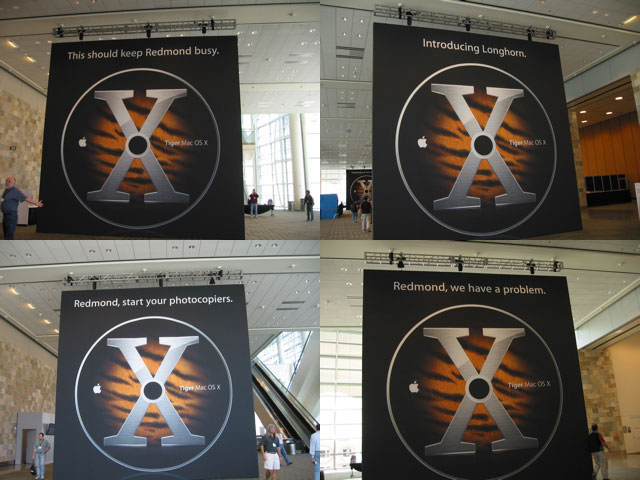
Comments Off on Apple’s posters at the WWDC
Filed under General Tech Stuff
Toledo local satellite channels
Finally, we’re getting locals! Dish turned on their Toledo locals last week sometime, and DirecTV has announced that they’ll deliver them as soon as they get FCC approval to move the DIRECTV5 satellite to 72.5°. Of course, this might take a while, especially since DirecTV is already in trouble with the FCC for moving DIRECTV3 without permission. Still, I’m hopeful that this will happen before the fall TV season starts, since most of the shows I want to TiVo are local broadcasts.
Comments Off on Toledo local satellite channels
Filed under HDTV and Home Theater


