Category Archives: UC&C

TechEd Europe: day 0

As I started writing this, I was in the back of a Delta MD-80 heading to Atlanta, thence to pick up Delta flight 109 to Madrid. The process reminds me in many ways of the first real set of international business trips I made, back in 2000-2002; Many aspects of the travel world have changed since then, but some have not.

For example, I have two laptops. Back in the day, I carried a ThinkPad for running Windows apps and a Powerbook for everything else. Now I’m taking my MacBook Pro because I need it to do demos in my TechEd session and my Dell-issued laptop because I need it for Dell work. All of the attendant weight, volume, and hassle constraints that come about from dual-wielding laptops are the same as they ever were.

Then there’s my cell phone. I have carried a Nokia 920 running Windows Phone 8 as my daily phone since November of 2012, and I am very happy with it. Unfortunately, AT&T wouldn’t SIM-unlock it for me, so I won’t be able to use it with a local SIM in Spain. That meant I had to dust off my iPhone 4, which is SIM-unlocked. I started using it last night and found it to be terribly clunky and slow compared to the 920. I don’t mean the data speed itself is slow, although it is; the phone UI itself is terribly slow compared to the 920. However, I like having iMessage available to chat with the many, many iOS users among my friends and contacts, and I am also toting my Pebble, which is completely unsupported and therefore essentially useless with Windows Phone. (Side note: I am eager to see what kind of Windows Phone announcements come out at Microsoft’s Build conference this week; I’m looking forward to more details on Nokia’s Amber and on Windows Phone Blue, or 8.1, or whatever it’s called now). So on balance, I’d have to say that the taking-a-US-cell-phone-to-Europe story is pretty much unchanged as well.

Delta surprised me with what’s known as an “operational upgrade,” or op-up, on the Atlanta-Madrid leg. That is, I didn’t buy a business class ticket, and I was not eligible for an upgrade based on my fare class, but Delta wanted to make more room in coach for paying passengers, and they had some empty business-class seats, so they moved me. I certainly wasn’t going to complain; this is the first time I’ve ever gotten an op-up and I was glad of it. I slept almost the entire way in the seat pod; by mashing buttons you can convert it into a narrow flat bed that ends up just about at floor level. The experience was oddly like sleeping in a mummy sleeping bag– the pod is only about 12″ at the footwell, and since I wear a size 13 shoe it was a bit of a tight fit.

We arrived on time at the Madrid airport, and I took a taxi to the hotel that Microsoft arranged for speakers, the Meliá Castilla. It’s gorgeous: very stately and European. Apparently it is near a bunch of nifty stuff but I was only there long enough to take a quick shower and catch a shuttle to IFEMA, the large conference center where TechEd itself is being held. I worked a shift at the “ask the experts” area and got a few good questions; more to say about that in another post. Then it was off to the speaker lounge to check my demos for tomorrow’s session. More to follow… 

1 Comment

Filed under Travel, UC&C

Exchange 2013 Inside Out early access versions on sale

For a limited time, O’Reilly and Microsoft Press have the “early access” editions of Exchange 2013 Inside Out: Connectivity, Clients, and Unified Messaging and Exchange 2013 Inside Out: Mailbox and High Availability on sale for $19.99 each. This is a fantastic deal given that you get early electronic access to the books– I am still in the midst of working on my book, but you can get access to parts of it now to learn what you need to know, well in advance of its official on-sale date. The deal is good until 0500 PDT on July 3, so you have a bit of time to take advantage of it. (Note that the sale doesn’t apply to the bundle that includes both the print book and the early access electronic edition).


Leave a comment

Filed under General Stuff, UC&C

UM Call Router troubleshooting adventure

Yesterday I was in Redmond, teaching the UM portion of the Microsoft Certified Solutions Master: Messaging class. This was the first rotation for this particular class, which replaces the MCM Exchange 2010 class, so I had all new content and an eager group of 14 motivated, smart MCSM candidates, including fellow MVP Michael van Horenbeeck, several people who I knew from online interactions (hi, Hany and Jerrid!), plus candidates from Germany, Israel, the US, Australia, and probably a few other places.

The teaching session went well, although my slides have a few lingering rough spots that I’ll need to polish. In this rotation we had a brand-new, and much improved, lab environment, so when Michael called me over to have a look at something my first thought was that it was a lab setup issue.

He couldn’t get the UM Call Router service to run after he’d enabled a certificate for it and set its startup mode to “dual”. These steps are required if you want to integrate Exchange UM with Lync, but they must be done in a specific order: first you change the startup mode with Set-UMCallRouterService (which will complain that you can’t enable secure SIP without a certificate!) and then you use Enable-ExchangeCertificate to assign the certificate.After he did so, the UM Call Router service stopped answering requests. When he ran netstat, he saw that it was listening on the IPv4 and IPv6 loopback addresses, but not on the assigned IPs for that server. The call router service had logged event ID 1621, which said that the UMCR couldn’t start because “the Client Access service was disabled.” This didn’t make a bit of sense, so we started digging.

First, I verified that no one else was having this particular problem—and they weren’t, so it seemed to be localized to Michael’s environment. Next I spent some time researching event ID 1621 on the intertubes, but that didn’t take long; the only two mentions I found were on TechNet, and the suggested solution was to reinstall Exchange. Nope, not gonna happen.

Michael had the bright idea to check the service component availability.. and it came back as “inactive”. However, the service was still running and would respond to telnet requests on port 5060 on the loopback address. This seemed very odd.

We ued Set-ServerComponentState to force the UMCR back into normal state, and it started listening on 0.0.0.0 again! So clearly the problem was that Managed Availability had killed off the service—now we started investigating why.

After a number of experiments, our theory was that because the UMCR couldn’t start in dual mode without a certificate assigned, so Managed Availability decided that it was unhealthy and marked its state as “inactive.” To test this, we ran Set-ServerComponentState to put the UMCR in maintenance mode; sure enough, the next time the service was probed, it unbound from 0.0.0.0 but remained bound to both loopback addresses. Forcing the service state back to healthy caused it to rebind to 0.0.0.0.

This leads me to point out a couple of things:

  • It strikes me as very odd that after Managed Availability marked the service as inactive that it kept running. I assume that this is on purpose; the service stays up so that Managed Availability can continue to probe it and keep its state updated.
  • The description for event ID 1621 is so bad it isn’t even wrong—the service wasn’t running because it couldn’t start with an unassigned certificate (and in fact, there was a separate event indicating exactly that). The problem had nothing to do with the (non-existent) client access service being disabled.
  • I didn’t see any events logged indicating that the component was in an unhealthy state, although I might have missed them. Once we’d fixed the binding problem, as we transitioned UMCR into and out of maintenance mode, we saw event ID 1648, indicating that the UMCR was returning to healthy state.

Clearly I still have a lot to learn about Managed Availability! I recommend starting with this blog post, which explains in more depth how you can find out what sort of mischief it may have committed on your unsuspecting services…

8 Comments

Filed under UC&C

Exchange 2013 Inside Out enters “early release” period

NewImage Lately I have been busy working on Exchange 2013 Inside Out: Clients, Connectivity, and Unified Messaging. More precisely, I’ve been dividing my time between performing technical review on Tony’s book, Exchange 2013 Inside Out: Mailbox and High Availability, and writing new content for my book. It’s all Exchange, all the time! To be more precise, right now I am about 55% done with the book: the chapters on unified messaging, Lync integration, message hygiene, client management, and mobile device management are done, and I’m working on the transport chapter now. That leaves me with chapters on CAS, load balancing, and Office 365 yet to do– certainly enough to keep me busy!

Microsoft Press is offering an early access program for these books (and a number of others). If you buy the ebook now, you get immediate access to the parts of the book that have been completed (meaning they’ve been through at least the first part of the editorial pipeline), with access to the remaining chapters as they’re finished. When the entire book is released in its final form, you get an electronic copy of it as well. I’m excited to see Microsoft Press offering early access to the book, because all signs point to gathering interest in the practical aspects of deploying Exchange 2013– something both books talk about quite a bit. We are targeting the final version to cover SP1 when it’s released, so there will be updates to the early access versions as well.

Now, back to writing!

Leave a comment

Filed under General Stuff, UC&C

PC reliability: Apple, Dell, and lessons for servers?

Via Ed Bott, a fascinating article on real-world robustness from Windows 7 and Windows 8 PCs: Want the most reliable Windows PC? Buy a Mac (or maybe a Dell). You should read the article, which outlines a report issued by Soluto, a cloud-based PC health and service monitoring company. Their report analyzes data reported to their service by customers to attempt to answer the question of which manufacturer’s PCs are the most reliable. Apple’s 13″ MacBook Pro comes out on top, with Acer’s Aspire E1-571 coming in second and Dell’s XPS 13 in third. In fact, out of the top 10, Apple has two spots, Acer has two spots, and Dell has five. Ed points out that it’s odd that Hewlett-Packard doesn’t have any entries in the list, and that Lenovo (which I have long considered the gold standard for laptops not made by Apple) only has one.

The report, and Ed’s column, speculate on why the results came out this way. I don’t know enough about the PC laptop world to have a good feel for how many of the models on their list are consumer-targeted versus business-targeted, although they do include cost figures that help provide some clues. There’s no doubt that the amount of random crap that PC vendors shovel on to their machines makes a big difference in the results, although I have to suspect that the quality of vendor-provided drivers makes a bigger difference. Graphics drivers are especially critical, since they run in kernel mode and can easily crash the entire machine; the bundled crapware included by many vendors strikes me as more of an annoyance than a reliability hazard (at least in terms of unwanted reboots or  crashes.)

The results raise the interesting question of whether there are similar results for servers. Given that servers from major vendors such as Dell and H-P come with very clean Windows installs, I wouldn’t expect to see driver issues play a major part in server reliability. My intuition is that the basic hardware designs from tier 1 vendors are all roughly equal in reliability, and that components such as SAN HBAs or RAID controllers probably have a bigger negative impact on overall reliability than the servers themselves– but I don’t have data to back that up. I’m sure that server vendors do, and equally sure that they guard it jealously.

More broadly, it’s fascinating that we can even have this discussion.

First of all, the rise of cloud-based services like Soluto (and Microsoft’s own Windows Intune) means that now we have data that can tell us fascinating things. I remember that during the development period of Windows 2003, Microsoft spent a great deal of effort persuading customers to send them crash dumps for analysis. The analysis revealed that the top two causes of server failures were badly behaving drivers and administrator errors. There’s not much we can do about problem #2, but Microsoft attacked the first problem in a number of ways, including restructuring how drivers are loaded and introducing driver signing as a means of weeding out unstable or buggy drivers. But that was a huge engineering effort led by a single vendor, using data that only they had– and Microsoft certainly didn’t embarrass or praise any particular OEM based on the number of crashes their hardware and drivers had.

Second, Microsoft’s ongoing effort to turn itself into a software + services + devices company (or whatever they’re calling it this week) means that they are able to gather a huge wealth of data about usage and behavior. We’ve seen them use that data to design the Office fluent interface, redesign the Xbox 360 dashboard multiple times, and push a consistent visual design language across Windows 8, Windows Phone 8, Xbox 360, and apps for other platforms such as Xbox SmartGlass. It’s interesting to think about the kind of data they are gathering from operating Office 365, and what kind of patterns that might reveal. I can imagine that Microsoft would like to encourage Exchange 2013 customers to share data gathered by Managed Availability, but there are challenges in persuading customers to allow that data collection, so we’ll have to see what happens.

To the cloud…

1 Comment

Filed under General Tech Stuff, UC&C

Blacklist blacklist blacklist: the forbidden word

I just got chapter 6 of Exchange 2013 Inside Out: Clients, Connectivity, and Unified Messaging back from Microsoft Press. Like most other major publishers, Microsoft Press has a strict process to try to catch potentially offensive, libelous, slanderous, or sensitive terms before they appear in print. In this particular chapter, the editors requested many changes because of the odd vocabulary associated with message hygiene. For example, it’s OK to say “spam” to mean “an unwanted commercial e-mail message,” but it’s not OK to say “ham” to mean “a legitimate or desired commercial e-mail message” because in some book markets, ham is either unheard of or regarded as offensive.

However, they also busted me for using “blacklist,” as in “real-time blacklist.” This is the accepted term of art for a DNS-based system that allows an e-mail server to look up IP addresses of senders in real time to decide if they appear on a list of known or suspected spammers. Apparently “blacklist” is an offensive word in some contexts, although I’m having a hard time figuring out where or why.

Imagine my surprise when I fired up my Xbox tonight and saw this:

NewImage

Now, to be clear, I get it– Microsoft Press is not the same as IEB, Microsoft’s behemoth of a business unit. I’m sure they have different rules or something. And my editor, bless her heart, is only enforcing the rules forced on her by some clique of zampolits…but seriously?! Xbox LIVE has tens of millions of worldwide customers who are seeing this forbidden word. On the other hand,  my book, if I am very lucky, may sell as many as 25,000 copies (that would make it a runaway hit by computer book standards), and yet I can’t use a well-known and commonly accepted term in context.

Sheesh…

3 Comments

Filed under FAIL, UC&C

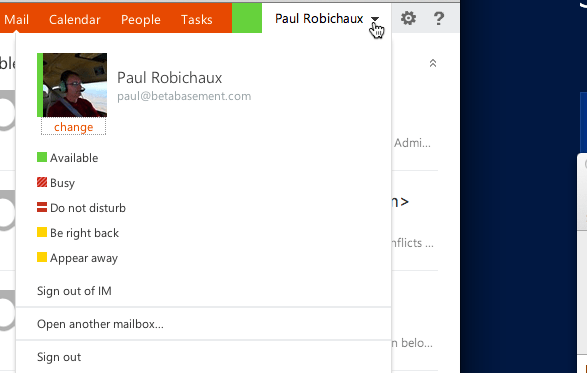
Exchange OWA IM integration and Lync trusted application pools

I am a bit ashamed to say that I wasted most of a day on this, but I’m posting this in the hopes that I can help someone else avoid the same mistake I made.

I just spent about five hours troubleshooting why I couldn’t get Exchange 2013 Outlook Web App to display IM and presence data from a Lync 2013 standard edition server. I had carefully followed the integration steps in the documentation, including the part that says this:

If you have installed the Microsoft Exchange Unified Messaging Call Router service and the Microsoft Exchange Unified Messaging service on the same computer then there is no need to create a trusted application pool for Outlook Web App. (This assumes that the server in question is hosting a SipName UM dial plan.

So, having read that, I didn’t set up a trusted application pool or trusted application… and IM didn’t work.

I fussed with certificates. I read a ton of documentation. I swore. I drank too much diet Coke. I ran OCSLogger and found errors about an unknown peer. “AHA!” I thought. “There must be an error in the docs and you really do need to create a trusted application pool.”

So I created the pool and the trusted app. Two quick lines of PowerShell, a quick login to OWA, and voila:

NewImage

As much as I would like to claim that it was a documentation error, this was pure fail on my part: the problem was that my Exchange 2013 server doesn’t host a SIP dial plan, so Lync doesn’t automatically add it to the Lync known servers table. It will have a SIP dial plan when I get to the next section of this chapter, but that’s a post for another day.

So, in summary: yes, you do need to create a trusted application pool and application for your Exchange servers even if they are multi-role unless they are hosting a SIP dial plan. 

Now, time for another diet Coke…

5 Comments

Filed under FAIL, UC&C

MEC 2014: Austin, 31 March-2 April 2014

This is pretty darn exciting: Microsoft has announced the official date and time of the Microsoft Exchange Conference (MEC) in 2014. It will be held in Austin, home of at least one of the original MECs (the first one, maybe? I wasn’t there so I’m not sure) from 31 March to 2 April 2014. 

I am sure that nothing bad will come of Microsoft’s decision to include April Fool’s Day as part of the conference. Nope, not at all.

On a personal note, I am excited that the conference will be in Austin. It’s one of my favorite cities, and I’ll be making side trips to see family (Hi, Lee Anne!) and friends while there. I also believe that we should have an Exchange-themed visit to the Salt Lick BBQ. Stay tuned for details!

Leave a comment

Filed under UC&C

Exchange 2013 Cumulative Update 1 released

I don’t have time to write a lengthy post detailing the changes and improvements in CU1, so go read this and this instead. Pay particular attention to the section in the Exchange team blog post about mailbox sizes. Happy installing!

Leave a comment

Filed under UC&C

Loading PowerShell snap-ins from a script

So I wanted to launch an Exchange Management Shell (EMS) script to do some stuff for a project at work. Normally this would be straightforward, but because of the way our virtualized lab environment works, it took me some fiddling to get it working.

What I needed to do was something like this:

c:\windows\system32\powershell\v1.0\powershell.exe -command "someStuff"

That worked fine as long as all I wanted to do was run basic PowerShell cmdlets. Once I started trying to run EMS cmdlets, things got considerably more complex because I needed a full EMS environment. First I had to deal with the fact that EMS, when it starts, tries to perform a CRL check. On a non-Internet-connected system, it will take 5 minutes or so to time out. I had completely forgotten this, so I spent some time fooling around with various combinations of RAM and virtual CPUs trying to figure out what the holdup was. Luckily Jeff Guillet set me straight when he pointed me to this article, helpfully titled “Configuring Exchange Servers Without Internet Access.” That cut the startup time waaaaay down.

However, I was still having a problem: my scripts wouldn’t run. They were complaining that “No snap-ins have been registered for Windows PowerShell version 2”. What the heck? Off to Bing I went, whereupon I found that most of the people reporting similar problems were trying to launch PowerShell.exe and load snap-ins from web-based applications. That puzzled me, so I did some more digging. Running my script from the PowerShell session that appears when you click the icon in the quick launch bar seemed to work OK. Directly running the executable by its path (i.e. %windir%\system32\powershell\v1.0\powershell.exe) worked OK too… but it didn’t work when I did the same thing from my script launcher.

Back to Bing I went. On about the fifth page of results, I found this gem at StackExchange. The first answer got me pointed in the right direction. I had completely forgotten about file system virtualization, the Windows security feature that, as a side effect, helps erase the distinction between x64 and x86 binaries by automatically loading the proper executable even when you supply the “wrong” path. In my case, I wanted the x64 version of PowerShell, but that’s not always what I was getting because my script launcher is a 32-bit x86 process. When it launched PowerShell.exe from any path, I was getting the x86 version, which can’t load x64 snap-ins and thus couldn’t run EMS.

The solution? All I had to do was read a bit further down in the StackExchange article to see this MSDN article on developing applications for SharePoint Foundation, which points out that you must use %windir%\sysnative as the path when running PowerShell scripts after a Visual Studio build. Why? Because Visual Studio is a 32-bit application, but the SharePoint snap-in is x64 and must be run from an x64 PowerShell session… just like Exchange.

Armed with that knowledge, I modified my scripts to run PowerShell using sysnative vice the “real” path and poof! Problem solved. (Thanks also to Michael B. Smith for some bonus assistance.)

1 Comment

Filed under General Tech Stuff, UC&C

An offer for Tim Cook

[note to readers: I encourage you to repost, retweet, and otherwise spread this offer. It’s legit; I am happy to help Apple in any way that I can. Since I don’t have any Apple execs on speed dial, perhaps social media will get this to the right folks. ]

Dear Mr. Cook:

We’ve never met. You’ve almost certainly never heard of me. But I’m going to make you an offer that I hope you’ll accept: I want to help you quit making such a mess of the world’s Exchange servers. More to the point, I want to help the iOS Exchange ActiveSync team clean up their act so we don’t have any more serious EAS bugs in iOS. The meeting hijacking bug was bad enough, but the latest bug? the one that results in Exchange servers running out of transaction log space? That’s bad for everyone. It makes your engineers look sloppy. It makes Exchange administrators into the bad guys because they have to block their users’ iOS devices.

These bugs make everyone lose: you, Microsoft, and your mutual users. They’re bad for business. Let’s fix them.

You might wonder why some dude you’ve never heard of is making you this offer. It’s because I’m a long-time Apple customer (got my first Mac in 1984 and first iPhone on launch day) and I’ve been working with Exchange for more than 15 years. As a stockholder, and fan, of both companies, I want to see you both succeed. Before there was any official announcement about the iOS SDK, I was bugging John Geleynse to let 3Sharp, my former company, help implement Exchange ActiveSync on the phone. He was a sly devil and wouldn’t even confirm that there would be an EAS client for the phone, but the writing was on the wall– the market power of Exchange Server, and the overwhelming prevalence of EAS, made that a foregone conclusion.

I’m an experienced developer and a ten-time Microsoft Most Valuable Professional for Exchange Server. I have experience training developers in Exchange Web Services, and I know EAS well; in fact, I was an expert source of evidence in the recent Google/Motorola vs Microsoft case in the UK. As a long-time member of the Exchange community, I can help your developers get in touch with experts in every aspect of Exchange they might want to know about, too.

It’s pretty clear that your EAS client team doesn’t know how Exchange client throttling works, how to retry EAS errors gently, or all the intricacies of recurring meeting management (and how the server’s business logic works). If they did, the client wouldn’t behave the way it has. They could learn it by trial and error… but look where that’s gotten us.

I’m in Mountain View, right up the road. Seriously. Have your people call my people.

Peace and Exchange 4eva,
-Paul

11 Comments

Filed under Security, UC&C

Exchange 2010 SP3 released

It’s here! 

 Microsoft today released Service Pack 3 for Exchange 2010 (available from http://www.microsoft.com/en-us/download/details.aspx?id=36768).

SP3 enables full coexistence between Exchange 2010 and Exchange 2013, plus it adds a couple of new features, such as Windows Server 2012 support. See the full feature list here.

After you’ve upgraded allof your 2010 servers to SP3, you will be able to install Exchange 2013 in your forest. Opinions differ on whether you should– for example, fellow MVPs Tony Redmond, Michael B. Smith, and Jason Sherry all agree that you should wait. For my part, I’m OK with deploying 2013 into production; it does have some rough edges, but I think CU1 is right around the corner, so adding 2013 in your environment now is certainly defensible.

2 Comments

Filed under UC&C

Excessive transaction log growth with iOS 6.1 devices

Well, it appears that Apple has done it again: reports are starting to surface of runaway transaction log growth when mobile devices running iOS 6.1 synchronize with Exchange Server. Tony has a good synopsis here.

Those of you who have been administering Exchange for a while may think this sounds familiar– that’s because there was a very similar problem with Microsoft Entourage back in the day, as detailed by Jeremy Kelly here. Remarkably, a couple of years later, we got the same bug in a slightly different guise, as described in KB 935848. In both cases, the problem was that the client was too stupid to detect certain types of failures, so it would keep retrying the failed operation, which would keep failing. This endless loop quickly resulted in large volumes of transaction log files on the Exchange server.

Luckily, Exchange 2010 and 2013 include throttling to prevent misbehaving clients from using up an excessive share of resources. However, the throttling controls available regulate EAS based on the amount of time user requests take, the number of concurrent connections, or the number of device partnerships. None of these parameters are useful in preventing the iOS 6.1-related problem; it’s not that the individual requests take up an excessive amount of time, it’s that there are so many requests that they generate an excessive log volume. (This video may provide a useful explanation for the phenomenon.)

Exchange 2013 includes the ability to specifically block misbehaving Exchange ActiveSync devices based on “suspicious” behavior. I will have a lot more to say about that in the near future, although that spiffy feature doesn’t help anyone now suffering the problem. For now, all we can do is the following:

  • Block iOS 6.1 devices using an Exchange ActiveSync device access rule
  • Discourage your users from upgrading, although I expect this to be an ineffective strategy
  • If you have a support relationship with Apple, report this problem to them. If you’re a developer, file a RADAR issue. If you have enterprise technical support with Apple, use it. I’ve seen reports that the ordinary consumer-level technical support (i.e. the $49 pay-per-incident support, as well as AppleCare) doesn’t have any way to report this particular problem in an actionable way.

Thoughts for another time: the rapid adoption rate of iOS devices has many benefits for users, including largely avoiding the fragmentation problems that plague Android with issues (like this “smishing” fix that virtually no one has). However, when Apple ships a buggy update, which is common, that rapid adoption multiplies the pain of the bug.

Update 1535 CST 8 Feb: Ina Fried at AllThingsD is reporting that Vodafone is telling iPhone 4S users not to upgrade to iOS 6.1.

1 Comment

Filed under UC&C

Thoughts on the new Exchange 2013 servicing model

Microsoft announced today that they are making significant changes to the way that Exchange 2013 updates are developed, packaged, and released. These changes come on the heels of some notable, and embarrassing, quality problems with previous Exchange rollup updates (RU). In fairness, the recent quality problems spring from the inclusion of Oracle-provided code in Exchange, code which needed to be updated to fix security vulnerabilities. (I hope the lesson here is clear: Microsoft, don’t ever include software from Oracle in your products, ever again, for any reason.) Anyway, even laying all of the blame for the original problem at Oracle’s doorstep, the fact is that the problematic RUs directly affected Exchange customers and besmirched the reputation of the Exchange team for delivering robust, high-quality code.

To help prevent this kind of problem from ever occurring again, Microsoft is taking some significant steps. First, the Exchange Sustaining Engineering team is going away, and its engineers are being integrated into the regular product development team. This sort of “one team, one fight” approach has been successful in many other places: rather than having a separate team working on sustaining older versions of the product while the main engineering effort goes toward new versions, management is free to pick the best available engineers for each update or new feature, regardless of whether that work is going toward an old version or a new version. There has already been a similar unification of the teams that develop Exchange on-premises and Office 365. In fact, that unification serves as the model for another important change Microsoft is making: exactly the same code will be deployed in Office 365 as will be delivered to Exchange on-premises customers. Note that this does not mean that the features between those two versions will be identical; there are already many cmdlets, parameters, and assorted capabilities that work on one side but not the other, especially in Exchange 2013. But the code will be the same. With a single code base deployed across millions of Office 365 (and, presumably, Live@EDU)  mailboxes and millions more customer mailboxes, Microsoft’s job of testing, fixing, and sustaining Exchange should become quite a bit simpler. In addition, I expect that Microsoft will continue to rigorously test updates before they go live on Office 365, and this testing will complement the existing release testing to hopefully give us more robust updates. The CU release plan is to release each CU to on-premises and hybrid customers after it has already been deployed on the production Office 365 network. That means that by the time you and I get a CU, it’s already been tested by the Exchange team, tested by the Office 365 team before deployment into production, and tested and validated by running in Office 365 production.

It’s important to note, of course, that Office 365 is a monolithic environment in many respects; it doesn’t necessarily represent the very wide range of configurations that customers actually have deployed out in the field. It remains to be seen whether future updates will run into problems because they passed tests in Microsoft’s environments, then failed under certain unusual configurations out in customer-land. More likely, Microsoft will establish support boundaries covering specific configurations and scenarios that they test the CUs against, although these boundaries may not necessarily be made public.

The biggest change in the servicing model, however, is that the existing system of rollup updates will go away. Instead, we will get quarterly cumulative updates (CU). This model is familiar to OCS and Lync administrators, who are accustomed to getting Lync CUs every so often instead of service packs (although the Lync product group still has a separate sustaining engineering team).

Cumulative updates package all of the rollups since RTM into a single update, so that applying the latest CU always brings you up-to-date on all product patches released to that point. This simplifies things for administrators, but it also means that you are essentially required to reinstall the product and do a build-to-build upgrade with each CU release– an action that cannot be reversed. It will take some time to figure out the best strategy for dealing with CU installation problems, should they arise.

CU packages may include features, too. In the past, customers have balked at the inclusion of features in updates outside of service packs, so it’s not clear where Microsoft will draw the line on how big a feature is OK to include in a CU. They have also remained mum about the future of service packs, although I expect to see occasional SP releases that combine the latest CU with major feature releases and documentation updates. Microsoft has explicitly said that CUs may include schema updates, eliminating at least one potential distinction between CUs and SPs.

Security patches will be included in CUs but may also be installed separately. That is, when CU1 ships, it will contain a set of security updates that were the latest available at whatever point in time the CU is frozen. You’ll install a CU, then add any security updates that were released between that freeze date and the current date.

There’s another major change, too: the support timeline for CUs is changing rather dramatically. Microsoft will support a CU for 3 months after the next CU ships. In other words, you have six months from the date a CU ships before it becomes unsupported. Suppose that CU1 is released on 3/2 and CU2 is released on 6/1. CU1 will age out of support on 9/1. Is 3 months enough time for customers to test and deploy CU2? That remains to be seen. I have the sense that a noticeable fraction of Exchange customers will balk at this timeline. In complex environments (where “complex” implies complexity of infrastructure, business or legal requirements, and/or politics) it may not be feasible to test, certify, and globally deploy a CU within that time window.

Finally, the other change I think noteworthy is that CUs won’t be offered through Windows Update; you’ll have to download them from the Microsoft Download Center. This is a good move because it reduces the risk that you’ll accidentally get an update that breaks something in your environment.

On balance, are these changes a good idea?

On one hand, having a regular cadence for CU releases is a great thing. We’ve seen the positive impact of having security fixes released on a predictable schedule: it’s easier to plan for, test, and deploy releases when you know what they fix and when they’re coming. Unfortunately, Microsoft has done a poor job in the past with documenting exactly what fixes are included in each rollup; there are many fixes that are not listed in the RU documentation, and there is generally no comprehensive public list for a given RU showing everything that’s fixed. This is different than what happens with security updates, the documentation for which tends to be pretty explicit about what’s fixed and which files are updated by the fix. I hope that we’ll see more detailed information about included fixes when the CU system gets rolling.

On the other hand, the schedule pressure caused by having a regular release schedule for CUs means that Microsoft may still have to deal with the case where a needed fix isn’t ready in the scheduled CU release timeframe. That means we’ll probably still be seeing hot fixes and security patches released outside the normal CU schedule. That’s fine; we all know how to deal with those. I am a little concerned that schedule pressure may lead to the release of fixes or features in a CU that have not been tested thoroughly enough for release; the reason I’m only a little concerned is because the visibility of releasing updates to both on-premises and Office 365 Exchange means that there will be a lot of pressure to ensure that updates are robust before release– and that will benefit everyone involved.

On that same other hand, I don’t think the 3-month support timeframe is going to sit well with customers. I freely admit that I don’t know this for sure (after all, Microsoft just announced it today), but that’s how it strikes me based on what I see when discussing Exchange servicing with existing customers.

Microsoft hasn’t said when we should expect CU1 for Exchange 2013, although I expect it to be soon. When it arrives, we’ll have to see how the update process itself works; on an ongoing basis, examining the timeliness and quality of future CUs will be the only way to see whether this change turns out to be good for Exchange.

2 Comments

Filed under UC&C

Can’t uninstall single Exchange 2013 role

I was very surprised to learn today that you cannot uninstall a single Exchange 2013 role from a serverb.

Quick review: one of the major changes in Exchange 2013 is that the number of server roles has decreased from 5 (hub, mailbox, edge, UM, CAS) to 2 (mailbox and CAS). This approach offers lots of potential benefits, but it also represents a major change to the internals of Exchange.

In Exchange 2007 and Exchange 2010, you could easily combine multiple roles on a single server, adding and removing roles more or less at will. This was fully supported and worked well: running setup with the /roles switch and the appropriate mode would do the trick.

For what I’m sure are excellent reasons, this is no longer supported; attempting to remove either the CAS or mailbox role from a server that has both will produce an error message indicating “invalid command line arguments”. In fairness, this is documented in the release notes, right up at the top– but I missed that the first time around and wanted to mention it here as a reference. 

The workaround: if you want to remove a role, you must remove Exchange entirely from the target server, then reinstall only the role you do want.

2 Comments

Filed under UC&C